当前位置:网站首页>How Navicat Connects to MySQL
How Navicat Connects to MySQL
2022-08-02 06:09:00 【Well well well!】
There are many database connection tools on the market, such as Navicat, SQLYog, WorkBench, etc. The most used ones are Navicat.Now let's talk about how Navicat connects to Mysql. This article is only applicable to Xiaobai, and God can skip it.
1. Open Navicat and click the [Connect] button in the upper left corner.

2. Create a new connection, everyone should pay attention. The new connection here is a new connection, not a new database. I see that many people write the connection name as the library name, which is wrong.The ability to create multiple connections means that for example, we can connect to the local mysql, the mysql of the development environment server, or the test environment, production environment and other different Mysql.
There are many friends who have forgotten the password of the MySQL database. We can use the [Connection Test] button in the lower left corner to test whether the password is correct.
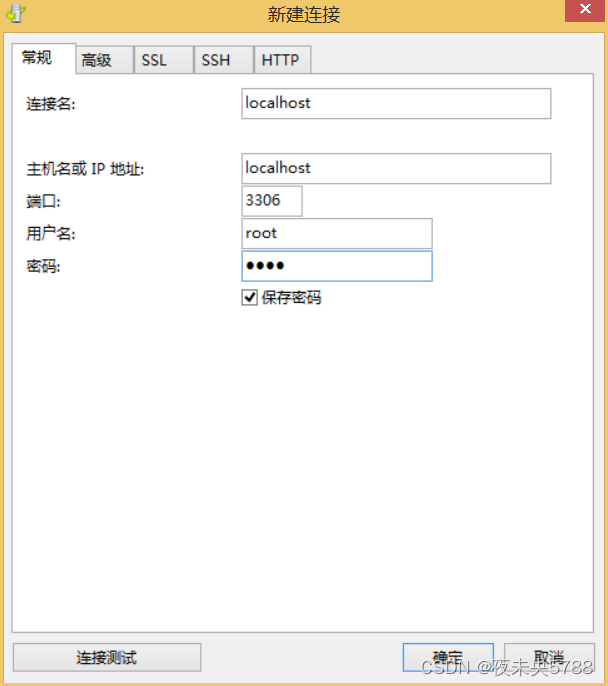
3. After the connection is successful, double-click the connection name in the list on the left, and you can see the system library that comes with Mysql.
Note: Several libraries that come with Mysql here are system libraries. Don't think that this is a mess and delete it.This will cause Mysql to run abnormally.

4. After the connection is successful, we need to create a new database, right-click on the connection name and select New Database.
Fill in the database name (the database name is usually the same as the sql file name provided by the source space station), the character set is utf-8, and the collation rule is utf8_general_ci.

5. Execute the SQL file. After the database is successfully created, we need to import the SQL file, right-click on the database name, and select [Run SQL File].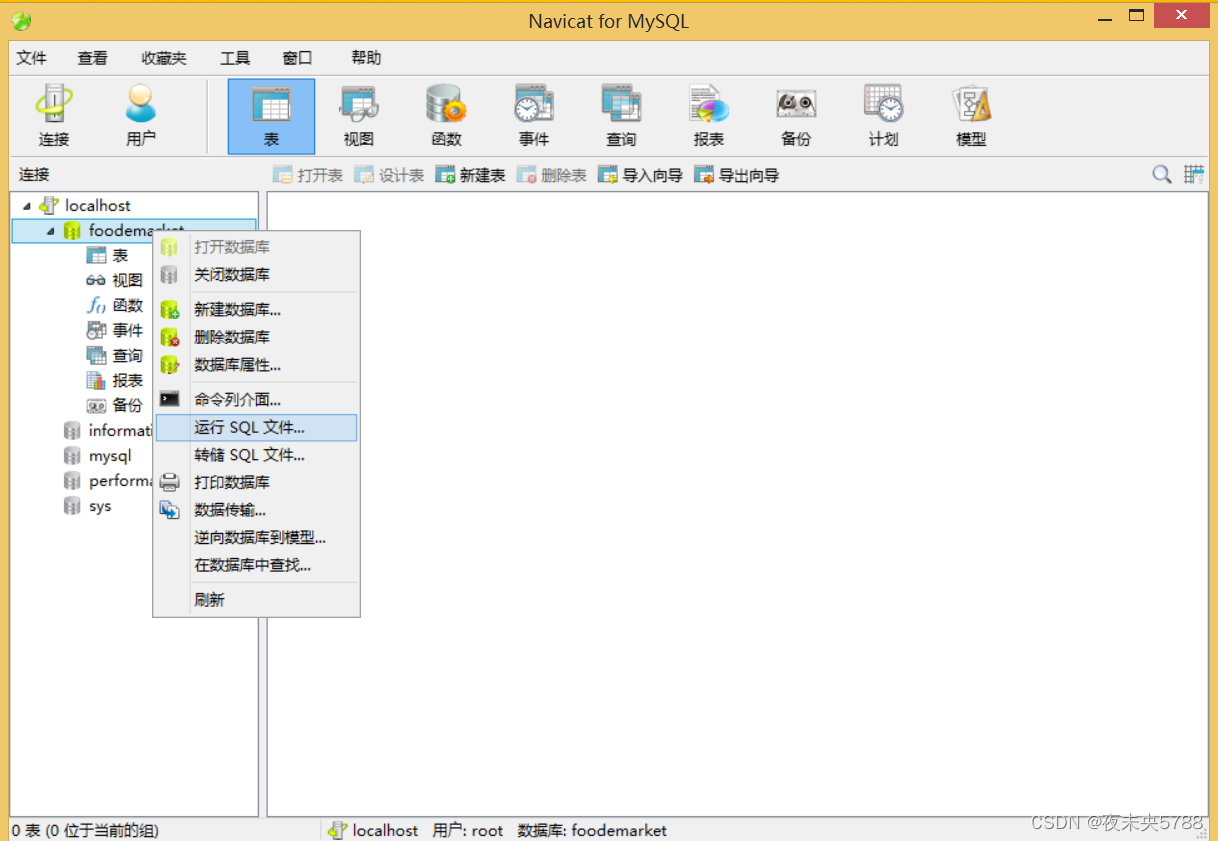
6. Find the local path where the sql file is located. After selecting it, click [Start] to execute the SQL file

7. After the execution is completed, there will be a prompt whether the execution is successful, such as success: Finished successfully.
Unsuccessful: Finished unsuccessfully. If it is unsuccessful, you need to check which statements are reporting the error, possibly because of the incompatible SQL syntax due to the version problem.

8. After successful execution, we see that the data table is still empty.At this time, many small partners are puzzled. Obviously, the implementation has been successful, why is there no table?Important: [Refresh] is required after the execution is completed.
Click the right mouse button on the [Table] and select [Refresh]. After the refresh is completed, all the tables will be displayed.


Have you learned it, my friend?
Let me introduce myself first. The editor graduated from Shanghai Jiaotong University in 2013. I worked in a small company and went to big factories such as Huawei and OPPO. I joined Alibaba in 2018, until now.I know that most junior and intermediate java engineers want to upgrade their skills, they often need to explore their own growth or sign up to study, but for training institutions, the tuition fee is nearly 10,000 yuan, which is really stressful.Self-learning that is not systematic is very inefficient and lengthy, and it is easy to hit the ceiling and the technology stops.Therefore, I collected a "full set of learning materials for java development" for everyone. The original intention is also very simple. I hope to help friends who want to learn by themselves but don't know where to start, and at the same time reduce everyone's burden.Add the business card below to get a full set of learning materials
边栏推荐
- Android studio connects to MySQL and completes simple login and registration functions
- 元宇宙:活在未来
- MySQL 的 limit 分页查询及性能问题
- MySQL String Concatenation - Various String Concatenation Practical Cases
- 【HCIE】NO.45 Hub and Spoke配置案例
- MobaXsterm如何使用
- RADIUS 如何提高 WiFi 无线网络安全性?
- Detailed explanation of mysql stored procedure
- apifox介绍及使用(1)。
- MySQL 8.0.29 设置和修改默认密码
猜你喜欢



随机推荐
12 reasons for MySQL slow query
2022河南萌新联赛第(四)场:郑州轻工业大学 C - 最大公因数
Redis常见题型
MP更新操作方式
mysql练习题
golang泛型
【热题】LeetCode 热题 HOT 100分类+题解
MySQL 5.7详细下载安装配置教程
MYSQL unique constraint
【Gazebo入门教程】第一讲 Gazebo的安装、UI界面、SDF文件介绍
MySQL 的 limit 分页查询及性能问题
合作的小伙伴,缺乏主人翁(owner)意识,好苦恼
分享|5G+智慧工业园区解决方案(附PDF)
11种你需要了解的物联网(IoT)协议
ES6——class类实现继承
物联网通信协议全解析
Js数据类型转化之数组的join方法
MySQL(7)
Grid布局介绍
UE4 蓝图实现AI随机移动