当前位置:网站首页>Wsl2 best practices, eliminate difficult xshell and finalshell
Wsl2 best practices, eliminate difficult xshell and finalshell
2022-07-26 04:34:00 【Salted egg yolk pie】
1、 install WSL2
1.1 precondition
- confirm Windows System version
- Turn on Virtualization
1.1.1 confirm Windows System version
Must run Windows 10 edition 2004 And higher ( Internal version 19041 And higher ) or Windows 11.
WIN + R Input winver Check the system version ,19041 You can continue to read the above ( If the version is too low, you can go to the Microsoft official website to download the tool for upgrading )
1.1.2 Turn on Virtualization
1、 Find... In the search Start or close Windows function .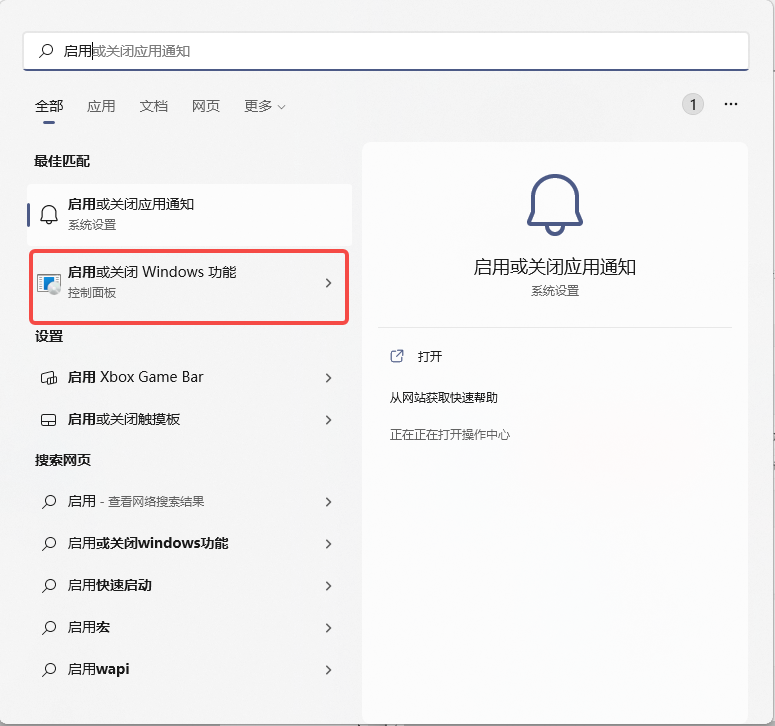
2、 Check the following two options 
1.2 Installation steps
1、 start-up WSL. Open as administrator PowerShell, And then in PowerShell in , Enter the following command .
dism.exe /online /enable-feature /featurename:Microsoft-Windows-Subsystem-Linux /all /norestart
2、 Turn on the virtual machine function . Also in PoweShell Enter the following command in . After entering the command , To restart the computer , Then proceed to the third step .
dism.exe /online /enable-feature /featurename:VirtualMachinePlatform /all /norestart

3、 download Linux Kernel update package , And install .
Download address :https://wslstorestorage.blob.core.windows.net/wslblob/wsl_update_x64.msi
4、 take WSL2 Set to default version . open PowerShell, Then install the new Linux Run the following command at release time , take WSL 2 Set to default version , The order is as follows .
wsl --set-default-version 2

notes : After installation , You can install the corresponding Linux It's released , Here we use Ubuntu20.4( because CentOS Is the charge ).
1.3 install Ubuntu Distribution version
1、 stay Windows The app store (https://aka.ms/wslstore ) Choose from Ubuntu 20.04 LTS.
2、 After installation , You can use it . If it is the first time to enter , You need to set the user name and password . After entering the system , You can use the following command to view the current Ubuntu Version of .
lsb_release -a

2、 install Windows Terminal
Windows It is suggested that WSL And Windows Terminal In combination with , Especially when planning to use multiple command lines .Windows Terminal The operation interface of is more humanized , Its main functions include multiple tabs 、 Panes 、Unicode and UTF-8 Character support 、GPU Accelerated text rendering engine , You can also use it to create your own theme and customize the text 、 Color 、 Background and shortcuts .
2.1 Installation steps
Also open Microsoft mall , Search for Terminal Get and download 
notes : I won't demonstrate more here , Relatively simple
After installation , open Windows Terminal Input “ wsl -l -v ” Check it out. VERSION Show 2 That's fine .

2.2 Set theme and shortcut keys
The terminal theme file is placed below , download
settings.json
1、 open Windows Terminal.

2、 Click Settings , In the startup options , Set the default configuration file to ubuntu( Make sure we install it every time you open it Linux Distribution version )

3、 Open and edit json file 
4、 Replace the contents of the file , And click save 
3、WSL combination VS Code
4、 Reference website
边栏推荐
- 2022河南萌新联赛第(三)场:河南大学 J - 神奇数字
- Life related - less expectation, happier
- 7、 Restful
- MySQL - multi table query - Cartesian product sum, correct multi table query, equivalent connection and unequal connection, inner connection and outer connection
- Sangi diagram of machine learning (for user behavior analysis)
- egg-sequelize TS编写
- 2022河南萌新联赛第(三)场:河南大学 A - 玉米大炮
- 1. If function of Excel
- Unable to find sygwin.s file during vscode debugging
- AWS Support Plan
猜你喜欢


随机推荐
建设面向青少年的创客教育实验室
Solve the error string value: '\xf0\x9f\x98\xad',... 'for column' commentcontent 'at row 1
Phaser(一):平台跳跃收集游戏
Life related - ten years of career experience (turn)
2022 a.static query on tree (tree section)
Why is mongodb fast
Threadpooltaskexecutor and ThreadPoolExecutor
【UOJ 429】串串划分(Runs)(容斥)+ 有关 Lyndon Tree 及其应用的小小记录
这种是我的vs没连上数据库吗
2022 Henan Mengxin League game (3): Henan University B - reverse pair count
Credit card fraud detection based on machine learning
Use of anonymous functions
UE4 获取玩家控制权的两种方式
Cnosdb Nirvana Rebirth: abandon go and fully embrace rust
Build a maker Education Laboratory for teenagers
data warehouse
MySQL日志分类:错误日志、二进制日志、查询日志、慢查询日志
Integrated architecture of performance and cost: modular architecture
UE4 switching of control rights of multiple roles
Face database collection summary