当前位置:网站首页>接口间调用为什么要用json、fastjson怎么赋值的、fastjson [email protected]映射关系问题
接口间调用为什么要用json、fastjson怎么赋值的、fastjson [email protected]映射关系问题
2022-07-06 22:37:00 【郝开】
接口间调用为什么要用json?
应用之间交互,不像前后台之间交互,那么方便可以定义命名一致,因为正常开发中,可能是多个团队编写的接口去互相访问,因此开发过程接收方和发送方传递的参数命名可能不完全一致,所以,你单纯的定义一个对象去接收,如果命名不一致,你就会得不到值。
如果在联调时才发现这种情况,再去改字段,可能涉及多个文件的依赖关系,改起来很麻烦。
因此接口见交互使用json来接收数据。
fastjson怎么赋值的?
通过@JSONField,可以使接口报文的字段映射到@JSONField name指定的字段。
然后再去通过set方法去赋值给你对应的java bean属性,所以这也是为什么需要你提供对应java bean的set方法,且是public的原因。
fastjson最新版本1.2.83报文与@JSONField映射关系问题
1.2.83结果表格(1.2.70都正常取值)
| 报文 | @JSONField | 转换结果 |
|---|---|---|
| “appId”:“app_id”, | @JSONField(name = “app_id”) | 取值为null |
| “app_id2”:“app_id2” | @JSONField(name = “appId2”) | 正常取值 |
| “op_id”:“op_id”, | //bean关系①:驼峰接收 @JSONField(name = “op_id”) private String opId; | 正常取值 |
| “op_id1”:“op_id1”, | //bean关系②:原值接收 @JSONField(name = “op_id1”) private String op_id1; | 正常取值 |
| “op_id2”:“op_id2”, | //bean关系③:它值接收 @JSONField(name = “op_id2”) private String param; | 正常取值 |
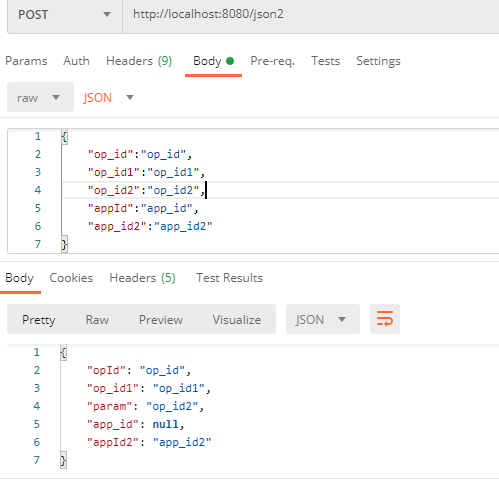
Json报文
{

    "op_id":"op_id",
    "op_id1":"op_id1",
    "op_id2":"op_id2",
    "appId":"app_id",
    "app_id2":"app_id2"
}
Bean
@Data
public class Json1 {


    /** * json报文与@JSONField一致 */
    //bean关系①:驼峰接收
    @JSONField(name = "op_id")
    private String opId;
    //bean关系②:原值接收
    @JSONField(name = "op_id1")
    private String op_id1;
    //bean关系③:它值接收
    @JSONField(name = "op_id2")
    private String param;

    /** * json报文传与@JSONField的驼峰转换 */
    @JSONField(name = "app_id")
    private String app_id;
    @JSONField(name = "appId2")
    private String appId2;
}
Controller
package com.example.helloworld.controller;

import com.alibaba.fastjson.JSON;
import org.springframework.beans.factory.annotation.Autowired;
import org.springframework.data.redis.core.StringRedisTemplate;
import org.springframework.http.MediaType;
import org.springframework.web.bind.annotation.RequestBody;
import org.springframework.web.bind.annotation.RequestMapping;
import org.springframework.web.bind.annotation.RequestMethod;
import org.springframework.web.bind.annotation.RestController;

@RestController
public class HelloController {


    @RequestMapping("/hello")
    public String hello() {

        return "hello ==== " + 222;
    }

    @RequestMapping(value = "/json1", method = RequestMethod.POST, produces = MediaType.APPLICATION_JSON_UTF8_VALUE, consumes = MediaType.APPLICATION_JSON_UTF8_VALUE)
    public Json1 json1(@RequestBody Json1 json) {

        System.out.println(json);
        return json;
    }

    /** * 为什么用requestJson接?我不想和你的bane属性叫的一样,一样了我也不想改,怎么办? * @param requestJson * @return */
    @RequestMapping(value = "/json2", method = RequestMethod.POST, produces = MediaType.APPLICATION_JSON_UTF8_VALUE, consumes = MediaType.APPLICATION_JSON_UTF8_VALUE)
    public Json1 json1(@RequestBody String requestJson) {

        System.out.println("request json:" + requestJson);
        Json1 json1 = JSON.parseObject(requestJson, Json1.class);
        System.out.println(json1);
        return json1;
    }
}
输出结果
1.2.70
request json:{

    "op_id":"op_id",
    "op_id1":"op_id1",
    "op_id2":"op_id2",
    "appId":"app_id",
    "app_id2":"app_id2"
}
Json1(opId=op_id, op_id1=op_id1, param=op_id2, app_id=app_id, appId2=app_id2)
1.2.83
request json:{

    "op_id":"op_id",
    "op_id1":"op_id1",
    "op_id2":"op_id2",
    "appId":"app_id",
    "app_id2":"app_id2"
}
Json1(opId=op_id, op_id1=op_id1, param=op_id2, app_id=null, appId2=app_id2)
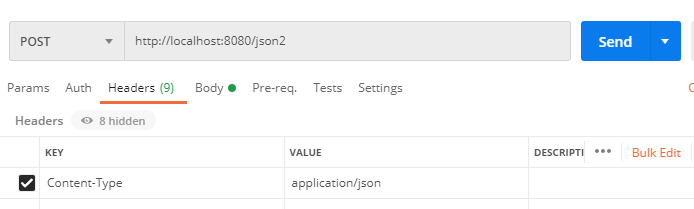
postman设置传输json测试
边栏推荐
- 九章云极DataCanvas公司蝉联中国机器学习平台市场TOP 3
- What is Web3
- Station B boss used my world to create convolutional neural network, Lecun forwarding! Burst the liver for 6 months, playing more than one million
- 【736. Lisp 语法解析】
- What work items do programmers hate most in their daily work?
- PLC Analog output analog output FB analog2nda (Mitsubishi FX3U)
- Depth first traversal template principle of tree and graph
- JS variable case
- Kivy tutorial of setting the size and background of the form (tutorial includes source code)
- JS variable case output user name
猜你喜欢
Flask项目使用flask-socketio异常:TypeError: function() argument 1 must be code, not str
![[hand torn STL] list](/img/aa/7060ab20b41936419041067cf9daed.jpg)
[hand torn STL] list

A simple and beautiful regression table is produced in one line of code~
Error: No named parameter with the name ‘foregroundColor‘
Field data acquisition and edge calculation scheme of CNC machine tools
【Android Kotlin协程】利用CoroutineContext实现网络请求失败后重试逻辑
How to design API interface and realize unified format return?

mpf2_ Linear programming_ CAPM_ sharpe_ Arbitrage Pricin_ Inversion Gauss Jordan_ Statsmodel_ Pulp_ pLU_ Cholesky_ QR_ Jacobi
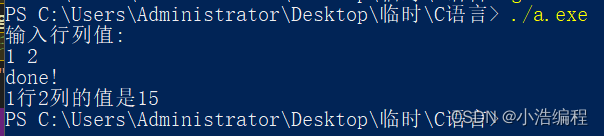
Function pointer and pointer function in C language

MySQL forgot how to change the password
随机推荐
The worse the AI performance, the higher the bonus? Doctor of New York University offered a reward for the task of making the big model perform poorly
U++ 元数据说明符 学习笔记
In depth analysis of kubebuilder
指针与数组在函数中输入实现逆序输出
A simple and beautiful regression table is produced in one line of code~
九章云极DataCanvas公司摘获「第五届数字金融创新大赛」最高荣誉!
R language principal component PCA, factor analysis, clustering analysis of regional economy analysis of Chongqing Economic Indicators
What about the collapse of win11 playing pubg? Solution to win11 Jedi survival crash
jvm是什么?jvm调优有哪些目的?
Monitoring cannot be started after Oracle modifies the computer name
Operand of null-aware operation ‘!‘ has type ‘SchedulerBinding‘ which excludes null.
JS variable case output user name
R语言主成分pca、因子分析、聚类对地区经济研究分析重庆市经济指标
[line segment tree practice] recent requests + area and retrieval - array modifiable + my schedule I / III
使用Thread类和Runnable接口实现多线程的区别
AttributeError: module ‘torch._C‘ has no attribute ‘_cuda_setDevice‘
JS input and output
Appium practice | make the test faster, more stable and more reliable (I): slice test
树与图的深度优先遍历模版原理
Structure actual training camp | after class homework | module 6