当前位置:网站首页>Jincang KFS replicator installation (oracle-kes)
Jincang KFS replicator installation (oracle-kes)
2022-06-24 09:05:00 【Thousands of sails pass by the side of the sunken boat_】
KFS replicator install (Oracle-KES)
one 、 Source end Oracle RAC
One 、 Install pre configuration
1、 Create installation users
groupadd flysync
useradd flysync -g flysync -G mysql
passwd flysync
2、 Upload installation packages and license File to server /home/flysync Under the table of contents , And extract the
tar -xzvf KingbaseFlySync-V001R006C003B20211213-replicator.tar.gz
3、 Configuration will hosts file , Add both source and target servers
vi /etc/hosts
192.168.100.117 oracle
192.168.100.124 kes8-2
4、 To configure /etc/security/limits.conf file 【 Optional 】
vi /etc/security/limits.conf
flysync - nofile 65535
flysync - nproc 8096
mssql - nofile 65535
mssql - nproc 8096
5、 Turn on the time synchronization service 【 Optional 】
yum install ntp
systemctl start ntpd
systemctl enable ntpd
6、 stay /etc/sysctl.conf To configure swappiness Parameters 【 Optional 】
vi /etc/sysctl.conf
vm.swappiness = 10
sysctl -p
7、 Check the dependent software jdk and ruby【 must 】
--jdk
java -version
Version less than 1.8 Of , have access to yum install 1.8 edition
yum install java-1.8.0-openjdk.x86_64
You can also download oracle Of 1.8 Version of JDK Manually upload and install packages
--ruby
have access to yum Way to install
yum install ruby
You can also use KFS The console server comes with ruby Package replacement , Position in :/opt/KFS/console/media/rbenv,
Extract the package to /usr/local, Then configure /etc/profile In the document $PATH environment variable , take ruby Of bin Add directory to
vi /etc/profile
export PATH=$PATH:/usr/local/ruby/bin
When the configuration is complete , Use source Command application
source /etc/profile
Two 、 install
1、oracle Database parameter configuration
(1)、 Configure database time format :
ALTER SYSTEM SET NLS_DATE_FORMAT='YYYY-MM-DD' SCOPE=SPFILE;
(2)、 Create connected users and grant relevant permissions :
create user flysync identified by 123456;
alter user flysync default tablespace users;
alter user flysync quota unlimited on users;
A.logminer Analytical way :
a. If you can provide DBA jurisdiction , Then the permissions that the user should grant include :
GRANT CONNECT, RESOURCE TO FLYSYNC;
GRANT EXECUTE_CATALOG_ROLE TO FLYSYNC;
GRANT CREATE SESSION TO FLYSYNC;
GRANT SELECT ANY TRANSACTION TO FLYSYNC;
GRANT SELECT ANY TABLE TO FLYSYNC;
b. If you can't provide DBA jurisdiction , The following permissions can be granted, including :
GRANT CONNECT TO FLYSYNC;
GRANT CREATE SESSION TO FLYSYNC;
GRANT UNLIMITED TABLESPACE TO FLYSYNC;
GRANT CREATE TABLE TO FLYSYNC;
GRANT CREATE MINING MODEL TO FLYSYNC;
GRANT LOGMINING TO FLYSYNC;
GRANT EXECUTE ON DBMS_FLASHBACK TO FLYSYNC;
GRANT EXECUTE ON DBMS_LOGMNR TO FLYSYNC;
GRANT EXECUTE ON DBMS_LOGMNR_D TO FLYSYNC;
GRANT EXECUTE ON SYS.DBMS_LOGMNR TO FLYSYNC;
GRANT EXECUTE ON SYS.DBMS_LOGMNR_D TO FLYSYNC;
GRANT EXECUTE ON SYS.DBMS_LOGMNR_INTERNAL TO FLYSYNC;
GRANT EXECUTE ON SYS.DBMS_LOGMNR_LOGREP_DICT TO FLYSYNC;
GRANT EXECUTE ON SYS.DBMS_LOGMNR_SESSION TO FLYSYNC;
GRANT EXECUTE_CATALOG_ROLE TO FLYSYNC;
GRANT SELECT ANY DICTIONARY TO FLYSYNC;
GRANT SELECT ANY TABLE TO FLYSYNC;
GRANT SELECT ANY TRANSACTION TO FLYSYNC;
GRANT SELECT ON SYS.V_$ARCHIVED_LOG TO FLYSYNC;
GRANT SELECT ON SYS.V_$DATABASE TO FLYSYNC;
GRANT SELECT ON SYS.V_$LOGMNR_CONTENTS TO FLYSYNC;
GRANT SELECT ON V_$ARCHIVED_LOG TO FLYSYNC;
GRANT SELECT ON V_$DATABASE TO FLYSYNC;
GRANT SELECT ON V_$LOG TO FLYSYNC;
GRANT SELECT ON V_$LOGFILE TO FLYSYNC;
GRANT SELECT ON V_$LOGMNR_CONTENTS TO FLYSYNC;
GRANT SELECT ON V_$LOGMNR_DICTIONARY TO FLYSYNC;
GRANT SELECT ON V_$LOGMNR_LOGS TO FLYSYNC;
GRANT SELECT ON V_$LOGMNR_PARAMETERS TO FLYSYNC;
GRANT SELECT ON V_$PARAMETER TO FLYSYNC;
B.redo Analytical way :
a. If you can provide DBA jurisdiction , Then the permissions that the user should grant include :
GRANT CONNECT, RESOURCE TO FLYSYNC;
GRANT EXECUTE_CATALOG_ROLE TO FLYSYNC;
GRANT CREATE SESSION TO FLYSYNC;
GRANT SELECT ANY TRANSACTION TO FLYSYNC;
GRANT SELECT ANY TABLE TO FLYSYNC;
GRANT UNLIMITED TABLESPACE TO FLYSYNC;
GRANT DBA TO FLYSYNC;
b. If you can't provide DBA jurisdiction , The following permissions can be granted, including :
GRANT CONNECT TO FLYSYNC;
GRANT CREATE SESSION TO FLYSYNC;
GRANT UNLIMITED TABLESPACE TO FLYSYNC;
GRANT CREATE TABLE TO FLYSYNC;
GRANT EXECUTE_CATALOG_ROLE TO FLYSYNC;
GRANT SELECT ANY DICTIONARY TO FLYSYNC;
GRANT SELECT ON V_$PARAMETER TO FLYSYNC;
(3)、 install Logminer(redo The parsing method does not need )
The order is as follows (Oracle 10g、Oracle 11g and Oracle 12c):
@$ORACLE_HOME/RDBMS/ADMIN/dbmslm.sql
@$ORACLE_HOME/RDBMS/ADMIN/dbmslmd.sql
@$ORACLE_HOME/RDBMS/ADMIN/dbmslms.sql
Be careful : Above three SQL Script , If you are installing Oralce If there are in the corresponding directory of the database, you must execute ; If not, ignore
(4)、 Turn on Oracle Archive log of database ( Must be turned on ) 了 , The specific steps are as follows :
A. View the current archive mode
SQL>select log_mode from v$database;
B、 Set archive path :
RAC The archive path of is set in the shared disk
SQL>alter system set log_archive_dest=’+DATA’ scope=spfile sid=’*';
C、 Then close all instances , start-up 1 An example , Change the database to archive mode :
SQL>shutdown immediate;
SQL>startup mount;
SQL>alter database archivelog;
SQL>alter database open;
SQL>archive log list;
D、 Start other nodes , Complete the change process of archive mode .
SQL>startup;
(5)、 Open completion log :
• Check the status of the completion log
SQL> SELECT supplemental_log_data_min, supplemental_log_data_pk,supplemental_log_data_all FROM v$database;
SUPPLEME SUP SUP
-------- --- ---
NO NO NO
• Open completion log ( It is suggested that MOUNT Execution in mode )
SQL> ALTER DATABASE ADD SUPPLEMENTAL LOG DATA;
SQL> ALTER DATABASE ADD SUPPLEMENTAL LOG DATA (PRIMARY KEY) COLUMNS;
SQL> ALTER DATABASE ADD SUPPLEMENTAL LOG DATA (ALL) COLUMNS;
• Check the status of the completion log again
SQL> SELECT supplemental_log_data_min, supplemental_log_data_pk, supplemental_log_data_all FROM v$database;
SUPPLEME SUP SUP
-------- --- ---
YES YES YES
must 3 Items are YES
(6)、 Switch log files
SQL> ALTER SYSTEM SWITCH LOGFILE;
If the database is 12c or 19c Pluggable database (pdb), The following points need to be noted :
- Enabling archiving and completion of logs must be in CDB Internal configuration
- User permissions are in PDB Internal configuration
- The database name in the database connection parameters is PDB name , No SID
- If the data to be synchronized is in CDB in , be CDB The user name created must be prefixed ”c##”, The connected database name is SID
2. flysync.ini To configure
Configure... In the home directory of the installation user flysync.ini file
vi /home/flysync/flysync.ini
I.logminer Parsing patterns
[defaults]
install-directory=/home/flysync/kfsrep
profile-script=~/.bash_profile
rmi-port=11000
[oracle11rac]
role=master
master=oracle
members=oracle
kufl-port=3112
replication-host=192.168.100.113
replication-port=1521
replication-user=FLYSYNC
replication-password=123456
datasource-type=oracle
oracle-extractor-method=logminer
datasource-oracle-service=orcl
svc-extractor-filters=dropstatementdata
property=replicator.extractor.dbms.tablePatterns=FLYSYNC.*,TEST.T2
property=replicator.extractor.dbms.scnSegmentationThreshold=5000
property=replicator.datasource.global.catalogPrefix=false
# Number of automatic recovery attempts , System OFFLINE when , Try to reset the system to ONLINE Number of States
repl_auto_recovery_max_attempts=100
# System OFFLINE when , Try ONLINE Waiting time before ,s( second )、m( minute )、h( Hours )
repl_auto_recovery_delay_interval=30s
# System automatic recovery times reset time ,s( second )、m( minute )、h( Hours )
repl_auto_recovery_reset_interval=300s
Be careful :
(1). oracle-extractor-method Set to logminer( Data extraction method )
(2). replication-host=192.168.100.113, Connected database IP If RAC Of VIP Address , You do not need to configure cluster parameters , However, the reconnect retry parameter must be configured .
# Number of automatic recovery attempts , System OFFLINE when , Try to reset the system to ONLINE Number of States
repl_auto_recovery_max_attempts=100
# System OFFLINE when , Try ONLINE Waiting time before ,s( second )、m( minute )、h( Hours )
repl_auto_recovery_delay_interval=30s
# System automatic recovery times reset time ,s( second )、m( minute )、h( Hours )
repl_auto_recovery_reset_interval=300s
If the connected database IP Configured is real IP Address , The following cluster parameters must be configured :
# Open clusters
property=replicator.datasource.global.connectionSpec.use_cluster=true
# Of other nodes in the cluster IP Address , There are multiple nodes separated by commas
property=replicator.datasource.global.connectionSpec.slave_add=192.168.100.111,192.168.100.112
# The network port corresponding to other nodes of the cluster , There are multiple nodes separated by commas , And with the above IP The addresses should correspond to each other
property=replicator.datasource.global.connectionSpec.slave_port=1521,1521
(3).replication-user=FLYSYNC, The user name must be configured to be uppercase
(4). replicator.extractor.dbms.scnSegmentationThreshold=5000,logminer Threshold value of query data ( When Flysync When the software starts up , The earliest archived log will be queried Scn Number , If the earliest Scn Number is the same as that of the current database Scn If the span is large , Will seriously affect the performance of the database , So set this threshold ), The default value is 5000
(5). svc-extractor-filters Indicates whether to synchronize DDL sentence ( The default value is :dropstatementdata, Means out of sync DDL sentence )
(6). property=replicator.extractor.dbms.tablePatterns Perform table filtering ,FLYSYNC.*,TEST.T2 Synchronous representation FLYSYNC All tables and tables in mode TEST In mode T2 Multiple rules in the table use commas (,) Division
(7). If configured property=replicator.extractor.dbms.tablePatterns When filtering table parameters , Please ensure that the flysync Use the heartbeat table under the database user to join tablePatterns Parameters in , namely : If you use flysync The database user used is KINGBASE, The user mode to be synchronized is TEST, Should be configured
property=replicator.extractor.dbms.tablePatterns=KINGBASE.*,TEST.*
(8). replicator.datasource.global.catalogPrefix KFS Whether the system table adds a prefix to the service name (serviceName_), After configuration, you need to consider KFS Table name change of system table , Cause the target end to casetransform and replicate The filter will take effect on the system table .
• Solution 1 : First configure rename, To configure casetransform and replicate filter
• Solution 2 : To configure casetransform after ,rename according to casetransform Configure after
II.redo Analytical way
[defaults]
user=flysync
install-directory=/home/flysync/kfsrep
profile-script=~/.bash_profile
rmi-port=11000
[oracle11rac]
role=master
master=oracle
members=oracle
kufl-port=3112
replication-host=192.168.100.111
replication-port=1521
replication-user=FLYSYNC
replication-password=123456
datasource-type=oracle
oracle-extractor-method=redo
datasource-oracle-service=orcl
svc-extractor-filters=dropstatementdata,ignoreddl
property=replicator.extractor.dbms.tablePatterns=FLYSYNC.*,TEST.T2
property=replicator.extractor.dbms.keepMixDML=false
property=replicator.filter.ignoreddl.ignore=CREATE;ALTER;DROP;TURNCATE
# Cluster configuration
property=replicator.datasource.global.connectionSpec.use_cluster=true
property=replicator.datasource.global.connectionSpec.slave_add=192.168.100.112
property=replicator.datasource.global.connectionSpec.slave_port=1521
#ASM To configure
property=replicator.datasource.oracle_redo.connectionSpec.asm_user=asmfly
property=replicator.datasource.oracle_redo.connectionSpec.asm_password=Flyl234
property=replicator.datasource.oracle_redo.connectionSpec.asm_serviceName=+ASM
# Reconnect retry configuration
repl_auto_recovery_max_attempts=100
repl_auto_recovery_delay_interval=30s
repl_auto_recovery_reset_interval=300s
Be careful :
(1) oracle-extractor-method Set to redo.
REDO Analytical way , If not used ASM Storage ,KFS Must be on the same physical machine as the database ; If you use ASM Storage , Can be deployed separately .
(2) use ASM storage , You have to configure ASM Parameters :
#ASM user , This user must have sysasm jurisdiction
property=replicator.datasource.oracle_redo.connectionSpec.asm_user=asmfly
#ASM User password
property=replicator.datasource.oracle_redo.connectionSpec.asm_password=Flyl234
#ASM Listening service name
property=replicator.datasource.oracle_redo.connectionSpec.asm_serviceName=+ASM
Connect asm Users of , Require to have sysasm jurisdiction .
establish asm The user's method :
su - grid
sqlplus / as sysasm
SQL> create user asmfly identified by 123456;
SQL> GRANT SYSASM TO asmfly;
(3) replication-host, Connected database IP If RAC Of VIP Address , You do not need to configure cluster parameters , However, the reconnect retry parameter must be configured .
# Number of automatic recovery attempts , System OFFLINE when , Try to reset the system to ONLINE Number of States
repl_auto_recovery_max_attempts=100
# System OFFLINE when , Try ONLINE Waiting time before ,s( second )、m( minute )、h( Hours )
repl_auto_recovery_delay_interval=30s
# System automatic recovery times reset time ,s( second )、m( minute )、h( Hours )
repl_auto_recovery_reset_interval=300s
If the connected database IP Configured is real IP Address , The following cluster parameters must be configured :
# Open clusters
property=replicator.datasource.global.connectionSpec.use_cluster=true
# Of other nodes in the cluster IP Address , There are multiple nodes separated by commas
property=replicator.datasource.global.connectionSpec.slave_add=192.168.100.111,192.168.100.112
# The network port corresponding to other nodes of the cluster , There are multiple nodes separated by commas , And with the above IP The addresses should correspond to each other
property=replicator.datasource.global.connectionSpec.slave_port=1521,1521
(4) replication-user=FLYSYNC, The user name must be configured to be uppercase
(5) replicator.extractor.dbms.keepMixDML Starting synchronization DDL Effective after , Mainly aimed at create table as Type statements , At the same time produce DDL and DML, Can pass replicator.extractor.dbms.keepMixDML To confirm whether to keep DML,true For the sake of reservation ,false In order not to keep , The default is false.
(6) svc-extractor-filters=dropstatementdata,ignoreddl( The default value is :dropstatementdata, Means out of sync DDL sentence ;ignoreddl, Indicates that the specified is out of sync DDL sentence , Configure one of the two )
(7) property=replicator.filter.ignoreddl.ignore To configure ignoreddl Effective when , Parameters can be all DDL Statement or keyword , Such as CREATE/DROP etc. , Multiple are separated by semicolons
3、 install
Switch to... Under the installation package directory tools subdirectories
cd /home/flysync/KingbaseFlySync-V001R006C003B20211213-replicator/tools
./fspm install
4、 take license Copy the file to the installation directory
cp license_8703_0.dat /home/flysync/kfsrep/license.dat
5、 start-up KFS
replicator start
see KFS state
replicator status
View service status
fsrepctl status
see KUFL list
kufl list
Ii. 、 Target end KES V8R6
One 、 Install pre configuration
1、 Create installation users
groupadd flysync
useradd flysync -g flysync -G mysql
passwd flysync
2、 Upload installation packages and license File to server /home/flysync Under the table of contents , And extract the
tar -xzvf KingbaseFlySync-V001R006C003B20211213-replicator.tar.gz
3、 Configuration will hosts file , Add both source and target servers
vi /etc/hosts
192.168.100.117 oracle
192.168.100.124 kes8-2
4、 To configure /etc/security/limits.conf file 【 Optional 】
vi /etc/security/limits.conf
flysync - nofile 65535
flysync - nproc 8096
mssql - nofile 65535
mssql - nproc 8096
5、 Turn on the time synchronization service 【 Optional 】
yum install ntp
systemctl start ntpd
systemctl enable ntpd
6、 stay /etc/sysctl.conf To configure swappiness Parameters 【 Optional 】
vi /etc/sysctl.conf
vm.swappiness = 10
sysctl -p
7、 Check the dependent software jdk and ruby【 must 】
--jdk
java -version
Version less than 1.8 Of , have access to yum install 1.8 edition
yum install java-1.8.0-openjdk.x86_64
You can also download oracle Of 1.8 Version of JDK Manually upload and install packages
--ruby
have access to yum Way to install
yum install ruby
You can also use KFS The console server comes with ruby Package replacement , Position in :/opt/KFS/console/media/rbenv,
Extract the package to /usr/local, Then configure /etc/profile In the document $PATH environment variable , take ruby Of bin Add directory to
vi /etc/profile
export PATH=$PATH:/usr/local/ruby/bin
When the configuration is complete , Use source Command application
source /etc/profile
Two 、 install
1、 Database configuration
Create a connection database account and authorize :
ksql>CREATE USER FLYSYNC SUPERUSER PASSWORD 'password';
2、flysync.ini To configure
[defaults]
install-directory=/home/flysync/kesrep
profile-script=~/.bash_profile
rmi-port=11000
[kingbase8]
role=slave
master=oracle
master-kufl-port=3112
members=kes8-2
kufl-port=3112
replication-host=192.168.100.114
replication-port=54321
replication-user=flysync
replication-password=123456
datasource-type=kingbase
datasource-version=8
kingbase-dbname=TEST
svc-parallelization-type=none
svc-remote-filters=casetransform,rename
property=replicator.filter.casetransform.to_upper_case=false
property=replicator.applier.dbms.optimizeRowEvents=true
property=replicator.applier.dbms.maxRowBatchSize=5000
3、 from KFS Under the installation package directory extensions/jdbc Copy jdbc package
V8R3( Not included ) The version above , Use kingbase8-8.6.0.jar
V8R3( contain ) The following versions , Use kingbase8-8.2.0.jar
cd /home/flysync/KingbaseFlySync-V001R006C003B20211213-replicator/extensions/jdbc
cp kingbase8-8.6.0.jar /home/flysync/KingbaseFlySync-V001R006C003B20211213-replicator/flysync-replicator/lib
4、 install
cd /home/flysync/KingbaseFlySync-V001R006C003B20211213-replicator/tools
./fspm install
5、 Reply to license File to installation directory
cp license.dat /home/flysync/kesrep/license.dat
6、 modify rename file
vi /home/flysync/kesrep/filters-config/rename.csv
FLYSYNC,trep_commit_seqno,*,flysync_kingbase8,-,-
FLYSYNC,consistency,*,flysync_kingbase8,-,-
FLYSYNC,heartbeat,*,flysync_kingbase8,-,-
FLYSYNC,trep_shard,*,flysync_kingbase8,-,-
FLYSYNC,trep_shard_channel,*,flysync_kingbase8,-,-
test,*,*,public,-,-
—— remarks : If rename Schema mapping is mapping to public In terms of mode ,flysync.ini The case conversion parameters in must be lowercase , namely property=replicator.filter.casetransform.to_upper_case The value of must be false
7、 Start and initialize
/home/flysync/kesrep/flysync/cluster-home/bin/startall
source ~/.bash_profile
see KFS state
replicator status
View service status
fsrepctl status
see KUFL list
kufl list
8、 Move
-- Structural relocation ( Speed mode )
ddlscan -target.service kingbase8 -source.user FLYSYNC -source.pass 123456 -source.db TEST -source.dbtype oracle -source.host 192.168.100.111 -source.port 1521 -source.schema TEST -target.db test -mgType 0
-- Data relocation
loader -source.user FLYSYNC -source.pass 123456 -source.db TEST -source.dbtype oracle -source.host 192.168.100.111 -source.port 1521 -source.schema test -target.service kingbase8 -mgType 0 -clean
边栏推荐
- “不平凡的代理初始值设定不受支持”,出现的原因及解决方法
- 【PyTorch基础教程30】DSSM双塔模型代码解析
- Why can ping fail while traceroute can
- Essay - Reflection
- A tip to read on Medium for free
- Data midrange: analysis of full stack technical architecture of data midrange, with industry solutions
- The list of open source summer winners has been publicized, and the field of basic software has become a hot application this year
- tcpdump抓包实现过程
- Alibaba Senior Software Testing Engineer recommends testers to learn -- Introduction to security testing
- What is graph neural network? Figure what is the use of neural networks?
猜你喜欢

OpenCV每日函数 结构分析和形状描述符(7) 寻找多边形(轮廓)/旋转矩形交集

【LeetCode】541. 反转字符串 II

基于QingCloud的 “房地一体” 云解决方案
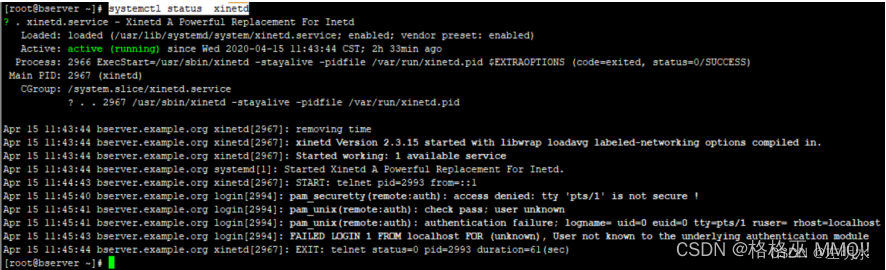
Telnet port login method with user name for liunx server

数云发布2022美妆行业全域消费者数字化经营白皮书:全域增长破解营销难题

【使用 PicGo+腾讯云对象存储COS 作为图床】
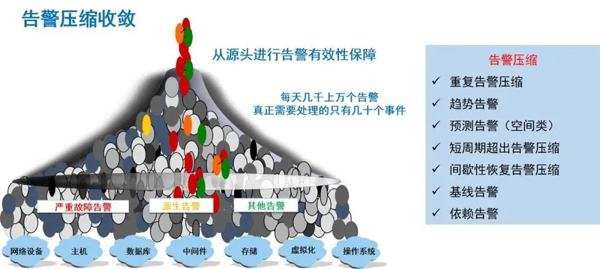
What is SRE? A detailed explanation of SRE operation and maintenance system

4275. Dijkstra序列

YOLOX backbone——CSPDarknet的实现

Mba-day25 best value problem - application problem
随机推荐
[MySQL from introduction to mastery] [advanced part] (I) character set modification and underlying principle
A tip to read on Medium for free
【MySQL从入门到精通】【高级篇】(一)字符集的修改与底层原理
MBA-day25 最值问题-应用题
IDEA另起一行快捷键
Wan Weiwei, a researcher from Osaka University, Japan, introduced the rapid integration method and application of robot based on WRS system
【LeetCode】541. Reverse string II
Double pointer analog
1844. 将所有数字用字符替换
目标检测系列——Fast R-CNN
JS to find and update the specified value in the object through the key
普通人没有学历,自学编程可以月入过万吗?
every()、map()、forEarch()方法。数组里面有对象的情况
One article explains in detail | those things about growth
Qingcloud based R & D cloud solution for geographic information enterprises
金仓KFS replicator安装(Oracle-KES)
China chip Unicorn Corporation
OpenCV每日函数 结构分析和形状描述符(7) 寻找多边形(轮廓)/旋转矩形交集
520. detect capital letters
【牛客】把字符串转换成整数