当前位置:网站首页>Telnet port login method with user name for liunx server
Telnet port login method with user name for liunx server
2022-06-24 08:46:00 【Gegwu MMQ!!】
telnet
telnet Usually used for remote login .telnet The program is based on TELNET Protocol remote login client program .Telnet Agreement is TCP/IP A member of the protocol family , yes Internet The standard protocol and main way of remote login service . It provides the user with the function of completing the remote host work on the local computer Ability . Use on the end user's computer telnet Program , Use it to connect to the server . The end user can be in telnet Enter the command in the program , These commands run on the server , It's like typing directly into the server's console . You can control the server locally . To start a telnet conversation , You must enter a user name and password to log in to the server .Telnet It's a common remote control Web Server method .
however ,telnet Because plaintext is used to transmit messages , Poor security , quite a lot Linux The server is not open telnet service , And switch to a safer ssh Way . But there are still many other systems that may be using telnet To provide remote login , So find out telnet The way the client is used is still necessary .
telnet Commands can be used for other purposes , For example, determine the status of remote services , For example, determine whether a port of the remote server can be accessed .
grammar :
telnet [ Parameters ] [ host ]
Parameters :
-8 Allow to use 8 Bit character data , Including input and output
-a Try to log in to the remote system automatically
-b< Host alias > Use the alias to specify the remote host name
-c Do not read... In the user's private directory .telnetrc file
-d Start troubleshooting mode
-e< Break away from character > Set escape character
-E Filter out detached characters
-f And the effect of this parameter is specified "-F" Parameters are the same
-F Use Kerberos V5 At the time of certification , Add this parameter to upload the authentication data of the local host to the remote host
-k< domain name > Use Kerberos At the time of certification , Add this parameter to let the remote host use the specified domain name , Not the domain name of the host
-K Do not automatically log in to the remote host
-l< User name > Specify the user name to log on to the remote host
-L Allow output 8 Bit character data
-n< Log files > Specify file record information
-r Use similar rlogin Command user interface
-S< Service type > Set up telnet What you need to connect IP TOS Information
-x Suppose the host has the function to support data encryption , Just use it
-X< Certification Form > Turn off the specified authentication mode
Case study
Default port , Direct login Telnet service
telnet 192.168.120.206
If you can't connect , How to deal with this situation :
(1) confirm ip Is the address correct ?
(2) confirm ip Whether the host corresponding to the address has been turned on ?
(3) If the host has been started , Confirm that the routing settings are set correctly ?( Use route Command view )
(4) If the host has been started , Make sure the host is turned on telnet service ?( Use netstat Command view ,TCP Of 23 Does the port have LISTEN Status line )
(5) If the host has been started telnet service , Make sure the firewall is open 23 Port access ?( Use iptables-save see )
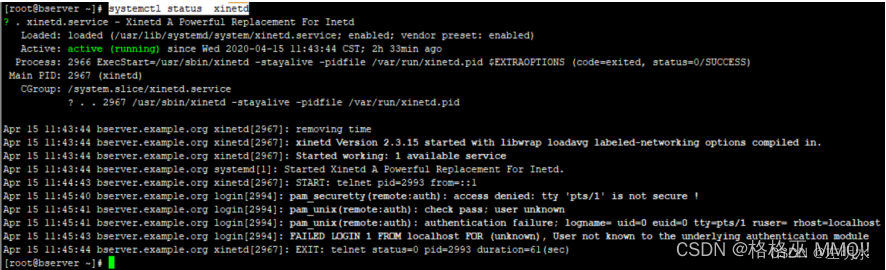

systemctl start telnet.socket
systemctl enable telnet.socket
systemctl status telnet.socket
Use Telnet Sign in
Login command :telnet HOST [PORT] for example :telnet 61.152.158.132 23( Default port )
To break off Telnet Connected commands :exit
Successfully establish Telnet Connect , In addition to mastering the account and password on the remote computer , You also need the remote computer to be turned on “Telnet service ”, And remove NTLM verification . You can also use special Telnet Tools to connect , such as STERM,CTERM Tools such as .
① ping + ip: View a ip Whether the address can be connected , Such as : ping 114.80.67.193
② telnet ip port : Check whether a port on a machine can be accessed , Such as :telnet 114.80.67.193 8080
③ Exit command : exit— sign out dos window ,q!,wq—Linux Next exit vi Editor
ctrl+], Then press q — sign out telnet Interface
quit— sign out MySQL…
There are two ways to install on the Internet , Sensory xinetd There are a lot of ways , I use it, too xinetd The way .
1、$sudo apt-get install xinetd telnetd
2、$sudo apt-get install openbsd-inetd telnetd
telnetd: Should belong to server process , With this process , You can get it from another machine telnet To this machine It's like sshd and ssh equally , To turn on sshd service , can ssh Connect
xinetd/openbsd-inetd Is to guard this process 

边栏推荐
猜你喜欢






随机推荐
How to mount a USB hard disk with NTFS file format under RHEL5 system
什么是SRE?一文详解SRE运维体系
It is enough to read this article about ETL. Three minutes will let you understand what ETL is
xtrabackup做数据备份
WebRTC系列-网络传输之5选择最优connection切换
1844. 将所有数字用字符替换
单目双视三维坐标确定
【生活思考】计划与自律
Jenkins自动化部署,连接不到所依赖的服务【已解决】
日本大阪大学万伟伟研究员介绍基于WRS系统机器人的快速集成方法和应用
Centos7安装jdk8以及mysql5.7以及Navicat连接虚拟机mysql的出错以及解决方法(附mysql下载出错解决办法)
Battle history between redis and me under billion level traffic
Qt 中发送自定义事件
Picture tools
Several schemes of PHP code encryption
A tip to read on Medium for free
RuntimeError: Missing dependencies:XXX
Rsync for file backup
Why do you want to file? What are the advantages and disadvantages of website filing?
第七章 操作位和位串(三)