当前位置:网站首页>SimpleITK使用——3. 常见操作
SimpleITK使用——3. 常见操作
2022-07-02 22:01:00 【吨吨不打野】
文章目录
1. 腐蚀/膨胀
1.1 python实现
import SimpleITK as sitk

demo_mask_path = "./seg.nii.gz"
demo_mask_image = sitk.ReadImage(demo_mask_path)
dilate_img=sitk.GrayscaleDilate(demo_mask_image , kernelRadius=[3,3,3])
sitk.WriteImage(dilate_img, "./dilatenii.gz")
效果类似下面这样:
参考:
- Welcome to the SimpleITK Image Filtering Tutorial
- 根据上一参考链接找到:
GrayscaleErodeImageFilter,进而去SimpleITK的在线文档进行搜索 - 进而找到:itk::simple::GrayscaleErodeImageFilter Class Reference
- 其中包括:GrayscaleErode()这个接口。
- 如果不小心忘了腐蚀和膨胀的意义,可以看看这个文章:opencv学习笔记(八):图像形态学操作
- 腐蚀是暗部变多,亮部变少,每次filter取最小值来覆盖(0-255,0是黑色)
- 膨胀是暗部变少,亮部变少,每次filter取最大值来覆盖
- SimpleITK等解析医学图像
- ITK07 掩膜处理
- ITK做腐蚀操作,这个使用了
itkGrayscaleErodeImageFilter这个类
1.2. C++实现
如果想搜索ITK的某些类,可以直接去SimpleITK的文档里去搜索,这里会显示那些ImageFilter的对应ITK中的说明文档。
例如:去文档中搜索erosion,可以得到以下结果,还是看一下哪个是自己需要的功能比较好


还有几个,这里就不放截图了
1.2.1 膨胀(Dilate)
膨胀对应的ImageFilter是:
- itk::BinaryDilateImageFilter< TInputImage, TOutputImage, TKernel > Class Template Reference
- 膨胀的C++示例位于:SphinxExamples/src/Filtering/BinaryMathematicalMorphology/DilateABinaryImage/Code.cxx
- 具体如下:
#include "itkImage.h"
#include "itkImageFileReader.h"
#include "itkImageFileWriter.h"
#include "itkFlatStructuringElement.h"
#include "itkBinaryDilateImageFilter.h"

int main(int argc, char * argv[])
{

  if (argc < 4)
  {

    std::cerr << "Usage: " << std::endl;
    std::cerr << argv[0] << " <inputImage> <outputImage> <radius>";
    std::cerr << std::endl;
    return EXIT_FAILURE;
  }
  const char *       inputImage = argv[1];
  const char *       outputImage = argv[2];
  const unsigned int radiusValue = std::stoi(argv[3]);

  using PixelType = unsigned char;
  constexpr unsigned int Dimension = 2;
  using ImageType = itk::Image<PixelType, Dimension>;

  const auto input = itk::ReadImage<ImageType>(inputImage);

  using StructuringElementType = itk::FlatStructuringElement<Dimension>;
  StructuringElementType::RadiusType radius;
  radius.Fill(radiusValue);
  StructuringElementType structuringElement = StructuringElementType::Ball(radius);
 // 主要是这句
  using BinaryDilateImageFilterType = itk::BinaryDilateImageFilter<ImageType, ImageType, StructuringElementType>;

  BinaryDilateImageFilterType::Pointer dilateFilter = BinaryDilateImageFilterType::New();
  dilateFilter->SetInput(input);
  dilateFilter->SetKernel(structuringElement);
  dilateFilter->SetForegroundValue(255); // Value to dilate

  try
  {

    itk::WriteImage(dilateFilter->GetOutput(), outputImage);
  }
  catch (itk::ExceptionObject & error)
  {

    std::cerr << "Error: " << error << std::endl;
    return EXIT_FAILURE;
  }

  return EXIT_SUCCESS;
1.2.2 腐蚀(Erode)
腐蚀对应的ImageFilter是:
- [itk::BinaryErodeImageFilter< TInputImage, TOutputImage, TKernel > Class Template Reference](itk::BinaryErodeImageFilter< TInputImage, TOutputImage, TKernel > Class Template Reference)
- 腐蚀的C++示例位于:SphinxExamples/src/Filtering/MathematicalMorphology/ErodeBinaryImageUsingFlatStruct/Code.cxx,以及SphinxExamples/src/Filtering/BinaryMathematicalMorphology/ErodeABinaryImage/Code.cxx
2. SimpleITK进行padding操作
我的使用场景:
- 对mask图像做了crop,删除了mask中一些不需要的标记点
- crop之后mask图像大小发生了变化,因此需要变回到crop之前的size
import SimpleITK as sitk

demo_mask_path = "./seg.nii.gz"
demo_mask_image = sitk.ReadImage(demo_mask_path)

cropped_image = sitk.Crop(demo_mask_image ,lowerBoundaryCropSize=[0,0,0],upperBoundaryCropSize=[crop_size,0,0])

half_image_y_pad =sitk.ConstantPad(cropped_image ,padLowerBound=[0,0,0],padUpperBound=[crop_size,0,0],constant=0)
ConstantPad和Crop很像,只是一个是裁剪,一个是补充。
参考:
3. SimpleITK提取某个切片
根据参考1,可以知道,
- 纯使用SimpleITK的Image去进行切片,代码比较复杂
- 建议还是直接转为numpy数组进行
import SimpleITK as sitk

demo_mask_path = "./seg.nii.gz"
demo_mask_image = sitk.ReadImage(demo_mask_path)
demo_array = sitk.GetArrayFromImage(demo_mask_image)
# 进行一些数组切片操作
....
demo_image =sitk.GetImageFromArray(demo_array)
demo_image.CopyInformation(demo_mask_image )
参考:
- SimpleITK 文档:Advanced Image Reading
- SimpleITK reading a slice of an image
- Python/ExtractSlice.py
- itk::simple::ExtractImageFilter Class Reference
4. SimpleITK的GetSize和GetArrayFromImage后的xyz对应
参考:【SimpleITK教程】GetSize()方法和GetArrayFromImage()方法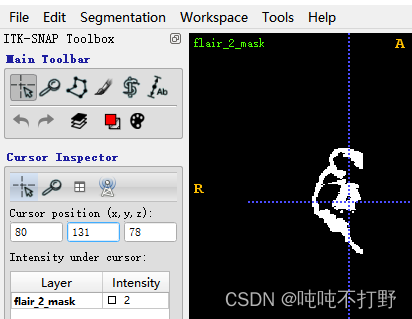

即
padding_path="XXXX.nii.gz"
padding_image=sitk.ReadImage(padding_path)
print(padding_image.GetSize())
padding_array = sitk.GetArrayFromImage(padding_image)
print(padding_array.shape)
padding_array[78,131,80]
> (240, 240, 155)  (x,y,z)
  (155, 240, 240)  (z,y,x)
2
5. SimpleITK阈值去骨
我使用的数据比较简单,这里也就是个简单的预处理。
import SimpleITK as sitk
image_path = "./im.nii.gz"
image = sitk.ReadImage(image_path)
skull_mask =sitk.BinaryThreshold(image, lowerThreshold=125, upperThreshold=2000, insideValue=1, outsideValue=0)
# 在125~2000范围内的,赋值为1,范围外的,赋值为0。得到的mask就是125~2000这个强度值的内容,即骨骼。
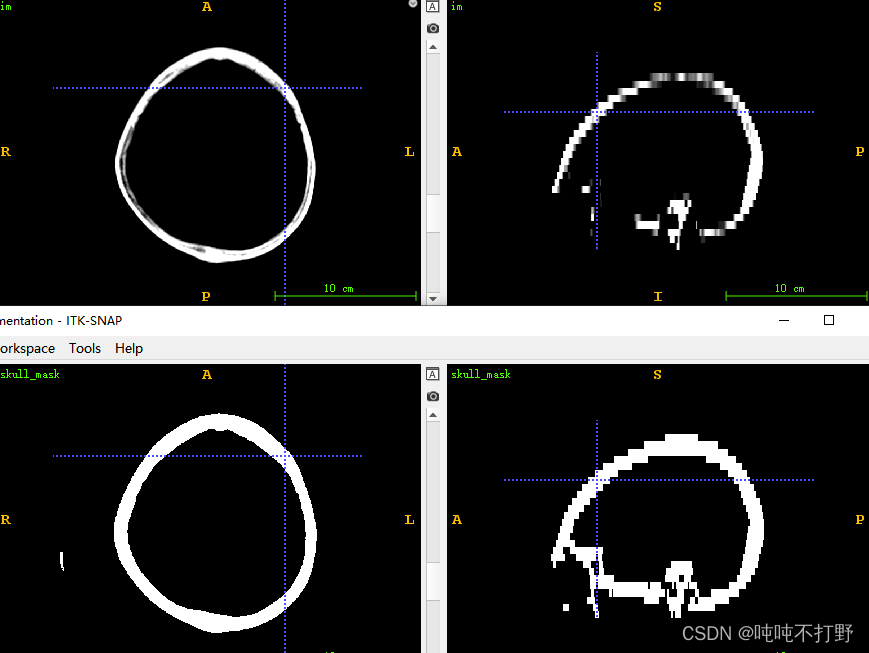
类似下图:
- 上面是将脑部CT窗宽窗位调整至level:700,window:500得到的图像
- 下面是使用阈值去骨后的结果,看起来还行
参考:
边栏推荐
- 《Just because》阅读感受
- Unity发布WebGL播放声音的一种方法
- [shutter] shutter gesture interaction (click event handling | click OnTap | double click | long press | click Cancel | press ontapdown | lift ontapup)
- The book "new programmer 002" is officially on the market! From "new database era" to "software defined car"
- 在beforeDestroy中销毁localStorage中的值无效
- ArrayList analysis 2: pits in ITR, listiterator, and sublist
- 540. Single element in ordered array
- Get off work on time! Episode 6 of Excel Collection - how to split and count document amounts
- [Jianzhi offer] 56 - ii Number of occurrences of numbers in the array II
- Technical solution of vision and manipulator calibration system
猜你喜欢

The book "new programmer 002" is officially on the market! From "new database era" to "software defined car"

《Just because》阅读感受
#include<>和#include“”的区别
pip安裝whl文件報錯:ERROR: ... is not a supported wheel on this platform

"Actbert" Baidu & Sydney University of technology proposed actbert to learn the global and local video text representation, which is effective in five video text tasks!

地理探测器原理介绍

Daily book -- analyze the pain points of software automation from simple to deep

Socket套接字C/S端流程

GEE:(二)对影像进行重采样
About test cases
随机推荐
[staff] Sibelius 7.5.1 score software installation (software download | software installation)
How do I access the kubernetes API?
[leetcode] sword finger offer 11 Rotate the minimum number of the array
TinyMCE visual editor adds Baidu map plug-in
Basic concepts of image and deep understanding of yuv/rgb
Meibeer company is called "Manhattan Project", and its product name is related to the atomic bomb, which has caused dissatisfaction among Japanese netizens
[shutter] shutter gesture interaction (small ball following the movement of fingers)
[C question set] of V
Promise optimized callback hell
U++ 学习笔记 堆
What "real skills" should a million year old cloud native developer master? Alibaba, Tencent, meituan and byte decrypt together
100 important knowledge points that SQL must master: using cursors
Market Research - current situation and future development trend of marine clutch Market
A week's life
Pip install whl file Error: Error: … Ce n'est pas une roue supportée sur cette plateforme
The source code of the daily book analyzes the design idea of Flink and solves the problems in Flink
Introduction to the principle of geographical detector
地理探测器原理介绍
kubernetes资源对象介绍及常用命令(四)
服务可见可观测性