当前位置:网站首页>How to build FTP server under win2003
How to build FTP server under win2003
2022-07-30 19:36:00 【Yisuyun】
How to build an FTP server under win2003
This article will introduce "how to build an FTP server under win2003 in detail. The content is detailed, the steps are clear, and the details are handled properly, I hope this article "How to build an FTP server under win2003" can help you solve your doubts. Let's follow the ideas of the editor and let's learn new knowledge together.
Build FTP server
First open the Windows 2003 Control Panel, Administrative Tools - Add and Remove Windows Programs.Or just run appwiz.cpl

Enter the add and delete windows program interface, find and delete windows components
In the windows component, find [Application Server]
In the Application Server, click Details.Go to find IIS Information Manager
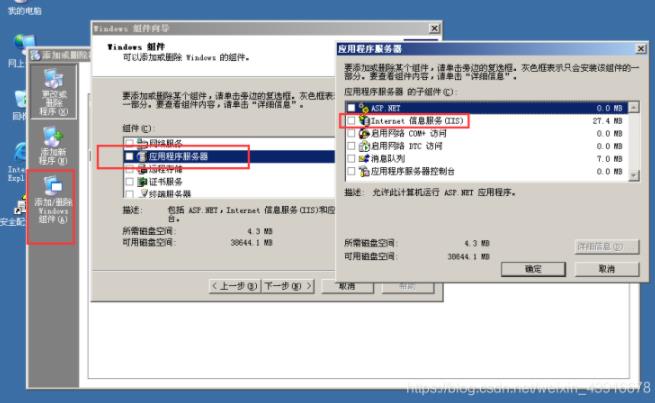
Click [IIS Information Manager] details, there is an FTP service, check it
Then go back, click Next, and then the system will start to install the ftp service.

Configure FTP server
Open Administrative Tools---Internet Information Manager---ftp Site

Next is to configure the ftp site IP address

According to the default settings, ftp can be accessed by any user, but there is no modification write permission.As shown in the figure, use ftp://server IP to feedback


Permission Control
Based on the win2003 FTP server user authority control, the authority configuration of the file server is performed.
Internet guest users set permission to read attributes, read extended attributes, and read permissions for each department directory; refuse to traverse folders/run files, list folders/read data, write attributes, extended attributes, deleteSubfolders and files, delete.

Access Test.

After reading this, this article "How to build an FTP server under win2003" has been introduced. If you want to master the knowledge points of this article, you need to use it yourself to understand it. If you want to understandFor more related articles, please pay attention to the Yisu Cloud Industry Information Channel.
边栏推荐
猜你喜欢
Zabbix 5.0 监控教程(一)

MySQL性能优化(硬件,系统配置,表结构,SQL语句)

JS提升:Promise中reject与then之间的关系
Google's AlphaFold claims to have predicted almost every protein structure on Earth

golang日志库zerolog使用记录

Delay queue optimization (2)
C# wpf borderless window add shadow effect
win2003下FTP服务器如何搭建

MySQL数据库————视图和索引
Cesium加载离线地图和离线地形
随机推荐
musicApp 的.eslintrc.js
牛客刷题系列之进阶版(组队竞赛,排序子序列,倒置字符串, 删除公共字符,修理牧场)
高并发秒杀项目总结
LocalDate时间生成
ImportError: attempted relative import with no known parent package
[PyTorchVideo Tutorial 01] Quickly implement video action recognition
监听开机广播
Niuke.com - Huawei Question Bank (100~108)
OMP: Error #15: Initializing libiomp5md.dll, but found libiomp5md.dll already initialized.解决方法
几个GTest、GMock的例子
Scala学习:breakable
Tensorflow2.0 confusion matrix does not match printing accuracy
- daily a LeetCode 】 【 191. A number of 1
【MindSpore】用coco2017训练Model_zoo上的 yolov4,迭代了两千多batch_size之后报错,大佬们帮忙看看。
【科普】无线电波怎样传送信息?
【Prometheus】Prometheus联邦的一次优化记录[续]
Download Win11 how to change the default path?Download Win11 change the default path method
VBA 运行时错误‘-2147217900(80040e14):自动化(Automation)错误
MindSpore:【JupyterLab】按照新手教程训练时报错
How do radio waves transmit information?