当前位置:网站首页>Flask framework beginner-03-template
Flask framework beginner-03-template
2022-07-26 10:03:00 【Flowing ink fragrance】
Templates
One 、 Template Introduction
Templates : ( Webpage , namely template Under the html file )
- A template is actually a file that contains the response text , It's a place holder ( Variable ) Represents the dynamic part , Tell the template engine that its specific value needs to be obtained from the data used
- Replace variables with real values , And then return the final string , This process is called ’ Rendering ’
- Flask It's using Jinja2 This template engine is used to render templates
Advantages of using templates :
- View functions are only responsible for business logic and data processing ( Business logic )
- The template takes the data result of the view function for display ( View presentation )
- The code structure is clear , Low coupling
Syntax of template :
1、 Get... In the template view Variable value passed in :{ { Variable name key }}
render_template(‘ Template file name ’,keyvalue,keyvalue,…)
@app.route('/register')
def register():
    #  The default from the templates Query in the folder
    r = render_template('register2.html')
    print(r)
    return r
Two 、 Receive value in template
| Type of reception | Handle |
|---|---|
| Receive list values | { { list.0 }} or { { list[0] }} |
| Receive dictionary value | { { dict.key }} or { { dict.get(key) }} |
| Receive object value | { { girl.name }} |
| Apply external file name | url_for(‘static’,filename = ‘css/style.css’) |
| Declare variables for use 1 | {% set username = ‘zhangsan’ %} { { username }} |
| Declare variables for use 2 | {% with num=1— %} { { num }} {% endwith %} |
example:
app1.py
from flask import Flask,request,render_template

import settings

app = Flask(__name__)
app.config.from_object(settings)


class Girl:
    def __init__(self,name,addr):
        self.name = name
        self.gender = ' Woman '
        self.addr = addr

@app.route('/show')
def show():
    name = 'haha'
    age = 18
    friends = ['haha', 'hehe', 'xixi', 'qiaqia']
    dicts = {
    'gift1':' The necklace ','gift2':' flower ','gift3':' ring '}
    #  Create objects
    girlfriend = Girl(' Cui Hua ',' jiangxi ')
    return render_template('show.html',name=name,age=age,friends=friends,dicts=dicts,girl=girlfriend)

if __name__ == '__main__':
    app.run()
show.html
<!DOCTYPE html>
<html lang="en">
<head>
    <meta charset="UTF-8">
    <title>Title</title>
</head>
<body>
<div> User information display </div>
<p>
     User name is :{
   {name}} ---- {
   {age}} --- {
   {gender}}
    <br>
    {
   {friends[0]}}
    {
   {friends.1}}
    {
   {friends[2]}}
    {
   {friends[3]}}
    <br>
    {
   {dicts.gift1}}
    {
   {dicts.get('gift2'}}
    <br>
    {
   {girl.name}} --- {
   {girl.gender}} --- {
   {girl.age}}
</p>

<table>
  {# Dynamically create #}
    <tr>
      <td></td>
    </tr>
</table>

<script> </script>
</body>
</html>
result :
3、 ... and 、 Template control block
| Control block | grammar |
|---|---|
| if Judge | {% if Conditions %} Condition is True Statements executed after {% else %} Condition is False Statements executed after {% endif %} |
| for loop | {% for Variable in Iteratable object %} for Statement to execute {% endfor %} |
| loop Variable cycle | loop.index The serial number from 1 Start loop.index0 The serial number from 0 Start loop.revindex The serial number is reversed loop.revindex0 loop.first Whether the first Boolean type loop.last Whether the last one Boolean type |
example:
app2.py
from flask import Flask,request,render_template

import settings

app = Flask(__name__)
app.config.from_object(settings)


@app.route('/show')
def show1():
    girls = [' Sun Yizhen ',' Song Yun ',' Li-ying zhao ',' Andy ',' Hu Bingqing ',' Sun Wen ']
    users = [
        {
    'username': 'haha1', 'password': '123', 'addr': ' Zhejiang ', 'phone': '10000000000'},
        {
    'username': 'haha2', 'password': '124', 'addr': ' Zhejiang ', 'phone': '10000000001'},
        {
    'username': 'haha3', 'password': '125', 'addr': ' Shanghai ', 'phone': '10000000002'},
        {
    'username': 'haha4', 'password': '126', 'addr': ' Beijing ', 'phone': '10000000003'},
        {
    'username': 'haha5', 'password': '127', 'addr': ' jiangsu ', 'phone': '10000000004'},
        {
    'username': 'haha6', 'password': '128', 'addr': ' jiangxi ', 'phone': '10000000005'},
    ]
    return render_template('show_controlblock.html',girls=girls,users=users)

if __name__ == '__main__':
    app.run()
show_controlblock.html
<!DOCTYPE html>
<html lang="en">
<head>
    <meta charset="UTF-8">
    <title> Demo control block </title>
    <style> .a {
       color: red; font-weight: bold; } </style>
</head>
<body>
{# ul...li #}
{# ol...li #}
<!-- html notes  -->
{# {
   {girls}} #}

<ul>
    {% for girl in girls %}
        <li> {
   { girl }} </li>
    {% endfor %}

</ul>

<hr>

<ul>
    {% for girl in girls %}
        {% if girl|length >= 3 %}
            <li class="a"> {
   { girl }} </li>
        {% else %}
            <li> {
   { girl }} </li>
        {% endif %}
    {% endfor %}
</ul>

<hr>

<table border="1" cellpadding="0" cellspacing="0" width="50%">
    {% for user in users %}
        <tr>
            <td>{
   { user.username }}</td>
            <td>{
   { user.password }}</td>
            <td>{
   { user.addr }}</td>
            <td>{
   { user.phone }}</td>
        </tr>
    {% endfor %}


</table>

<hr>


<table border="1" cellpadding="0" cellspacing="0" width="50%">
    {% for user in users %}
        <tr {% if loop.last %} style="background-color: deeppink" {% endif %}>
            <td>{
   { loop.index0 }}</td>
            <td>{
   { loop.index }}</td>
            <td>{
   { user.username }}</td>
            <td>{
   { user.password }}</td>
            <td>{
   { user.addr }}</td>
            <td>{
   { user.phone }}</td>
        </tr>
    {% endfor %}


</table>

</body>
</html>
result :
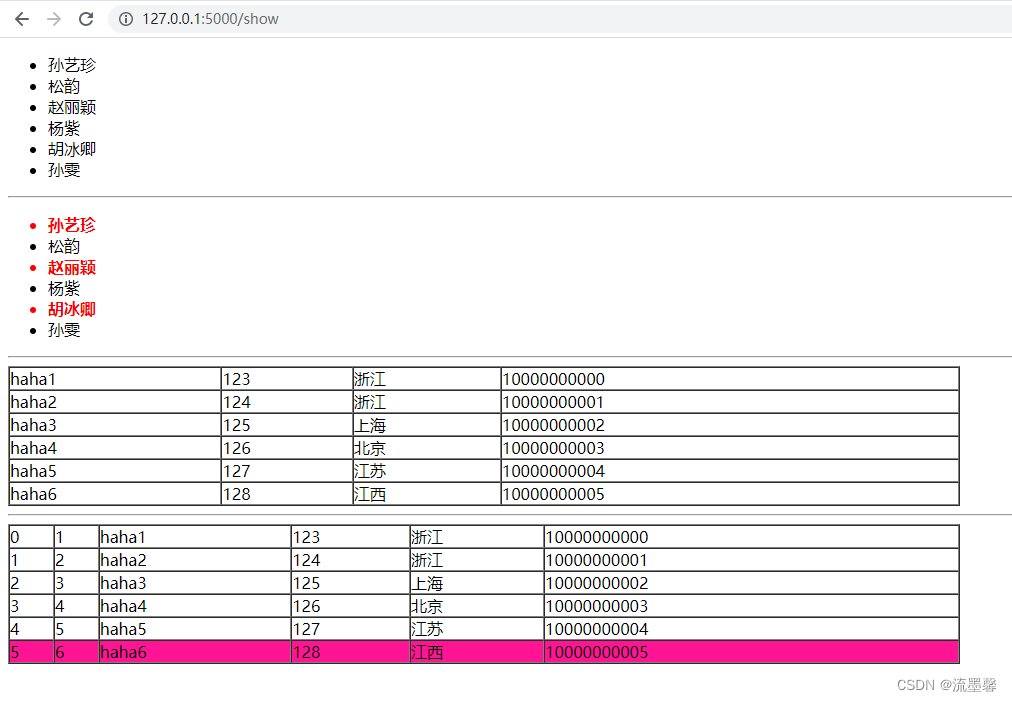
Four 、 Template filter
The essence of filter is function
Filter in template syntax :
{ { Variable name | filter }}
{ { Variable name | filter (*args) }}
Common filters :
1、safe : escape Keep the style , Don't escape tags , Let it still show the style
2、capitalize : Capitalize the first letter of a word
3、lower/upper: Word case conversion
4、title : The first letter of each word in a sentence is capitalized
5、reverse : Reverse spelling of words and letters
6、format : format conversion
7、truncate : Returns a truncated length string
8、 Filters that exist in the list :
{ { girls | first }}
{ { girls | last }}
{ { girl | length }}
{ { [1,3,5,7,9] | sum }}
{ { [2,0,1,5.8,3] | sort }}
9、tojson() : Convert the given object to JSON Express
<script type=text/javascript>
    doSomethingWith({
   { user.username|tojson|safe }});
</script>
10、 Filters that exist in the dictionary :
Get value :
 {% for v in users.0.values() %}
	 <p>{
   { v }} </p>
 {% endfor %}
Get key :
{% for v in users.0.keys() %}
     <p>{
   { v }} </p>
{% endfor %}
Get key value pairs :
{% for k,v in users.0.items() %}
   <p>{
   { k }}---{
   { v }}</p>
{% endfor %}
11、 Custom filter
1、 adopt flask Module add_template_filter Method
def  replace_hello(value):
    print('---->',value)
    value = value.replace('hello','')
    print('=======>',value)
    return value.strip()
app.add_template_filter(replace_hello,'replace')
2、 Use the decorator to complete
@app.template_filter('listreverse')
def reverse_list(li):
    temp_li = list(li)
    temp_li.reverse()
    return temp_li
3、 Add to app manually jinja_env
def reverse_filter(s):
    return s[::-1]
app.jinja_env.filters['reverse'] = reverse_filter
example:
app3.py
from flask import Flask,request,render_template

import settings

#  Contains filters 、 Judge the condition if、 The loop condition for

app = Flask(__name__)
app.config.from_object(settings)

@app.route('/show')
def show1():
    girls = [' Sun Yizhen ',' Song Yun ',' Li-ying zhao ',' Andy ',' Hu Bingqing ',' Sun Wen ']
    users = [
        {
    'username': 'haha1', 'password': '123', 'addr': ' Zhejiang ', 'phone': '10000000000'},
        {
    'username': 'haha2', 'password': '124', 'addr': ' Zhejiang ', 'phone': '10000000001'},
        {
    'username': 'haha3', 'password': '125', 'addr': ' Shanghai ', 'phone': '10000000002'},
        {
    'username': 'haha4', 'password': '126', 'addr': ' Beijing ', 'phone': '10000000003'},
        {
    'username': 'haha5', 'password': '127', 'addr': ' jiangsu ', 'phone': '10000000004'},
        {
    'username': 'haha6', 'password': '128', 'addr': ' jiangxi ', 'phone': '10000000005'},
    ]
    girls.append('zhangsan')
    msg = '<h1>520 happy !</h1>'
    n1 = 'hello'
    return render_template('show_controlblock.html',girls=girls,users=users,msg=msg,n1=n1)


@app.route('/')
def hello_word():
    msg = 'hello everyone hello world'
    li = [3,4,5]
    return render_template('define_filter.html',msg=msg,li=li)

#  The first way
#  Filters are essentially functions
def  replace_hello(value):
    print('---->',value)
    value = value.replace('hello','')
    print('=======>',value)
    return value.strip()

app.add_template_filter(replace_hello,'replace')

#  The second way   Decorator
@app.template_filter('listreverse')
def reverse_list(li):
    temp_li = list(li)
    temp_li.reverse()
    return temp_li

if __name__ == '__main__':
    app.run()
show_controlblock.html
<!DOCTYPE html>
<html lang="en">
<head>
    <meta charset="UTF-8">
    <title> Demo control block </title>
    <style> .a {
       color: red; font-weight: bold; } </style>
</head>
<body>
{# ul...li #}
{# ol...li #}
<!-- html notes  -->
{# {
   {girls}} #}

<ul>
    {% for girl in girls %}
        <li> {
   { girl }} </li>
    {% endfor %}

</ul>

<hr>

<ul>
    {% for girl in girls %}
        {% if girl|length >= 3 %}
            <li class="a"> {
   { girl }} </li>
        {% else %}
            <li> {
   { girl }} </li>
        {% endif %}
    {% endfor %}
</ul>

<hr>

<table border="1" cellpadding="0" cellspacing="0" width="50%">
    {% for user in users %}
        <tr>
            <td>{
   { user.username }}</td>
            <td>{
   { user.password }}</td>
            <td>{
   { user.addr }}</td>
            <td>{
   { user.phone }}</td>
        </tr>
    {% endfor %}


</table>

<hr>


<table border="1" cellpadding="0" cellspacing="0" width="50%">
    {% for user in users %}
        <tr {% if loop.last %} style="background-color: deeppink" {% endif %}>
            <td>{
   { loop.index0 }}</td>
            <td>{
   { loop.index }}</td>
            <td>{
   { user.username }}</td>
            <td>{
   { user.password }}</td>
            <td>{
   { user.addr }}</td>
            <td>{
   { user.phone }}</td>
        </tr>
    {% endfor %}


</table>

</body>
</html>
define_filter.html
<!DOCTYPE html>
<html lang="en">
<head>
    <meta charset="UTF-8">
    <title> Use of filters </title>
</head>
<body>
 The current user is :{
   { girls | length }}  people
<br>
{#  Filter escape  #}
{
   { len(girls) }}
<br>
{
   { msg | safe }}
<br>
{
   { n1 | capitalize }}
<br>
{
   { n1 | upper }}
<br>
{
   { n2 | lower }}
<br>
{
   { n1 | reverse }}
<br>
{
   { '%s id %d' | format('lili',18 }}
<br>
{
   { 'hello world' | truncate(7) }}

{#  Use of list filters  #}
{
   { girls | first }}
<br>
{
   { girls | last }}
<br>
{
   { girl | length }}
<br>
{
   { [1,3,5,7,9] | sum }}
<br>
{
   { [2,0,1,5.8,3] | sort }}
<br>

<p>
   {
   { users.0 }}
    <br>
    {% for v in users.0.values() %}
        <p>{
   { v }} </p>
    {% endfor %}
    <hr>
    {% for k,v in users.0.items() %}
        <p>{
   { k }}---{
   { v }}</p>
    {% endfor %}

</p>


</body>
</html>
result :


5、 ... and 、 Template reuse
Template inheritance :
Cases requiring template inheritance :
1、 Multiple templates have exactly the same top and bottom
2、 Multiple templates have the same template content , But part of the content is different
3、 Multiple templates have identical templates label :
{% block name %}
{% endblock %}
- step :
1、 First use the label in the parent template to leave a change area ( Be careful : Styles and scripts need to be reserved in advance )
{% block name %}
{% endblock %}
2、 The child template inherits the parent template
{% extends ' Parent template name ' %}
3、 Then in the child template, the variable name of the response name in the parent template , Fill in
 {% block name %}
 	 Change content
 {% endblock %}
The child template introduces the parent template
| include: contain | Use scenarios : stay A,B,C Pages have common parts , But other pages don't have this part step : 1、 First define a common template part :.html 2、 Use include Import the files you need to use ( Be careful : The folder must be in template Inside ) {% include ‘ Folder /.html’ %} |
| macro :macro | 1、 Think of it as jinja2 A function of , This function returns a HTML character string 2、 Purpose : Code can be reused , Avoid code redundancy Two ways to define : 1、 Define directly in the template : similar :macro1.html How to define 2、 Extract all macros into one template :macro.html Import when using : {% import ‘macro.html’ as Call name %} { { Call name . macro ( Parameter values ) }} |
| { { url_for(‘static’,filename=‘’) }}: load static The following static file | Use scenarios : Load e.g javaScript or css Wait for the documents |
example:
app4.py
from flask import Flask,request,render_template

import settings

app = Flask(__name__)
app.config.from_object(settings)

@app.route('/base')
def load_inherit():
    return render_template('inherit.html')

@app.route('/')
def index():
    return render_template('inherit2.html')

@app.route('/welcome')
def welcome():
    return render_template('include.html')

@app.route('/macro')
def use_macro():
    return render_template('macro/macro1.html')

@app.route('/macro1')
def use_macro1():
    return render_template("macro/macro2.html")

@app.route('/index')
def welcome():
    return render_template('index.html')

if __name__ == '__main__':
    app.run()
inherit.html
<!DOCTYPE html>
<html lang="en">
<head>
    <meta charset="UTF-8">
    <title>
      {% block title %} Of parent template title{% endblock %}
    </title>
    <style> #head{
       height : 50px; background-color : bisque; } #head ul{
       list-style: none; } #head ul li{
       float : left; width : 100px; text-align : center; font-size : 50px; line-height: 50px; } #middle{
       height : 900px; background-color : azure; } #foot{
       height : 50px; line-height : 50px; background-color : darkseagreen; } </style>
    {% block mycss %}
    {% endblock %}
</head>
<body>
  <div id="head">
    <ul>
      <li> home page </li>
      <li> seckill </li>
      <li> The supermarket </li>
      <li> The book </li>
      <li> members </li>
    </ul>

  </div>
  <div id="middle" >
    {% block middle %}
      <button> I'm the middle part </button>
    {% endblock %}

  </div>
  <div id="foot">
         I'm the bottom part
  </div>
{% block myjs %}
{% endblock %}
</body>
</html>
inherit2.html
{% extends 'base.html' %}
{% block title %}
     home page
{% endblock %}
{% block mycss %}
    <style> #middle{
       background-color : deeppink; } .div1{
       width: 33%; height: 500px; float: left; border: 1px solid red; } </style>
    <# link rel="stylesheet" href="../static/css/style.css" #>
    <link rel="stylesheet" href="{
     { url_for('static',filename = 'css/style.css') }}">
{% endblock %}
{% block myjs %}
    <script> btn = document.getElementById('btn') btn.onclick(function(){
       alert(' Don't order me !') }) </script>
{% endblock %}

{% block middle %}
    <div class="div1" id="d1"></div>
    <div class="div1"></div>
    <div class="div1"></div>
    <img src="{
     { url_for('static',filename='images/a.png')}}" alt="" >
{% endblock %}
header.html
<!DOCTYPE html>
<html lang="en">
<head>
    <meta charset="UTF-8">
    <title> Head </title>
</head>
<body>
<div style="heigh: 50px;background-color: deeppink"></div>

</body>
</html>
include.html
<!DOCTYPE html>
<html lang="en">
<head>
    <meta charset="UTF-8">
    <title> The welcome page </title>
</head>
<body>
{% include 'common/header.html' %}
<div style="background-color: darkseagreen; width: 100px; "></div>
</body>
</html>
macro/macro1.html
<!DOCTYPE html>
<html lang="en">
<head>
    <meta charset="UTF-8">
    <title> macro </title>
</head>
<body>
{#  Defining macro  #}
{% macro form(action,value=' Sign in ',method='post') %}
  <form action="{
     { action }}" method="{
     { method }}">
      <input type="text" value="" placeholder=" user name " name="username">
      <br>
      <input type="password" placeholder=" password " name="password">
      <br>
      <input type="submit" value="{
     { value }}">
  </form>
{% endmacro %}

{#  Call the macro  #}
{
   { form('/') }}
</body>
</html>
macro/macro.html
{#  Defining macro  #}
{% macro form(action,value=' Sign in ',method='post') %}
  <form action="{
     { action }}" method="{
     { method }}">
      <input type="text" value="" placeholder=" user name " name="username">
      <br>
      <input type="password" placeholder=" password " name="password">
      <br>
      <input type="submit" value="{
     { value }}">
  </form>
{% endmacro %}
macro/macro2.html
<!DOCTYPE html>
<html lang="en">
<head>
    <meta charset="UTF-8">
    <title> Use of macros 2</title>
</head>
<body>
{% import 'macro/macro.html' as f %}
{
   { f.form('welcome',value=' register ')   }}

{#  Declare variables for use  #}}
{% set username = 'zhangsan' %}
{
   { username }}

{% with num=1--- %}
    {
   { num }}
{% endwith %}

</body>
</html>
hello.js
function sayHello() {

   alert("Hello World")
}
index.html
<html>

   <head>
      <script type = "text/javascript" src = "{
     { url_for('static', filename = 'hello.js') }}" ></script>
   </head>

   <body>
      <input type = "button" onclick = "sayHello()" value = "Say Hello" />
   </body>

</html>
6、 ... and 、 summary
| type | Method |
|---|---|
| Variable | { { name }} |
| block | {% if Conditions %} …{% endif %} {% for Conditions %} …{% endfor %} {% block Conditions %} …{% endblock %} {% macro Conditions %} …{% endmacro % |
| {% include ‘’ %} contain {% import ‘’ %} Import {% extends ‘’ %} Inherit | |
| { { url_for(‘static’,filename=‘’) }} { { macro name(***) }} |
边栏推荐
- Spolicy request case
- 2022年中科磐云——服务器内部信息获取 解析flag
- 在同一conda环境下先装Pytroch后装TensorFlow
- 【荧光字效果】
- El table implements adding / deleting rows, and a parameter changes accordingly
- Uni app learning summary
- Interview shock 68: why does TCP need three handshakes?
- Applet record
- Sqoop【付诸实践 02】Sqoop1最新版 全库导入 + 数据过滤 + 字段类型支持 说明及举例代码(query参数及字段类型强制转换)
- 分布式网络通信框架:本地服务怎么发布成RPC服务
猜你喜欢
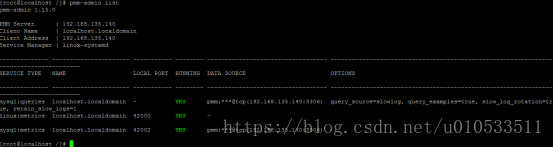
PMM (percona monitoring and management) installation record
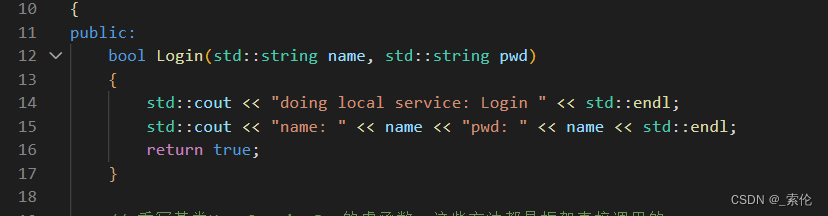
Distributed network communication framework: how to publish local services into RPC services
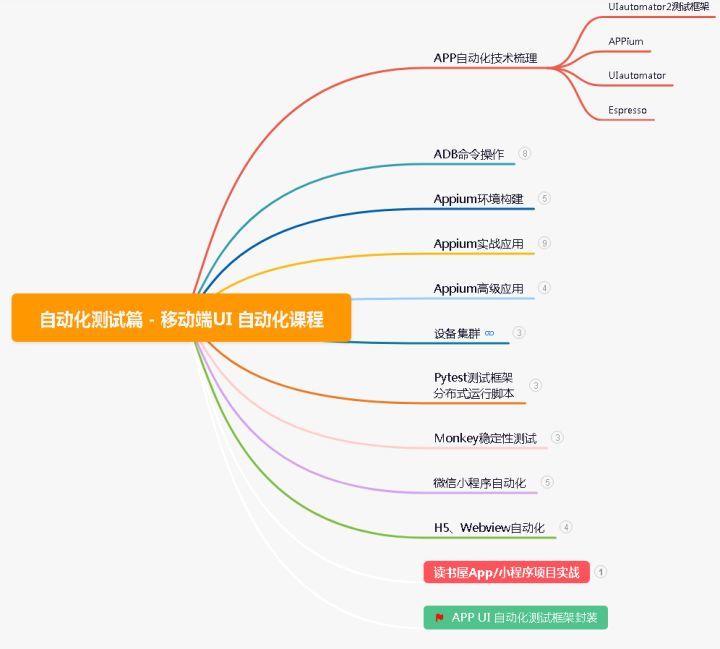
Development to testing: a six-year road to automation starting from 0

Matlab Simulink realizes fuzzy PID control of time-delay temperature control system of central air conditioning

Leetcode 504. 七进制数
MQTT X CLI 正式发布:强大易用的 MQTT 5.0 命令行工具
分布式网络通信框架:本地服务怎么发布成RPC服务

Apple dominates, Samsung revives, and domestic mobile phones fail in the high-end market
一种分布式深度学习编程新范式:Global Tensor

AirTest
随机推荐
【荧光字效果】
Node memory overflow and V8 garbage collection mechanism
The whole process of server environment configuration
时间序列异常检测
Sqoop【环境搭建 01】CentOS Linux release 7.5 安装配置 sqoop-1.4.7 解决警告并验证(附Sqoop1+Sqoop2最新版安装包+MySQL驱动包资源)
Principle analysis and source code interpretation of service discovery
Docker configuring MySQL Cluster
Production of a-modal drag function in antui
Solve proxyerror: CONDA cannot proceed due to an error in your proxy configuration
B站这个视频我是跪着看完的
Uniapp common error [wxml file compilation error]./pages/home/home Wxml and using MySQL front provided by phpstudy to establish an independent MySQL database and a detailed tutorial for independent da
【信息系统项目管理师】初见高项系列精华汇总
spolicy请求案例
MySQL function
SQL优化的魅力!从 30248s 到 0.001s
Logical architecture of MySQL
IE7 set overflow attribute failure solution
新公链Aptos何以拉满市场期待值?
Study notes of the first week of sophomore year
面试突击68:为什么 TCP 需要 3 次握手?