当前位置:网站首页>Unity uses shader to quickly make a circular mask
Unity uses shader to quickly make a circular mask
2022-07-28 20:38:00 【_ Mr orange】
Unity Use Shader Quickly make a circular mask
How to use Shader To make a circle 、 Chamfer and edge virtualization
Orange Preface
Hello everyone , I'm an orange , Recently made a function similar to music player .
Click play later The round picture in the middle will start to rotate , Used to Some Yi music player or other mobile player knows .
And then because of me ( lazy ) I don't want to cut pictures into circles , So I want to use it Shader Let's make a mask .
Tips : The following is the main body of this article , The following cases can be used for reference
One 、 establish Shader
First, create a new folder , The name for :Shaders
The name for UICircular
Double-click to open Copy the following code
//By: The oranges  2022-5-11  Unique blog address :https://blog.csdn.net/weixin_45375968
Shader "Custom/UICircular"
{

	Properties
	{

		_R(" The radius of the circle R", Range(0,1)) = 0.5
		_Blur(" The scope of edge virtualization ", Range(0,100)) = 100

		[PerRendererData] _MainTex("Sprite Texture", 2D) = "white" {
    }
		_Color("Tint", Color) = (1,1,1,1)

		_StencilComp("Stencil Comparison", Float) = 8
		_Stencil("Stencil ID", Float) = 0
		_StencilOp("Stencil Operation", Float) = 0
		_StencilWriteMask("Stencil Write Mask", Float) = 255
		_StencilReadMask("Stencil Read Mask", Float) = 255

		_ColorMask("Color Mask", Float) = 15

		[Toggle(UNITY_UI_ALPHACLIP)] _UseUIAlphaClip("Use Alpha Clip", Float) = 0
	}

		SubShader
		{

			Tags
			{

				"Queue" = "Transparent"
				"IgnoreProjector" = "True"
				"RenderType" = "Transparent"
				"PreviewType" = "Plane"
				"CanUseSpriteAtlas" = "True"
			}

			Stencil
			{

				Ref[_Stencil]
				Comp[_StencilComp]
				Pass[_StencilOp]
				ReadMask[_StencilReadMask]
				WriteMask[_StencilWriteMask]
			}

			Cull Off
			Lighting Off
			ZWrite Off
			ZTest[unity_GUIZTestMode]
			Blend SrcAlpha OneMinusSrcAlpha
			ColorMask[_ColorMask]

			Pass
			{

				Name "Default"
			CGPROGRAM
				#pragma vertex vert
				#pragma fragment frag
				#pragma target 2.0

				#include "UnityCG.cginc"
				#include "UnityUI.cginc"

				#pragma multi_compile __ UNITY_UI_CLIP_RECT
				#pragma multi_compile __ UNITY_UI_ALPHACLIP

				struct appdata_t
				{

					float4 vertex   : POSITION;
					float4 color    : COLOR;
					float2 texcoord : TEXCOORD0;
					UNITY_VERTEX_INPUT_INSTANCE_ID
				};

				struct v2f
				{

					float4 vertex   : SV_POSITION;
					fixed4 color : COLOR;
					float2 texcoord  : TEXCOORD0;
					float4 worldPosition : TEXCOORD1;
					UNITY_VERTEX_OUTPUT_STEREO
				};

				fixed4 _Color;
				fixed4 _TextureSampleAdd;
				float4 _ClipRect;
				float _R;
				float _X;
				float _Y;
				float _Blur;

				v2f vert(appdata_t v)
				{

					v2f OUT;
					UNITY_SETUP_INSTANCE_ID(v);
					UNITY_INITIALIZE_VERTEX_OUTPUT_STEREO(OUT);
					OUT.worldPosition = v.vertex;
					OUT.vertex = UnityObjectToClipPos(OUT.worldPosition);

					OUT.texcoord = v.texcoord;

					OUT.color = v.color * _Color;
					return OUT;
				}

				sampler2D _MainTex;

				fixed4 frag(v2f IN) : SV_Target
				{

					half4 color = (tex2D(_MainTex, IN.texcoord) + _TextureSampleAdd) * IN.color;

					#ifdef UNITY_UI_CLIP_RECT
					color.a *= UnityGet2DClipping(IN.worldPosition.xy, _ClipRect);
					#endif

					#ifdef UNITY_UI_ALPHACLIP
					clip(color.a - 0.001);
					#endif

					// circular
					float x = IN.texcoord.x - 0.5f;
					float y = IN.texcoord.y - 0.5f;
					float lerp = (1 - _Blur * (_R * _R - (x * x + y * y))) * color.a;// If you don't add this code , There will be obvious jagged edges in the picture
					color.a = (color.a - lerp) * step(x * x + y * y, _R * _R);// If  _R*_R<(x*x + y * y), return  0; otherwise , return  1.

					return color;
				}
			ENDCG
			}
		}
}
Two 、 establish Material
Or the folder just now 
Once created
As shown in the figure 
choice Custom And then put UICircular Drag onto Inspector Inside 
3、 ... and 、 Create to virtualize Image

Four 、 debugged Shader Until you are satisfied
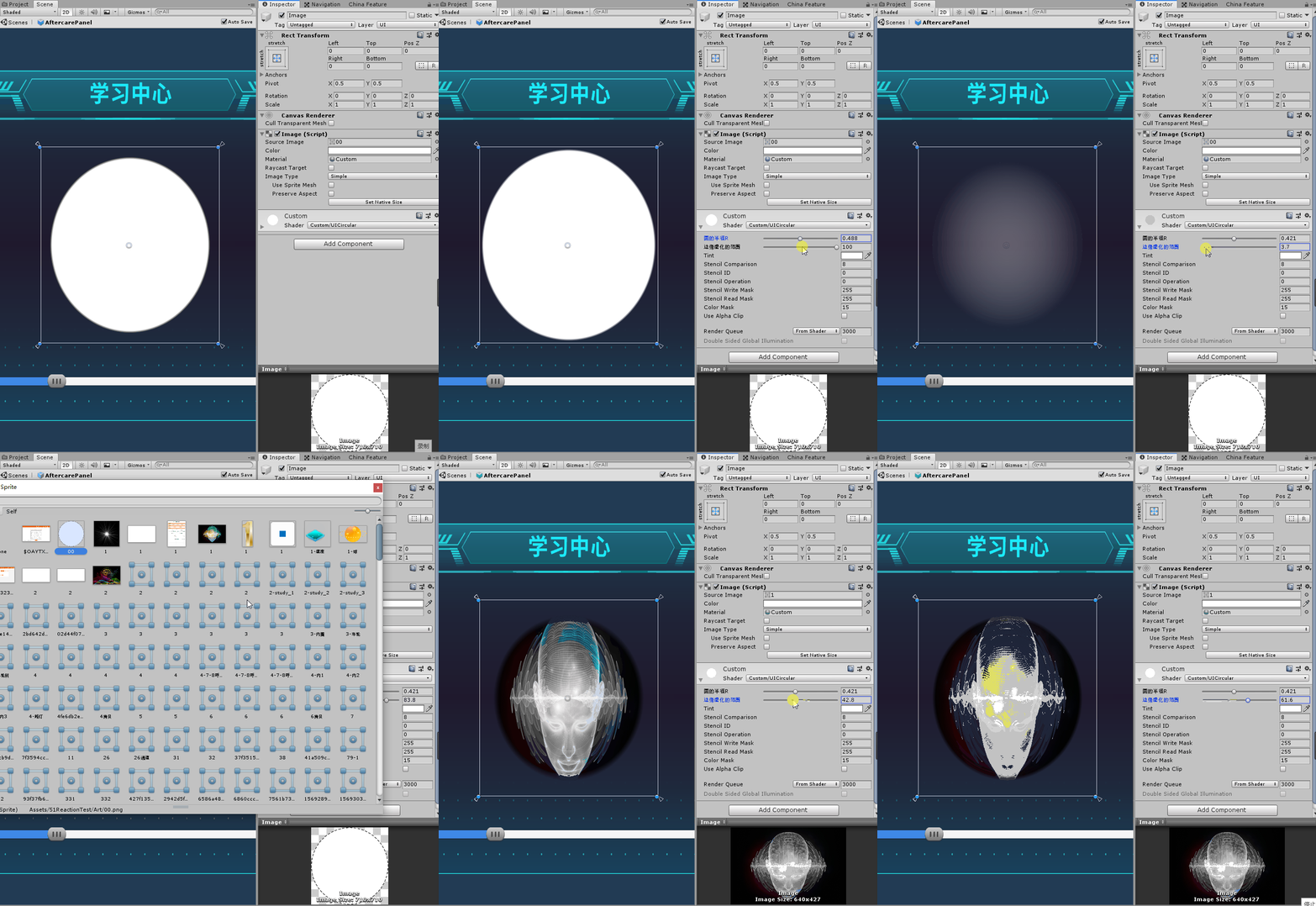
5、 ... and 、 summary
All right. That's all for this tutorial , Describes how to create a Shader Script , And create a new shader .
Now put any photos Are kept in a circle .
6、 ... and 、 Conclusion
Inferior to silicon step , A thousand miles .
Don't product the little stream , Beyond into the sea .
Make a little progress every day Thank you for watching .
Feel helpful to yourself , Welcome to your attention 、 Collection 、 forward ! See you next time
边栏推荐
- MySQL error: specified key was too long; max key length is 767 bytes
- [C语言刷题篇]链表运用讲解
- Shanghai Jiaotong University joined hands with Taobao to set up a media computing laboratory: promoting the development of key technologies such as video super score
- DSACTF7月re
- PXE_ KS unattended system
- C语言简单实例 1
- CNN convolutional neural network structure
- Scheduled backup of MySQL database under Windows system
- Leetcode-297 serialization and deserialization of binary tree
- 动态规划:背包问题模板代码汇总
猜你喜欢

Usage Summary of thymeleaf

C语言数据 3(2)

Raspberry connects EC20 for PPP dialing

卡通js射击小游戏源码

Linxu 【权限,粘滞位】

上海交大牵手淘宝成立媒体计算实验室:推动视频超分等关键技术发展

Extract China map from global.Nc data and calculate regional CO2 value based on acgis

太空射击第10课: Score (繪畫和文字)
![[C language] 5000 word super detailed explanation of various operations of the sequence table](/img/3b/932526e96ef14df8a321048e9c14b4.png)
[C language] 5000 word super detailed explanation of various operations of the sequence table

DOS common commands
随机推荐
js图片悬挂样式照片墙js特效
Raspberry pie uses the command line to configure WiFi connections
七种轮询介绍(后附实践链接)
Leetcode-297 serialization and deserialization of binary tree
Representation of base and number 2
Usage Summary of thymeleaf
C# 委托 delegate 的理解
Teach you how to draw a map with ArcGIS [thermal map]
上海交大牵手淘宝成立媒体计算实验室:推动视频超分等关键技术发展
Use of DDR3 (axi4) in Xilinx vivado (5) board test
Anaconda creation environment
【CodeForces】Educational Codeforces Round 132 (Rated for Div. 2)
关于链接到其他页面的标题
[POC - proof of concept]
Pop up modal box
About the title of linking to other pages
js飞入js特效弹窗登录框
LeetCode-297-二叉树的序列化与反序列化
About IP address
Pytorch model parameter assignment - tensor.copy_ () method