当前位置:网站首页>PR 2021 quick start tutorial, how to use audio editing in PR?
PR 2021 quick start tutorial, how to use audio editing in PR?
2022-06-29 00:27:00 【Mac1236】
PR2021 Quick start tutorial , After learning , Making tiktok videos ,vlog, Movie mix cut , Daily records, etc ! Zero basis , Welcome to the pit !
Content of this section
PR Generally, it is the default of video editing software , But actually PR It also has strong audio processing ability , Let's talk about it in detail today PR Audio editing .
Sample tools :Premiere Pro 2021 for Mac
There are many similarities between audio editing and video editing , For example, add clips or tracks on the timeline panel 、 Change view size 、 Use a razor tool to split and so on . You can unlink audio and video , To modify the audio clip separately . By default , The sequence of the timeline panel includes 3 A standard audio track and a main track . Main channel ( blend ) Soundtrack , Used to control the synthetic output of all audio tracks in the sequence .
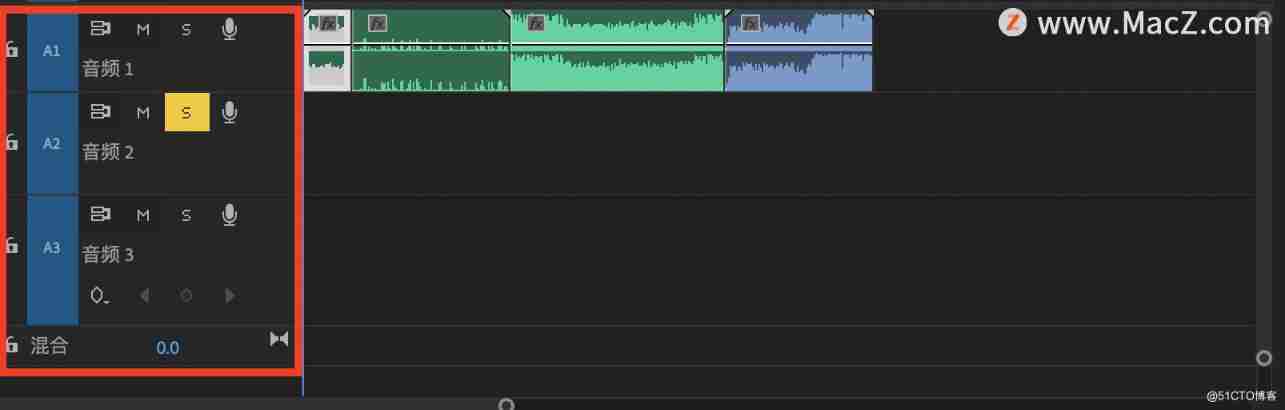
Audio track type
Standard track
The standard track replaces the old version of the stereo track type . It can accommodate both mono and stereo audio clips .
Mono track
The mono track contains one audio channel . If you add stereo audio material to a mono track , Stereo audio channels will be aggregated into mono .
5.1 Track... Track
5.1 The track contains 3 Front audio channel ( Left voice way 、 Middle channel 、 Right channel )、 Two rear or surround audio channels ( Left and right channels ) Low frequency effect leading to SUBWOOFER SPEAKER (LFE) Audio Channel . stay 5.1 Only channels and tracks can contain 5.1 Audio material .
Adaptive track
Adaptive tracks can only contain mono 、 Stereo and adaptive material .

Audio Editor
There are many similarities between audio editing and video editing , For example, add tracks on the timeline panel 、 Scale clip waveform 、 Use the razor tool to split clips and so on , You can also unlink audio and video , To modify the audio object separately .
(1) Add track
Execute menu : Sequence / Add track . perhaps , Right click on the timeline panel and select “ Add track ”, perhaps , Drag the existing audio clip to the next line of the main channel .
Relative video track , There is mute on the left panel of the audio track 、 solo 、 Voice over recording and other three audio unique buttons .

Right click the microphone icon , You can enter the voice over recording settings ; After the voice over recording is completed , Will .wav The file format is saved in the project folder ; More than one track can be set as solo , They output the mix to the main channel .
One more “ Show keys ” Button , Can choose “ Clip keys ”、“ Track keyframes ” And “ Orbital acoustic imager ”.
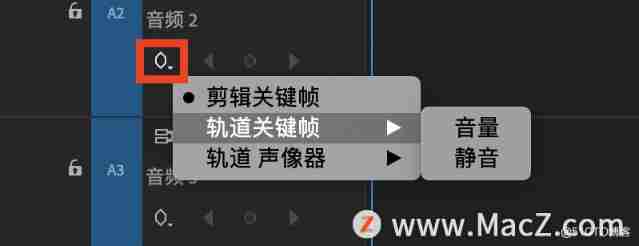
Clip keys : Display keyframes based on audio clips .
Track keyframes : Set based on the whole audio track “ The volume ”、“ Mute ” Equal key frame . In this state , You cannot move a single clip ( You can delete a single clip ). When dragging other audio onto the track , It will also be processed according to the effect of track keyframes .
Orbital acoustic imager : Set based on the whole audio track “ Balance ” Keyframes .
(2) Audio gain adjustment
Audio gain refers to the output current to audio 、 Increase degree of power, etc , The unit is decibels (dB). Audio gain is often used to restore the original audio material to the normal volume .
It can be tuned for a single audio clip , You can also tune for the whole track , This requires different methods and panels .
Right click on the audio clip , choice “ Audio gain ”, Or directly drag the line in the timeline panel clip up and down ( Different from the previous method , This is an audio effect ).

On the audio instrument panel , lower than -10dB, Low volume ; exceed 0dB, Easy to cause explosion point ( The thick red line on the audio instrument panel indicates that the audio clip has a burst point ). Normal audio gain at -6dB about . Therefore, the amplitude should be adjusted according to the peak value .

Using audio gain is just one way to adjust the volume , You can also use the audio clip mixer or track mixer . perhaps , Drag and drop directly on the line inside the audio clip in the timeline panel .
The audio clip mixer is used to adjust the left and right balance of the current audio clip on the track 、 Volume level and mute setting 、 Solo, etc . You can also turn on the function of writing keyframes . Before adjusting using the audio clip mixer , On the left side of the timeline panel “ Show keys ” Button , choice “ Clip keys ”( Default ), For intuitive observation .

After the write key function is turned on , Manually adjust the volume slider while playing audio , When you stop playing, you can automatically create keys . You can also write keyframes for left-right balance , Need to be in the effect control panel “ Acoustic imager / Balance ” To observe . Tips : stay “ Preferences / Audio / Automatic keyframe optimization ” in , Can increase the “ Minimum time ”, To prevent too many keyframes .

The track mixer panel controls the whole track .

3、 Add audio effects
Add special effects to audio objects , Such as fade in and fade out 、 Swing effect and audio effect of the system .
(1) Audio transition
The method of keyframing audio clips is the same as that of video clips . After adding keyframes, pull the line directly , Or the volume in the audio effect in the effect control panel / Level adjustment , You can easily achieve the fade in and fade out effect .
Tips : Mute yes -∞dB.
The audio transition in the audio effect provides 3 Cross dilution transition . among , Constant power is equivalent to the crossover in the video transition , Is the default audio transition effect .

(2) Use audio effects
“ Audio effects ” In the folder 40 Multiple sound effects . In the effects control panel, all sound effects have bypass Options , Equivalent to special effect switch . and Acoustic imager Medium Balance , The sound of stereo channel can be transformed into the effect of switching back and forth between left and right channels .
Analyze several common effects :
Multifunctional delay 、 Analog delay, etc : It is often used to produce echo effect .
Indoor reverberation : It is often used to simulate the reverberation effect in different environments , Such as hall reverberation , There is a sense of presence in the room .
Noise reduction 、 Eliminate buzzing 、 Adaptive noise reduction, etc : Commonly used to remove noise from audio .

That's right pr Introduction to audio editing , Have you learned ?
pr Video editing software download address : Premiere Pro 2021 for Mac(pr 2021 Direct Edition )
边栏推荐
- websocket-js连接如何携带token验证
- Précautions d'installation et d'utilisation des joints rotatifs
- Chrome浏览器的基本使用
- MapReduce case
- 每日一题:数组中数字出现的次数2
- FATAL ERROR: Could not find ./bin/my_print_defaults的解决办法
- Leetcode 178 Score ranking (June 27, 2022)
- [image denoising] matlab code for removing salt and pepper noise based on fast and effective multistage selective convolution filter
- Pinhole camera with added lens
- The magical zero knowledge proof can not only keep secrets, but also make others believe you!
猜你喜欢

Sword finger offer 12 Path in matrix

每日一练:删除有序数组中的重复项

be based on. NETCORE development blog project starblog - (13) add friendship link function

三個pwn題
![[image detection] line recognition based on Hough transform (fitting angle bisector) with matlab code](/img/29/a3dc68ebc958ff96c3d8cc771a84f1.jpg)
[image detection] line recognition based on Hough transform (fitting angle bisector) with matlab code

Accessories and working process of machine vision system
Precautions for installation and use of rotary joint

LinkedIn datahub - experience sharing

Realization of beauty system with MATLAB
Give you a project, how will you carry out performance testing (I)
随机推荐
Structure of the actual combat battalion | module 5
Leetcode 178 Score ranking (June 27, 2022)
10. Yolo series
scp拷贝文件夹
Easy to use free ppt template
JDBC连接、断开数据库的封装
Program environment and pretreatment
mysql 8.0以上报2058 解决方式
Zoom with mouse wheel
Is the compass stock software reliable? Is it safe to trade stocks on it?
[leetcode] 522. 最长特殊序列 II 暴力 + 双指针
Reprint: VTK notes - clipping and segmentation - 3D curve or geometric cutting volume data (black mountain old demon)
Accessories and working process of machine vision system
Comparison between winding process and lamination process
What will be done after digital IC Verification?
三個pwn題
WPF implementation calls local camera~
Mapbox GL loading local publishing DEM data
SCP copy folder
Leetcode daily question: implementing strstr()