当前位置:网站首页>[redis] quick start
[redis] quick start
2022-07-27 02:46:00 【Quasi Java full stack Development Engineer】
Quick start
One 、 What is? NoSQL ?
- Introducing Redis Before , We need to be right first NoSQL There is a simple connection ,Redis It's also common NoSQL database .
- NoSQL: namely Not-Only SQL, Non relational database in general , As a supplement to relational databases .
- effect : Dealing with data processing problems based on massive users and massive data .
- features :
- Expandable , Telescopic
- High performance with large amount of data
- Flexible data model
- High availability
- common NoSQL database :
- Redis
- MongoDB
- HBase
- …
Two 、 What is? Redis ?
- Redis: namely Remote Dictionary Server, Yes, it is C Language development of an open source high-performance key value pair ( key - value ) database .
- features :
- There is no necessary relationship between databases
- Internal use single thread mechanism to work
- High performance
- Support multiple data types , Such as :string String type ,list List the type ,hash Hash type ,set Collection types ,sorted_set Ordered set type .
- Support persistence
- Application scenarios :
- Speed up the query of hot data , Such as : Hot products 、 hot news 、 Hot information and other high traffic information .
- Task queue , Such as : seckill 、 Rush purchase 、 Queuing up for tickets, etc .
- Instant messaging , Such as : Ranking List 、 Website visit statistics 、 Number of people online .
- Time effective information control , Such as : Captcha control 、 Vote control .
- Distributed data sharing
- Message queue
- …
3、 ... and 、Redis Download and install of
- Download address :Redis Windows Version download ,Redis have Windows and Linux Two versions , This time we introduce Windows Download and installation of version , The download link is shown above , Need to GitHub Download in , Want to enter GitHub Need to climb over the wall , There must be countless wall climbing software in your hands . If there is no wall climbing software , You can send it to a blogger , The blogger will send you the downloaded compressed package .
- After downloading, you will get a compressed package , After decompression, you can use it directly , Very convenient , The following figure shows the contents contained in the folder .

- among , In the beginning stage , We often use " redis-cli.exe " and " redis-server.exe " ," redis-cli.exe " For the command line client ," redis-server.exe " Start the program for the server , When using , We need to start " redis-server.exe " Turn on the service , After opening, you will see the black box as shown in the following figure , You can see the current version information 、Port The port number and PID etc. .

- After opening the server , Let's run " redis-cli.exe " Client program , You will also get a black box as shown in the figure below , We write commands in it to complete relevant operations .

Four 、Redis Basic operation
When using command line mode tools , Usually , We all need to master the following four categories of commands :
- Functional commands
- Clear screen information command
- Help information lookup command
- Exit command
1、 Information addition command
- function : Set up key,value
- Format :set key value
- Example :set name origin, among key = name,value = origin

2、 Information query command
- function : according to key Query corresponding value value , If it doesn't exist , It returns null ( nil ), stay Redis Use in nil Said empty , amount to Java Medium null.
- Format :get key
- Example :get name, That is to get name The corresponding value value .

3、 Clear screen information command
- function : Clear the information on the screen , That is what we often call screen clearing operation .
- Format :clear
- After using the command , The information in the screen will be cleared , Get a cleaner screen , So that we can write other function commands .
4、 Help order
- function : Get the command help document , Get all command information names in the group .
- Format :
- help Command name , That is, get the help document of the command .
- help @ Group name , That is, get all the command information in the command group .
- Example 1 : obtain set Help documentation for commands

- Example 2 : obtain string All command information in the Group
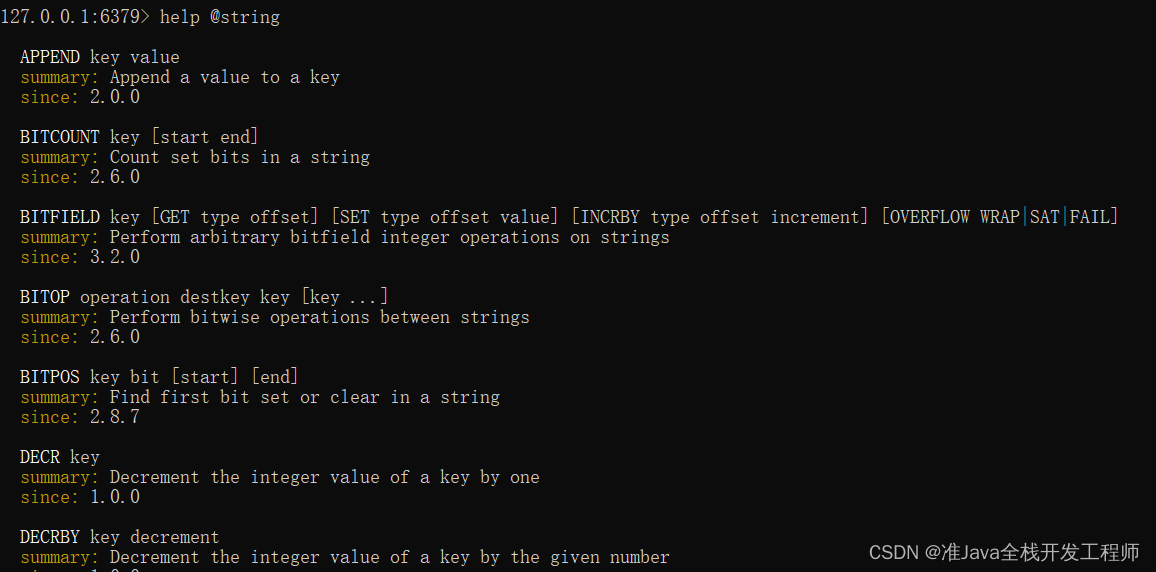
5、 Exit command
- function : Exit client
- Format :
- quit
- exit
- In keyboard ESC key
The above is the whole content of the article , If you have any suggestions, you can make them .
It's not easy to create , If it helps you , Welcome to pay attention to likes collection .
边栏推荐
- [after this article, learning the linked list is a smooth way]
- Area optimization of digital chips: detailed explanation of question 1 in the digital direction of the third "Huawei Cup" graduate innovation core competition
- FormData的使用
- How does the whole network display IP ownership?
- 毕业进入HW,从测试工程师到项目经理,现如今在鹅厂年收入百万,我的给大家的一些建议...
- 关于序列化变量保存的坑,加了索引器的数据不能序列化
- [dimension reduction blow, take you to learn CPU in depth (Part 1)]
- After working in Tencent testing post for 5 years, I was ruthlessly dismissed in July, trying to wake up my brother who was still paddling
- C语言程序的编译上
- 用swiper分类图标
猜你喜欢

Jmeter接口测试, 快速完成一个单接口请求

excel整行删除,图片一起删除
【Code】剑指offer 04二维数组中的查找

无效的目标发行版:17 的解决办法
![[do you know cache - fully understand cache]](/img/65/df29f6f1ff6d0d119da4a3971db0fc.png)
[do you know cache - fully understand cache]

Towhee 每周模型

Static routing experiment configuration

Area optimization of digital chips: detailed explanation of question 1 in the digital direction of the third "Huawei Cup" graduate innovation core competition

Hcip first day

什么是进程?
随机推荐
C language student information management system can access text files based on arrays
Sort icons with swiper
Go language slow start - package
聊聊连接池和线程
C language program compilation
uni-app 微信小程序搜索关键字标红显示
项目时区问题解决
excel整行删除,图片一起删除
As for the pit saved by serialized variables, the data added with indexer cannot be serialized
文章主要内容提取软件[基于NLP技术]
系统安全测试要怎么做,详细来说说
动态设置小程序swiper的高度
「软件测试」包装简历从这几点出发,直接提升通过率
[enchanting interpretation, 15 minutes let you thoroughly learn how to use the stack!!!]
Hcip day 3 Wan topology experiment
Jmeter接口测试, 快速完成一个单接口请求
Smooth data migration from single table to sub table
毕业进入HW,从测试工程师到项目经理,现如今在鹅厂年收入百万,我的给大家的一些建议...
Hcip day 6 OSPF static experiment
Summary of dataset operations in ppocrlabel format.