当前位置:网站首页>Go operation excel library excel use
Go operation excel library excel use
2022-07-26 01:33:00 【CK continues to grow】
Today we talk about using excelize operation excel, First get familiar with excel Of the documents ,excel It is divided into the following structures :
1. excel file ,2. sheet page , 3. That's ok row, 4. Column col, 5. term cell
The corresponding structure is shown in the figure below :
1. preparation
The file format we read is shown in the figure above , Let's define a StockInfo Structure to store the corresponding fields
type StockInfo struct {

	ID              uint64    `gorm:"primaryKey;autoIncrement"`
	CompanyNo       string    `gorm:"column:company_no"`
	CompanyAbbr     string    `gorm:"column:company_abbr"`
	StockNo         string    `gorm:"column:stock_no"`
	StockName       string    `gorm:"column:stock_name"`
	ListingTime		time.Time `gorm:"column:listing_time"`
	GmtCreate 		time.Time `gorm:"column:gmt_create"`
	GmtModified 	time.Time `gorm:"column:gmt_modified"`
}

func (stock *StockInfo) TableName() string {

	return "stock_info"
}
Here we will use gorm Store data in a database , So here we add gorm The label of .
install excelize library :
go get github.com/xuri/excelize/[email protected].5.0
2. Use excelize Read excel file ,
Operation steps :
- Get file first excel.File object ,excelize Two functions are provided to obtain files File object
  func OpenFile(filename string, opt ...Options) (*File, error)
  func OpenReader(r io.Reader, opt ...Options) (*File, error)
Here we use the following methods to obtain File example :
   file, err := excelize.OpenFile("stock.xlsx")
   if err != nil {

      log.Fatalf("open excel file err, error:%+v\n", err)
   }
You can also use the following methods :
   fileReader,err := os.OpenFile("stock.xlsx", os.O_RDWR|os.O_CREATE|os.O_APPEND, 0666)
   if err != nil {

     log.Fatalf("open excel file err, error:%+v\n", err)
   }

   file, err := excelize.OpenReader(fileReader)
   if err != nil {

     log.Fatalf("open excel file err, error:%+v\n", err)
   }
- obtain sheet, excelize The library provides the following operations sheet Function of
 //  according to sheet Get the name of sheet The index of
 func (f *File) GetSheetIndex(name string) int
 //  according to sheet Get the index of sheet The name of
 func (f *File) GetSheetName(index int) (name string)
 //  Get all sheet List of names for
 func (f *File) GetSheetList() (list []string)
 //  Get all sheet The set of names corresponding to the index of
 func (f *File) GetSheetMap() map[int]string
Here we first pass GetSheetList Get all sheet Name list , Then for each sheet To operate
- Read excel Data in the
Read mode 1 : Direct reading Row and Col Two dimensional array of data , Then read , Use the following function
func (f *File) GetRows(sheet string, opts ...Options) ([][]string, error)
The following code realizes reading by row and column , Set the read set with StockInfo The structure is stored in Slice
 func GetStockList1(file *excelize.File) ([]StockInfo, error){


 	var list []StockInfo

 	for _,sheetName := range file.GetSheetList() {


 		rows, err := file.GetRows(sheetName)

 		if err != nil {

 			log.Printf("excel get rows error, err:%+v\n", err)
 			return nil, err
 		}

 		for index, row := range rows {

 			//  Skip the first line title
 			if index == 0 {

 				continue
 			}

 			lt, err := time.Parse("2006-01-02", strings.TrimSpace(row[4]))
 			if err != nil {

 				return nil, err
 			}

 			list = append(list, StockInfo{

 				CompanyNo:   row[0],
 				CompanyAbbr: row[1],
 				StockNo:     row[2],
 				StockName:   row[3],
 				ListingTime: lt,
 				GmtCreate:   time.Now(),
 			})
 		}
 	}

 	return list,nil
 }
Read mode 2 : Use Rows function , return Rows Object to operate , The function prototype is as follows :
func (f *File) Rows(sheet string) (*Rows, error)
And then with Rows Object's Next Methods and Columns Method , Get column data , as follows :
 func GetStockList2(file *excelize.File) ([]StockInfo, error){

 	var list []StockInfo

 	for _,sheetName := range file.GetSheetList() {


 		rows, err := file.Rows(sheetName)
 		if err != nil{

 			return nil, err
 		}

 		for rows.Next() {

 			//  When I read the first line of the title here , skip
 			if rows.CurrentRow() == 1 {

         //  This sentence must call , Otherwise, the two columns of data are superimposed
 				rows.Columns()
 				continue
 			}

 			//  Get the column of the current row
 			cols,_ := rows.Columns()

 			//  Process by column
 			lt, _ := time.Parse("2006-01-02", strings.TrimSpace(cols[4]))
 			list = append(list, StockInfo{

 				CompanyNo:  strings.TrimSpace(cols[0]) ,
 				CompanyAbbr: strings.TrimSpace(cols[1]),
 				StockNo:     strings.TrimSpace(cols[2]),
 				StockName:   strings.TrimSpace(cols[3]),
 				ListingTime: lt,
 				GmtCreate:   time.Now(),
 			})
 		}
 	}

 	return list,nil
 }
Read mode 3 : Use GetCellValue function , According to the concrete sheet and Cell Get the row and column names of Cell value ,GetCellValue Function as follows :
func (f *File) GetCellValue(sheet, axis string, opts ...Options) (string, error)
Use it directly file Of GetCellValue Function operation of , Use excel Of "A2","E4" This row and column positioning cell The way to operate :
 func GetStockList3(file *excelize.File) ([]StockInfo, error){

 	var list []StockInfo

 	for _,sheetName := range file.GetSheetList() {


 		rows, err := file.Rows(sheetName)
 		if err != nil{

 			return nil, err
 		}

     //  Read from the second line
 		for i := 2; i <= rows.TotalRows(); i++ {


 			//  according to sheet in Cell Location acquisition for , for example A1 Represents the first column of the first row
 			companyNo, _ := file.GetCellValue(sheetName,fmt.Sprintf("A%d",i))
 			companyAbbr, _ := file.GetCellValue(sheetName,fmt.Sprintf("B%d",i))
 			stockNo, _ := file.GetCellValue(sheetName,fmt.Sprintf("C%d",i))
 			stockName, _ := file.GetCellValue(sheetName,fmt.Sprintf("D%d",i))

 			cell4, err := file.GetCellValue(sheetName, fmt.Sprintf("E%d",i))
 			if err != nil {

 				log.Printf("get cell error, err:%+v\n", err)
 			}
 			lt, _ := time.Parse("2006-01-02", strings.TrimSpace(cell4))

 			list = append(list, StockInfo{

 				CompanyNo:  companyNo ,
 				CompanyAbbr: companyAbbr,
 				StockNo:     stockNo,
 				StockName:   stockName,
 				ListingTime: lt,
 				GmtCreate:   time.Now(),
 			})
 		}
 	}

 	return list,nil
 }
- After the data is read successfully , We use gorm Store data in a database
  dsn := "root:[email protected](127.0.0.1:3306)/stock?charset=utf8mb4&parseTime=True&loc=Local"
  db, err := gorm.Open(mysql.Open(dsn), &gorm.Config{
    })
  if err != nil {

    log.Fatalf("connect mysql error:%+v\n",err)
  }

  file, err := excelize.OpenFile("stock.xlsx")
  if err != nil {

    log.Fatalf("open excel file err, error:%+v\n", err)
  }

  list1, err := GetStockList3(file)
  if err != nil {

    log.Fatalf("get stock list1 error:%+v\n", err)
  }

  log.Printf("read stock list:%+v\n", list1)

  defer file.Close()

  db.Omit("GmtModified").Create(&list1)
3. Use excelize Write data to excel file
Operation steps :
- First we start with mysql database , Read the above example from the database
dsn := "root:[email protected](127.0.0.1:3306)/stock?charset=utf8mb4&parseTime=True&loc=Local"
	db, err := gorm.Open(mysql.Open(dsn), &gorm.Config{
    })

	if err != nil {

		log.Fatalf("connect mysql error:%+v\n",err)
	}

	var stocks []StockInfo
	db.Find(&stocks)

	log.Printf("stocks:%+v\n", stocks)
- establish excelize Of file object , Used for operation excel file
file := excelize.NewFile()
//  Create a name for stock Of sheet page
file.NewSheet("stock")
- Writes data to excel
Write mode 1 : Add data method by row :
 func (f *File) SetSheetRow(sheet, axis string, slice interface{
    }) error
The first parameter is zero sheet The name of , The second parameter indicates which column to start with , The third parameter is the number of columns written consecutively slice, The code is as follows :
 func WriteToExcel1(file *excelize.File, stocks []StockInfo) error {


 	rowsCount := len(stocks)

 	for i := 1; i <= rowsCount ;i++ {

ex
 		file.SetSheetRow("stock",fmt.Sprintf("A%d",i),&[]interface{
    }{
    stocks[i-1].CompanyNo,
 			stocks[i-1].CompanyAbbr, stocks[i-1].StockNo, stocks[i-1].StockName})
 	}
 	return nil
 }
Write mode 2 : Press Cell Set up the data :
 func WriteToExcel2(file *excelize.File, stocks []StockInfo) error {


 	rowsCount := len(stocks)

 	for i := 1; i <= rowsCount ;i++ {


 		file.SetCellStr("stock",fmt.Sprintf("A%d",i),stocks[i-1].CompanyNo)
 		file.SetCellValue("stock",fmt.Sprintf("B%d",i),stocks[i-1].CompanyAbbr)
 		file.SetCellValue("stock",fmt.Sprintf("C%d",i),stocks[i-1].StockNo)
 		file.SetCellValue("stock",fmt.Sprintf("D%d",i),stocks[i-1].StockName)
 		file.SetCellValue("stock",fmt.Sprintf("E%d",i),stocks[i-1].ListingTime)

 	}
 	return nil
 }
- take excel Save the data to a file
defer file.Close()
file.SaveAs("stock_2.xlsx")
4. Reference material :
Package address :https://pkg.go.dev/github.com/xuri/excelize/v2
边栏推荐
- Pycharm automatically adds header comments when creating py files
- Cross linguistic transfer of correlations between parts of speech and Gazette Features Reading Notes
- 销量连连夺冠,五菱的成功秘诀只有低价吗?
- What are the ways to quickly improve programming skills in the process of programming learning?
- Handler消息机制-FWK层
- FastJson 处理泛型
- Docker advanced -mysql master-slave replication
- 8. Learn Mysql to create data tables
- Dot screen precautions
- Ideal Path(UVA - 1599)
猜你喜欢

U++学习笔记 UStruct、UEnum声明以及函数库简单函数实现

推荐⼀款超好⽤的UI⾃动化⼯具: UiAutomator2!
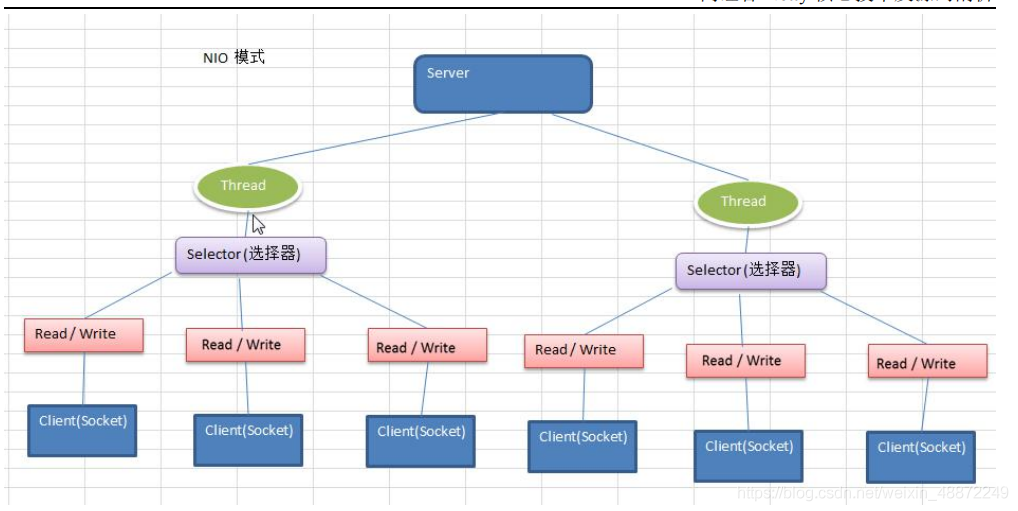
NiO simple example

Fastjason handles generics

Nodejs builds cloud native microservice applications based on dapr, a quick start guide from 0 to 1

Jushi | Haitai Fangyuan appears at the 5th Digital China Construction Summit
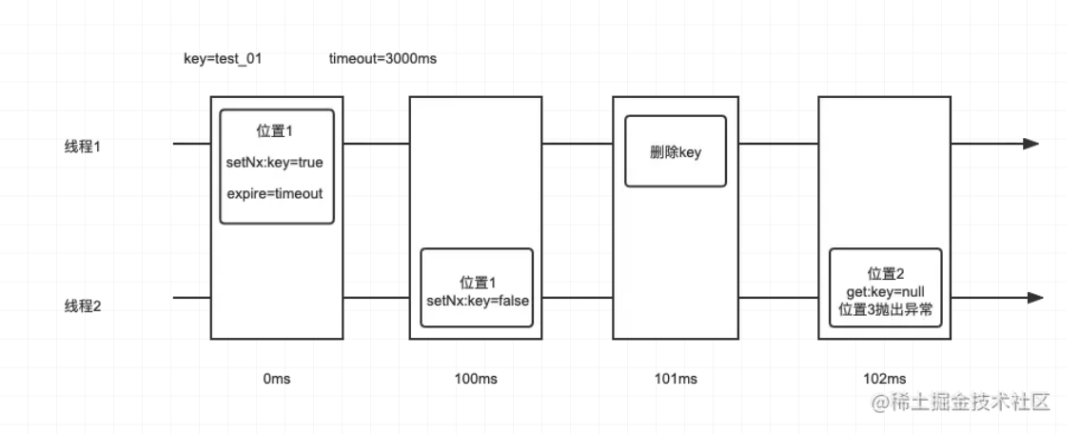
记一次自定义 Redis 分布式锁导致的故障
![[secsha concept] large and small end](/img/1e/d295a6eb7ecaccb53ed9f7d2234956.png)
[secsha concept] large and small end

Big view +500 cases, software teams should improve R & D efficiency in this way
大咖观点+500强案例,软件团队应该这样提升研发效能
随机推荐
Introduction to API testing
[combinational logic circuit] - encoder
8、学习MySQL 创建数据表
Oracle - isupplier portal Invoicing error
01. MySQL transaction isolation level and concurrent database access
What should I do when my blog is attacked by hackers?
Tencent employees' salary: the real 985 graduation salary, do you think I can be saved? Netizen: daily salary?
Leetcode537. Complex multiplication (yes, solved)
快速创建题目文件夹
"Wei Lai Cup" 2022 Niuke summer multi school training camp 2 personal problem sets
Codeforces Round #810 (Div. 2)A~C
Dijkstra find the shortest path
3059. 雕塑(jzoj)
Huawei wireless device WDS configuration command
“蔚来杯“2022牛客暑期多校训练营2 D.[Link with Game Glitch] 二分答案+SPFA判环
Travel (split points and layers)
Linear relationship between vectors
"Weilai Cup" 2022 Niuke summer multi school training camp 2 i.[let fat tension] matrix multiplication j.[link with arithmetic progression] linear regression
Failed to load DLL
Stack Title: basic calculator