当前位置:网站首页>机器学习之深度学习卷积神经网络,实现基于CNN网络的手写字体识别
机器学习之深度学习卷积神经网络,实现基于CNN网络的手写字体识别
2022-06-28 15:24:00 【华为云】
实现基于CNN网络的手写字体识别
首先下载数据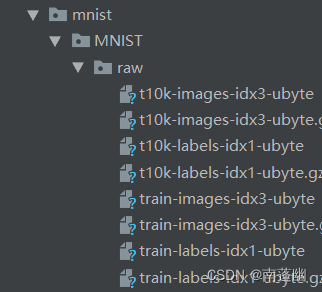
1、搭建CNN网络模型;
class CNN(nn.Module): def __init__(self): super(CNN,self).__init__() ''' 一般来说,卷积网络包括以下内容: 1.卷积层 2.神经网络 3.池化层 ''' self.conv1=nn.Sequential( nn.Conv2d( #--> (1,28,28) in_channels=1, #传入的图片是几层的,灰色为1层,RGB为三层 out_channels=16, #输出的图片是几层 kernel_size=5, #代表扫描的区域点为5*5 stride=1, #就是每隔多少步跳一下 padding=2, #边框补全,其计算公式=(kernel_size-1)/2=(5-1)/2=2 ), # 2d代表二维卷积 --> (16,28,28) nn.ReLU(), #非线性激活层 nn.MaxPool2d(kernel_size=2), #设定这里的扫描区域为2*2,且取出该2*2中的最大值 --> (16,14,14) ) self.conv2=nn.Sequential( nn.Conv2d( # --> (16,14,14) in_channels=16, #这里的输入是上层的输出为16层 out_channels=32, #在这里我们需要将其输出为32层 kernel_size=5, #代表扫描的区域点为5*5 stride=1, #就是每隔多少步跳一下 padding=2, #边框补全,其计算公式=(kernel_size-1)/2=(5-1)/2= ), # --> (32,14,14) nn.ReLU(), nn.MaxPool2d(kernel_size=2), #设定这里的扫描区域为2*2,且取出该2*2中的最大值 --> (32,7,7),这里是三维数据 ) self.out=nn.Linear(32*7*7,10) #注意一下这里的数据是二维的数据 def forward(self,x): x=self.conv1(x) x=self.conv2(x) #(batch,32,7,7) #然后接下来进行一下扩展展平的操作,将三维数据转为二维的数据 x=x.view(x.size(0),-1) #(batch ,32 * 7 * 7) output=self.out(x) return output2、设计损失函数,选择优化函数;
# 添加优化方法optimizer=torch.optim.Adam(cnn.parameters(),lr=LR)# 指定损失函数使用交叉信息熵loss_fn=nn.CrossEntropyLoss()3、实现模型训练与测试。
step=0for epoch in range(EPOCH): #加载训练数据 for step,data in enumerate(train_loader): x,y=data #分别得到训练数据的x和y的取值 b_x=Variable(x) b_y=Variable(y) output=cnn(b_x) #调用模型预测 loss=loss_fn(output,b_y)#计算损失值 optimizer.zero_grad() #每一次循环之前,将梯度清零 loss.backward() #反向传播 optimizer.step() #梯度下降 #每执行50次,输出一下当前epoch、loss、accuracy if (step%50==0): #计算一下模型预测正确率 test_output=cnn(test_x) y_pred=torch.max(test_output,1)[1].data.squeeze() accuracy=sum(y_pred==test_y).item()/test_y.size(0) print('now epoch : ', epoch, ' | loss : %.4f ' % loss.item(), ' | accuracy : ' , accuracy)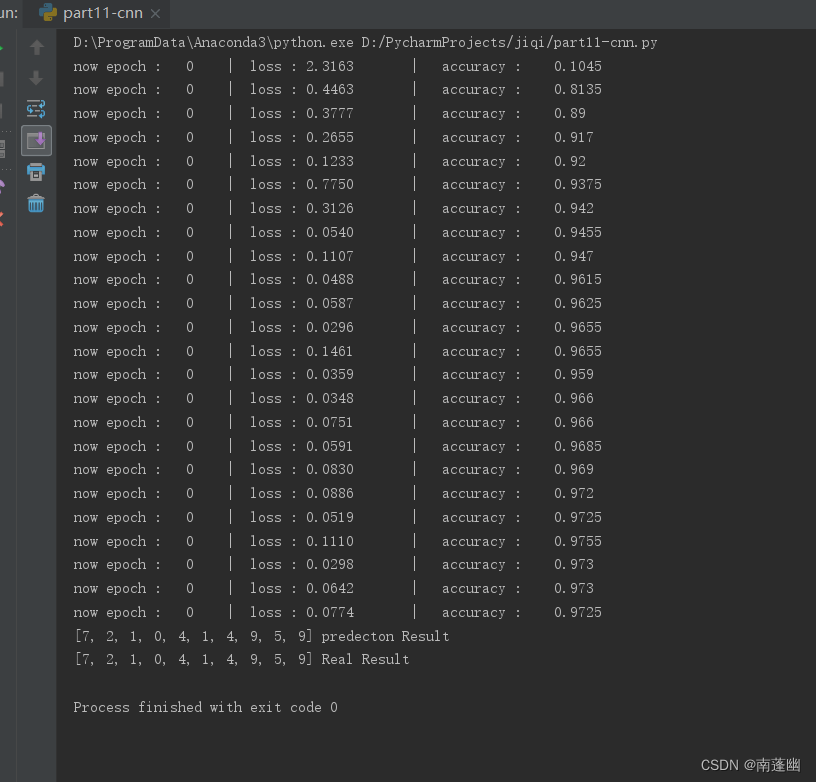
代码:
import torchimport torch.nn as nnfrom torch.autograd import Variableimport torch.utils.data as Dataimport torchvision#Hyper prametersEPOCH=1BATCH_SIZE=50LR=0.001DOWNLOAD_MNIST=Falsetrain_data = torchvision.datasets.MNIST( root='./mnist', train=True, transform=torchvision.transforms.ToTensor(), #将下载的文件转换成pytorch认识的tensor类型,且将图片的数值大小从(0-255)归一化到(0-1) download=DOWNLOAD_MNIST)train_loader=Data.DataLoader(dataset=train_data, batch_size=BATCH_SIZE, shuffle=True)test_data=torchvision.datasets.MNIST( root='./mnist', train=False,)with torch.no_grad(): test_x=Variable(torch.unsqueeze(test_data.data, dim=1)).type(torch.FloatTensor)[:2000]/255 #只取前两千个数据吧,差不多已经够用了,然后将其归一化。 test_y=test_data.targets[:2000]'''开始建立CNN网络'''class CNN(nn.Module): def __init__(self): super(CNN,self).__init__() ''' 一般来说,卷积网络包括以下内容: 1.卷积层 2.神经网络 3.池化层 ''' self.conv1=nn.Sequential( nn.Conv2d( #--> (1,28,28) in_channels=1, #传入的图片是几层的,灰色为1层,RGB为三层 out_channels=16, #输出的图片是几层 kernel_size=5, #代表扫描的区域点为5*5 stride=1, #就是每隔多少步跳一下 padding=2, #边框补全,其计算公式=(kernel_size-1)/2=(5-1)/2=2 ), # 2d代表二维卷积 --> (16,28,28) nn.ReLU(), #非线性激活层 nn.MaxPool2d(kernel_size=2), #设定这里的扫描区域为2*2,且取出该2*2中的最大值 --> (16,14,14) ) self.conv2=nn.Sequential( nn.Conv2d( # --> (16,14,14) in_channels=16, #这里的输入是上层的输出为16层 out_channels=32, #在这里我们需要将其输出为32层 kernel_size=5, #代表扫描的区域点为5*5 stride=1, #就是每隔多少步跳一下 padding=2, #边框补全,其计算公式=(kernel_size-1)/2=(5-1)/2= ), # --> (32,14,14) nn.ReLU(), nn.MaxPool2d(kernel_size=2), #设定这里的扫描区域为2*2,且取出该2*2中的最大值 --> (32,7,7),这里是三维数据 ) self.out=nn.Linear(32*7*7,10) #注意一下这里的数据是二维的数据 def forward(self,x): x=self.conv1(x) x=self.conv2(x) #(batch,32,7,7) #然后接下来进行一下扩展展平的操作,将三维数据转为二维的数据 x=x.view(x.size(0),-1) #(batch ,32 * 7 * 7) output=self.out(x) return output cnn=CNN()# print(cnn)# 添加优化方法optimizer=torch.optim.Adam(cnn.parameters(),lr=LR)# 指定损失函数使用交叉信息熵loss_fn=nn.CrossEntropyLoss()'''开始训练我们的模型哦'''step=0for epoch in range(EPOCH): #加载训练数据 for step,data in enumerate(train_loader): x,y=data #分别得到训练数据的x和y的取值 b_x=Variable(x) b_y=Variable(y) output=cnn(b_x) #调用模型预测 loss=loss_fn(output,b_y)#计算损失值 optimizer.zero_grad() #每一次循环之前,将梯度清零 loss.backward() #反向传播 optimizer.step() #梯度下降 #每执行50次,输出一下当前epoch、loss、accuracy if (step%50==0): #计算一下模型预测正确率 test_output=cnn(test_x) y_pred=torch.max(test_output,1)[1].data.squeeze() accuracy=sum(y_pred==test_y).item()/test_y.size(0) print('now epoch : ', epoch, ' | loss : %.4f ' % loss.item(), ' | accuracy : ' , accuracy)'''打印十个测试集的结果'''test_output=cnn(test_x[:10])y_pred=torch.max(test_output,1)[1].data.squeeze() #选取最大可能的数值所在的位置print(y_pred.tolist(),'predecton Result')print(test_y[:10].tolist(),'Real Result')边栏推荐
- Fleet |「後臺探秘」第 3 期:狀態管理
- MIPS汇编语言学习-02-逻辑判断-前台输入
- Longest continuous sequence
- [C language] how to generate normal or Gaussian random numbers
- GBASE南大通用亮相第六届世界智能大会
- After QQ was stolen, a large number of users "died"
- [JS] Fibonacci sequence implementation (recursion and loop)
- Yiwen teaches you to quickly generate MySQL database diagram
- 当下不做元宇宙,就像20年前没买房!
- Oracle11g database uses expdp to back up data every week and upload it to the backup server
猜你喜欢
Oracle11g数据库使用expdp每周进行数据备份并上传到备份服务器

隐私计算 FATE - 离线预测

Curve 替换 Ceph 在网易云音乐的实践
![[C language] nextday problem](/img/7b/422792e07dd321e3a37c1fff55c0ca.png)
[C language] nextday problem

Xinchuang operating system -- kylin kylin desktop operating system (project 10 security center)

Talking about open source - Linus and Jim talk about open source in China

币圈大地震:去年赚100万,今年亏500万

C语言学习-19-全排列

Fleet | background Discovery issue 3: Status Management

MIPS汇编语言学习-01-两数求和以及环境配置、如何运行

随机推荐
C语言基础语法
Li Kou today's question -522 Longest special sequence
SaaS application management platform solution in the education industry: help enterprises realize the integration of operation and management
[C language] how to generate normal or Gaussian random numbers
C#/VB. Net to convert PDF to excel
GCC efficient graph revolution for joint node representationlearning and clustering
How can the digital intelligent supply chain management platform of the smart Park optimize process management and drive the development of the park to increase speed and quality?
Power battery is divided up like this
关于针对tron API签名广播时使用curl的json解析问题解决方案及针对json.loads方法的问题记录
一个bug肝一周...忍不住提了issue
抽奖动画 - 鲤鱼跳龙门
化学制品制造业智慧供应商管理系统深度挖掘供应商管理领域,提升供应链协同
Leike defense: 4D millimeter wave radar products are expected to be mass produced and supplied by the end of the year
WSUS客户端访问服务端异常报错-0x8024401f「建议收藏」
openGauss内核:SQL解析过程分析
BatchNorm2d原理、作用及其pytorch中BatchNorm2d函数的参数讲解
Cross cluster deployment of helm applications using karmada
笔试面试算法经典–最长回文子串
GBASE南大通用亮相第六届世界智能大会
动力电池,是这样被“瓜分”的