当前位置:网站首页>Creation and use of XSync synchronization script (taking debian10 cluster as an example)
Creation and use of XSync synchronization script (taking debian10 cluster as an example)
2022-06-26 09:23:00 【hhhSir'blog】
List of articles
1、 brief introduction
When configuring the cluster machine , It is often necessary to put a file or directory copy To the same multiple clusters , If a machine to copy , More trouble . If there is a way , This can be achieved with a single command , It's much simpler .xsync This is a synchronization script .xsync Is to rsync Secondary encapsulation of script , The script content can be modified according to your own needs .
2、 Pre knowledge
2.1 scp And rsync
Copying files or directories across machines is very common , In general, you can go through scp Command and rsync Command to implement .
- scp : The command format is
scp -r $pdir/$fname [email protected]:$pdir/$filename
Well understood. ,-r Represents recursive replication , Then give the local file or directory address and User name of the target machine 、 host IP、 The destination path and file name can complete the copy operation . Use scp Data transfer , The file is encrypted , Therefore, any sensitive content will not be tampered with during transmission . - rsync : The command format is
rsync -av $pdir/$fname [email protected]$host:$pdir/$fname
The meaning of the command is the same as scp be similar ,-a Indicates an archived copy ,-v Indicates that the copy process is displayed .
scp And rsync The difference between :
- scp Through safe SSH Connect to copy files from the local machine to the remote machine , and rsync Allows you to synchronize remote folders .
- scp Read the source file and write it to the destination , Is to perform linear replication locally or over a network .rsync Also copy files locally or over the network , But it uses special incremental transfer algorithms and some optimizations to make it faster .
- scp It's always safe , and rsync Must pass SSH Transmission can be safe .
- If you want to transfer large files , And the transmission is disconnected before completion ,rsync The transmission will continue from the place of interruption , and scp No, .
- rsync Compare the files at each end and transfer only the changed part of the changed file , When you first transfer files , Its behavior and scp Very similar , But for the second transfer of most files unchanged , It will push more data than scp much less . This is also a convenient way to restart a failed transfer , You just need to repeat the same command , It will start where it was last interrupted , and scp Will start from scratch .
2.2 ssh
Among them we can see scp And rsync Can be based on ssh File transfer , If you don't want to enter your password every time , You can configure the non secret login transmission between clusters .
ssh Session connection process :
- Initiate a connection locally to the remote server
- The server randomly generates a string and sends it to the local end that initiates the login
- Use the private key locally for this string (~/.ssh/id_rsa) Encrypt and send to the server
- The server uses the public key (~/.ssh/id_rsa.pub) Decrypt the encrypted string of the private key
- The server compares the decrypted string with the unencrypted string sent to the client for the first time , If they are consistent, it is judged that the login is successful

3、 Configure clusters hostname
First , Why do I need to configure a cluster hostname Well ? Because clusters IP It's not easy to write .
hosts File is linux Responsible in the system ip Address and domain name fast resolution of the file , With ASCII The format is saved in /etc Under the table of contents ,Debian The corresponding file is /etc/hostname.hosts The file contains ip Mapping between address and host name , Include an alias for the host name , Without a domain name server , All network programs on the system can query the file to resolve the ip Address , Otherwise, you need to use DNS Service program to solve . Usually, you can combine common domain names with ip Address mapping adds to hosts In file , Fast and convenient access .
Can be in /etc/hostname This file configures the cluster IP Another name for
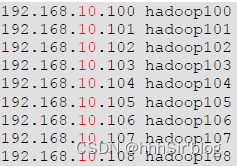
Then you can ping hostname To see if you can ping through .
4、 Configure password free login
Through the above ssh The principle of , Public and private keys need to be generated locally , Then send the public key to the destination machine , Conduct ssh operation .
1、 Enter the user directory , Use command ssh-keygen, Then hit three returns .
[[email protected] ~]# ssh-keygen
Generating public/private rsa key pair.
Enter file in which to save the key (/root/.ssh/id_rsa):
Enter passphrase (empty for no passphrase):
Enter same passphrase again:
Your identification has been saved in /root/.ssh/id_rsa.
Your public key has been saved in /root/.ssh/id_rsa.pub.
The key fingerprint is:
SHA256:kXclvgbcNBCbW9Z88eP1brP1TtPOc+YAuWTw0xi4QrU [email protected]
The key’s randomart image is:
±–[RSA 2048]----+
| +o+ … |
| + O * o|
| + E B o.+|
| . o X …+|
| S o @ …|
| . + + …|
| . .o|
| BO|
| =O|
±—[SHA256]-----+

Be careful , stay ~ Under the table of contents .ssh Two files are generated in the folder id_rsa( Private key )、id_rsa.pub( Public key ), The next step is to pass the public key to the destination machine .
2、 Synchronize to the directory of the destination machine , Use command
ssh-copy-id -i ~/.ssh/id_rsa.pub [email protected]:/root/.ssh/
Other methods can refer to the blog : Portal .
3、 Handling of accidents . obviously , Some clusters may not be allowed between machines ssh Connect via password , Then the public key cannot be sent to the destination machine during configuration , At this point, you can refer to the following blog to solve the problem .
The possible problems are introduced in this blog : solve Permission denied(publickey)
Be careful , If the above problems occur , Change again /etc/ssh/sshd_config After configuring the file, you need to use the command systemctl restart sshd restart sshd service
5、xsync Script writing and use
After configuration , Finally arrived xsync Scripting .
First step : have a look rsync This command can be used without ? If it doesn't work , Just install it rsync
apt-get install rsync
If the above command fails , Run the following command before running the above command
apt-get update
apt-get upgrade
The second step : Create script xsync
#!/bin/bash

#1. Judge the number of parameters
if [ $# -lt 1 ]
then
    echo Not Enough Arguement!
    exit;
fi

#2. Traverse all machines in the cluster   Please change to your own host mapping
for host in host1 host2 host3
do
    echo =============== $host ==================
    #3. Traverse all directories , Send... One by one
    for file in [email protected]
    do
        #4. Judge whether the file exists
        if [ -e $file ]
            then
		    #5. Get parent directory
            pdir=$(cd -P $(dirname $file); pwd)
		    fname=$(basename $file)
		    #  Create folders and transfer files . Please change it to your own port number
		    ssh -p 32200 $host "mkdir -p $pdir"
		    rsync -av -e 'ssh -p 32200' $pdir/$fname $host:$pdir
	    else
		    echo $file does not exists!
	    fi
    done
done
The above code comments are very clear , To change the host mapping name and port number .
The third step : Give script execution permission chmod 777 filename
Step four : To make your scripts run in any folder , You can add scripts to global variables . adopt echo $PATH View the path of the global environment variable , Copy it to one of the paths .
Then you can start the test , It should be no problem .
6、 summary
take your time , To walk slowly is to walk well .
边栏推荐
- How to convert wechat applet into Baidu applet
- Unity 接入图灵机器人
- How to handle the small program tabbar that does not support parameter transfer
- 集合对象复制
- The most complete and simple nanny tutorial: deep learning environment configuration anaconda+pychart+cuda+cudnn+tensorflow+pytorch
- Principle and application of single chip microcomputer -- Overview
- Docker install redis
- Yolov5 advanced III training environment
- Spark based distributed parallel processing optimization strategy - Merrill Lynch data
- Function function of gather()
猜你喜欢

Pycharm occasionally encounters low disk space

《一周搞定模电》—基本放大电路

Baidu applet rich text parsing tool bdparse

Solutions for safety management and control at the operation site

常用电路设计

In depth study paper reading target detection (VII) Chinese version: yolov4 optimal speed and accuracy of object detection

Edge computing is the sinking and extension of cloud computing capabilities to the edge and user sides
How to compile builds

kubernetes集群部署(v1.23.5)

How to convert wechat applet into Baidu applet
随机推荐
《一周搞定模电》-二极管
Dedecms applet plug-in is officially launched, and one click installation does not require any PHP or SQL Foundation
Principle and application of single chip microcomputer -- Overview
Application of hidden list menu and window transformation in selenium
php不让图片跟数据一起上传(不再是先上传图片再上传数据)
常用电路设计
php提取txt文本存储json数据中的域名
Edge computing is the sinking and extension of cloud computing capabilities to the edge and user sides
Practice is the fastest way to become a network engineer
"One week's work on Analog Electronics" - Basic amplification circuit
Edit type information
Self learning neural network sequence -- 2 perceptron
【开源】使用PhenoCV-WeedCam进行更智能、更精确的杂草管理
"One week's solution to analog electricity" - power circuit
thinkphp5使用composer安装插件提示php版本过高
首期Techo Day腾讯技术开放日,628等你
Analysis of ROS calculation diagram level
Yolov5 advanced camera real-time acquisition and recognition
Construction practice of bank intelligent analysis and decision-making platform
【Sensors 2021】Relation-Based Deep Attention Network with Hybrid Memory for One-Shot Person Re-Id