当前位置:网站首页>[question 019: what is the understanding of spherecastcommand in unity?]
[question 019: what is the understanding of spherecastcommand in unity?]
2022-07-26 04:01:00 【valaki】
One 、 background
In the game optimization, the ray detection in physics will be optimized , For example, you will perform the same for multiple players Physics.SphereCast() Radiographic testing , Most of the time , In the process of research and development, we may directly adopt a circular way , Many times Physics.SphereCast() Logical processing ; Here we can use SpherecastCommand replace , combination Job To operate ;
Two 、 The demo 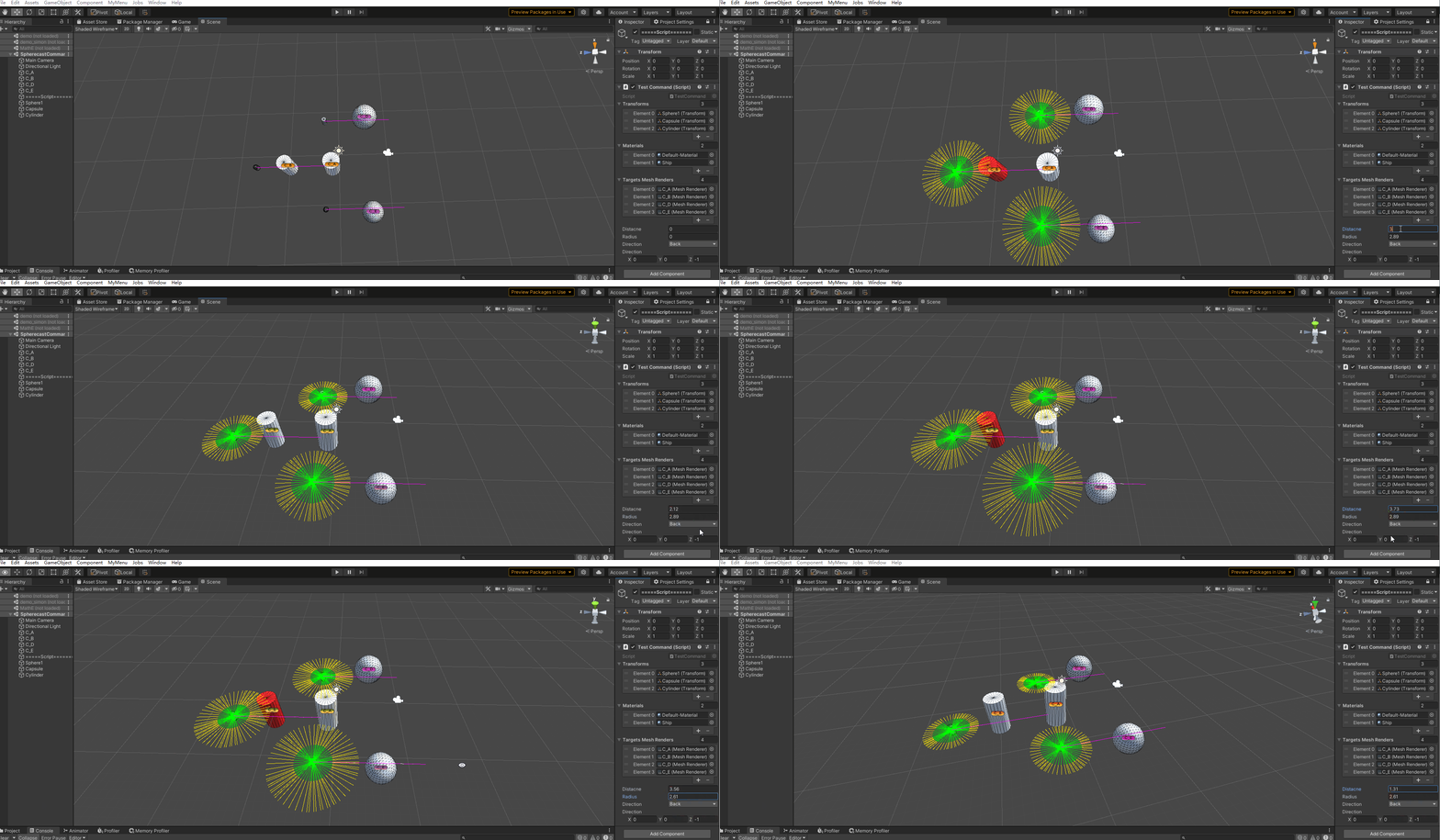
In the animation above 3 Objects to be detected , The objects here can be added or deleted according to the actual situation ; It will be adjusted according to the actual situation radius 、 Detection distance 、 Detection direction To test ; Different parameters will detect their corresponding results ; among Red Indicates that the object is the point detected by the ray ;
From the above animation, you can dynamically adjust the radius, but the dynamic change of the green part , Similarly, the adjustment of detection distance will also be visualized ;
For specific logic, please refer to the source code ; There are detailed logical comments in the code .
3、 ... and 、 Source code
using System;
using System.Collections;
using System.Collections.Generic;
using System.Text.RegularExpressions;
using Unity.Collections;
using Unity.Mathematics;
using UnityEditor.Timeline;
using UnityEngine;


[ExecuteAlways]
public class TestCommand : MonoBehaviour
{

    public List<Transform> transforms;
    public List<Material> materials;
    public List<MeshRenderer> targetsMeshRenders;


    public enum Direction
    {

        Right,
        Left,
        Forward,
        Back,
    }


    public float distacne = 1;
    public float radius = 1;
    int count = 1;

    public Direction direction = Direction.Right;

    public Vector3 _direction = Vector3.right;

    // Update is called once per frame
    void Update()
    {

        //https://docs.unity3d.com/cn/2019.1/ScriptReference/SpherecastCommand.html  For details, please refer to the official instructions here

        count = transforms.Count;
        InitDirection();
        RestMaterials();
        // Define a RaycastHit Array   Used to store RaycastHit Information about   here count Indicates the number to be detected
        NativeArray<RaycastHit> raycastHits = new NativeArray<RaycastHit>(count, Allocator.TempJob);
        // Definition SpherecastCommand Array   Represents an array of sphere commands   That is, how many commands need to execute sphere ray detection
        NativeArray<SpherecastCommand>
            spherecastCommands = new NativeArray<SpherecastCommand>(count, Allocator.TempJob);

        // The loop here shows how many objects need to perform sphere radiography   So how many sphere ray detection commands are created   Here we just store the created commands , The specific implementation is later ;
        for (int i = 0; i < count; i++)
        {

            CheckRadius(i);
            CheckDistance(i);
            CheckDirection(i);
            // Create sphere ray casting instructions
            /* *  The starting position of the projection  *  Radius of the projected sphere 【scene You can see the green in 】 * direction: Direction of detection 【scene It can be seen that 】 * distance: The distance of detection  【scene It can be seen that 】 */
            spherecastCommands[i] =
                new SpherecastCommand(transforms[i].position, radius, transforms[i].rotation * _direction, distacne);
        }

        //https://docs.unity3d.com/cn/2019.1/ScriptReference/SpherecastCommand.ScheduleBatch.html

        // Here is the sphere batch projection command that needs to be executed   There will be a return here job object   And arrange the job here to enter the state of waiting for execution ,
        var jobhandel = SpherecastCommand.ScheduleBatch(spherecastCommands, raycastHits, 1, default);
        // Wait for the execution of this batch to complete
        jobhandel.Complete();


        for (int i = 0; i < raycastHits.Length; i++)
        {

            RaycastHit raycastHit = raycastHits[i];
            if (raycastHit.transform != null)
            {

                raycastHit.transform.GetComponent<MeshRenderer>().sharedMaterial = materials[1];
            }
        }

        // Release
        raycastHits.Dispose();
        // Release
        spherecastCommands.Dispose();
    }


    void InitDirection()
    {

        switch (direction)
        {

            case Direction.Back:
                _direction = Vector3.back;
                break;
            case Direction.Forward:
                _direction = Vector3.forward;
                break;

            case Direction.Left:
                _direction = Vector3.left;
                break;
            case Direction.Right:
                _direction = Vector3.right;
                break;
        }
    }


    /// <summary>
    ///  Direction of detection
    /// </summary>
    /// <param name="index"></param>
    void CheckDirection(int index)
    {

        Debug.DrawLine(transforms[index].position,
            transforms[index].position + transforms[index].rotation * _direction * 15, Color.magenta);
    }

    /// <summary>
    ///  Radius detection range
    /// </summary>
    /// <param name="index"></param>
    void CheckRadius(int index)
    {

        Vector3 pos = transforms[index].position;
        for (int i = 0; i < 360; i += 5)
        {

            float x = pos.x + math.cos(i) * radius;
            float z = pos.z + math.sin(i) * radius;

            Debug.DrawLine(pos, new Vector3(x, pos.y, z), Color.green);
        }
    }


    /// <summary>
    ///  Distance detection   The starting point of distance detection is the radius , Actual detection distance = radius + distance
    /// </summary>
    /// <param name="index"></param>
    void CheckDistance(int index)
    {

        Vector3 pos = transforms[index].position;
        for (int i = 0; i < 360; i += 5)
        {

            float rx = math.cos(i) * radius;
            float ry = math.sin(i) * radius;

            float sx = pos.x + rx;
            float sz = pos.z + ry;

            float ex = sx + math.cos(i) * distacne;
            float ey = sz + math.sin(i) * distacne;

            Debug.DrawLine(new Vector3(sx, pos.y, sz), new Vector3(ex, pos.y, ey), Color.yellow);
        }
    }


    /// <summary>
    ///  Reset Materail
    /// </summary>
    void RestMaterials()
    {

        foreach (var tmr in targetsMeshRenders)
        {

            tmr.sharedMaterial = materials[0];
        }
    }
}
Four 、 Conclusion
It seems that eating too much chili is a little inflamed -【valaki】
边栏推荐
- Seat / safety configuration upgrade is the administrative experience of the new Volvo S90 in place
- 微信小程序实现音乐播放器(4)(使用pubsubjs实现页面间通信)
- Synchronous FIFO based on shift register
- PHP <=> 太空船运算符(组合比较符)
- 【Unity3d Shader】角色投影与倒影
- Can't the container run? The Internet doesn't have to carry the blame
- Asemi rectifier bridge gbu1510 parameters, gbu1510 specifications, gbu1510 package
- leetcode: 102. 二叉树的层序遍历
- [Reading Notes - > data analysis] Introduction to BDA textbook data analysis
- PHP method to find the location of session storage file
猜你喜欢

Chapter 18: explore the wonders of the mean in the 2-bit a~b system, specify the 3x+1 conversion process of integers, specify an interval to verify the angular Valley conjecture, explore the number of

Opencv learning notes - edge detection and Canny operator, Sobel operator, lapiacian operator, ScHARR filter

Communication protocol and message format between microservices

座椅/安全配置升级 新款沃尔沃S90行政体验到位了吗

One stop monitoring of the software and hardware infrastructure of the whole university, and Suzhou University replaces PostgreSQL with time series database

深度学习之SuperViT

基于Caffe ResNet-50网络实现图片分类(仅推理)的实验复现

Advanced content of MySQL -- three MySQL logs that must be understood binlog, redo log and undo log

构建关系抽取的动词源
![[programmers must] Tanabata confession strategy:](/img/55/0b43dd18c8682250db13ad94cd2c2c.png)
[programmers must] Tanabata confession strategy: "the moon meets the cloud, the flowers meet the wind, and the night sky is beautiful at night". (with source code Collection)
随机推荐
Aike AI frontier promotion (7.18)
研发了 5 年的时序数据库,到底要解决什么问题?
Dracoo Master天龙卡牌大师
【Unity3d Shader】角色投影与倒影
[Reading Notes - > data analysis] Introduction to BDA textbook data analysis
Opencv learning notes -- Hough transform
Find my technology | the Internet of things asset tracking market has reached US $6.6 billion, and find my helps the market develop
Verilog implementation of key dithering elimination
Working ideas of stability and high availability guarantee
zk-SNARK:关于私钥、环签名、ZKKSP
括号嵌套问题(建议收藏)
某大厂开发和测试干了一架,还用鼠标线勒脖子...
ACM mm 2022 | end to end multi granularity comparative learning for video text retrieval
座椅/安全配置升级 新款沃尔沃S90行政体验到位了吗
5 years, 1.4W times, NFT og's road to immortality Web3 column
[cloud native kubernetes] how to use configmap under kubernetes cluster
【数字IC/FPGA】热独码检测
SDL2 Opengl遇到的坑
《opencv学习笔记》-- 霍夫变换
微信小程序实现音乐播放器(5)