当前位置:网站首页>How to build your own website (using the pagoda panel)
How to build your own website (using the pagoda panel)
2022-06-12 06:28:00 【Work hard working!】
1. Buy domain names and servers
1. domain name
A simple explanation , The domain name we buy will give us a public network ip, Usually this public network ip It's hard to remember . So we can match the domain name with ip Conduct " binding ".
It is recommended to buy a meaningful domain name , Not too expensive . Pay attention to the renewal price of the next year !!
Alibaba cloud perhaps Tencent cloud
The following is my domain name ( It has the same meaning as my name )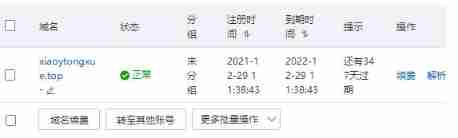
2. The server
Server , If you just build a system with less user access , Such as personal blog ! If so, just New Alibaba cloud users More than 100 lightweight servers that can be renewed for three years perhaps The first year of Tencent cloud 38 Lightweight servers .
tips: The server is equivalent to a remote computer Generally selected Centos System
It's important !!! If you choose Hong Kong, China, you don't need to file !!! Otherwise, it needs to be filed .
I chose Shanghai ( So I put it on record for a long time )…
tips : Remember to reset the password Remember that 
2. Connect the server and install the pagoda panel
1. Connect to server
I use it. Xshell This tool is used for remote connection
Be careful : Before connecting We need to Open the port on the server That is, the security group
ssh The remote connection needs to be enabled 22 port Pagoda panel installation needs to be open 8888 port
Here I put two linked tutorials
Tencent ECS open port
Alicloud server open port 
2. And then you can use it Xshell The tool is connected to our server 
3. Now let's start installing our pagoda panels
Pagoda panel installation website
After entering this website , Select the installation command according to the system of our server . Then copy this command to our command line , It will start downloading 
after , You will get one of these two addresses Login name and password 
3. Log in to the pagoda panel Resolve the domain name and build a website
1. Log in to the pagoda panel , It is the login name and password above
Select the recommended LNMP This system These are the following systems 
2. Domain name resolution 
Then log in to our domain name console Domain name resolution 
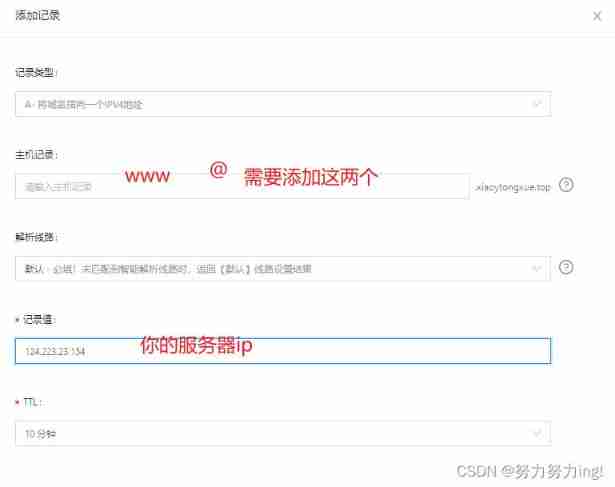
After that, just like me 
Here you can visit your domain name , Will be displayed Congratulations on your successful website building style !!
4. Two templates WordPress and Typecho
1.WordPress This is the case. , The pagoda panel can be deployed with one click , No tedious steps are required 
2.Typecho The pagoda panel does not provide one click deployment , Let's set it ourselves
First download Typecho
Typecho Download link 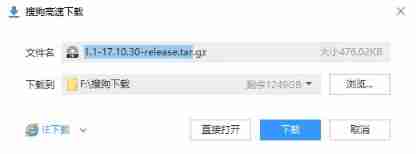
After downloading , We need to upload the installation package to the pagoda panel , unpack 
Select the file we downloaded to upload and unzip 
After key decompression Cut all the files in the folder Then delete everything in the root directory , Paste the file you cut !!!
Just like me !!!
These files are extracted Things in the folder .
5. Get into Typecho perhaps WordPress Installation
After completing the above steps , You can visit www. Your domain name \install.php After a series of next steps , You can choose a template to create your website page .
The various templates you find online , You can also upload through the pagoda panel … You can also use it yourself Html CSS Beautify your website …
边栏推荐
- PDF. JS help file
- Multithreading (2) -- pipeline (2) -- synchronized underlying monitor, lightweight, biased lock, lock inflation
- Computer composition and design work05 ——fifth verson
- leetcode 35. Search insert location
- English语法_副词_有无ly,意义不同
- Video fire detection based on Gaussian mixture model and multi-color
- Android studio mobile development creates a new database and obtains picture and text data from the database to display on the listview list
- Open the camera in unity3d and display the contents of the camera in the scene as texture2d
- About why GPU early-z reduces overdraw
- Qt-- realize TCP communication
猜你喜欢

SQL injection read / write file
Word2Vec

使用 ms17-010 永恒之蓝漏洞对 win7 进行渗透及建立永久后门

Redis queue

leetcode 300. Longest increasing subsequence

Multithreading mode (I) -- protective pause and join source code
SQL 注入读写文件

leetcode 278. First wrong version

MNIST handwritten data recognition by CNN

Deep and detailed analysis of PHP one sentence Trojan horse
随机推荐
On the normalization of camera rotation interpolation
Multithreading mode (I) -- protective pause and join source code
LeetCode-997. Find the town judge
C2w model - language model
Script for unity3d to recursively search for a node with a specific name from all child nodes of a node
Unity surface shader with template buffer
Excel VBA opens a file that begins with the specified character
JS variable scope
Redis configuration (IV) -- cluster
SQL injection - blind injection
The vs 2019 community version Microsoft account cannot be logged in and activated offline
The difference between get and post and the code implementation of message board
The unity3d script searches for colliders with overlaps within the specified radius
使用 ms17-010 永恒之蓝漏洞对 win7 进行渗透及建立永久后门
Simulateur nightGod ADB View log
It only takes 10 minutes to understand the underlying principle of NiO
Sensor bringup 中的一些问题总结
Pytorch implementation of regression model
LeetCode-1078. Bigram participle
Redis queue