当前位置:网站首页>C # interaction with MySQL database - MySQL configuration and addition, deletion, query and modification operations
C # interaction with MySQL database - MySQL configuration and addition, deletion, query and modification operations
2022-07-27 19:04:00 【Miracle Fan】
c# And Mysql Interaction
List of articles
- c# And Mysql Interaction
1. To configure dll file


2. download Mysql And graphical auxiliary interface
This blog uses phpmyadmin Graphical management tools , Use the established phpstudy Management tools are carried out according to .
2.1phpstudy download
Small leather panel (phpstudy)
2.2 download apache and mysql
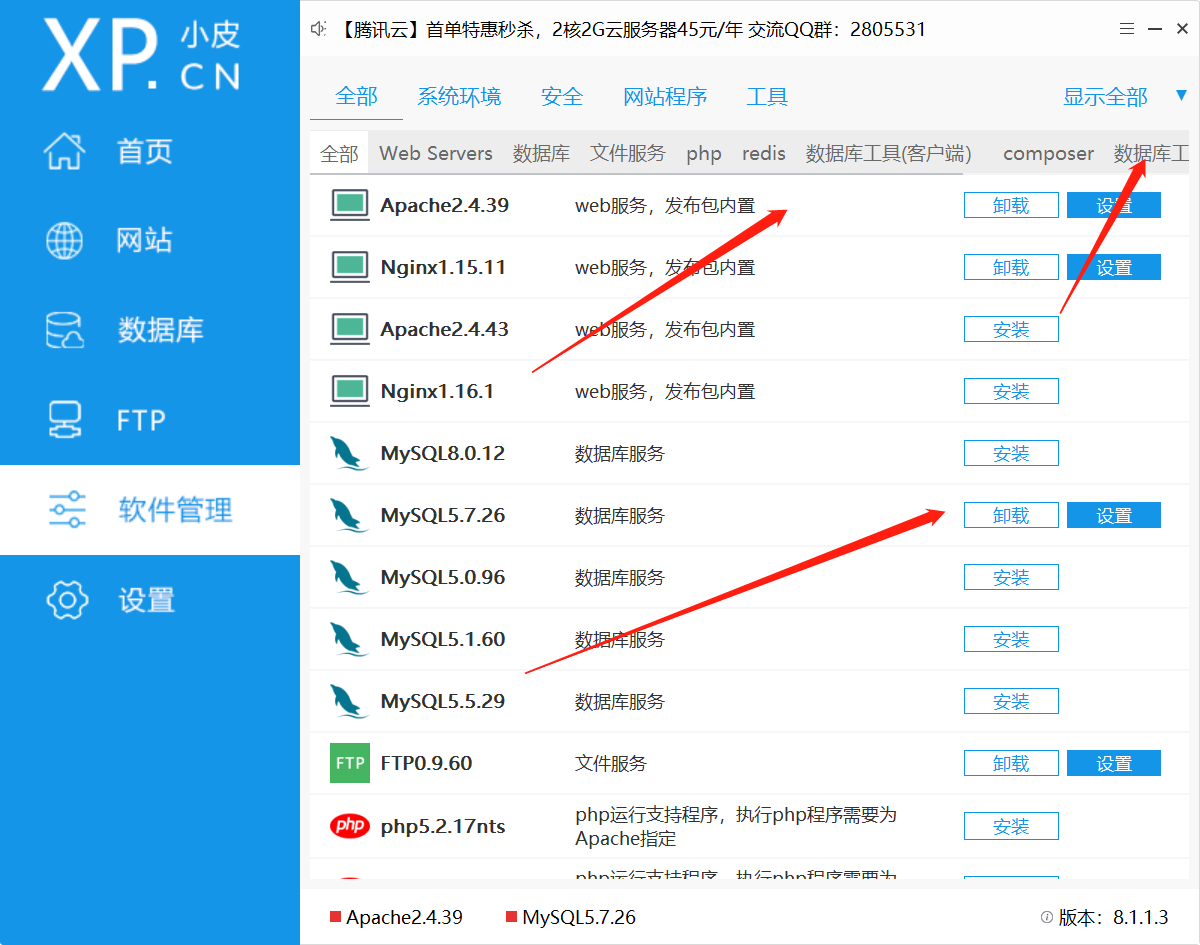
2.3 download mysql Management tools

2.4 Enable service

2.5 phpmyadmin Basic operation


2. Introduce namespace
using MySql.Data.MySqlClient;
3. Create corresponding static fields
| Class name | Description |
|---|---|
| MySqlConnection | Database connection class |
| MySqlCommand | The class that executes statements on the database |
| MySqlDataReader | Provide a way from MySQL Database one-way reading method |
private static MySqlConnection conn;
private static MySqlCommand cmd;
private static MySqlDataReader reader;
4.MySqlConnection- Connect and close the database
4.1 Connect to database
MySqlConnection(server,database,user,password)
| Parameter | Description |
|---|---|
| server | Server address -ip, Local use localhost Can |
| database | Corresponding database |
| user | Enter the database account name |
| password | Enter the database password |
| charset | Optional , Specify character encoding , Chinese garbled code may need to be modified |
conn = new MySqlConnection(connstr);
This statement only instantiates a MySqlConnection object , It also needs to go through conn.open() Connect to the database .
 static void ContoSQL()
        {
            string connstr = "server=localhost;database=user;user=root;password=root;charset = uft8";
            conn = new MySqlConnection(connstr);
            conn.Open();    // Establishing a connection , Open database
            Console.WriteLine(" Open database successfully ");
        }
4.2 Close the connection , Release resources
Close the connection to the database , But don't clean up the cache
conn.close();
conn.Dispose()
4.3 Other common attributes
The specific details MySqlConnection Methods
| attribute | describe |
|---|---|
| ServerVersionser | mysql Server version |
| State | Connection status |
 static void ContoSQL()
        {
            string connectStr = "server=localhost;database=user;user=root;password=root;";
            conn = new MySqlConnection(connectStr);
            conn.Open();    // Establishing a connection , Open database
            Console.WriteLine("ServerVersion: " + conn.ServerVersionser +
"\nState: " + conn.State.ToString());
            conn.Close();

        }

5 Data addition, deletion, query and modification
cmd = new MySqlCommand(sql, conn);// utilize sql Statement and a connection object instantiation MysqlDataCommand object
cmd.ExecuteNonQuery();// perform SQL sentence , And return the number of rows affected . Generally used in addition, deletion and modification
reader=cmd.ExecuteReader();// Execute the query statement and pass the information to MysqlDataReader class
5.1 Insert data into
string sql="insert into test( Field name 1, Field name 2) values('22','ChenChen')";
string sql = "insert into test(username,F1) values('22','ChenChen')";
 static void InsertSQL(string sql)
        {
            try
            {
                ContoSQL();
                cmd = new MySqlCommand(sql, conn);
				cmd.ExecuteNonQuery(); // perform sql sentence
            }
            catch (Exception ex)// If there is an error in execution, execute the internal statement , Close connection after execution
            {
                Console.WriteLine(ex.ToString());
            }
            finally
            {
                conn.Close();   // Close the connection
            }
        }
5.2 Data update
string sql = "update  Data table name  set  Field name  = 'FaFa' where  Field name  = '2002' ";
string sql = "update test set F1 = 'FaFa' where username = '2002' ";
static void UpdateSQL(string sql)
        {
            try
            {
                ContoSQL();  // Establishing a connection
                cmd = new MySqlCommand(sql, conn);
				cmd.ExecuteNonQuery();   // perform sql sentence

            }
            catch (Exception ex)
            {
                Console.WriteLine(ex.ToString());
            }
            finally
            {
                conn.Close();   // Close the connection
            }
        }
5.3 Data deletion
string sql = "Delete from test where username = '22' ";
 static void DeleteSQL(string sql)
        {
            try
            {
                ContoSQL();
                cmd = new MySqlCommand(sql, conn);
				cmd.ExecuteNonQuery();
            }
            catch (Exception ex)
            {
                Console.WriteLine(ex.ToString());
            }
            finally
            {
                conn.Close();
            }
5.4 Data query
1. Usage of several common query statements
string sql ="select * from  Data table name  "
string sql = "select * from test";// Read all lines
string sql = "select* from test where username = '2002'"; // Read the specified line
string sql = "select* from test where  password ='2'and username=2002";// Multiple constraints
string sql = "select username, password ,F1 from test where  password ='2'and username=2002"; // Read the specified column
- obtain reader Method of data
| Method | explain |
|---|---|
reader[" Field name "] | Associative array , Get the data through the field name and return object type , Need to pass .Tostring() transformation |
reader[num] | The index array , By reading the sorting corresponding to the field , from 0 Start |
reader.GetString(" Field name /num") | Same as above |
For more information, see MySqlDataReader Class
Console.WriteLine(reader["username"].ToString() +' '+ reader[" password "].ToString()+' '+ reader["F1"].ToString());
Console.WriteLine(reader[0].ToString() +' '+ reader[1].ToString()+' '+ reader[2].ToString());
static void ReadSQL(string sql)
        {
            try
            {
                ContoSQL();
                cmd = new MySqlCommand(sql, conn);
                reader = cmd.ExecuteReader();
                while (reader.Read())    Read data line by line , No data is returned in the next row false
                {
                    Console.WriteLine(reader["username"].ToString() +' '+ reader["F1"].ToString()+' '+reader["F2"]);
                }
            }
            catch (Exception ex)
            {
                Console.WriteLine(ex.ToString());
            }
            finally
            {
                conn.Close();   // Close the connection
            }
        }
6. Add, delete, check and modify examples
 		using MySql.Data.MySqlClient;// Reference namespace , Add to first line
		private static MySqlConnection conn;
        private static MySqlCommand cmd;
        private static MySqlDataReader reader;


        static void ContoSQL()
        {
            string connectStr = "server=localhost;database=user;user=root;password=root;";
            conn = new MySqlConnection(connectStr);
            conn.Open();    // Establishing a connection , Open database
            Console.WriteLine(" Open database successfully ");
        }
        /// <summary>
        ///  Read database data
        /// </summary>
        /// <param name="sql"> Executive sql sentence </param>

        static void ReadSQL(string sql)
        {
            try
            {
                 ContoSQL();
                 cmd = new MySqlCommand(sql, conn);
                 reader = cmd.ExecuteReader();

                while (reader.Read())   // Traverse the data in the table
                {
                    Console.WriteLine(reader[0].ToString() +' '+ reader[" password "].ToString()+' '+ reader["F1"].ToString());

                }
            }
            catch (Exception ex)
            {
                Console.WriteLine(ex.ToString());
            }
            finally
            {
                conn.Close();   // Close the connection
            }
        }
        static void InsertSQL(string sql)
        {
            try
            {
                ContoSQL();
                cmd = new MySqlCommand(sql, conn);
				cmd.ExecuteNonQuery();

            }
            catch (Exception ex)
            {
                Console.WriteLine(ex.ToString());
            }
            finally
            {
                conn.Close();   // Close the connection
            }
        }
        static void UpdateSQL(string sql)
        {

            try
            {
                ContoSQL();
                cmd = new MySqlCommand(sql, conn);
                result = cmd.ExecuteNonQuery();

            }
            catch (Exception ex)
            {
                Console.WriteLine(ex.ToString());
            }
            finally
            {
                conn.Close();   // Close the connection
            }
        }
        static void DeleteSQL(string sql)
        {

            try
            {
                ContoSQL();
                cmd = new MySqlCommand(sql, conn);
                cmd.ExecuteNonQuery();
            }
            catch (Exception ex)
            {
                Console.WriteLine(ex.ToString());
            }
            finally
            {
                conn.Close();   // Close the connection
            }
        }
        static void Main(string[] args)
        {
            string sql = "select username, password ,F1 from test where  password ='2'and username=2002";
            ReadSQL(sql);
            sql = "select * from test";
            ReadSQL(sql);
        }

边栏推荐
- Baidu map eagle eye track service
- Acquisition data transmission mode and online monitoring system of vibrating wire wireless acquisition instrument for engineering instruments
- PHP字符串操作
- 瑞吉外卖sql表
- npm的身份证和依赖
- Mini washing machine touch chip dlt8ma12ts Jericho
- Hash、Set、List、Zset、BitMap、Scan
- MySQL 05 stored procedure
- MySQL 01 关系型数据库设计
- `this.$emit` 子组件给父组件传递多个参数
猜你喜欢

`this.$emit` 子组件给父组件传递多个参数

LeetCode 刷题 第三天

How to break the team with automated testing

自控原理学习笔记-系统稳定性分析(2)-环路分析及Nyquist-Bode判据

The understanding of string in C.

Whole body multifunctional massage instrument chip-dltap602sd

Music rhythm colorful gradient lamp chip -- dlt8s04a- Jericho

专项测试之「 性能测试」总结

MySQL 01 relational database design
NPM's ID card and dependence
随机推荐
Leetcode brushes questions the next day
Typeerror: conv2d(): argument 'padding' (position 5) must be multiple of ints, not STR [error]
微信支付及支付回调
WinForm screenshot save C code
Some advice for NS2 beginner.
JDBC MySQL 02 data access and Dao mode
自控原理学习笔记-系统稳定性分析(2)-环路分析及Nyquist-Bode判据
MySQL 01 relational database design
MySQL create event execution task
NPM's ID card and dependence
CMD command
TypeScript安装
MySQL 05 stored procedure
express
Unity学习笔记(刚体-物理-碰撞器-触发器)
Electric heating neck pillow chip-dltap703sc
Zhaoqi scientific and technological innovation introduces high-level talents at home and abroad and connects innovation and entrepreneurship projects
Dynamic proxy
Redis annotation
MySQL 03 高级查询(一)