当前位置:网站首页>Blog recommendation | building IOT applications -- Introduction to flip technology stack
Blog recommendation | building IOT applications -- Introduction to flip technology stack
2022-06-11 00:17:00 【StreamNative】
Introduction to translator
Wang Zhongxing , Inauguration eBay Message oriented middleware team . Community nickname AlphaWang.
This article is translated from StreamNative Blog 《What the FLiP is the FLiP Stack?》, author Tim Spann,StreamNative Preacher .
FLiP Introduction to technology stack
This article will introduce FLiP Technology stack , We will explain how to build real-time event driven applications using the latest open source framework , And how to pass Apache Pulsar、Apache Flink、Apache Spark and Apache NiFi Construct a Python IoT application . Thanks to the FLiP Simple 、 Fast 、 Scalable features , Use FLiP You can quickly build applications for various scenarios .
FLiP The technology stack consists of many open source technologies that can work together , Is a best practice pattern for building various streaming data applications .FLiP What items are included in the technology stack is not fixed , But by the needs of specific scenarios 、 The technology stack currently mastered by the team 、 And the desired final outcome . Based on the Apache Flink and Apache Pulsar Based on FLiP The technology stack has many variations .
For example, in the case of log analysis , A clear and intuitive dashboard is often required to visualize 、 Aggregate and query log data . For this scenario , You may need something like FLiPEN Technology like this , As a pair of ELK Technology stack [1] The enhancement of . From this we can see that ,FLiP+ Is a variable abbreviation , Represents a variety of open source projects that work together .
Common scenes
because FLiP There are many variations of the technology stack , So it may be difficult to determine which scenario is right for you . therefore , We provide some general guidelines , You can choose the right one according to different scenes FLiP+ Technology stack . The log analysis mentioned above is a common scenario , Of course, there are other more scenes , Usually by data source and sink drive .


Flink-Pulsar Integrate
FLiP A key component of the technology stack is the use of Apache Flink[2] As a streaming engine to process Apache Pulsar data . This is based on Pulsar-Flink Connector implementation , Developers can build native Flink application , And when the event occurs from Pulsar Stream events on a large scale , Suitable for streaming ELT And continuous execution on the topic stream SQL Such as the scene .SQL Is a business language , By using Flink SQL Write for Pulsar Simplicity of flow SQL Inquire about ( Including aggregation and connection ) To implement event driven real-time applications .
Pulsar-Flink The connector builds an elastic data processing platform , Through seamless integration Apache Pulsar and Apache Flink It is allowed to treat... On any scale Pulsar Message for full read-write access . As a data engineer or data analyst , You can focus on business logic , Without worrying about data sources and storage . You can learn more about... Through the following resources Pulsar-Flink Knowledge of connectors :
• Batch flow is integrated into the cloud :StreamNative Cloud Support Flink SQL
• Use Apache Pulsar and Apache Flink SQL Conduct flow analysis [3]
NiFi-Pulsar Integrate
In the near future ,StreamNative And Cloudera Announce launch Apache Pulsar + Apache NiFi Joint solutions . Now we officially support the use of Apache NiFi This low code flow tool is from any Pulsar Consumption and production messages in the topic .
utilize NiFi-Pulsar Integrate , We can build a real-time data processing and analysis platform for any data pipeline . This is the key connector for the popularization of streaming application development .

To learn more , You can read the following article :
• StreamNative And Cloudera Announce launch Apache Pulsar + Apache NiFi Joint solutions
• Producing and Consuming Pulsar messages with Apache NiFi[4]
• Code for Pulsar, NiFi Tie-Up Now Open Source[5]
• Pulsar and NiFi Integration Resources[6]
FLiP Examples of technology stacks
As described above FLiP Technology portfolio of 、 Usage scenarios and basic integration , Now let's look at one FLiP Examples of technology stack applications . In this example , We run from one Python Pulsar The device of the program collects sensing data .

Demonstrate the edge hardware specifications used
• 2GB In memory Raspberry Pi 4
• Pimoroni BreakoutGarden Hat
• Sensiron SGP30 TVOC And eCO2 sensor
• TVOC The sensor is used for 0-60,000 ppb( Parts per billion )
• CO2 The sensor is used for 400-60,000 ppm( Parts per million )

Demonstrate the edge software specifications used
• Apache Pulsar C++ And Python client
• Pimoroni SGP30 Python library
Streaming server
• HP ProLiant DL360 G7 1U RackMount 64 Bit servers
• Ubuntu 18.04.6 LTS
• 72GB PC3 RAM
• X5677 Xeon 3.46GHz 24 nucleus CPU
• 4×900GB 10K SAS SFF HDD
• Apache Pulsar 2.9.1
• Apache Spark 3.2.0
• Scala 2.12.15 (OpenJDK 64-Bit Server VM, Java 1.8.0_302)
• Apache Flink 1.13.2
• MongoDB
NiFi/AI The server
• NVIDIA Jetson Xavier NX Developer Kit
• AI Perf: 21 TOPS
• GPU: 48 Tensor Core Of 384 nucleus NVIDIA Volta GPU
• CPU:6 nucleus NVIDIA Carmel ARMv8.2 64 position CPU 6 MB L2 + 4 MB L3
• Memory :8 GB 128 position LPDDR4x 59.7GB/s
• Ubuntu 18.04.5 LTS (GNU/Linux 4.9.201-tegra aarch64)
• Apache NiFi 1.15.3
• Apache NiFi Registry 1.15.3
• Apache NiFi Toolkit 1.15.3
• Pulsar processor
• OpenJDK 8 and 11
• Jetson Inference GoogleNet
• Python 3
Use FLiPN-Py Build air quality sensor program

In this sample program , We want to continuously monitor the air quality in the office , And then give a lot of data to data scientists to predict . Once the model is complete , We will add it to Puslar Function Real time anomaly detection in , Send alarm to office personnel . We also need a dashboard to monitor trends 、 Perform aggregation and advanced analysis .
Once the initial prototype proof is available , We will deploy to all remote offices to monitor internal air quality . We will continue to improve in the future , Collect external air quality data and local weather conditions .
Our client device performs the following three steps to collect sensor readings , Format the data as expected schema, And send the record to Pulsar.
The first step at the edge : Collect sensor readings
result = sgp30.get_air_quality()
The second step at the edge : according to Schema Format data
class Garden(Record):
    cpu = Float()
    diskusage = String()
    endtime = String()
    equivalentco2ppm = String()
    host = String()
    hostname = String()
    ipaddress = String()
    macaddress = String()
    memory = Float()
    rowid = String()
    runtime = Integer()
    starttime = String()
    systemtime = String()
    totalvocppb = String()
    ts = Integer()
    uuid = String()
Step 3 at the edge end : Production records to Pulsar The theme
producer.send(gardenRec,partition_key=str(uniqueid))
Now we have built from edge devices to Pulsar Data acquisition pipeline , Next, we will publish to Pulsar Do some interesting processing on the sensor data .
The first step in the cloud : adopt Spark ETL Turn into Parquet file
val dfPulsar =
spark.readStream.format("pulsar")
.option("service.url", "pulsar://pulsar1:6650")
.option("admin.url", "http://pulsar1:8080")
.option("topic","persistent://public/default/garden3")
.load()

val pQuery = dfPulsar.selectExpr("*")
.writeStream
.format("parquet")
.option("truncate", false)
.option("checkpointLocation", "/tmp/checkpoint")
.option("path", "/opt/demo/gasthermal").start()
The second step in the cloud : Use Flink SQL Carry out continuous SQL analysis
select equivalentco2ppm, totalvocppb, cpu, starttime, systemtime, ts, cpu, diskusage, endtime, memory, uuid from garden3;

select max(equivalentco2ppm) as MaxCO2, max(totalvocppb) as MaxVocPPB from garden3;
The third step in the cloud : Use Pulsar SQL Conduct SQL analysis
select * from pulsar."public/default"."garden3"
Step 4 in the cloud :NiFi Filter 、 route 、 Convert and store to MongoDB

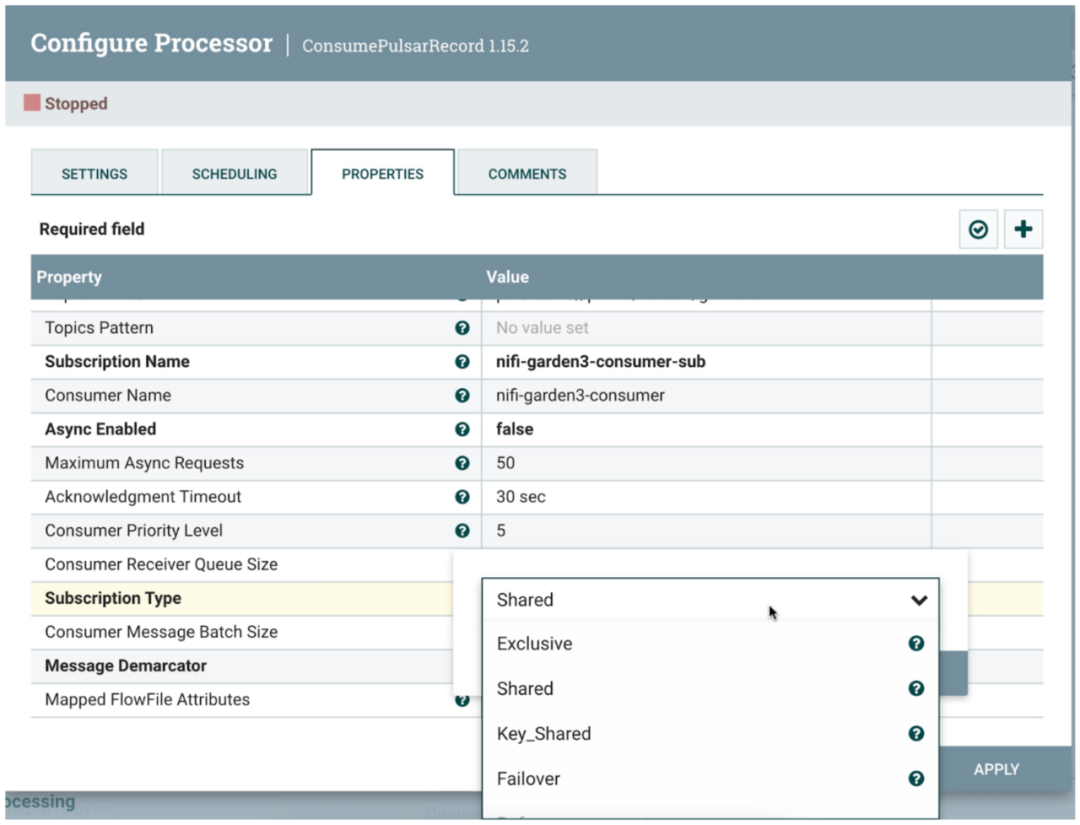
We could have been MongoDB Use Pulsar Function and Pulsar IO Sink, But use Apache NiFi Data enrichment can be accomplished without coding .
Step 5 in the cloud : verification MongoDB data
show collections

db.garden3.find().pretty()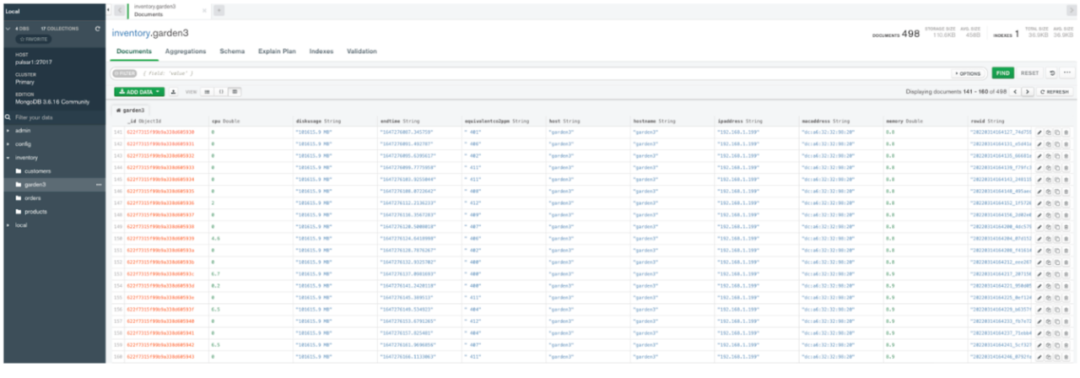

Example data
{'cpu': 0.3, 'diskusage': '101615.7 MB', 'endtime': '1647276937.7144697', 'equivalentco2ppm': ' 411', 'host': 'garden3', 'hostname': 'garden3', 'ipaddress': '192.168.1.199', 'macaddress': 'dc:a6:32:32:98:20', 'memory': 8.9, 'rowid': '20220314165537_a9941b0d-6ce2-48f9-8a1b-4ac7cfbd889e', 'runtime': 0, 'starttime': '03/14/2022 12:55:37', 'systemtime': '03/14/2022 12:55:38', 'totalvocppb': ' 18', 'ts': 1647276938, 'uuid': 'garden3_uuid_oqz_20220314165537'}Use Web Socket Of HTML Example data presentation
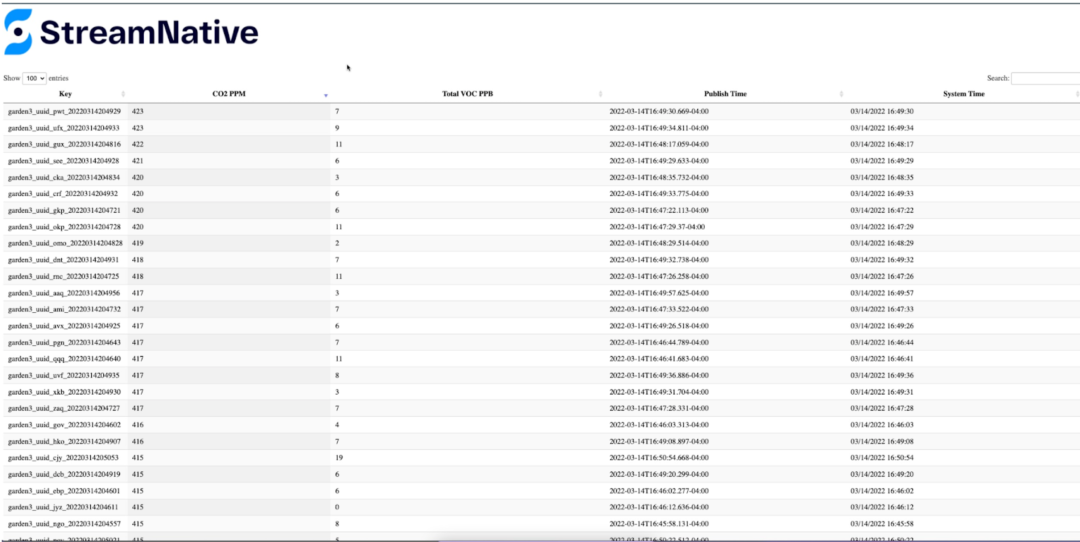
Watch the demo video

Conclusion
This article introduces how to make use of the latest open source framework FLiP Technology stack , To build real-time event driven applications . By using the latest excellent open source Apache Stream processing and big data projects , We can be faster 、 More relaxed 、 Build applications more extensible .
Welcome to use Pulsar And other excellent tools in upstream and downstream ecosystems to build scalable applications . Start with the data , adopt Pulsar Routing , Transform it to meet analysis needs , And stream it to every corner of the enterprise . It doesn't take months , Data engineers can build large-scale, fast data-driven dashboards in a matter of hours 、 Real time reporting 、 Applications and machine learning analyze data . Start building these now FLiPN Application bar .
resources
• Source code for the air quality sensors application[7]
• FLiP Stack for Apache Pulsar Developer[8]
• Using the FLiPN Stack for Edge AI (Flink, NiFi, Pulsar)[9]
build Pulsar colony
Set up in a few minutes Puslar colony : If you need to build a microservice application instead of building it yourself Pulsar colony , Please register now StreamNative Cloud[10].StreamNative Cloud You can relax in the public cloud 、 Fast 、 Run... Cost effectively Pulsar, So you can start one in a few minutes Pulsar colony
Related reading
Reference link
[1] ELK Technology stack : https://www.elastic.co/what-is/elk-stack[2] Apache Flink: https://flink.apache.org/[3] Use Apache Pulsar and Apache Flink SQL Conduct flow analysis : https://github.com/tspannhw/FLiP-SQL[4] Producing and Consuming Pulsar messages with Apache NiFi: https://www.datainmotion.dev/2021/11/producing-and-consuming-pulsar-messages.html[5] Code for Pulsar, NiFi Tie-Up Now Open Source: https://www.datanami.com/2022/03/09/code-for-pulsar-nifi-tie-up-now-open-source/[6] Pulsar and NiFi Integration Resources: https://streamnative.io/apache-nifi-connector/[7] Source code for the air quality sensors application: https://github.com/tspannhw/FLiP-Py-Pi-GasThermal/[8] FLiP Stack for Apache Pulsar Developer: https://www.flipstack.dev/[9] Using the FLiPN Stack for Edge AI (Flink, NiFi, Pulsar): https://www.youtube.com/watch?v=pfhoF3yTdHU[10] StreamNative Cloud: https://console.streamnative.cloud/
▼ Focus on 「Apache Pulsar」 Get more technical dry goods ▼
Join in Apache Pulsar Chinese communication group

Click to read the original text , by Pulsar Praise it. !
边栏推荐
- Yum source update
- teterttet
- Basic operation of OpenCV actual combat image: this effect amazed everyone (with code analysis)
- The same customized right-click menu beautification on this site - Xingze V Club
- Static method static learning
- Chapter 2 application layer 2.4 DNS
- Qt客户端套接字QTcpSocket通过bind指定本地ip
- 电脑录屏免费软件gif等格式视频
- Bluetooth development (7) -- L2CAP layer connection process
- 【AcWing】4. Multiple knapsack problem I
猜你喜欢
![[pyGame games] tank battle, how many childhood games do you remember?](/img/30/951fdbb944e026701af08c0c068cd8.png)
[pyGame games] tank battle, how many childhood games do you remember?

Njupt South Post collection_ Experiment 2
![[pyGame games] here it is. This Gobang game is super A. share it with your friends~](/img/76/faea3558ed6fadff755c517922088b.png)
[pyGame games] here it is. This Gobang game is super A. share it with your friends~

【自动回复or提醒小助手】妈妈再也不用担心我漏掉消息了(10行代码系列)
![[pyGame games] don't look for it. Here comes the leisure game topic - bubble dragon widget - recommendation for leisure game research and development](/img/fb/a966b4bf52cdab4030578d4595e09b.png)
[pyGame games] don't look for it. Here comes the leisure game topic - bubble dragon widget - recommendation for leisure game research and development

【Pygame小游戏】这款“打地鼠”小游戏要火了(来来来)

Go语言Channel理解使用
![[turtle confessions collection]](/img/97/6f1008386931bcb93655d94121e2c4.png)
[turtle confessions collection] "the moon at the bottom of the sea is the moon in the sky, and the person in front of us is the sweetheart." Be happy for the rest of your life, and be safe for ever ~
![[MVC&Core]ASP.NET Core MVC 视图传值入门](/img/c2/3e69cda2fed396505b5aa5888b9e5f.png)
[MVC&Core]ASP.NET Core MVC 视图传值入门

【Opencv实战】寒冷的冬季,也会迎来漫天彩虹,这特效你爱了嘛?
随机推荐
String time sorting, sorting time format strings
C language file operation
【Pygame小游戏】首月破亿下载 一款高度融合了「超休闲游戏特性」的佳作~
When leaving the web page, the website displays 404 Not found- starze V Club
[pyGame collection] memory killing - "Childhood Games", how many shots did you get? (attach five source codes for self access)
【Turtle表白合集】“海底月是天上月,眼前人是心上人。”余生多喜乐,长平安~(附3款源码)
Read it once: talk about MySQL master-slave
mysql 数据库 表 备份
[fireworks in the sky] it's beautiful to light up the night sky with gorgeous fireworks. A programmer brought a fireworks show to pay New Year's greetings to everyone~
【AI出牌器】第一次见这么“刺激”的斗地主,胜率高的关键因素竟是......
Lambda learning records
[auto reply or remind assistant] Mom doesn't have to worry about me missing messages any more (10 Line Code Series)
Judgment and other issues: how to determine whether the judgment of the procedure is correct?
【JVM】类加载机制
文件缓存和session怎么处理?
【JVM】线程
[MVC&Core]ASP.NET Core MVC 视图传值入门
From the perspective of Confucius Temple IP crossover, we can see how the six walnuts become "butterflies" for the second time
【Pygame合集】回忆杀-“童年游戏”,看看你中几枪?(附五款源码自取)
【JVM】内存模型