当前位置:网站首页>Cadence innovus physical implementation series (I) Lab 1 preliminary innovus
Cadence innovus physical implementation series (I) Lab 1 preliminary innovus
2022-06-30 07:35:00 【Snow fish】
I am a snowy fish , a FPGA lovers , The research direction is FPGA Architecture exploration .
Notes sync in my Personal website updated , Welcome to check .
IC/FPGA Design learning exchange group number : 866169462
List of articles
The experimental manual and data are from Innovus Lab and Lab Guide Download address
Required for the experiment
- have access to Cadence Innovus Software
- The experimental data in the above link has been downloaded
One 、 Import design
The goal is : open Innovus GUI Interface and import design
In this experiment , Will learn
(1) How to import gate level net tables and libraries to Innovus in , And create floorplan;
(2) Can be familiar with floorplanning The process and power planning technological process ;
(3) You will learn how to use the blind key to check the library , Design .
- stay
InnovusBlk_18_1/FPR/workOpen the terminal in the directory , InputinnovusOpen software :
- Click on In the menu bar
File -> Import Design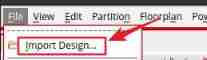
The window for importing design will pop up automatically :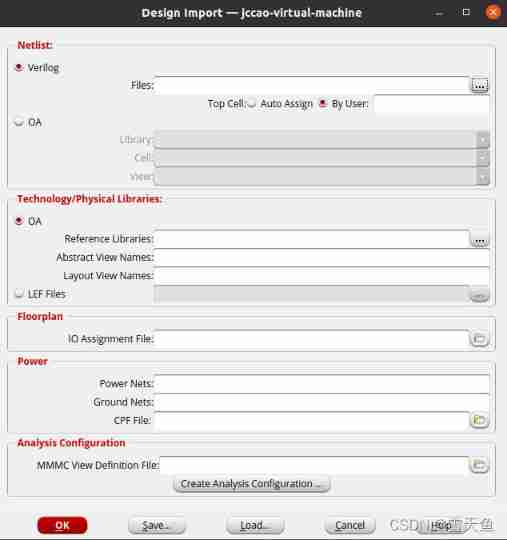
Directly click on... Of the five buttons at the bottom of the window Load...:
Choose dtmf.globals file , Click on open:
You can see that the columns of the design import window have been configured .
dtmf.viewThe file contains pointers to the timing library and the constraint file .dtmf.ioFile is I/O Assign files , Contains information about core Place around the area I/O Pad instructions .
The introduction of each part of the window is as follows :
| name | effect |
|---|---|
| Netlist-Verilog | Add the integrated door level Verilog Net watch , namely .v file |
| LEF Files | Contains physical information about catalogs and components , It also includes wiring layers and DRC The rules |
| IO Assignment File | Contains for placing IO Pad To core Peripheral instructions , If you did not add this file , The software will randomly place IO pad |
| MMMC View Definition File | Contains points to the timing library and SDC Pointer to constraint file |
Here we have a look dtmf.globals file :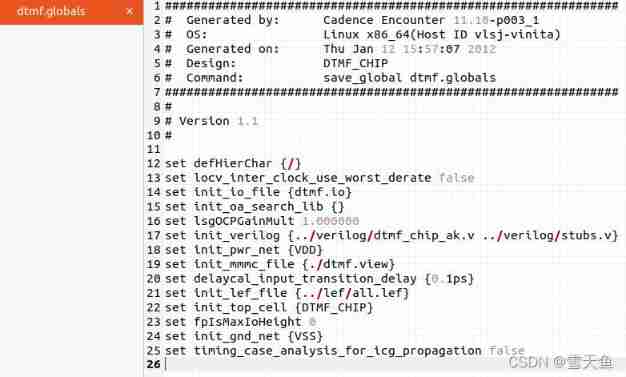
You can see in this file , Some configurations of the design are defined by many commands , such as gnd/Power The signal , Door level net list to import , Top level unit name , Process library files lef Etc . When importing a design, you only need Load Check this configuration file , You can easily import your own design , So you can write your own design configuration file following this file in the future .
- Load After the configuration file is completed , Just click OK:

Two 、 View design
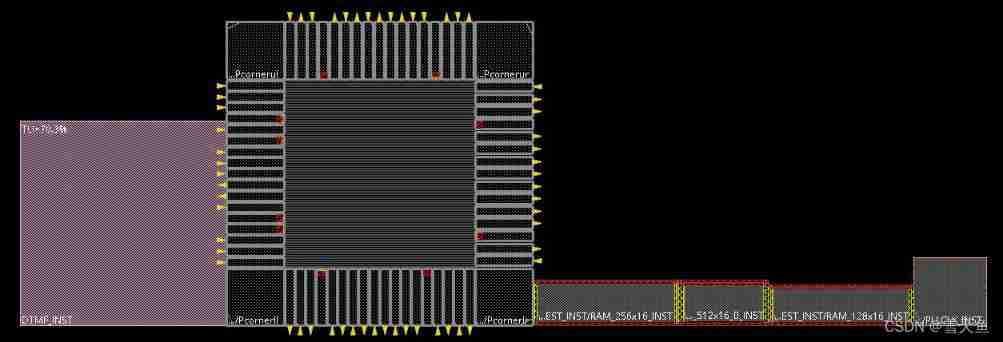
1. Click on Innovus On the right side Floorplan view Icon :
Press again F , Place the design in the middle of the window 
2. On the right side of the All Colors Panel , Choose Cell , take Pin Shapes Check on , Make it visible .
3. You can use the menu bar Tools -> Log Viewer see log
You can see ,log Contained in the Innovus Information about each step of operation .
4. Select the module on the left side of the design DTMF_INST, Click on Ungroup Icon once , Ungroup :

Split the module into multiple modules . Double click on these sub modules to see their names and properties :
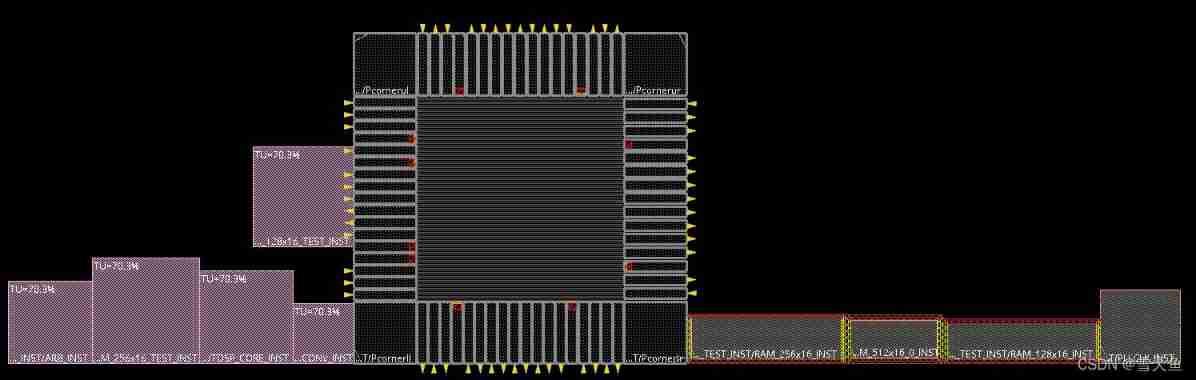
In the diagram above , The pink module on the left is the module defined in the imported net list file , On the right is a hard macro or IP.
5. Select a pink module , Click combination , Restructuring .

3、 ... and 、 View the design hierarchy
- In all objects Without being selected , Click on the
Tools->Design Browser:

You can see DTMF_CHIP Design level of .
This time, Lab To this end ! I mainly learned how to import design , Then on Innovus Some basic operations of .
边栏推荐
- Cross compile opencv3.4 download cross compile tool chain and compile (3)
- uniapp图片下方加标签标图片
- 期末复习-PHP学习笔记11-PHP-PDO数据库抽象层.
- Parameter calculation of deep learning convolution neural network
- Shell command, how much do you know?
- Pool de Threads - langage C
- DXP software uses shortcut keys
- Tencent and Fudan University "2021-2022 yuan universe report" with 102 yuan universe collections
- String application -- string violent matching (implemented in C language)
- Sublime text 3 configuring the C language running environment
猜你喜欢

视频播放器(一):流程

Virtual machine VMware: due to vcruntime140 not found_ 1.dll, unable to continue code execution

Basic knowledge of system software development

TC397 QSPI(CPU)

Digital white paper on total cost management in chain operation industry

Investment and financing analysis report of Supply Chain & logistics industry in 2021

Use of ecostruxure (3) creating composite function blocks

Stm32g0 porting FreeRTOS

期末复习-PHP学习笔记4-PHP自定义函数

Common sorting methods
随机推荐
How to quickly delete routing in Ad
Use of ecostruxure (2) IEC61499 to establish function blocks
Examen final - notes d'apprentissage PHP 3 - Déclaration de contrôle du processus PHP
Line fitting (least square method)
Calculate Euler angle according to rotation matrix R yaw, pitch, roll source code
STM32 infrared communication 3 brief
Xiashuo think tank: 50 planet updates reported today (including the global architects Summit Series)
Implementation of double linked list in C language
Basic knowledge of compiling learning records
2021 China Enterprise Cloud index insight Report
Video player (II): video decoding
期末复习-PHP学习笔记3-PHP流程控制语句
LabVIEW程序代码更新缓慢
Final review -php learning notes 9-php session control
Private method of single test calling object
PMIC power management
期末复习-PHP学习笔记8-mysql数据库
Raspberry pie trivial configuration
期末複習-PHP學習筆記6-字符串處理
2022 retail industry strategy: three strategies for consumer goods gold digging (in depth)