当前位置:网站首页>It's no exaggeration to say that this is the most user-friendly basic tutorial of pytest I've ever seen
It's no exaggeration to say that this is the most user-friendly basic tutorial of pytest I've ever seen
2022-07-02 14:43:00 【Software test small P】
 Pytest brief introduction
Pytest is a mature full-featured Python testing tool that helps you write better programs.The pytest framework makes it easy to write small tests, yet scales to support complex functional testing for applications and libraries.
Through the introduction of the official website, we can learn ,Pytest Is a very mature full-featured python The test framework , It mainly has the following characteristics :
Simple, flexible and easy to use
Support parameterization
Support simple unit testing and complex functional testing , It can also be used for automated testing
There are many third-party plug-ins , And you can customize the extension
Of test cases skip and xfail Handle
It can be very good and Jenkins Integrate
Support run by Nose、UnitTest Test cases written
Pytest install
1. Use it directly pip Command to install :
pip install -U pytest # -U Yes, if installed, it will automatically upgrade to the latest version
( Slide left and right to see the full code )
2. Verify installation results :
pytest --version # Show the currently installed version C:\Users\edison>pytest --version pytest 6.2.5
( Slide left and right to see the full code )
3. stay pytest In the test framework , The following constraints apply :
The test file name should conform to test_*.py or *_test.py Format ( for example test_min.py)
The test class should be Test start , And cannot have init Method
In a single test class , Can contain one or more test_ Initial function
Pytest The test execution
pytest Testing is relatively simple , Let's look at an example :
import pytest # Import pytest package def test_001(): # Function to test_ start print("test_01") def test_002(): print("test_02") if __name__ == '__main__': pytest.main(["-v","test_1214.py"]) # call pytest Of main Function execution test
( Slide left and right to see the full code )
Here we define two test functions , Print the result directly , Now perform the test :
============================= test session starts ============================= platform win32 -- Python 3.8.0, pytest-6.2.5, py-1.11.0, pluggy-1.0.0 -- D:\Code\venv\Scripts\python.exe cachedir: .pytest_cache rootdir: D:\Code collecting ... collected 2 items test_1214.py::test_001 PASSED [ 50%] test_1214.py::test_002 PASSED [100%] ============================== 2 passed in 0.11s ============================== Process finished with exit code 0
( Slide left and right to see the full code )
The output shows how many cases have been executed 、 Corresponding test module 、 Number of passes and execution time .
Test class main function
pytest.main(["-v","test_1214.py"])
( Slide left and right to see the full code )
adopt python Code execution pytest.main():
Direct execution pytest.main() 【 Automatically find the current directory , With test_ A document that begins with or with _test At the end of the py file 】;
Set up pytest The execution parameters of pytest.main(['--html=./report.html','test_login.py'])【 perform test_login.py file , And generate html Report in format 】.
main() Execution parameters and plug-in parameters can be passed in parentheses , adopt [] Segmentation ,[] Multiple parameters in the pass through ‘ comma ,’ Segmentation :
Run all use cases under the directory and sub packages pytest.main([' Directory name '])
Run all use cases of the specified module pytest.main(['test_reg.py'])
Run the specified module, specified class, specified use case pytest.main(['test_reg.py::TestClass::test_method']) Colon division
-m=xxx: Run tagged use cases
-reruns=xxx: Failed to rerun
-q: Quiet mode , Do not output environment information
-v: Rich information mode , Output more detailed use case execution information
-s: Displays the... In the program print/logging Output
--resultlog=./log.txt Generate log
--junitxml=./log.xml Generate xml The report
assert methods
pytest Assertions mainly use Python Native assertion methods , There are mainly the following :
== The content and type must be equal at the same time
in Actual results include expected results
is Assert that the two values before and after are equal
import pytest # Import pytest package def add(x,y): # Define to test_ Start function return x + y def test_add(): assert add(1,2) == 3 # Assert success str1 = "Python,Java,Ruby" def test_in(): assert "PHP" in str1 # Assertion failed if __name__ == '__main__': pytest.main(["-v","test_pytest.py"]) # call main Function execution test
( Slide left and right to see the full code )
============================= test session starts ============================= platform win32 -- Python 3.8.0, pytest-6.2.5, py-1.11.0, pluggy-1.0.0 -- D:\Code\venv\Scripts\python.exe cachedir: .pytest_cache rootdir: D:\Code collecting ... collected 2 items test_pytest.py::test_add PASSED [ 50%] test_pytest.py::test_in FAILED [100%] ================================== FAILURES =================================== ___________________________________ test_in ___________________________________ def test_in(): > assert "PHP" in str1 E AssertionError: assert 'PHP' in 'Python,Java,Ruby' test_pytest.py:11: AssertionError =========================== short test summary info =========================== FAILED test_pytest.py::test_in - AssertionError: assert 'PHP' in 'Python,Java... ========================= 1 failed, 1 passed in 0.18s ========================= Process finished with exit code 0
( Slide left and right to see the full code )
You can see that the reason for the error is clearly pointed out in the operation result “AssertionError”, because PHP be not in str1 in .
A detailed explanation of common orders
1. Run the specified case :
if __name__ == '__main__': pytest.main(["-v","-s","test_1214.py"])
( Slide left and right to see the full code )
2. Run all use cases in the current folder, including subfolders :
if __name__ == '__main__': pytest.main(["-v","-s","./"])
( Slide left and right to see the full code )
3. Run the specified folder (code All use cases in the directory ):
if __name__ == '__main__': pytest.main(["-v","-s","code/"])
( Slide left and right to see the full code )
4. Use cases are specified in the run module ( In the running module test_add Use cases ):
if __name__ == '__main__': pytest.main(["-v","-s","test_pytest.py::test_add"])
( Slide left and right to see the full code )
5. Maximum number of execution failures .
Use expressions "--maxfail=num" To achieve ( Be careful : There can be no spaces in the expression ), Indicates that the total number of use case failures is equal to num Stop running when .

Add picture comments , No more than 140 word ( Optional )

Add picture comments , No more than 140 word ( Optional )
6. The error message is displayed on one line .
In the actual project, if many use cases fail to execute , Checking the error message will be troublesome . Use "--tb=line" command , It can solve this problem very well .

Add picture comments , No more than 140 word ( Optional )
Interface call
Write an interface to query user information locally , adopt pytest To call , And make interface assertions .
# -*- coding: utf-8 -*- import pytest import requests def test_agent(): r = requests.post( url="http://127.0.0.1:9000/get_user", data={ "name": " Wu lei ", "sex": 1 }, headers={"Content-Type": "application/json"} ) print(r.text) assert r.json()['data']['retCode'] == "00" and r.json()['data']['retMsg'] == " Successful call " if __name__ == "__main__": pytest.main(["-v","test_api.py"])
( Slide left and right to see the full code )
边栏推荐
猜你喜欢
QT new project
The most complete analysis of Flink frame window function
Daily learning 3

每日学习2
天猫商品详情接口(APP,H5端)

STM32-DAC实验&高频DAC输出测试
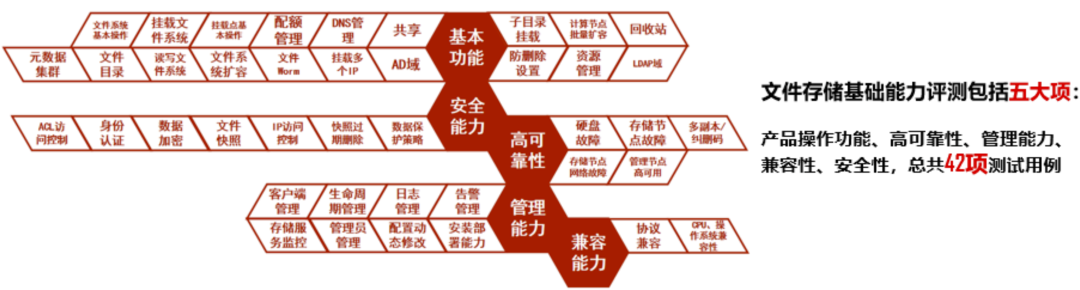
Tencent cloud tstor unified storage passed the evaluation of the first batch of basic file storage capabilities of the ICT Institute

Pychart connects to the remote server
How kaggle uses utility script

Socket and socket address
随机推荐
STM32标准固件库函数名(一)
String matching problem
tmall. product. schema. Get (product information acquisition schema acquisition), Taobao store upload commodity API interface, Taobao commodity publishing interface, Taobao commodity upload API interf
Find the maximum inscribed circle of the contour
Openharmony notes --------- (4)
obsidian安装第三方插件——无法加载插件
Fabric. JS upper dash, middle dash (strikethrough), underline
STM32 standard firmware library function name (I)
每日学习2
Solving the longest subsequence with linear DP -- three questions
OpenCV调用USB摄像头的点滴
mongodb的认识
检查密码
Convolutional neural network (Introduction)
ONNX+TensorRT:将预处理操作写入ONNX并完成TRT部署
taobao. trade. Get (get some information of a single transaction), Taobao store order interface, Taobao oauth2.0 interface, Taobao R2 interface code docking and sharing
微信小程序使用towxml显示公式
docker mysql
Fabric.js 橡皮擦的用法(包含恢复功能)
Simple verification code generator for 51 single chip microcomputer experiment