当前位置:网站首页>Qt supports HEIC/HEIF format images
Qt supports HEIC/HEIF format images
2022-08-01 10:02:00 【CSDN】
HEIF 格式简介(From Baidu Know)
heicThe format is for AppleiOS11A specially developed photo format.Heic是Apple iOS和macOS的文件格式,For processing images and videos.Heic是IOS 11The system replaces the original videos and photosH.264和JEP格式.HeicFormatting not only saves memory,Original image quality is also preserved.Heic格式是Apple iOS和macOS的专用格式
与JPG相比,它占用的空间更小,画质更加无损.HEIC格式照片支持iOS11及macOS High Sierra(10.13)及更新版本.但是此种格式是无法在Windows 中直接使用看图软件打开的(Windows10 RS4开始支持该格式).
HEIF和HEIC的关系?
HEIF 是图片格式,HEVC (HEVC 是编码格式(比如 H.264,H.265))进行编码的 HEIF The picture is suffixed with .heic 的图片
Qt 支持HEIF插件编译
首先声明,Qt官方并未支持heic格式图片,But there are already great gods based on itlibheiflibrary didQt的插件,This article is just to help you solve how to compile thisHeif插件
- 插件github地址
- 编译依赖:Cmake、libheif (≥ version 1.1)、Qt 5 (Core and GUI modules)
The official documentation says that compiling depends on cmake、pkg-config(个人不了解,If there is a god, please give pointers)是不准确的,容易产生误导,The real dependency isQt+libheif并且通过Cmake进行构建工程
下载编译qt-heif-image-plugin
git clone [email protected]:jakar/qt-heif-image-plugin.git
First of all, we will get an error when compiling directly
The essence here is that we can't find itpkg-config的库,So we need to solve the compilation environment configuration problem first
配置构建环境
Libheif地址
安装Libheif,github的readmehas been clearly stated in "Libheif is included in Vcpkg.",The library is already includedVcpkg中,To simplify we also need to compile it ourselvesLibheif,我们直接使用Vcpkg 进行安装Libheif
下载并安装vcpkg
> git clone https://github.com/microsoft/vcpkg

> .\vcpkg\bootstrap-vcpkg.bat

安装Libheif(以64bit column)
#指定安装(编译)64位库
> .\vcpkg\vcpkg install libheif:x64-windows
#指定安装(编译)32位库
> .\vcpkg\vcpkg install libheif:x86-windows
#默认安装32位
> .\vcpkg\vcpkg install libheif
Libheif Dependencies required during compilation are automatically downloaded(All of a sudden it's simple) 编译安装之后,输出
安装pkg-config
Because it will be revised laterCmake文件,It wasn't really used laterpkg-config,此步骤可以忽略,Do your best to follow along
./vcpkg install pkgconf:x64-windows

如何让Cmake 知道我们安装的vcpkg库?
- cmake要用vcpkg下载的库
- 设置DCMAKE_TOOLCHAIN_FILE
“-DCMAKE_TOOLCHAIN_FILE=[path to vcpkg]/scripts/buildsystems/vcpkg.cmake”
我的目录是E:\Git\vcpkg
E:\Git\vcpkg\downloads\tools\cmake-3.22.2-windows\cmake-3.22.2-windows-i386\bin\cmake -B ./build_2019 -G "Visual Studio 16 2019" -A x64 -S . "-DCMAKE_TOOLCHAIN_FILE=E:\\Git\\vcpkg\\scripts\\buildsystems\\vcpkg.cmake"
构建
如果下载了pkg-configCan be directly built successfully,Otherwise, it needs to be modified firstCmake文件,才可以构建VS工程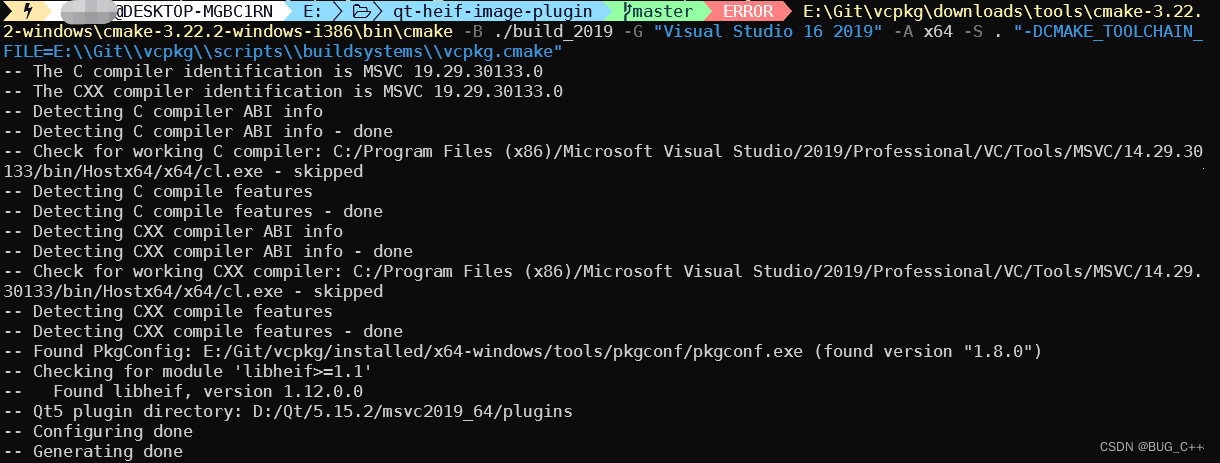
修改Cmake
cmake_minimum_required(VERSION 3.5)  # lowest version tried
#新增加===
#DEBUG增加后缀
set(CMAKE_DEBUG_POSTFIX "d")
set(LIBHEIF_PATH E:\\Git\\vcpkg\\installed\\x64-windows)
###Add your own path here
set(LIBHEIF_INC_DIR ${LIBHEIF_PATH}\\include)
set(LIBHEIF_LIB_DIR ${LIBHEIF_PATH}\\lib)
#Set additional header files
include_directories(${LIBHEIF_INC_DIR})
#设置附加库目录
link_directories(${LIBHEIF_LIB_DIR})
#新增加===

set(CMAKE_CXX_STANDARD 11)
set(CMAKE_CXX_STANDARD_REQUIRED ON)
set(CMAKE_CXX_EXTENSIONS OFF)

# make release build, if not specified
# (from https://blog.kitware.com/cmake-and-the-default-build-type/)
set(default_build_type "RelWithDebInfo")

if (NOT CMAKE_BUILD_TYPE AND NOT CMAKE_CONFIGURATION_TYPES)
  set(CMAKE_BUILD_TYPE "${default_build_type}" CACHE STRING "Build type" FORCE)
  set_property(
    CACHE CMAKE_BUILD_TYPE PROPERTY STRINGS
    "Debug" "Release" "MinSizeRel" "RelWithDebInfo")
endif ()

# compiler flags
# TODO: separate GCC and Clang warnings; add more
#修改==
set(
  CMAKE_CXX_FLAGS "${CMAKE_CXX_FLAGS} \ -Wall \ ")
#set(CMAKE_CXX_FLAGS_DEBUG "${CMAKE_CXX_FLAGS_DEBUG} -Og")
#修改===

set(sanitizer_flags "-fsanitize=address -fsanitize=undefined")
set(CMAKE_CXX_FLAGS_DEBUG "${CMAKE_CXX_FLAGS_DEBUG} ${sanitizer_flags}")
set(CMAKE_MODULE_LINKER_FLAGS_DEBUG
    "${CMAKE_MODULE_LINKER_FLAGS_DEBUG} ${sanitizer_flags}")

#
# third-party libs
#

# qt
find_package(Qt5 COMPONENTS Core Gui REQUIRED)
add_definitions(-DQT_NO_KEYWORDS)
set(CMAKE_AUTOMOC ON)

# libheif
#修改==
#find_package(PkgConfig)
#pkg_check_modules(libheif REQUIRED libheif>=1.1)

set (LIB_HEIF heif libx265 libde265)
#修改==
#
# project source
#

set(CMAKE_INCLUDE_CURRENT_DIR ON)

set(sources main.cpp qheifhandler.cpp)


add_library(qheif MODULE ${sources})
#修改==
target_link_libraries(
  qheif
  PRIVATE
  Qt5::Gui
  ${LIB_HEIF}
)
#修改==

#
# installation
#

# Use qmake to find plugin dir (adapted from lxqt-qtplugin)
get_target_property(
  QT_QMAKE_EXECUTABLE ${Qt5Core_QMAKE_EXECUTABLE} IMPORTED_LOCATION)

if (NOT QT_QMAKE_EXECUTABLE)
  message(FATAL_ERROR "qmake is not found.")
endif ()

execute_process(
  COMMAND ${QT_QMAKE_EXECUTABLE} -query QT_INSTALL_PLUGINS
  OUTPUT_VARIABLE QT_PLUGINS_DIR
  OUTPUT_STRIP_TRAILING_WHITESPACE)

if (QT_PLUGINS_DIR)
  message(STATUS "Qt5 plugin directory: " "${QT_PLUGINS_DIR}")
else ()
  message(FATAL_ERROR "Qt5 plugin directory cannot be detected.")
endif ()

# Prefix with DESTDIR if available to allow packaging
if (ENV{
    DESTDIR} AND NOT ENV{
    DESTDIR} STREQUAL "")
  set(plugins_dir "$ENV{DESTDIR}${QT_PLUGINS_DIR}")
else ()
  set(plugins_dir "${QT_PLUGINS_DIR}")
endif ()

install(
  TARGETS qheif
  LIBRARY DESTINATION "${plugins_dir}/imageformats")

# vim:sw=2
验证
- VS直接打开Demo工程
- Modify the example source code
#include <QApplication>
#include <QDebug>
#include <QImage>
#include<QImageReader>
#include <QLabel>
const QString path="E:\\Git\\qt-heif-image-plugin\\bird_burst.heic";
int main(int argc, char *argv[])
{

    QApplication a(argc, argv);
    //Output supported images
    qDebug()<<QImageReader::supportedImageFormats();
    const QString imgPath(path);
    QImage image(imgPath);
    if (!image.isNull()) {

        qDebug() << "image size:" << image.size();
        QLabel* label = new QLabel();
        int w = 0;
        int h = 0;
        if (image.width() > image.height()) {

            w = 1400;
            h = (1.0 * image.height()) / (1.0 * image.width() * 1400);
        } else {

            h = 1400;
            w = (1.0 * 1400 * image.height()) /(1.0 * image.width());
        }
        qDebug() << w << h;
        const QPixmap pixmap = QPixmap::fromImage(image);
        label->setPixmap(pixmap);
        label->show();
        label->resize(image.size());
     } else {

           qCritical() << "Invalid image:" << imgPath;
    }

    return a.exec();
}
- 编译
- 使用windeployqt打包exe
windeployqt qtheif.exe
把qheif.dllCopied to the program running directoryimageformats下
把heif.dll、libde265.dll、libx265.dllCopy to the root directory of the program running directory
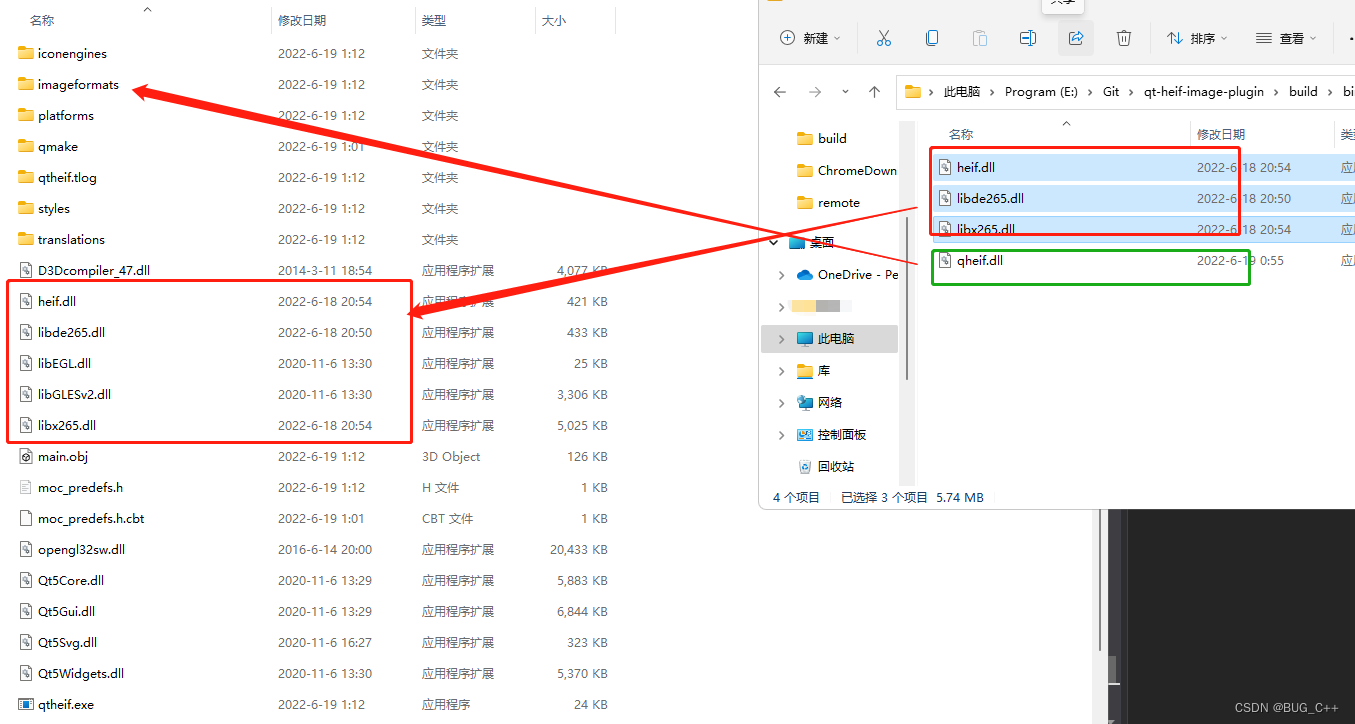
运行程序,Pictures can be loaded and displayed

参考文献
vcpkg 快速入门
HEIF&HEIC
边栏推荐
- 周鸿祎称微软抄袭 360 安全模式后发文否认;英特尔CEO基辛格回应市值被AMD超越:股价下跌是咎由自取|极客头条
- C语言小游戏——扫雷
- Visualization - Superset installation and deployment
- 线上问题排查常用命令,总结太全了,建议收藏!!
- SQL Server database schema and objects related knowledge notes
- 自定义类型——枚举、联合
- PDMan-国产免费通用数据库建模工具(极简,漂亮)
- Quantify daily work metrics
- SkiaSharp 之 WPF 自绘 五环弹动球(案例版)
- Google Earth Engine APP——15行代码搞定一个inspector高程监测APP
猜你喜欢





随机推荐
Custom Types - Enums, Unions
Comprehensive experiment BGP
YOLOv7-Pose尝鲜,基于YOLOv7的关键点模型测评
记一次 .NET 某智慧物流WCS系统CPU爆高分析
退役划水
SkiaSharp 之 WPF 自绘 五环弹动球(案例版)
Parsing MySQL Databases: "SQL Optimization" vs. "Index Optimization"
PerViT: 神经网络也能像人类利用外围视觉一样观察图像!
CTFshow,命令执行:web31
【软件架构模式】MVVM模式和MVC模式区别
Shell: Conditional test action
关于#SQL#的问题,如何解决?
CTFshow,命令执行:web37
50.【Application of dynamic two-dimensional array】
pve 删除虚拟机「建议收藏」
已解决(pip安装库报错)Consider using the-- user option or check the permissions.
STM32个人笔记-程序跑飞
WLAN networking experiment of AC and thin AP
跨域网络资源文件下载
STM32 Personal Notes - Embedded C Language Optimization