当前位置:网站首页>Complete collection of common error handling in MySQL installation
Complete collection of common error handling in MySQL installation
2022-07-29 02:10:00 【xiaoweiwei99】
???
hello ! Hello everyone , I am a 【】, Jianghu people jeames007,10 year DBA Work experience
China DBA Alliance members , A highly motivated 【 Bloggers in big data field 】!???
China DBA union (ACDU) member , Currently engaged in DBA And program programming
Good at mainstream data Oracle、MySQL、PG Operations and development , Backup recovery , Installation migration , performance optimization 、 Fault emergency treatment, etc .
If there is a pair of 【 database 】 Interested in 【 Cutie 】, Welcome to your attention 【】???
Thank you, big and small !
List of articles
- Preface
- ??1. Unable to start processing , error 1053
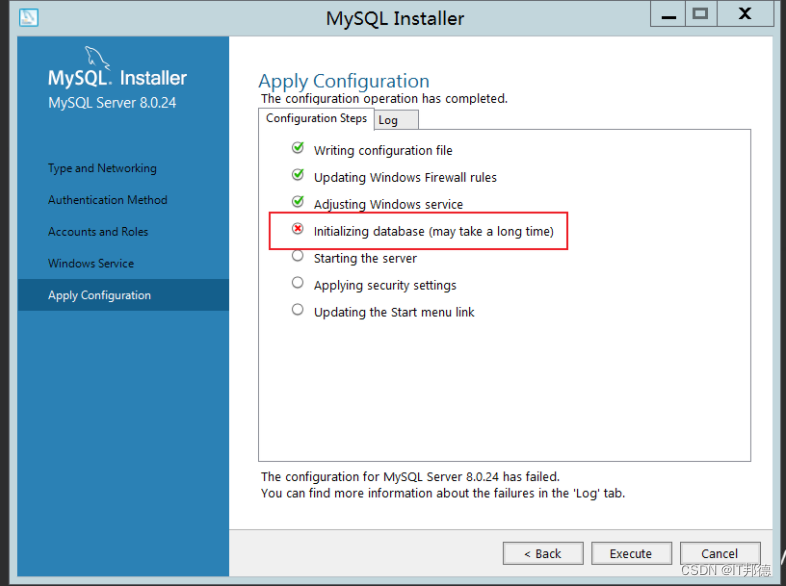
- ?? 2.Winwods Installation initialization error
- ?? 4.Centos Environmental Science rpm initialization MySQL Report errors
- ?? 4.MySQL8 Unable to log in after installation
Preface
This article summarizes MySQL Common troubleshooting during installation , Share with you
1. Unable to start processing , error 1053
Windows Can't start Mysql service error 1053: The service did not respond promptly to startup or control requests 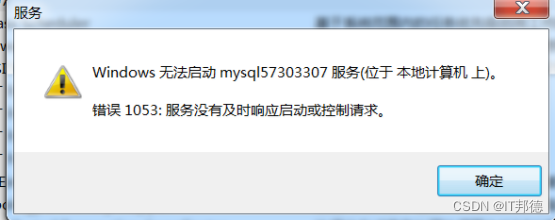
1.1 The end of the process
processing method :
1、 Type... On the command line tasklist Check the process
2、 Kill a process according to its name
taskkill /f /t /im Process name
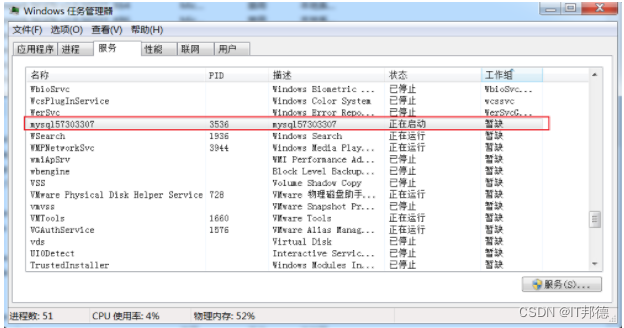
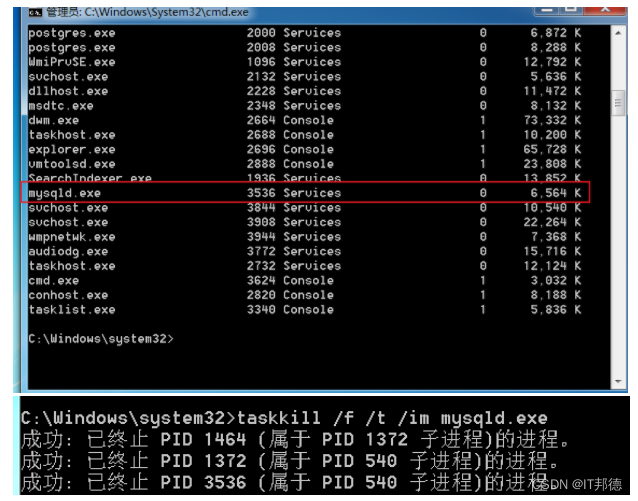
1.2 Change network service
Server2012 Location
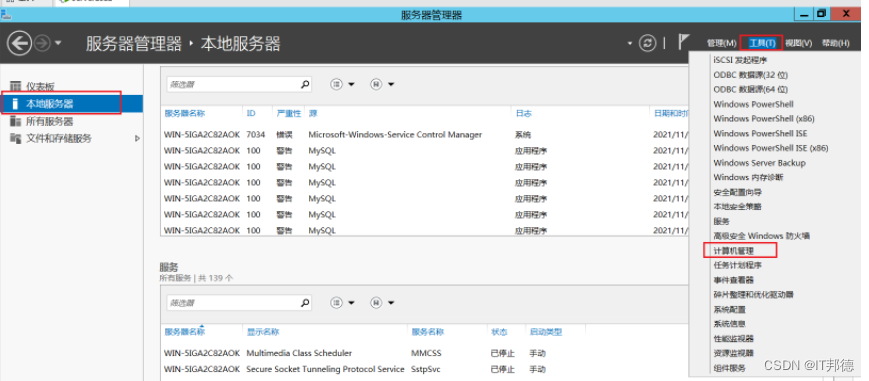
other win7 And win10 operating system
1)、 Computer -> management -> Local users and groups -> Group double-click , The renderings are as follows :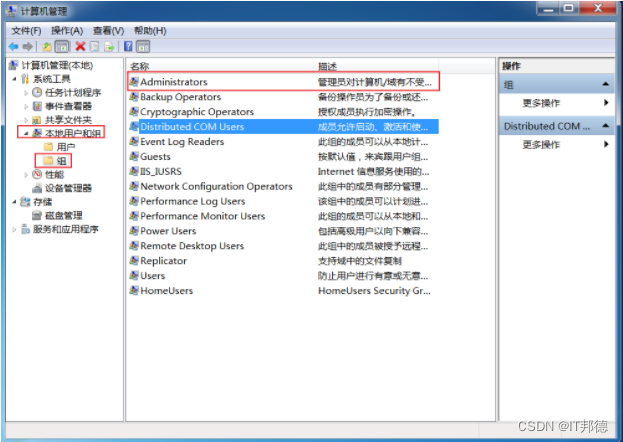
(2)、 double-click Administrators, And click Add , Then click Advanced
(3)、 hold NETWORK SERVICE Add to Administrators Group 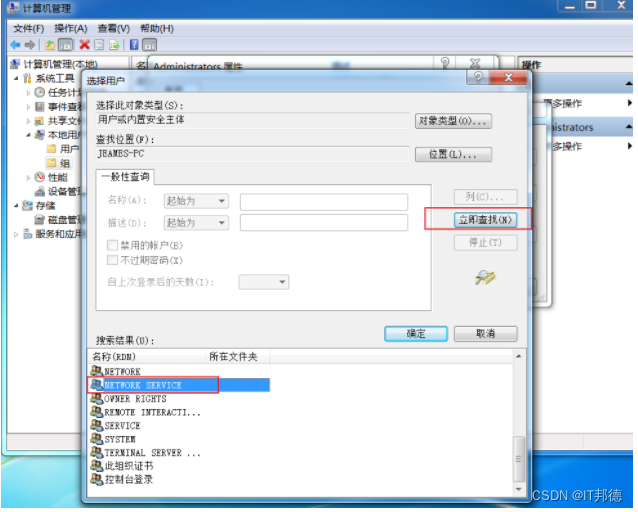
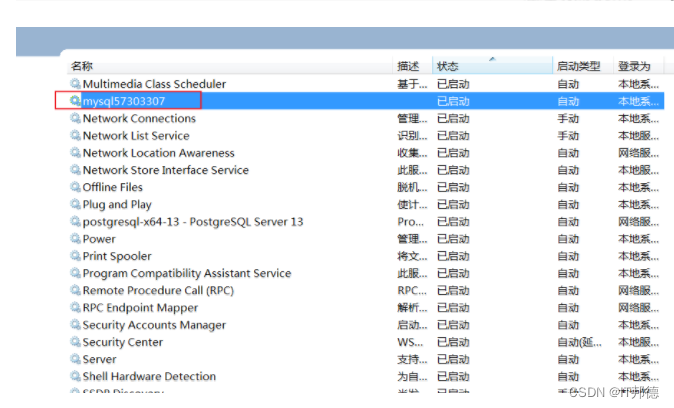
1.3 Delete service
sc delete mysql57303307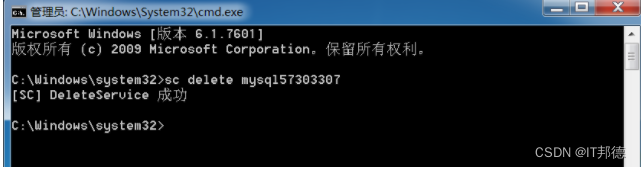
Remember here , reinstall Mysql Can ,2 Repeat the following operation ( Delete old Mysql file , Just reinstall them all )
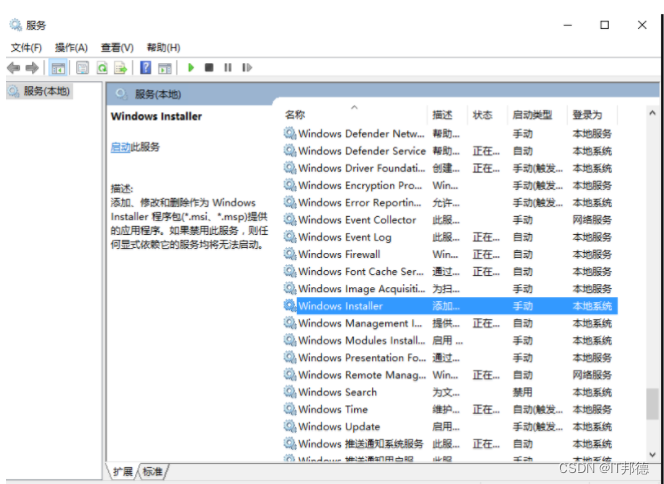
There's another hole , If you still can't start , Remember to start this service Windows Installer
Windows Installer It is a general way of software distribution , For software installation .
By default , The service is started manually , You need to enter the service management to open .
Right click to start —— function —— Input “services.msc”——Windows Installer—— start-up
2.Winwods Installation initialization error
Beginning configuration step: Writing configuration file

Saving my.ini configuration file...
Saved my.ini configuration file.
Ended configuration step: Writing configuration file

Beginning configuration step: Updating Windows Firewall rules

Adding a Windows Firewall rule for MySQL80 on port 3306.
Attempting to add a Windows Firewall rule with command: netsh.exe advfirewall firewall add rule name="Port 3306" protocol=TCP localport=3306 dir=in action=allow
 determine .


Successfully added the Windows Firewall rule.
Adding a Windows Firewall rule for MySQL80 on port 33060.
Attempting to add a Windows Firewall rule with command: netsh.exe advfirewall firewall add rule name="Port 33060" protocol=TCP localport=33060 dir=in action=allow
 determine .


Successfully added the Windows Firewall rule.
Ended configuration step: Updating Windows Firewall rules

Beginning configuration step: Adjusting Windows service

Attempting to grant Network Service require filesystem permissions.
Granted permissions.
Adding new service
New service added
Ended configuration step: Adjusting Windows service

Beginning configuration step: Initializing database (may take a long time)

Attempting to run MySQL Server with --initialize-insecure option...
Starting process for MySQL Server 8.0.24...
Starting process with command: C:Program FilesMySQLMySQL Server 8.0binmysqld.exe --defaults-file="C:ProgramDataMySQLMySQL Server 8.0my.ini" --console --initialize-insecure=on --lower-case-table-names=1...
Process for mysqld, with ID 2572, was run successfully and exited with code -1073741515.
Failed to start process for MySQL Server 8.0.24.
Database initialization failed.
Ended configuration step: Initializing database (may take a long time)
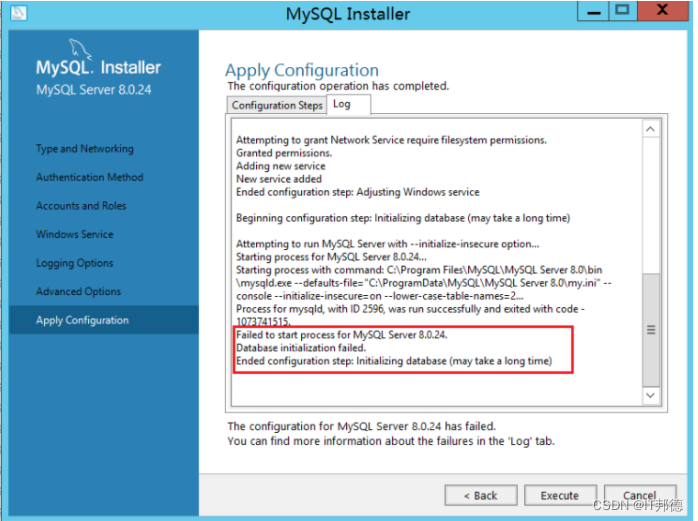
install VC_redist.x86 You can execute both OK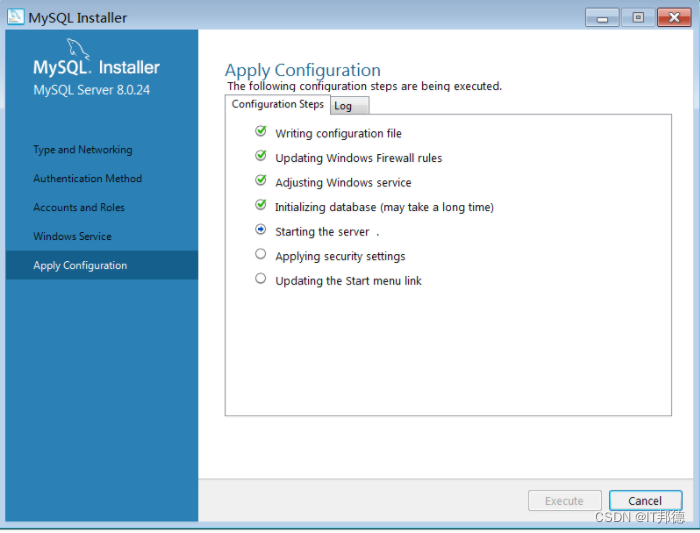
Input gpedit.msc, Open policy management 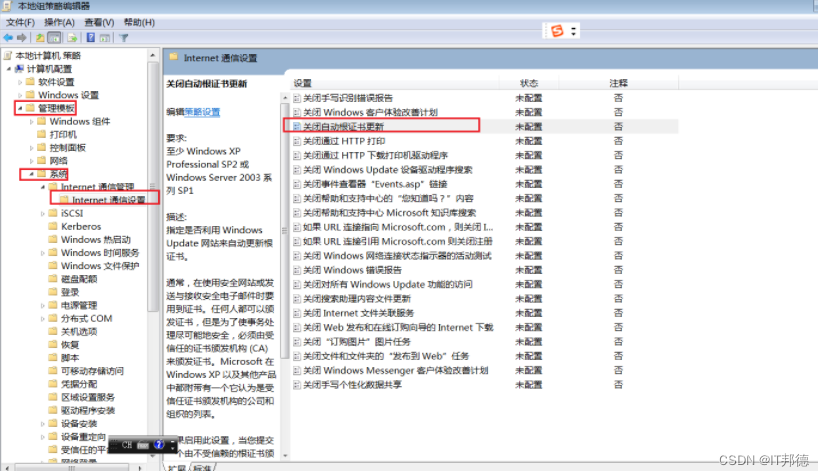
After enabling certificate update, it works normally
Because some system images are built earlier , And the system cannot be updated , You need to install a system patch to complete vc++ install
4.Centos Environmental Science rpm initialization MySQL Report errors
Centos7 Provided by default openssl The version is 1.0.2 Of , some php Extensions or other software dependencies 1.1 Above version , If it is too low, an error will be reported
libssl.so.1.1: cannot open shared object file: No such file or directory
There is also implementation openssl version The times error is consistent with the above , This is because openssl The location of the library is incorrect or not installed 1.1 The problem with the above version
Want to upgrade openssl Version needs to be compiled manually , The error reporting solution is very simple , Install correctly ,
Now let's say that I use Centos7 For example , Let's talk about the specific compilation and installation steps
–openssl Version confirmation
[[email protected] ~]# openssl version
OpenSSL 1.0.1e-fips 11 Feb 2013
– compile openssl
tar -xvf openssl-1.1.1g.tar.gz
cd openssl-1.1.1g
./config shared --openssldir=/usr/local/openssl --prefix=/usr/local/openssl
make && make install
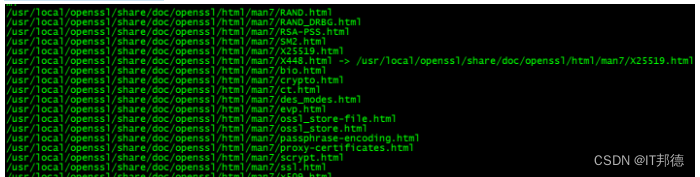
– To configure
After compilation , Use openssl version, Let's take a look at the current situation openssl Version number ,
You will find out whether it is 1.0.2, So here we need to do some additional configuration work .
[[email protected] openssl-1.1.1g]# more /etc/ld.so.conf
include ld.so.conf.d/*.conf
[[email protected] openssl-1.1.1g]# echo “/usr/local/lib64/” >> /etc/ld.so.conf
[[email protected] openssl-1.1.1g]# ldconfig
Again using openssl version Just verify the version ,
If it doesn't , Try the following ,
Execute sequentially ( Back up the old version first , Then create a soft connection from the installation location of the new version )
mv /usr/bin/openssl /usr/bin/openssl.old
ln -s /usr/local/openssl/bin/openssl /usr/bin/openssl
ln -s /usr/local/openssl/include/openssl /usr/include/openssl
echo “/usr/local/openssl/lib” >> /etc/ld.so.conf
ldconfig -v
4.MySQL8 Unable to log in after installation
First method :
1. Edit with command /etc/my.cnf The configuration file , namely :vim /etc/my.cnf perhaps vi /etc/my.cnf
2. stay [mysqld] Add below skip-grant-tables, Then save and exit
3. restart mysql service :service mysqld restart
4. change root user name
After the restart , perform mysql Order to enter mysql Command line
5. modify root User password , Note here , Sometimes it will be reported that modification is not allowed , First flush privileges You can do it again
update mysql.user set authentication_string=password(‘root’) where user=‘root’; --5.7 edition
flush privileges;
6. hold /etc/my.cnf Medium skip-grant-tables Comment out , And then restart mysql, namely :service mysqld restart
Okay , You can use root New password login !
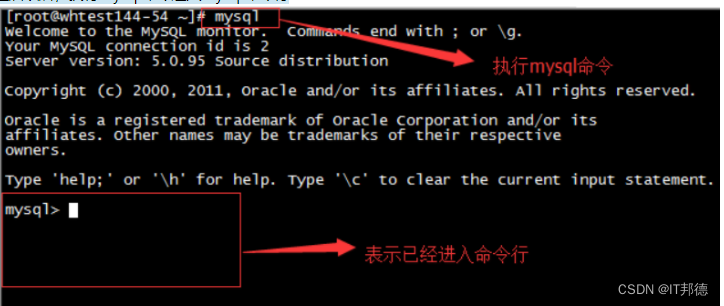
The second way :
stay mysql8 Under the system , The following method is applicable ( The full path )
G:mysql-8.0.23-winx64inmysqld --datadir=G:mysql-8.0.23-winx64data80323308 --console --skip-grant-tables --shared-memory

Then open another window , Execute the following command
cd G:mysql-8.0.23-winx64in
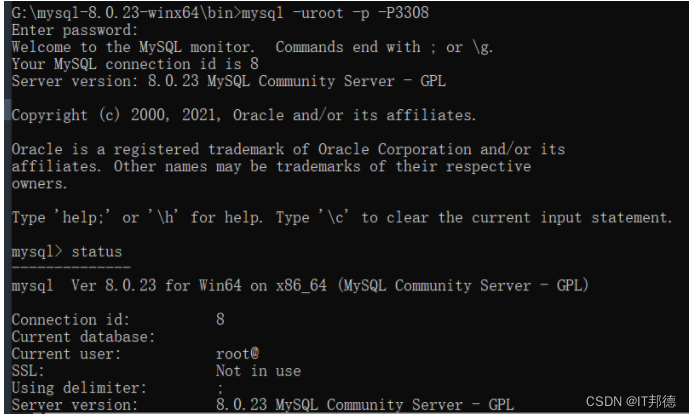
mysql> select user,host,authentication_string from mysql.user;
mysql> delete from mysql.user where user=‘root’ ;
mysql> flush privileges; -- Remember to refresh , If the prompt cannot be created
mysql> create user [email protected]‘%’ identified with mysql_native_password by ‘root’;
mysql> grant all on . to [email protected]‘%’ with grant option;
mysql> flush privileges;
mysql> drop user ‘root’@‘localhost’;
mysql> flush privileges;
mysql> create user [email protected]‘localhost’ identified with mysql_native_password by ‘root’;
mysql> grant all on . to [email protected]‘localhost’ with grant option;
mysql> flush privileges;

边栏推荐
- Number of consecutive subarrays with leetcode/ and K
- Why can't Bi software do correlation analysis
- 基于C51实现数码管的显示
- [UE4] replay game playback for ue4.26
- Leetcode/0 and 1 consecutive subarrays with the same number
- IDEA 连接 数据库
- Comprehensive analysis of news capture doorway
- 物联网开发--MQTT消息服务器EMQX
- [the road of Exile - Chapter 5]
- 「活动推荐」冲冲冲!2022 国际开源节有新内容
猜你喜欢


![[the road of Exile - Chapter 4]](/img/76/e1e249ddb2f963abb5d2b617a5f178.png)
![[the road of Exile - Chapter 7]](/img/3c/8b4b7c40367b8b68d0361d9ca4013a.png)
随机推荐
12.< tag-动态规划和子序列, 子数组>lt.72. 编辑距离
在Qt中如何编写插件,加载插件和卸载插件
JS dom2 and dom3
[the road of Exile - Chapter 5]
LeetCode 练习——剑指 Offer 45. 把数组排成最小的数
Number of consecutive subarrays with leetcode/ and K
Why does stonedb dare to call it the only open source MySQL native HTAP database in the industry?
2022年编程语言排名,官方数据来了,让人大开眼界
Day01 job
控制输入框弹出弹窗 和不弹出窗口
2022.7.27-----leetcode.592
[circuit design] convert AC AC to DC
Sharpness evaluation method without reference image
druid. IO custom real-time task scheduling policy
忽略微信设置字体
Resolve the conflict with vetur when using eslint, resulting in double quotation marks and comma at the end of saving
[UE4] replay game playback for ue4.26
[electronic components] zener diode
数学建模——派出所选址
druid. io index_ Realtime real-time query