当前位置:网站首页>Three ways to uninstall Symantec Endpoint Protection Symantec
Three ways to uninstall Symantec Endpoint Protection Symantec
2022-06-24 08:33:00 【shawyang】
Method 1 、 Tool unload
https://support.broadcom.com/security
from SYMANTEC Download from the official website cleanwipe (Symantec Uninstall tools )
https://knowledge.broadcom.com/external/article?articleId=178870
Pull to the bottom , The attachment is cleanwipe Compressed package , Version number 14.3.4615.2000
Method 2 、 Command uninstall , Reference resources https://knowledge.broadcom.com/external/article/151297
①PowerShell
Open a PowerShell Window as Administrator
Run the following command: (Get-WmiObject -Class Win32_Product -Filter "Name='Symantec Endpoint Protection'" -ComputerName . ).Uninstall()
A successful uninstall will return a message that ends with "ReturnValue: 0"
(Get-WmiObject -Class Win32_Product -Filter "Name='Symantec Endpoint Protection'" -ComputerName . ).Uninstall()
result return 0
②CMD
msiexec.exe /x { That string of things } /q /norestart
for example msiexec.exe /x {923094F3-F3D1-4E28-ABF5-10B80F6BF51A} /q /norestart
Be careful :
/passive Follow /norestart Continuous use ,/norestart It doesn't work , It will restart automatically
/q Follow /norestart Continuous use ,/norestart It works , No automatic restart
{ That string of things } use UninstallView This software can find
Method 3 、 Manually Unloaded
Symantec's files are usually in the following paths
C:\Progra~2\Symantec (C:\Program Files (x86)\Symantec)
C:\Progra~3\Symantec (C:\ProgramData\Symantec)
C:\windows\system32\Drivers\SYMEVENT64x86.SYS
C:\windows\system32\Drivers\SRTSPX64.SYS
C:\windows\system32\Drivers\SRTSP64.SYS
C:\windows\system32\Drivers\symefasi\
C:\windows\system32\Drivers\SEP\
C:\Progra~2\Common Files\Symantec Shared\
Unloading steps :
1、 function appwiz.cpl Through the system “ Uninstall or change programs ” To uninstall , Finally, it will prompt to restart
2、 After restarting, there are still 2 Directories have not been deleted completely
C:\Progra~2\Common Files\Symantec Shared\
C:\Progra~3\Symantec
Can be deleted manually , You can also run the command to delete
cmd.exe /c rd /S /Q "C:\Progra~2\Common Files\Symantec Shared"
cmd.exe /c rd /S /Q "C:\Progra~3\Symantec"
Supplementary information :
https://www.aihao.cc/thread-47986-1-1.html
Symantec Endpoint Protection 14.3 RU2 Build 4615 (14.3.4615.2000) English version
Symantec Endpoint Protection 14.3 RU2 for Windows 64-bit (116 MB) https://dl.comss.org/download/Symantec_Endpoint_Protection_14.3.0_RU2_Win64-bit_Client_EN.exe Symantec Endpoint Protection 14.3 RU2 for Windows 32-bit (107 MB) https://dl.comss.org/download/Symantec_Endpoint_Protection_14.3.0_RU2_Win32-bit_Client_EN.exe Symantec Endpoint Protection 14.3 RU2 - All Clients (346 MB) https://dl.comss.org/download/Symantec_Endpoint_Protection_14.3.0_RU2_All_Clients_EN.zip Symantec Endpoint Protection 14.3 RU2 - Full Installation (1.9 GB) https://dl.comss.org/download/Symantec_Endpoint_Protection_14.3.0_RU2_Full_Installation_EN.exe Symantec Endpoint Protection Manager 14.3 RU2 (1.5 GB) https://dl.comss.org/download/Symantec_Endpoint_Protection_14.3.0_RU2_SEPM_EN.exe
You can install it yourself Symantec Endpoint Protection 14.3 RU2 - All Clients after , use cleanwipe Uninstall .
边栏推荐
- Qmenu response in pyqt
- 【微服务~Nacos】Nacos服务提供者和服务消费者
- Easydss anonymous live channel data volume instability optimization scheme sharing
- WCF TCP protocol transmission
- Pat 1157: school anniversary
- List of Li Bai's 20 most classic poems
- Five level classification of loans
- ZUCC_ Principles of compiling language and compilation_ Big job
- Which is the first poem of Tang Dynasty?
- Several ways you can't move zero (sequel)
猜你喜欢

【无标题】

Use of swift basic closure /block (source code)

2022 tea artist (intermediate) work license question bank and online simulation examination

Two methods of QT exporting PDF files
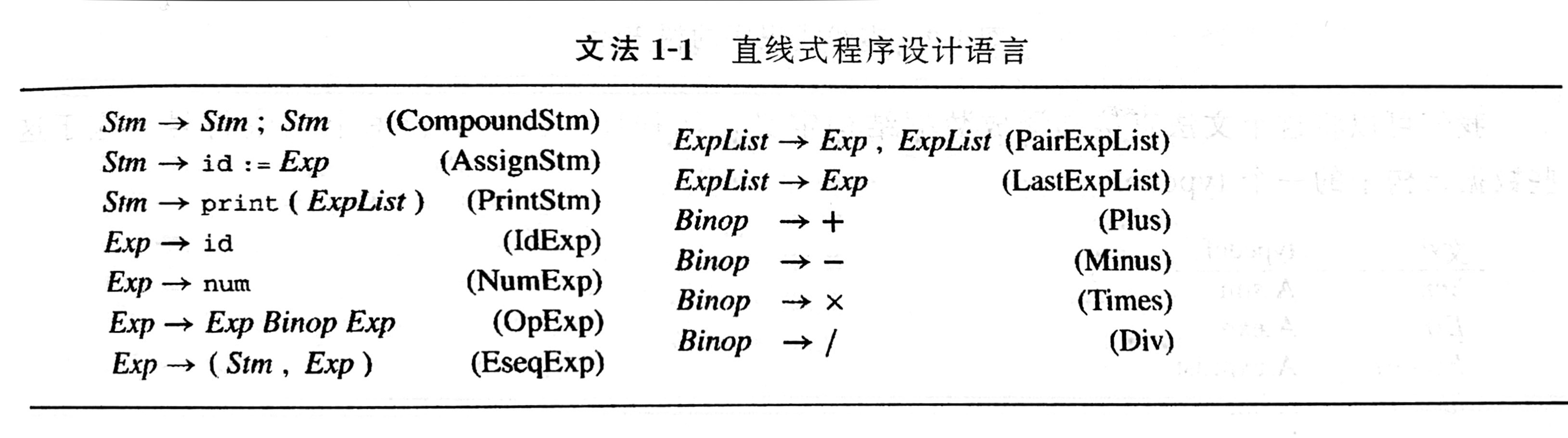
ZUCC_编译语言原理与编译_实验04 语言与文法

Understanding of the concept of "quality"

ZUCC_ Principles of compiling language and compilation_ Experiment 05 regular expression, finite automata, lexical analysis

The article takes you to understand the security of Windows operating system and protect your computer from infringement

ZUCC_编译语言原理与编译_实验01 语言分析与简介
[untitled]
随机推荐
貸款五級分類
根据网络上的视频的m3u8文件通过ffmpeg进行合成视频
Pat 1157: school anniversary
io模型初探
DHCP, TFTP Foundation
1279_ Vsock installation failure resolution when VMware player installs VMware Tools
权限模型 DAC ACL RBAC ABAC
2022 mobile crane driver special operation certificate examination question bank and online simulation examination
将mysql的数据库导出xxx.sql,将xxx.sql文件导入到服务器的mysql中。项目部署。
2022年制冷与空调设备运行操作上岗证题库及模拟考试
Three categories of financial assets under the new standards: AMC, fvoci and FVTPL
贷款五级分类
Longhorn installation and use
PAT 1157:校庆
普通token
2021-03-09 comp9021 class 7 Notes
JUC personal simple notes
Getting started with ffmpeg
Several ways you can't move zero (sequel)
ZUCC_编译语言原理与编译_实验04 语言与文法