当前位置:网站首页>Machine learning notes - time series as features
Machine learning notes - time series as features
2022-06-28 01:49:00 【Sit and watch the clouds rise】
One 、 Serial dependency
Attributes of time series that are most easily modeled as time-dependent attributes , in other words , We can get features directly from the time index . however , Some time series attributes can only be modeled as series related attributes , That is, the past value of the target sequence is used as the feature . as time goes on , The structure of these time series may not be obvious ; However , Draw based on past values , The structure becomes clear - As shown in the figure below .

With trends and seasonality , We trained the model to fit the curve to the graph on the left of the above figure —— These models are learning about time dependency .
1、 loop
A particularly common way to represent serial dependencies is through loops . Periods are growth and decay patterns in time series , It is related to how the value in a sequence depends on the value of the previous time , But it doesn't necessarily depend on the time step itself . Cyclic behavior is a characteristic of a system that can affect itself or its response over time . economic 、 Epidemic 、 Animal populations 、 Volcanic eruptions and similar natural phenomena often exhibit cyclic behavior .

The difference between cyclical behavior and seasonality is , Cycles do not necessarily depend on time as seasons do . What happens in a cycle has nothing to do with a specific date , And it's more about recent events . With time ( At least relative ) Independence means that circular behavior may be more irregular than seasonality .
Two 、 Lag sequence and lag graph
To investigate possible sequence dependencies in time series ( Such as period ), We need to create a sequence “ lagging ” copy . A lag time series means moving its value forward by one or more time steps , Or equivalent , Moves the time in its index backward by one or more steps . In any case , The result is that the observations in the lag series seem to occur at a later time .
This shows the monthly unemployment rate (y) And its first and second lag sequences ( Respectively y_lag_1 and y_lag_2). Notice how the value of the lag sequence moves forward in time .
import pandas as pd

# Federal Reserve dataset: https://www.kaggle.com/federalreserve/interest-rates
reserve = pd.read_csv(
    "../input/ts-course-data/reserve.csv",
    parse_dates={'Date': ['Year', 'Month', 'Day']},
    index_col='Date',
)

y = reserve.loc[:, 'Unemployment Rate'].dropna().to_period('M')
df = pd.DataFrame({
    'y': y,
    'y_lag_1': y.shift(1),
    'y_lag_2': y.shift(2),
})

df.head()| Date | y | y_lag_1 | y_lag_2 |
|---|---|---|---|
| 1954-07 | 5.8 | NaN | NaN |
| 1954-08 | 6.0 | 5.8 | NaN |
| 1954-09 | 6.1 | 6.0 | 5.8 |
| 1954-10 | 5.7 | 6.1 | 6.0 |
| 1954-11 | 5.3 | 5.7 | 6.1 |
Through lag time series , We can make its past value appear at the same time as the value we are trying to predict ( let me put it another way , In the same line ). This makes the lag sequence available as a feature for modeling sequence dependencies . To predict the unemployment rate series , We can use y_lag_1 and y_lag_2 As a feature to predict the target y. This will forecast the future unemployment rate as a function of the unemployment rate in the previous two months .
1、 Lag graph
The lag graph of the time series shows the plotted values relative to the lag . By looking at the lag graph , The sequence dependence in time series usually becomes obvious . We can see from this lagging chart of the US unemployment rate , There is a strong and obvious linear relationship between the current unemployment rate and the past unemployment rate .

The most common measure of sequence dependence is called autocorrelation , It is only the correlation between time series and one of their lags . The unemployment rate is lagging behind 1 The autocorrelation of time is 0.99, It's lagging behind 2 When is 0.98, And so on .
2、 Choice lag
When selecting hysteresis as a feature , It is often useless to include each lag in autocorrelation . for example , In the midst of unemployment , lagging 2 The autocorrelation of may come entirely from hysteresis 1 Of “ attenuation ” Information —— It is only the related information inherited from the previous step . If lag 2 Does not contain any new content , So if we already have a lag 1, There is no reason to include it .
Partial autocorrelation tells you the correlation of the lag to all previous lags —— so to speak , Lagging contribution “ new ” Correlation quantity . Plotting partial autocorrelation can help you choose which hysteresis feature to use . In the following illustration , lagging 1 To lag 6 Fall in the “ No correlation ” Section ( Blue ) outside , So we can choose to lag 1 To lag 6 As a characteristic of the unemployment rate . ( lagging 11 It could be a false alarm .)

A graph like the one above is called a correlation graph . The correlation diagram is applicable to the hysteresis characteristics , It is essentially like a periodic graph applied to Fourier features .
Last , We need to note that autocorrelation and partial autocorrelation are measures of linear correlation . Because the time series in the real world usually have great nonlinear correlation , Therefore, when selecting hysteresis characteristics , It's best to look at the lag chart ( Or use some more general correlation measures , Such as mutual information ). The sunspot series have nonlinear related hysteresis , We may ignore autocorrelation .

A nonlinear relationship like this can be transformed into a linear relationship , You can also learn through appropriate algorithms .
3、 ... and 、 Example - Influenza trends
Flu Trends Data set containing 2009 - 2016 A doctor's record of seeing a doctor for flu for several weeks over the years . Our goal is to predict the number of influenza cases in the coming weeks .
We will take two approaches . First , We will use the lag feature to predict the number of doctor visits . Our second method is to use the lag of another set of time series to predict the number of doctor visits : Google Trends captures flu related search terms .
from pathlib import Path
from warnings import simplefilter

import matplotlib.pyplot as plt
import numpy as np
import pandas as pd
import seaborn as sns
from scipy.signal import periodogram
from sklearn.linear_model import LinearRegression
from sklearn.model_selection import train_test_split
from statsmodels.graphics.tsaplots import plot_pacf

simplefilter("ignore")

# Set Matplotlib defaults
plt.style.use("seaborn-whitegrid")
plt.rc("figure", autolayout=True, figsize=(11, 4))
plt.rc(
    "axes",
    labelweight="bold",
    labelsize="large",
    titleweight="bold",
    titlesize=16,
    titlepad=10,
)
plot_params = dict(
    color="0.75",
    style=".-",
    markeredgecolor="0.25",
    markerfacecolor="0.25",
)
%config InlineBackend.figure_format = 'retina'


def lagplot(x, y=None, lag=1, standardize=False, ax=None, **kwargs):
    from matplotlib.offsetbox import AnchoredText
    x_ = x.shift(lag)
    if standardize:
        x_ = (x_ - x_.mean()) / x_.std()
    if y is not None:
        y_ = (y - y.mean()) / y.std() if standardize else y
    else:
        y_ = x
    corr = y_.corr(x_)
    if ax is None:
        fig, ax = plt.subplots()
    scatter_kws = dict(
        alpha=0.75,
        s=3,
    )
    line_kws = dict(color='C3', )
    ax = sns.regplot(x=x_,
                     y=y_,
                     scatter_kws=scatter_kws,
                     line_kws=line_kws,
                     lowess=True,
                     ax=ax,
                     **kwargs)
    at = AnchoredText(
        f"{corr:.2f}",
        prop=dict(size="large"),
        frameon=True,
        loc="upper left",
    )
    at.patch.set_boxstyle("square, pad=0.0")
    ax.add_artist(at)
    ax.set(title=f"Lag {lag}", xlabel=x_.name, ylabel=y_.name)
    return ax


def plot_lags(x, y=None, lags=6, nrows=1, lagplot_kwargs={}, **kwargs):
    import math
    kwargs.setdefault('nrows', nrows)
    kwargs.setdefault('ncols', math.ceil(lags / nrows))
    kwargs.setdefault('figsize', (kwargs['ncols'] * 2, nrows * 2 + 0.5))
    fig, axs = plt.subplots(sharex=True, sharey=True, squeeze=False, **kwargs)
    for ax, k in zip(fig.get_axes(), range(kwargs['nrows'] * kwargs['ncols'])):
        if k + 1 <= lags:
            ax = lagplot(x, y, lag=k + 1, ax=ax, **lagplot_kwargs)
            ax.set_title(f"Lag {k + 1}", fontdict=dict(fontsize=14))
            ax.set(xlabel="", ylabel="")
        else:
            ax.axis('off')
    plt.setp(axs[-1, :], xlabel=x.name)
    plt.setp(axs[:, 0], ylabel=y.name if y is not None else x.name)
    fig.tight_layout(w_pad=0.1, h_pad=0.1)
    return fig


data_dir = Path("../input/ts-course-data")
flu_trends = pd.read_csv(data_dir / "flu-trends.csv")
flu_trends.set_index(
    pd.PeriodIndex(flu_trends.Week, freq="W"),
    inplace=True,
)
flu_trends.drop("Week", axis=1, inplace=True)

ax = flu_trends.FluVisits.plot(title='Flu Trends', **plot_params)
_ = ax.set(ylabel="Office Visits")
Our influenza trend data show irregular cycles rather than regular seasonality : The peak often occurs around the new year , But sometimes earlier or later , Sometimes larger or smaller . Modeling these cycles using lag features will enable our forecasters to respond dynamically to changing conditions , Instead of being limited by the exact date and time as seasonal characteristics .
Let's first look at the lag and autocorrelation graph :
_ = plot_lags(flu_trends.FluVisits, lags=12, nrows=2)
_ = plot_pacf(flu_trends.FluVisits, lags=12)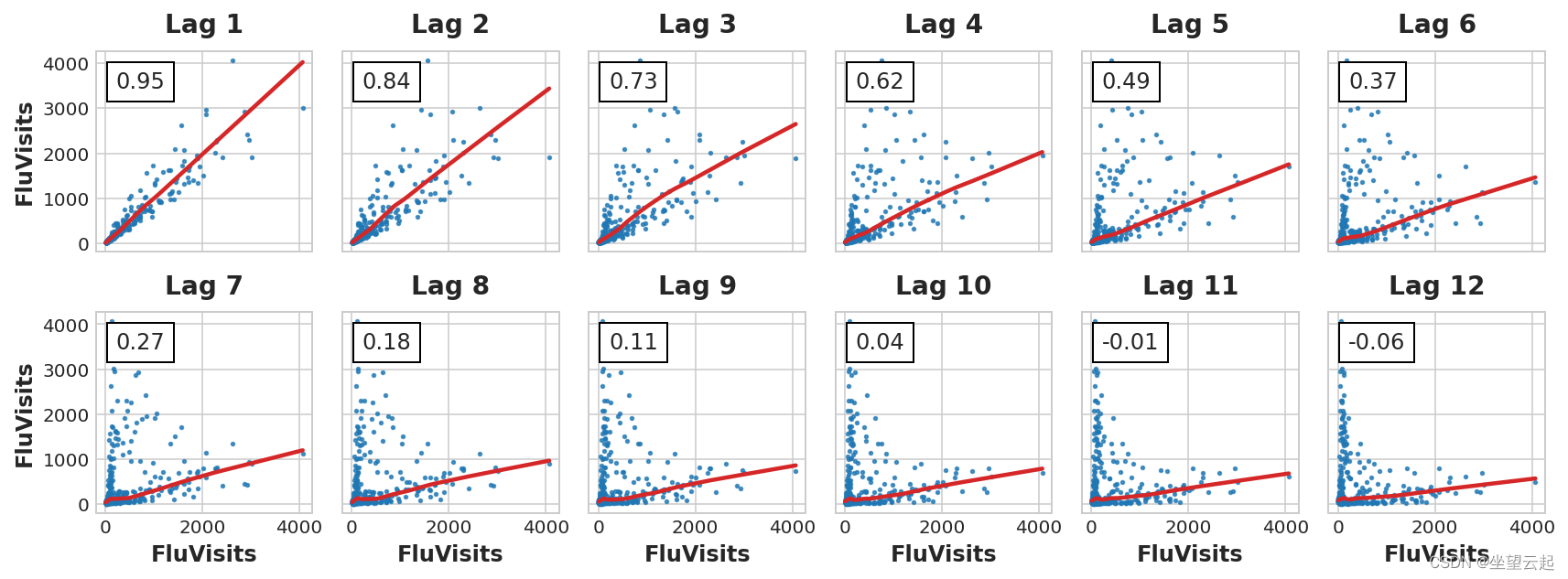

The hysteresis diagram shows FluVisits The relationship with its lag is mainly linear , Partial autocorrelation indicates that hysteresis can be used 1、2、3 and 4 Capture dependencies . We can use shift Method lag Pandas Time series in . For this question , We will use 0.0 Fill in missing values created by lag .
def make_lags(ts, lags):
    return pd.concat(
        {
            f'y_lag_{i}': ts.shift(i)
            for i in range(1, lags + 1)
        },
        axis=1)


X = make_lags(flu_trends.FluVisits, lags=4)
X = X.fillna(0.0)
We can create predictions for any number of steps beyond the training data . However , When hysteresis is used , We are limited to the time steps available to predict the lag value . Use lag on Monday 1 function , We can't predict Wednesday , Because of the lag required 1 The value is Tuesday , But it hasn't happened yet .
For the current example , We will only use values from the test set .
# Create target series and data splits
y = flu_trends.FluVisits.copy()
X_train, X_test, y_train, y_test = train_test_split(X, y, test_size=60, shuffle=False)

# Fit and predict
model = LinearRegression()  # `fit_intercept=True` since we didn't use DeterministicProcess
model.fit(X_train, y_train)
y_pred = pd.Series(model.predict(X_train), index=y_train.index)
y_fore = pd.Series(model.predict(X_test), index=y_test.index)

ax = y_train.plot(**plot_params)
ax = y_test.plot(**plot_params)
ax = y_pred.plot(ax=ax)
_ = y_fore.plot(ax=ax, color='C3')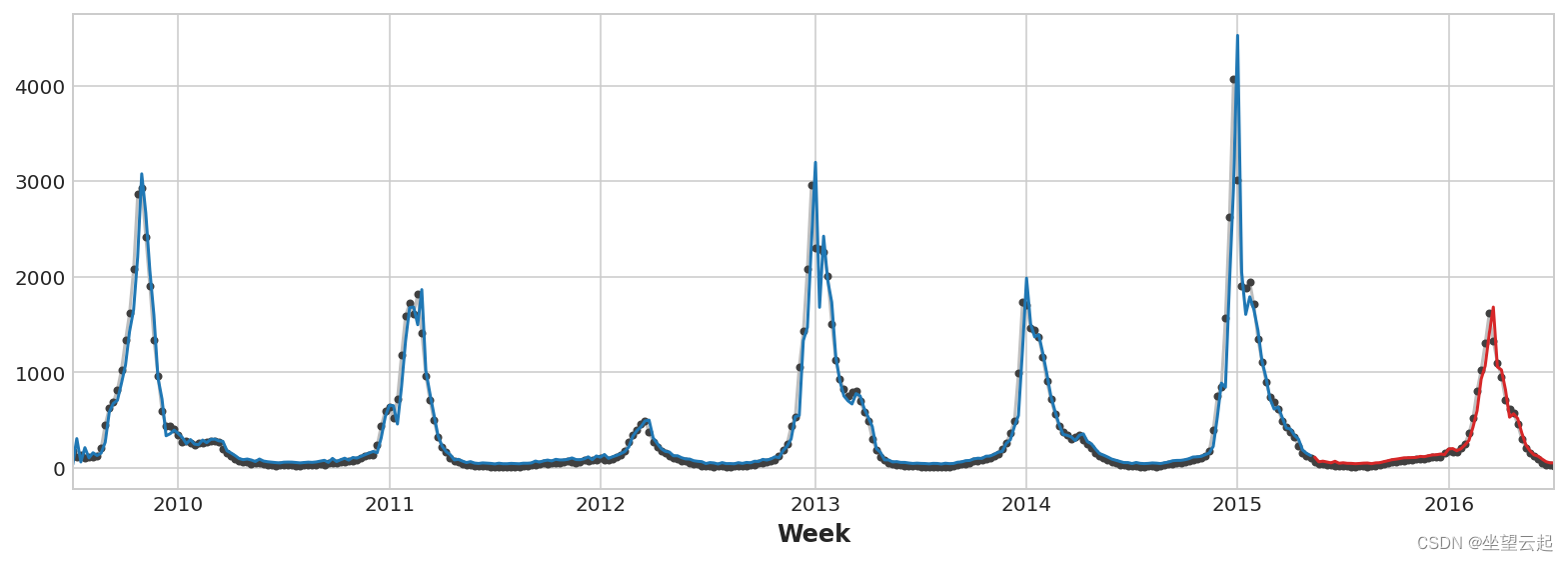
Just look at the forecast , We can see how our model needs a time step to respond to sudden changes in the target sequence . This is a common limitation of models that only use the lag of the target series as a feature .
ax = y_test.plot(**plot_params)
_ = y_fore.plot(ax=ax, color='C3')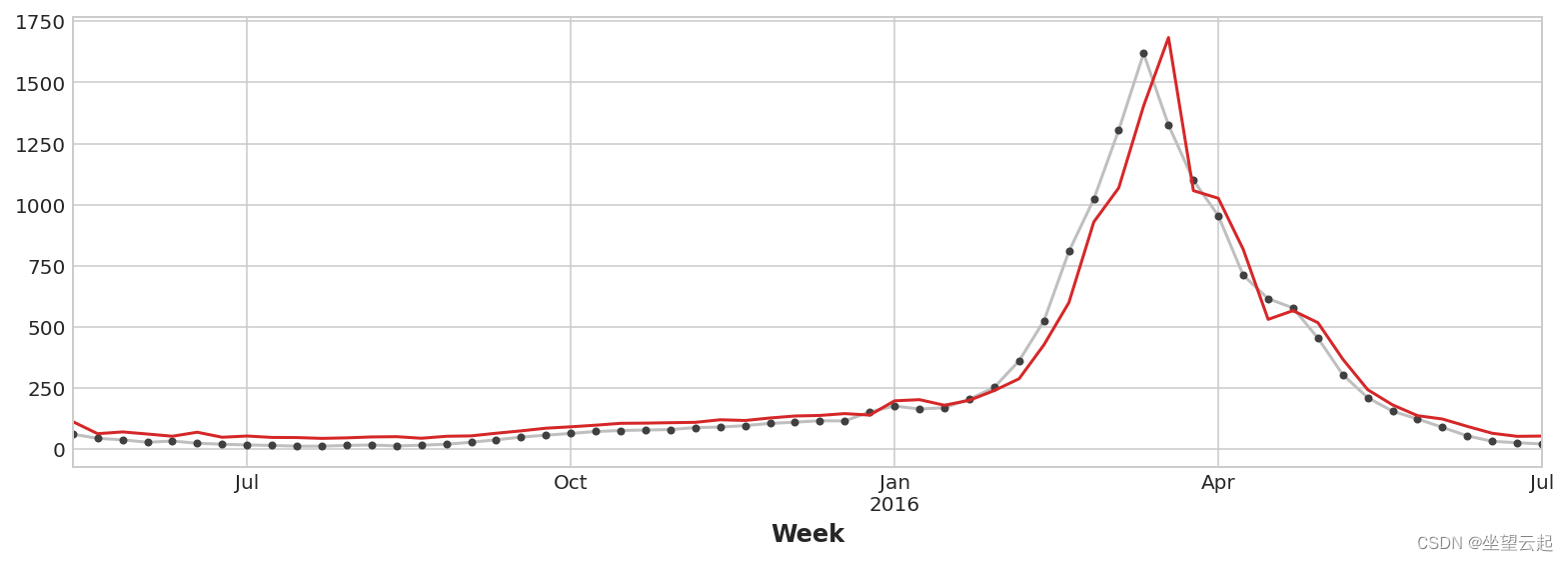
To improve forecasting , We can try to find leading indicators , That is, it can provide information for the change of influenza cases “ early warning ” Time series of . For our second method , We will add to our training data the popularity of some flu related search terms measured by Google Trends .
Will search for the phrase “FluCough” And target “FluVisits” Draw a chart to show , Such search terms may be useful as leading indicators : Flu related searches tend to become more popular a few weeks before the visit .
ax = flu_trends.plot(
    y=["FluCough", "FluVisits"],
    secondary_y="FluCough",
)
The dataset contains 129 Such a term , We only use a few of them .
search_terms = ["FluContagious", "FluCough", "FluFever", "InfluenzaA", "TreatFlu", "IHaveTheFlu", "OverTheCounterFlu", "HowLongFlu"]

# Create three lags for each search term
X0 = make_lags(flu_trends[search_terms], lags=3)

# Create four lags for the target, as before
X1 = make_lags(flu_trends['FluVisits'], lags=4)

# Combine to create the training data
X = pd.concat([X0, X1], axis=1).fillna(0.0)
Our prediction is a bit rough , But our model seems to be better able to predict the sudden increase in influenza visits , This shows that several time series of search popularity are indeed effective as leading indicators .
X_train, X_test, y_train, y_test = train_test_split(X, y, test_size=60, shuffle=False)

model = LinearRegression()
model.fit(X_train, y_train)
y_pred = pd.Series(model.predict(X_train), index=y_train.index)
y_fore = pd.Series(model.predict(X_test), index=y_test.index)

ax = y_test.plot(**plot_params)
_ = y_fore.plot(ax=ax, color='C3')
The time series in this paper can be called “ Pure cycle ”: They have no obvious trend or seasonality . Time series have trends at the same time 、 Seasonality and periodicity , Such sequences can be modeled using linear regression by adding appropriate features to each component . You can even mix models that have been trained to learn components separately .
边栏推荐
- lefse分析本地实现方法带全部安装文件和所有细节,保证成功。
- From small to large, why do you always frown when talking about learning
- 力扣今日题-522. 最长特殊序列
- 万字长文看懂商业智能(BI)|推荐收藏
- 嵌入式必学,硬件资源接口详解——基于ARM AM335X开发板 (上)
- Golang monkeys eat peaches and ask for the number of peaches on the first day
- Solon 1.8.3 release, cloud native microservice development framework
- 评价——秩和比综合评价
- Lmsoc: a socially sensitive pre training method
- 【牛客討論區】第四章:Redis
猜你喜欢

Adobe Premiere Basics - general operations for editing material files (offline files, replacing materials, material labels and grouping, material enabling, convenient adjustment of opacity, project pa

【嵌入式基础】串口通信
How about the market application strength of large-size conductive slip rings

面试官问:能否模拟实现JS的new操作符

美团动态线程池实践思路已开源

Database query optimization: master-slave read-write separation and common problems

药物发现综述-01-药物发现概述
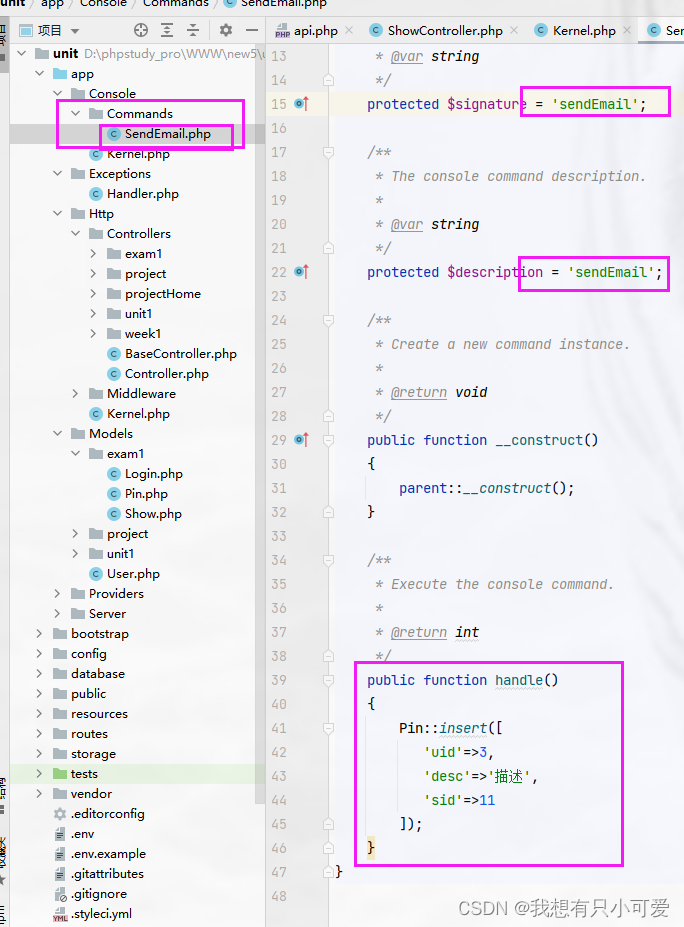
Implementation of timed tasks in laravel framework
Adobe Premiere基础-编辑素材文件常规操作(脱机文件,替换素材,素材标签和编组,素材启用,便捷调节不透明度,项目打包)(十七)

Adobe Premiere Basics - common video effects (cropping, black and white, clip speed, mirroring, lens halo) (XV)
随机推荐
Some habits of making money in foreign lead
Google Earth engine (GEE) -- an error caused by the imagecollection (error) traversing the image collection
[embedded foundation] memory (cache, ram, ROM, flash)
Golang monkeys eat peaches and ask for the number of peaches on the first day
Neural network of zero basis multi map detailed map
【嵌入式基础】内存(Cache,RAM,ROM,Flash)
Comprehensive evaluation of free, easy-to-use and powerful open source note taking software
药物发现综述-03-分子设计与优化
零基础多图详解图神经网络
Cloud assisted privacy collection intersection (server assisted psi) protocol introduction: Learning
Adobe Premiere基础-编辑素材文件常规操作(脱机文件,替换素材,素材标签和编组,素材启用,便捷调节不透明度,项目打包)(十七)
TIA botu_ Concrete method of making analog input and output Global Library Based on SCL language
Meituan dynamic thread pool practice idea has been open source
Why stainless steel swivel
9. Openfeign service interface call
[open source] open source system sorting - Examination Questionnaire, etc
向excel中导入mysql中的数据表
解决ionic4 使用hammerjs手势 press 事件,页面无法滚动问题
什么是数字化?什么是数字化转型?为什么企业选择数字化转型?
药物发现综述-01-药物发现概述