当前位置:网站首页>Chapter2 Standard Output
Chapter2 Standard Output
2022-07-23 04:11:00 【梦想家DBA】
1.1 Writing Output to the Terminal/Window
Use the echo built-in command.All the parameters on the command line are printed to the screen.
The echo command is one of the most simple of all bash commands .
keep in mind:
(1) the shell is parsing the arguments on the echo command line.
(2) the spacing between arguments is ignored
[[email protected] shelllearning]$ echo Please wait
Please wait
[[email protected] shelllearning]$ echo this     was     very      widely        spaced
this was very widely spaced
[[email protected] shelllearning]$
1.2 Writing Output but Preserving Spacing
Enclose the string in quotes.
[[email protected] shelllearning]$ echo "this    was    very   widely   spaced"
this    was    very   widely   spaced
[[email protected] shelllearning]$ echo 'this    was    very   widely   spaced'
this    was    very   widely   spaced
[[email protected] shelllearning]$
1.3 Writing Output with More Formatting Control
The numbers between the % and the format type (s or f) provide additional formatting details.
For a string , the first digit is the maximum field width, and the second is the minimum field width.
[[email protected] shelllearning]$ printf '%s = %d\n' Lines $LINES
Lines = 49
[[email protected] shelllearning]$ printf '%-10.10s = %4.2f\n' 'GigaHerz' 1.92735
GigaHerz   = 1.93
[[email protected] shelllearning]$
1.4 Writing Output Without the Newline
Using printf ——just leave of the ending \n in your format string. with echo use the -n option.
[[email protected] shelllearning]$ printf "%s %s" next promt
next promt[[email protected] shelllearning]$
[[email protected] shelllearning]$ echo -n prompt
prompt[[email protected] shelllearning]$
[[email protected] shelllearning]$
1.5 Saving Output from a Command
Use the > symbol to tell the shell to redirect the output into a file.
The cat command get its name from the longer word concatenation. The cat command concatenates the output from the several files listed on its command line.
[[email protected] shelllearning]$ echo fill it up
fill it up
[[email protected] shelllearning]$ echo fill it up > file.txt | cat file.txt
fill it up
[[email protected] shelllearning]$ echo fill it up one  > first.half
[[email protected] shelllearning]$ echo fill it up two  > second.half
[[email protected] shelllearning]$ cat first.half second.half > whole.file | cat whole.file
fill it up one
fill it up two
[[email protected] shelllearning]$
1.6 Saving Output to Other Files
Use more of a pathname when you redirect the output.
[[email protected] test]$ echo some more data > /tmp/echo.out
[[email protected] test]$ # or
[[email protected] test]$ echo some more data > ../../over.here
[[email protected] test]$
1.7 Saving Output from the ls Command
Use the -C option on ls when you redirect the output.
[[email protected] test]$ echo you are a  > a.out
[[email protected] test]$ echo he is a congfigure > cong.txt
[[email protected] test]$ echo my name is def > def.conf
[[email protected] test]$ echo that is a good file > file.txt
[[email protected] test]$ echo there are more foods > more.txt
[[email protected] test]$ echo I like the zebra which is a animal > zebra.list
[[email protected] test]$ ls
a.out  cong.txt  def.conf  file.txt  more.txt  zebra.list
[[email protected] test]$ ls > /tmp/save.out | cat /tmp/save.out
[[email protected] test]$ cat /tmp/save.out
a.out
cong.txt
def.conf
file.txt
more.txt
zebra.list
[[email protected] test]$ ls -C > /tmp/save.out
[[email protected] test]$ cat /tmp/save.out
a.out  cong.txt  def.conf  file.txt  more.txt  zebra.list
[[email protected] test]$ ls -l
total 24
-rw-rw-r-- 1 maxwell maxwell 10 Jul 21 15:39 a.out
-rw-rw-r-- 1 maxwell maxwell 19 Jul 21 15:40 cong.txt
-rw-rw-r-- 1 maxwell maxwell 15 Jul 21 15:40 def.conf
-rw-rw-r-- 1 maxwell maxwell 20 Jul 21 15:40 file.txt
-rw-rw-r-- 1 maxwell maxwell 21 Jul 21 15:41 more.txt
-rw-rw-r-- 1 maxwell maxwell 35 Jul 21 15:42 zebra.list
[[email protected] test]$
[[email protected] test]$
1.8 Sending Both Output and Error Messages to Different Files.
Redirect output and error messages to different files
[[email protected] test]$ myprogram 1> messages.out 2> message.error more commonly
[[email protected] test]$ myprogram > messages.out 2> message.err
1.9 Sending Both Output and Error Messages to the Same File
Use the shell syntax to redirect standard error messages to the same place as standard output.
[[email protected] test]$ both >& outfile

# or

[[email protected] test]$ both &> outfile
&> or >& is a shortcut that simply sends both STDOUT and STDERR to the same place --exactly what we want to do.
1.10 Appending Rather Than Clobbering Output
[[email protected] test]$ ls
a.out  cong.txt  def.conf  file.txt  more.txt  zebra.list
[[email protected] test]$ ls > /tmp/ls.out
[[email protected] test]$ cd ../elsewhere
[[email protected] elsewhere]$ ls >> /tmp/ls.out
[[email protected] elsewhere]$ cd ../anotherdir
[[email protected] anotherdir]$ ls >> /tmp.ls.out
-bash: /tmp.ls.out: Permission denied
[[email protected] anotherdir]$ ls >> /tmp/ls.out
[[email protected] anotherdir]$ cat /tmp/ls.out
a.out
cong.txt
def.conf
file.txt
more.txt
zebra.list
a1.out
cong1.txt
def1.conf
file1.txt
more1.txt
zebra1.list
TestA.txt
TestB.txt
TestC.txt
[[email protected] anotherdir]$
1.11 Using Just the Beginning or End of a File
use the head or tail commands.head will output the first 10 lines and tail will output the last 10 lines of the given file.
1.12 Throwing Output Away
Redirect the output to /dev/null as shown in these examples:
[[email protected] test]$ find / -name myfile -print 2> /dev/null
[[email protected] test]$ noisy >/dev/null 2>&1
1.13 Saving or Grouping Output from Several Commands
Use braces { } to group these commands together, then redirection applies to the output from all commands in the group.
[[email protected] test]$ { pwd; ls; cd ../elsewhere; pwd; ls; } > /tmp/all.out
[[email protected] elsewhere]$ (pwd; ls; cd ../elsewhere; pwd; ls;) > /tmp/alla.out
[[email protected] elsewhere]$ cat /tmp/all.out
/home/maxwell/shelllearning/test
a.out
asdfwednnrw2rs2esff.txt
cong.txt
def.conf
file.txt
lines
more.txt
zebra.list
/home/maxwell/shelllearning/elsewhere
a1.out
cong1.txt
def1.conf
file1.txt
more1.txt
zebra1.list
[[email protected] elsewhere]$ cat /tmp/alla.out
/home/maxwell/shelllearning/elsewhere
a1.out
cong1.txt
def1.conf
file1.txt
more1.txt
zebra1.list
/home/maxwell/shelllearning/elsewhere
a1.out
cong1.txt
def1.conf
file1.txt
more1.txt
zebra1.list
[[email protected] elsewhere]$
1.14 Connecting Two Programs by Using Output As Input
[[email protected] test]$ cat one.file another.file > /tmp/cat.out
[[email protected] test]$ sort < /tmp/cat.out
1
23
345
4567
56789
678910
a
ab
abc
abcd
abcde
abcdef
abcdefg
abcdefgh
abcdefghi
abcdefghij
adjajnsojqo
dfjajdjado
sadjajdfc
sdjdasfa
[[email protected] test]$ cat one.file another.file | sort
1
23
345
4567
56789
678910
a
ab
abc
abcd
abcde
abcdef
abcdefg
abcdefgh
abcdefghi
abcdefghij
adjajnsojqo
dfjajdjado
sadjajdfc
sdjdasfa
[[email protected] test]$ 边栏推荐
- Chrome selenium uses the default profile without emptying it every time
- Kingbasees SQL language reference manual of Jincang database (8. Function (V))
- Kingbasees SQL language reference manual of Jincang database (8. Function (I))
- Accessory mode
- 金仓数据库 KingbaseES SQL 语言参考手册 (8. 函数(二))
- 22、wpf之Combobox使用小记
- 31-spark的算子使用及调度流程
- redis的事务、锁机制、秒杀
- 网络数据泄露事件频发,个人隐私信息如何保护?
- c# 字节数组和类相互转换
猜你喜欢

Read write barrier in memory barrier -- concurrency problem

More detailed series than your teacher -- structure

vs中新建文件/筛选器/文件夹

performance介绍

How does the browser import and export | delete bookmarks? Here are the steps

CV (3)- CNNs

Redis事务-秒杀案例模拟实现详细过程
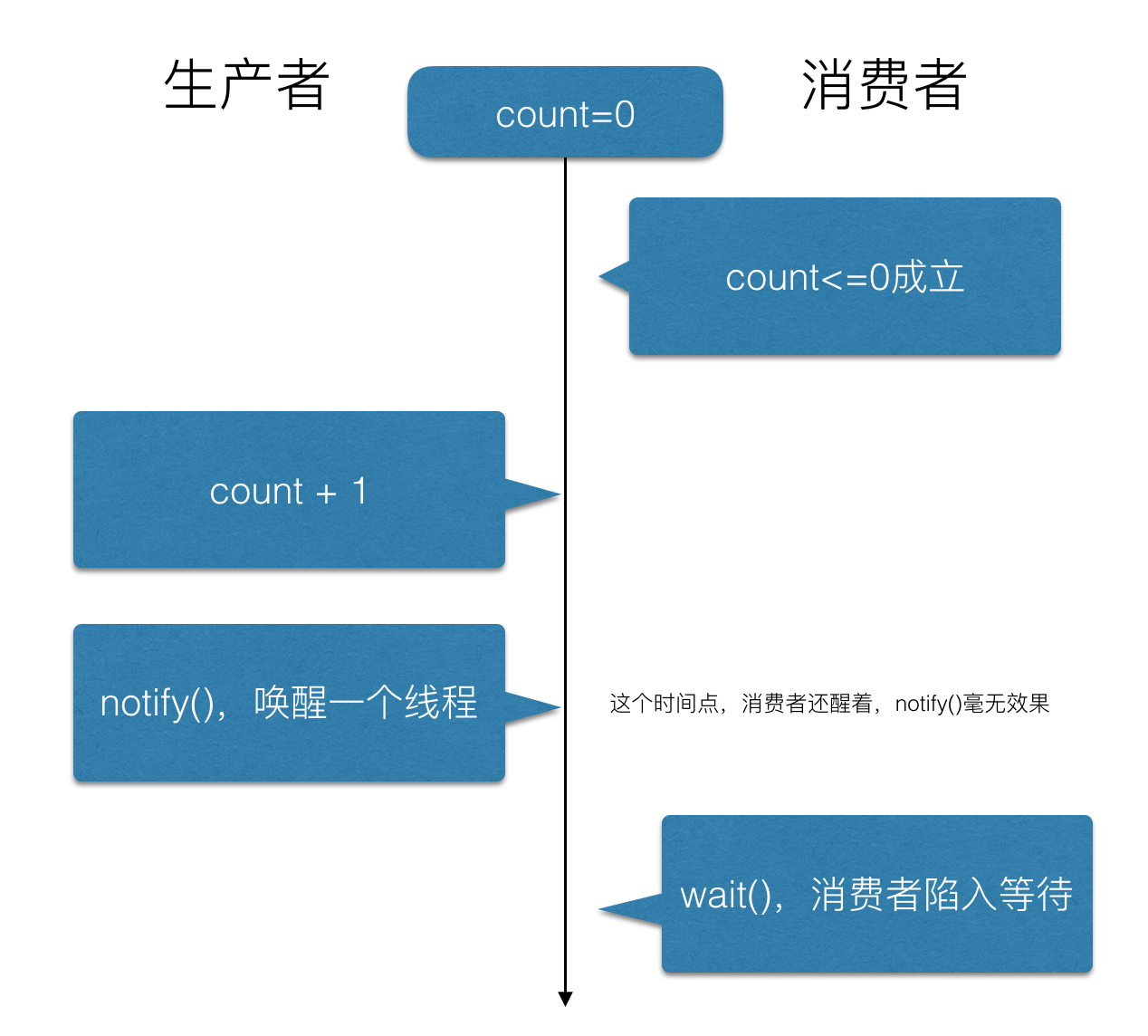
"Lost wake up problem" in multithreading | why do wait() and notify() need to be used with the synchronized keyword?

宇视NVR设备接入EasyCVR平台,离线后无法上线该如何解决?

Cs5266+ma8621 do the scheme design of typec to hdmi+pd+u3+2u+sd/tf seven in one expansion dock | cs5266 multi port expansion dock pcb+ schematic diagram reference
随机推荐
谈谈实施数据治理时常犯的10大错误
仅用5000行代码,在V853上AI渲染出一亿幅山水画
How to delete an item in sonar
Kingbasees SQL language reference manual of Jincang database (8. Function (2))
Registration tree mode
什么是文件管理软件?你为什么需要它?
"Lost wake up problem" in multithreading | why do wait() and notify() need to be used with the synchronized keyword?
After 100 billion of revenue, Alibaba cloud ecosystem has a new way to play
1. Assignment statement
【学习笔记】图论思维题
UE5 官方案例Lyra全特性详解 6.生成防御塔
MySQL queries all table names and column information of the database through SQL
[pytorch] the difference between cuda() and to (device)
Redis transaction, lock mechanism, seckill
MySQL master-slave replication
How to query data differences between two isomorphic tables of massive data
金仓数据库 KingbaseES SQL 语言参考手册 (8. 函数(五))
Sonar中如何删除一个项目
The difference between sprite and overridesprite in unity image (Reprint)
Kingbasees SQL language reference manual of Jincang database (8. Function (9))