当前位置:网站首页>Canal安装配置
Canal安装配置
2022-06-24 06:39:00 【Angryshark_128】
资源下载
链接:https://pan.baidu.com/s/1wKqJ0VypFxKd6WnJxIoEqg
提取码:wrmf
配置Mysql
新建canal库
CREATE USER canal IDENTIFIED BY 'canal';
GRANT SELECT, REPLICATION SLAVE, REPLICATION CLIENT ON *.* TO 'canal'@'%';
FLUSH PRIVILEGES;
解压至目录
> tar -xf canal.deployer-1.1.5-SNAPSHOT.tar.gz -C /pandora/soft/canal-1.1.5
修改配置文件
> vi /pandora/soft/canal-1.1.5/conf/canal.properties

# 设置数据库实例
canal.destinations = oidd

> cp -R example/ oidd

> cd /pandora/soft/canal-1.1.5/conf/oidd

> vi instance.properties

# 要监控的数据库地址
canal.instance.master.address=127.0.0.1:30000

# 数据库用户名
canal.instance.dbUsername = canal
# 数据库密码
canal.instance.dbPassword = canal
# 指定需要同步的数据库
canal.instance.defaultDatabaseName = oidd
# 指定编码方式
canal.instance.connectionCharset = UTF-8
启动Canal
> cd /pandora/soft/cannal-1.1.5/bin
> ./startup.sh
打开Canal样例项目运行
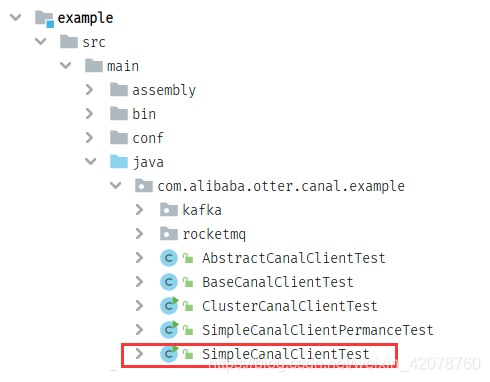

修改参数:IP 端口 数据库 用户名 密码
package com.alibaba.otter.canal.example;

import java.net.InetSocketAddress;

import com.alibaba.otter.canal.client.CanalConnector;
import com.alibaba.otter.canal.client.CanalConnectors;
import com.alibaba.otter.canal.common.utils.AddressUtils;

/**
 * 单机模式的测试例子
 *
 * @author jianghang 2013-4-15 下午04:19:20
 * @version 1.0.4
 */
public class SimpleCanalClientTest extends AbstractCanalClientTest {

    public SimpleCanalClientTest(String destination) {
        super(destination);
    }

    public static void main(String[] args) {
        // 根据ip,直接创建链接,无HA的功能

        String destination = "oidd";
        String ip = "106.13.73.198";
        Integer port = 11111;
        String userName = "canal";
        String password = "canal";

        CanalConnector connector = CanalConnectors.newSingleConnector(new InetSocketAddress(ip, port),
                destination,
                userName,
                password);

        final SimpleCanalClientTest clientTest = new SimpleCanalClientTest(destination);
        clientTest.setConnector(connector);
        clientTest.start();
        Runtime.getRuntime().addShutdownHook(new Thread() {

            public void run() {
                try {
                    logger.info("## stop the canal client");
                    clientTest.stop();
                } catch (Throwable e) {
                    logger.warn("##something goes wrong when stopping canal:", e);
                } finally {
                    logger.info("## canal client is down.");
                }
            }

        });
    }

}
创建新表
use oidd;


CREAETE TABLE ***
可以看到最新的LOG

边栏推荐
- What is the main function of cloud disk? How to restore deleted pictures
- Multi sensor fusion track fusion
- Record -- about the problem of garbled code when JSP foreground passes parameters to the background
- Application of intelligent reservoir management based on 3D GIS system
- RealNetworks vs. 微软:早期流媒体行业之争
- Accumulateur Spark et variables de diffusion
- C语言学生管理系统——可检查用户输入合法性,双向带头循环链表
- You have a chance, here is a stage
- [JUC series] completionfuture of executor framework
- 缓存操作rockscache原理图
猜你喜欢

leetcode:85. Max rectangle

With a goal of 50million days' living, pwnk wants to build a "Disneyland" for the next generation of young people

Virtual file system

开源与创新

puzzle(019.1)Hook、Gear
原神方石机关解密
![[JUC series] completionfuture of executor framework](/img/d0/c26c9b85d1c1b0da4f1a6acc6d33e3.png)
[JUC series] completionfuture of executor framework

Oracle SQL comprehensive application exercises
Open source and innovation
leetcode:85. 最大矩形
随机推荐
面渣逆袭:MySQL六十六问,两万字+五十图详解
What are the audio formats? Can the audio format be converted
Oracle SQL comprehensive application exercises
How to operate the little red book account: making good use of the theory of long tail words
Centos7 deploying mysql-5.7
Spark累加器和廣播變量
Spark accumulators and broadcast variables
跳跃游戏II[贪心练习]
Cloud native high availability and Disaster Recovery Series (I): pod break up scheduling
puzzle(019.1)Hook、Gear
Game website making tutorial and correct view of games
为什么要用lock 【readonly】object?为什么不要lock(this)?
Actual combat | how to deploy flask project using wechat cloud hosting
【问题解决】The connection to the server localhost:8080 was refused
Page Jump and database connection of student management system
智能视觉组A4纸识别样例
How do I turn off win10 automatic update? What are the good ways?
Spark累加器和广播变量
Five minute run through 3D map demo
Command ‘[‘where‘, ‘cl‘]‘ returned non-zero exit status 1.