当前位置:网站首页>Statistical learning method (4/22) naive Bayes
Statistical learning method (4/22) naive Bayes
2022-06-29 01:11:00 【Xiaoshuai acridine】
Naive Bayes (naive bayes) Method is a classification method based on Bayesian theorem and the assumption of independence of feature conditions . For a given set of training data , Firstly, the joint probability distribution of input and output is learned based on the assumption of characteristic condition independence : And then based on this model , For the given input x, Using Bayes theorem to get the output with the maximum posterior probability y. Naive Bayes is easy to implement , Efficient learning and forecasting , Is a common method .
Eye of depth course link :https://ai.deepshare.net/detail/p_619b93d0e4b07ededa9fcca0/5
Code link :
https://github.com/zxs-000202/Statistical-Learning-Methods


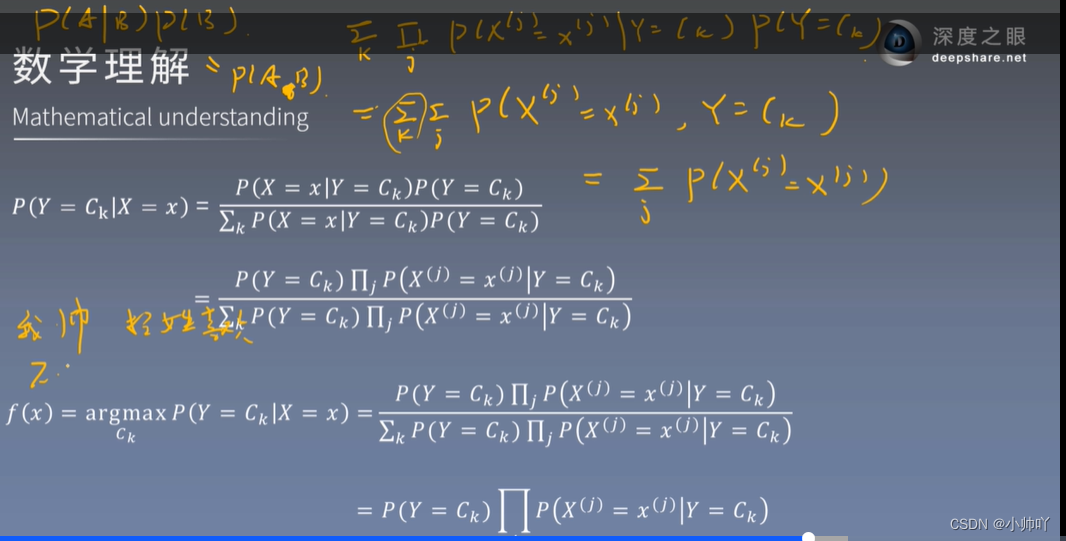


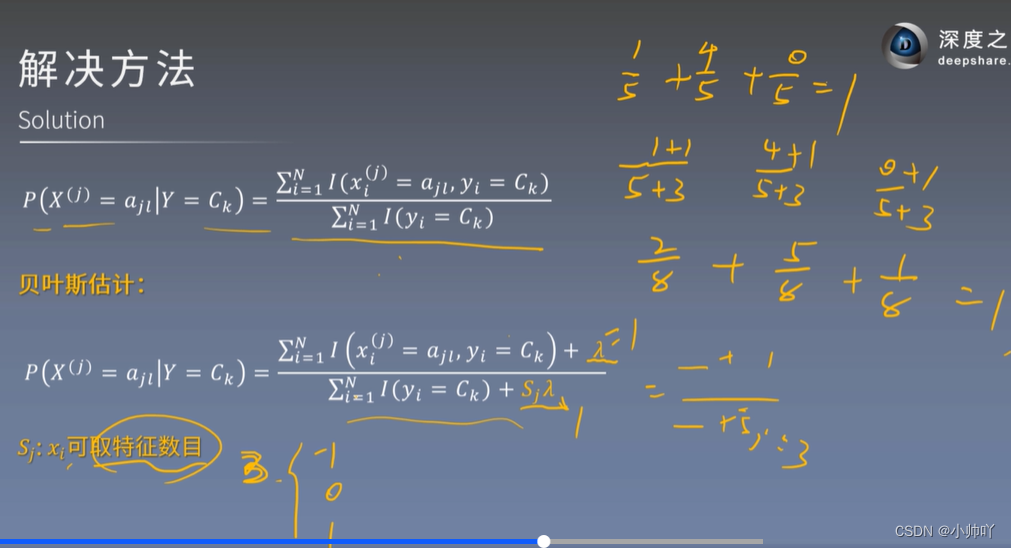
In the process of derivation, there will be a situation in which the number of samples is zero and the denominator is zero



A posteriori probability maximization is equivalent to expected risk minimization 


# coding=utf-8
# Author:Dodo
# Date:2018-11-17
# Email:[email protected]

'''  Data sets :Mnist  Number of training sets :60000  Number of test sets :10000 ------------------------------  Running results :  Accuracy rate :84.3%  Run time :103s '''

import numpy as np
import time

def loadData(fileName):
    '''  Load the file  :param fileName: File path to load  :return:  Data sets and tag sets  '''
    # Store data and mark
    dataArr = []; labelArr = []
    # Read the file
    fr = open(fileName)
    # Traverse every line in the file
    for line in fr.readlines():
        # Get current row , And press “,” Cut into fields and put them in the list
        #strip: Remove the characters specified at the beginning and end of each line of string ( Default space or newline )
        #split: Cut the string into each field according to the specified characters , Return to list form
        curLine = line.strip().split(',')
        # Put the data in each row except the tag into the data set (curLine[0] Tag information for )
        # At the same time, the data in the original string form is converted to integer
        # In addition, the data is binarized , Greater than 128 Of into 1, Less than is converted to 0, Convenient for subsequent calculation
        dataArr.append([int(int(num) > 128) for num in curLine[1:]])
        # Put tag information into the tag set
        # Convert tag to integer while placing
        labelArr.append(int(curLine[0]))
    # Return data sets and tags
    return dataArr, labelArr

def NaiveBayes(Py, Px_y, x):
    '''  Probability estimation by naive Bayes  :param Py:  A priori probability distribution  :param Px_y:  Conditional probability distribution  :param x:  Sample to estimate x :return:  Back to all label The estimated probability of  '''
    # Set the number of features
    featrueNum = 784
    # Set the number of categories
    classNum = 10
    # Create an array of estimated probabilities to store all tags
    P = [0] * classNum
    # For each category , Estimate the probability separately
    for i in range(classNum):
        # initialization sum by 0,sum For the sum term .
        # In the training process, the probability is log Handle , So here we should have multiplied all the probabilities , Finally, compare which probability is the greatest
        # But when used log When dealing with , Successive multiplication becomes accumulation , So use sum
        sum = 0
        # Get each conditional probability value , Add up
        for j in range(featrueNum):
            sum += Px_y[i][j][x[j]]
        # And then add it to the prior probability ( That's the formula 4.7 A priori probability in times the later ones , Multiplication because log It all becomes addition )
        P[i] = sum + Py[i]

    #max(P): Find the maximum probability
    #P.index(max(P)): Find all corresponding to the maximum value of the probability ( The index value is equal to the label value )
    return P.index(max(P))


def model_test(Py, Px_y, testDataArr, testLabelArr):
    '''  Test the test set  :param Py:  A priori probability distribution  :param Px_y:  Conditional probability distribution  :param testDataArr:  Test set data  :param testLabelArr:  Test set tag  :return:  Accuracy rate  '''
    # Error value count
    errorCnt = 0
    # Loop through each sample in the test set
    for i in range(len(testDataArr)):
        # Get predictions
        presict = NaiveBayes(Py, Px_y, testDataArr[i])
        # Compare with the answer
        if presict != testLabelArr[i]:
            # If wrong   Error value count plus 1
            errorCnt += 1
    # Return accuracy
    return 1 - (errorCnt / len(testDataArr))


def getAllProbability(trainDataArr, trainLabelArr):
    '''  The prior probability distribution and conditional probability distribution are calculated through the training set  :param trainDataArr:  Training data set  :param trainLabelArr:  Training tag set  :return:  Prior probability distribution and conditional probability distribution  '''
    # Set the number of special diagnosis samples , The handwritten pictures in the dataset are 28*28, The transformation to a vector is 784 dimension .
    # ( Our data set has been converted from images to 784 The form of dimension ,CSV In the format is )
    featureNum = 784
    # Set the number of categories ,0-9 There are ten categories
    classNum = 10

    # Initialize the prior probability distribution to store the array , The result of subsequent calculation P(Y = 0) Put it in Py[0] in , And so on
    # The data length is 10 That's ok 1 Column
    Py = np.zeros((classNum, 1))
    # Cycle through each category , Calculate their prior probability distributions respectively
    # The calculation formula is "4.2 section   Parameter estimation of naive Bayesian method   The formula 4.8"
    for i in range(classNum):
        # The following formula is taken apart for analysis
        #np.mat(trainLabelArr) == i: Convert labels to matrix form , Every one of them has something to do with i Compare , If equal , This bit becomes Ture, conversely False
        #np.sum(np.mat(trainLabelArr) == i): Calculate the matrix obtained in the previous step Ture The number of , In sum ( Intuitively, it is to find all label How many of them
        # by i The tag , Get 4.8 type P(Y = Ck) The molecule in )
        #np.sum(np.mat(trainLabelArr) == i)) + 1: Reference resources “4.2.3 section   Bayesian estimation ”, For example, if the dataset does not exist y=1 The tag , in other words
        # There are no... In the handwritten dataset 1 This picture , So if you don't add 1, Because there is no y=1, So the molecule becomes 0, So when we finally find the posterior probability, this term becomes 0, Again
        # And conditional probability , The result is also 0, This is not allowed , So molecules add 1, Denominator plus K(K The number of values taken for the tag , Here you are 10 Number , The value is 10)
        # Refer to the formula 4.11
        #(len(trainLabelArr) + 10): The total length of the label set +10.
        #((np.sum(np.mat(trainLabelArr) == i)) + 1) / (len(trainLabelArr) + 10): A priori probability finally obtained
        Py[i] = ((np.sum(np.mat(trainLabelArr) == i)) + 1) / (len(trainLabelArr) + 10)
    # Convert to log Logarithmic form
    #log It is not written in the book , But in practice, we need to consider , And the reason is that :
    # Finally, when we get the posterior probability estimation , Form is the multiplication of items (“4.1  Learning of naive Bayes method ”  type 4.7), There are two problems :1. A certain item is 0 when , The result is 0.
    # This problem can be eliminated by adding a corresponding number to the numerator and denominator , It has been handled well .2. If there are many special cases ( For example, here , The items that need to be connected are 784 Features
    # Add a prior probability distribution to get a total of 795 Item multiplication , All numbers are 0-1 Between , The result must be a small approach 0 Number of numbers .) Theoretically, it can be judged by the size of the result ,  But in
    # It is very likely that the program will overflow downward during operation and cannot be compared , Because the value is too small . Therefore, the value is artificially calculated log Handle .log It is an increasing function in the domain of definition , in other words log(x) in ,
    #x The bigger it is ,log And the bigger , Monotonicity is consistent with the original data . So add log It has no effect on the result . In addition, the multiplicative term passes log in the future , It can become the accumulation of items , Simplify the calculation .
    # In the likelihood function, we usually use log The way to deal with ( As for why this book does not cover , I don't know either )
    Py = np.log(Py)

    # Calculate the conditional probability  Px_y=P(X=x|Y = y)
    # The calculation of conditional probability is divided into two steps , The first big one below for A loop is used to accumulate , In reference books “4.2.3  Bayesian estimation   type 4.10”, The first big one below for Inside the loop is
    # Used to calculate 4.10 The molecules of , As for the molecular +1 And the calculation of denominator is the second largest below For Inside
    # Initialize to full 0 matrix , Used to store conditional probabilities in all cases
    Px_y = np.zeros((classNum, featureNum, 2))
    # Traverse the tag set
    for i in range(len(trainLabelArr)):
        # Get the tag used by the current loop
        label = trainLabelArr[i]
        # Get the current sample to be processed
        x = trainDataArr[i]
        # Traverse each vitta of the sample
        for j in range(featureNum):
            # Add... To the corresponding position in the matrix 1
            # The conditional probability has not been calculated here , First add up all the numbers , After adding it all , In the following steps, the corresponding conditional probability is calculated
            Px_y[label][j][x[j]] += 1


    # The second big for, Calculation formula 4.10 Denominator of , And the division between numerator and denominator
    # Loop through each tag ( common 10 individual )
    for label in range(classNum):
        # Cycle each feature corresponding to each tag
        for j in range(featureNum):
            # obtain y=label, The first j Special diagnosis 0 The number of
            Px_y0 = Px_y[label][j][0]
            # obtain y=label, The first j Special diagnosis 1 The number of
            Px_y1 = Px_y[label][j][1]
            # fitting 4.10 Divide the numerator and denominator of , Before division, it is based on Bayesian estimation , The denominator needs to be added with 2( The number of values that can be taken for each feature )
            # Calculate separately for y= label,x The first j The first characteristic is 0 and 1 Conditional probability distribution of
            Px_y[label][j][0] = np.log((Px_y0 + 1) / (Px_y0 + Px_y1 + 2))
            Px_y[label][j][1] = np.log((Px_y1 + 1) / (Px_y0 + Px_y1 + 2))

    # Returns a priori probability distribution and conditional probability distribution
    return Py, Px_y


if __name__ == "__main__":
    start = time.time()
    #  Get the training set
    print('start read transSet')
    trainDataArr, trainLabelArr = loadData('../Mnist/mnist_train.csv')

    #  Get the test set
    print('start read testSet')
    testDataArr, testLabelArr = loadData('../Mnist/mnist_test.csv')

    # Start training , Learn prior probability distribution and conditional probability distribution
    print('start to train')
    Py, Px_y = getAllProbability(trainDataArr, trainLabelArr)

    # Test the test set using the learned prior probability distribution and conditional probability distribution
    print('start to test')
    accuracy = model_test(Py, Px_y, testDataArr, testLabelArr)

    # Print accuracy
    print('the accuracy is:', accuracy)
    # Print time
    print('time span:', time.time() -start)


边栏推荐
- Different subsequence problems I
- 198. house raiding
- [MCU club] design of classroom number detection based on MCU [simulation design]
- [temperature detection] thermal infrared image temperature detection system based on Matlab GUI [including Matlab source code 1920]
- 【RRT三维路径规划】基于matlab快速扩展随机树无人机三维路径规划【含Matlab源码 1914期】
- How can multidimensional analysis pre summary work?
- Drawing ECG curve with WPF
- 华泰证券安全吗
- 统计学习方法(4/22)朴素贝叶斯
- 狼人杀休闲游戏微信小程序模板源码/微信小游戏源码
猜你喜欢

GUI Graphical user interface programming example - color selection box

Uvm:field automation mechanism
![[image enhancement] manual multiple exposure fusion amef image defogging based on MATLAB [including Matlab source code 1916]](/img/e9/e5a7163c949db9e649829fcdcf76f5.jpg)
[image enhancement] manual multiple exposure fusion amef image defogging based on MATLAB [including Matlab source code 1916]
![[temperature detection] thermal infrared image temperature detection system based on Matlab GUI [including Matlab source code 1920]](/img/b7/95601082e67fd31aab80c35d57f273.png)
[temperature detection] thermal infrared image temperature detection system based on Matlab GUI [including Matlab source code 1920]

EasyCVR接入Ehome协议的设备,无法观看设备录像是什么原因?

Difference between applying for trademark in the name of individual and company

Werewolf kill casual game wechat applet template source code / wechat game source code

What is redis
![[RRT 3D path planning] rapid expansion of random tree UAV 3D path planning based on MATLAB [including Matlab source code phase 1914]](/img/85/a2c159e7051cca01fe7ea177a5b1eb.png)
[RRT 3D path planning] rapid expansion of random tree UAV 3D path planning based on MATLAB [including Matlab source code phase 1914]

浏览器缓存库设计总结(localStorage/indexedDB)
随机推荐
华泰证券安全吗
【火灾检测】基于matlab GUI森林火灾检测系统(带面板)【含Matlab源码 1921期】
【图像处理】基于matlab实现图像曲线调整系统
测试只能干到35岁?35岁+的测试就会失业?
Depth first search to realize the problem of catching cattle
After easycvr creates a new user, the video access page cannot be clicked. Fix the problem
How to handle a SIGTERM - how to handle a SIGTERM
多维分析预汇总应该怎样做才管用?
Blazor University (34)表单 —— 获得表单状态
What is the reason for the service crash caused by replacing the easycvr cluster version with the old database?
Uvm:field automation mechanism
Maximum path and problem (cherry picking problem)
How to solve the problem of Caton screen when easycvr plays video?
《Reinforcement learning based parameters adaption method for particleswarm optimization》代码复现
Vulnerability mining | routine in password retrieval
使用.Net驱动Jetson Nano的OLED显示屏
有了这款工具,自动化识别验证码再也不是问题
EasyCVR集群版本替换成老数据库造成的服务崩溃是什么原因?
UI高度自适应的修改方案
Getting started with SQL