当前位置:网站首页>TodoList案例
TodoList案例
2022-08-02 19:42:00 【gh-xiaohe】
文章目录
作者: gh-xiaohe
gh-xiaohe的博客
觉得博主文章写的不错的话,希望大家三连(关注,点赞,评论),多多支持一下!!!
TodoList案例1.0版本
组件化编码流程(通用)
- 1、实现静态组件:抽取组件,使用组件实现静态页面效果
- 2、展示动态数据:
- 数据的类型、名称是什么?
- 数据保存在哪个组件?
- 3、交互——从绑定事件监听开始
总结:
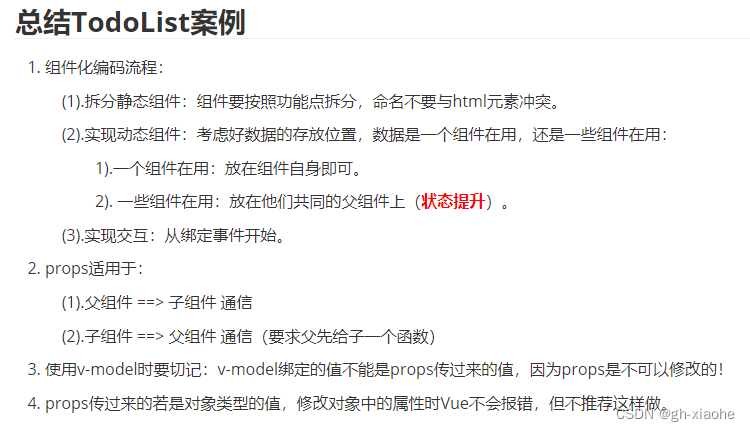
1、静态编写
① 基础创建
MyFooter.vue
<template>

</template>

<script>
	export default {
		name:'MyFooter',
	}
</script>

<style scoped>

</style>
MyHeader.vue
<template>

</template>

<script>
	export default {
		name:'MyHeader',

	}
</script>

<style scoped>

</style>
MyItem.vue
<template>

</template>

<script>
	export default {
		name:'MyItem',
	}
</script>

<style scoped>

</style>
MyList.vue
<template>

</template>

<script>
	import MyItem from './MyItem'

	export default {
		name:'MyList',
		components:{MyItem},
	}
</script>

<style scoped>

</style>
App.vue —> 引入
<template>

</template>

<script>
	import MyHeader from './components/MyHeader'
	import MyList from './components/MyList'
	import MyFooter from './components/MyFooter.vue'

	export default {
		name:'App',
		components:{MyHeader,MyList,MyFooter},
	}
</script>

<style>

</style>
② 导入已有的结构和样式
app.vue
<template>
	<div id="root">
	  <div class="todo-container">
		<div class="todo-wrap">
		  <div class="todo-header">
			<input type="text" placeholder="请输入你的任务名称,按回车键确认"/>
		  </div>
		  <ul class="todo-main">
			<li>
			  <label>
				<input type="checkbox"/>
				<span>xxxxx</span>
			  </label>
			  <button class="btn btn-danger" style="display:none">删除</button>
			</li>
			<li>
			  <label>
				<input type="checkbox"/>
				<span>yyyy</span>
			  </label>
			  <button class="btn btn-danger" style="display:none">删除</button>
			</li>
		  </ul>
		  <div class="todo-footer">
			<label>
			  <input type="checkbox"/>
			</label>
			<span>
			  <span>已完成0</span> / 全部2
			</span>
			<button class="btn btn-danger">清除已完成任务</button>
		  </div>
		</div>
	  </div>
	</div>

</template>

<script>
	import MyHeader from './components/MyHeader'
	import MyList from './components/MyList'
	import MyFooter from './components/MyFooter.vue'

	export default {
		name:'App',
		components:{MyHeader,MyList,MyFooter},
	}
</script>

<style>
	/*base*/
	body {
	  background: #fff;
	}

	.btn {
	  display: inline-block;
	  padding: 4px 12px;
	  margin-bottom: 0;
	  font-size: 14px;
	  line-height: 20px;
	  text-align: center;
	  vertical-align: middle;
	  cursor: pointer;
	  box-shadow: inset 0 1px 0 rgba(255, 255, 255, 0.2), 0 1px 2px rgba(0, 0, 0, 0.05);
	  border-radius: 4px;
	}

	.btn-danger {
	  color: #fff;
	  background-color: #da4f49;
	  border: 1px solid #bd362f;
	}

	.btn-danger:hover {
	  color: #fff;
	  background-color: #bd362f;
	}

	.btn:focus {
	  outline: none;
	}

	.todo-container {
	  width: 600px;
	  margin: 0 auto;
	}
	.todo-container .todo-wrap {
	  padding: 10px;
	  border: 1px solid #ddd;
	  border-radius: 5px;
	}

	/*header*/
	.todo-header input {
	  width: 560px;
	  height: 28px;
	  font-size: 14px;
	  border: 1px solid #ccc;
	  border-radius: 4px;
	  padding: 4px 7px;
	}

	.todo-header input:focus {
	  outline: none;
	  border-color: rgba(82, 168, 236, 0.8);
	  box-shadow: inset 0 1px 1px rgba(0, 0, 0, 0.075), 0 0 8px rgba(82, 168, 236, 0.6);
	}

	/*main*/
	.todo-main {
	  margin-left: 0px;
	  border: 1px solid #ddd;
	  border-radius: 2px;
	  padding: 0px;
	}

	.todo-empty {
	  height: 40px;
	  line-height: 40px;
	  border: 1px solid #ddd;
	  border-radius: 2px;
	  padding-left: 5px;
	  margin-top: 10px;
	}
	/*item*/
	li {
	  list-style: none;
	  height: 36px;
	  line-height: 36px;
	  padding: 0 5px;
	  border-bottom: 1px solid #ddd;
	}

	li label {
	  float: left;
	  cursor: pointer;
	}

	li label li input {
	  vertical-align: middle;
	  margin-right: 6px;
	  position: relative;
	  top: -1px;
	}

	li button {
	  float: right;
	  display: none;
	  margin-top: 3px;
	}

	li:before {
	  content: initial;
	}

	li:last-child {
	  border-bottom: none;
	}

	/*footer*/
	.todo-footer {
	  height: 40px;
	  line-height: 40px;
	  padding-left: 6px;
	  margin-top: 5px;
	}

	.todo-footer label {
	  display: inline-block;
	  margin-right: 20px;
	  cursor: pointer;
	}

	.todo-footer label input {
	  position: relative;
	  top: -1px;
	  vertical-align: middle;
	  margin-right: 5px;
	}

	.todo-footer button {
	  float: right;
	  margin-top: 5px;
	}

</style>
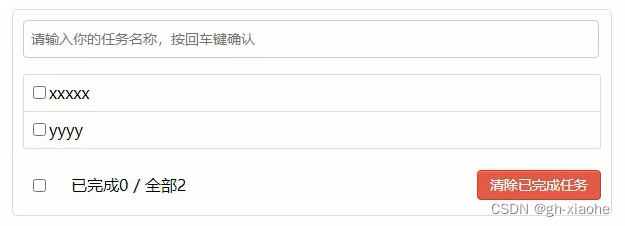
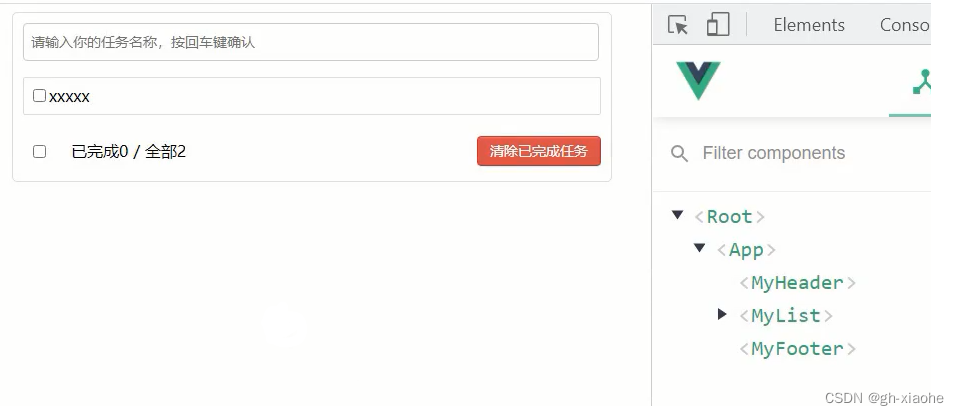
拆:先拆结构在拆样式,剪切走后立马写上结构,借助开发者工具查看
拆结构
- 把app中tempalte中的模板,剪切走复制到对应的组件位置
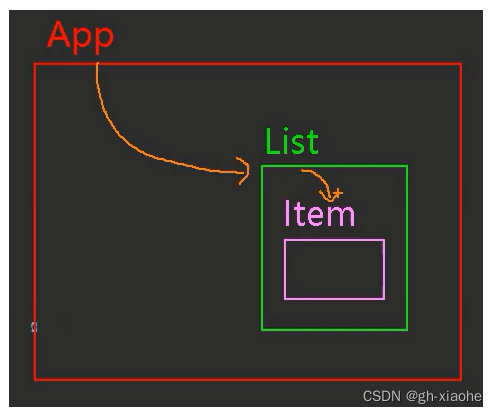
- MyItem 中没有数据 在拆 MyLIst组件
app.vue
<template>
	<div id="root">
	  <div class="todo-container">
		<div class="todo-wrap">
		  <MyHeader/>
         <MyList/>
         <MyFooter/>
		</div>
	  </div>
	</div>

</template>

<script>
	import MyHeader from './components/MyHeader'
	import MyList from './components/MyList'
	import MyFooter from './components/MyFooter.vue'

	export default {
		name:'App',
		components:{MyHeader,MyList,MyFooter},
	}
</script>

<style>
	/*base*/
	body {
	  background: #fff;
	}

	.btn {
	  display: inline-block;
	  padding: 4px 12px;
	  margin-bottom: 0;
	  font-size: 14px;
	  line-height: 20px;
	  text-align: center;
	  vertical-align: middle;
	  cursor: pointer;
	  box-shadow: inset 0 1px 0 rgba(255, 255, 255, 0.2), 0 1px 2px rgba(0, 0, 0, 0.05);
	  border-radius: 4px;
	}

	.btn-danger {
	  color: #fff;
	  background-color: #da4f49;
	  border: 1px solid #bd362f;
	}

	.btn-danger:hover {
	  color: #fff;
	  background-color: #bd362f;
	}

	.btn:focus {
	  outline: none;
	}

	.todo-container {
	  width: 600px;
	  margin: 0 auto;
	}
	.todo-container .todo-wrap {
	  padding: 10px;
	  border: 1px solid #ddd;
	  border-radius: 5px;
	}

	/*header*/
	.todo-header input {
	  width: 560px;
	  height: 28px;
	  font-size: 14px;
	  border: 1px solid #ccc;
	  border-radius: 4px;
	  padding: 4px 7px;
	}

	.todo-header input:focus {
	  outline: none;
	  border-color: rgba(82, 168, 236, 0.8);
	  box-shadow: inset 0 1px 1px rgba(0, 0, 0, 0.075), 0 0 8px rgba(82, 168, 236, 0.6);
	}

	/*main*/
	.todo-main {
	  margin-left: 0px;
	  border: 1px solid #ddd;
	  border-radius: 2px;
	  padding: 0px;
	}

	.todo-empty {
	  height: 40px;
	  line-height: 40px;
	  border: 1px solid #ddd;
	  border-radius: 2px;
	  padding-left: 5px;
	  margin-top: 10px;
	}
	/*item*/
	li {
	  list-style: none;
	  height: 36px;
	  line-height: 36px;
	  padding: 0 5px;
	  border-bottom: 1px solid #ddd;
	}

	li label {
	  float: left;
	  cursor: pointer;
	}

	li label li input {
	  vertical-align: middle;
	  margin-right: 6px;
	  position: relative;
	  top: -1px;
	}

	li button {
	  float: right;
	  display: none;
	  margin-top: 3px;
	}

	li:before {
	  content: initial;
	}

	li:last-child {
	  border-bottom: none;
	}

	/*footer*/
	.todo-footer {
	  height: 40px;
	  line-height: 40px;
	  padding-left: 6px;
	  margin-top: 5px;
	}

	.todo-footer label {
	  display: inline-block;
	  margin-right: 20px;
	  cursor: pointer;
	}

	.todo-footer label input {
	  position: relative;
	  top: -1px;
	  vertical-align: middle;
	  margin-right: 5px;
	}

	.todo-footer button {
	  float: right;
	  margin-top: 5px;
	}

</style>
MyFooter.vue
<template>
		<div class="todo-footer">
			<label>
			  <input type="checkbox"/>
			</label>
			<span>
			  <span>已完成0</span> / 全部2
			</span>
			<button class="btn btn-danger">清除已完成任务</button>
		</div>
</template>
MyHeader.vue
<template>
	<div class="todo-header">
		<input type="text" placeholder="请输入你的任务名称,按回车键确认"/>
	 </div>
</template>
MyItem.vue
<template>
	<li>
		 <label>
				<input type="checkbox"/>
				<span>xxxxx</span>
		 </label>
			  <button class="btn btn-danger" style="display:none">删除</button>
	</li>
</template>
MyList.vue
<template>
	<ul class="todo-main">
		<li>
			<label>
				<input type="checkbox"/>
				<span>xxxxx</span>
			</label>
			<button class="btn btn-danger" style="display:none">删除</button>
		</li>
	</ul>
</template>

// 在拆 到 MyItem中
<template>
	<ul class="todo-main">
		<MyItem/>
       // 想要数据多 就继续引入 <MyItem/> 组件
	</ul>
</template>
拆样式
- 样式中有相应的备注
app.vue
<template>
	<div id="root">
	  <div class="todo-container">
		<div class="todo-wrap">
		  <MyHeader/>
         <MyList/>
         <MyFooter/>
		</div>
	  </div>
	</div>

</template>


	import MyHeader from './components/MyHeader'
	import MyList from './components/MyList'
	import MyFooter from './components/MyFooter.vue'

	export default {
		name:'App',
		components:{MyHeader,MyList,MyFooter},
	}
</script>

<style>
	/*base*/
	body {
	  background: #fff;
	}

	.btn {
	  display: inline-block;
	  padding: 4px 12px;
	  margin-bottom: 0;
	  font-size: 14px;
	  line-height: 20px;
	  text-align: center;
	  vertical-align: middle;
	  cursor: pointer;
	  box-shadow: inset 0 1px 0 rgba(255, 255, 255, 0.2), 0 1px 2px rgba(0, 0, 0, 0.05);
	  border-radius: 4px;
	}

	.btn-danger {
	  color: #fff;
	  background-color: #da4f49;
	  border: 1px solid #bd362f;
	}

	.btn-danger:hover {
	  color: #fff;
	  background-color: #bd362f;
	}

	.btn:focus {
	  outline: none;
	}

	.todo-container {
	  width: 600px;
	  margin: 0 auto;
	}
	.todo-container .todo-wrap {
	  padding: 10px;
	  border: 1px solid #ddd;
	  border-radius: 5px;
	}
</style>
MyFooter.vue
<template>
		<div class="todo-footer">
			<label>
			  <input type="checkbox"/>
			</label>
			<span>
			  <span>已完成0</span> / 全部2
			</span>
			<button class="btn btn-danger">清除已完成任务</button>
		</div>
</template>

<style>
	/*footer*/
	.todo-footer {
	  height: 40px;
	  line-height: 40px;
	  padding-left: 6px;
	  margin-top: 5px;
	}

	.todo-footer label {
	  display: inline-block;
	  margin-right: 20px;
	  cursor: pointer;
	}

	.todo-footer label input {
	  position: relative;
	  top: -1px;
	  vertical-align: middle;
	  margin-right: 5px;
	}

	.todo-footer button {
	  float: right;
	  margin-top: 5px;
	}
</style>
MyHeader.vue
<template>
	<div class="todo-header">
		<input type="text" placeholder="请输入你的任务名称,按回车键确认"/>
	 </div>
</template>

<style>
   /*header*/
	.todo-header input {
	  width: 560px;
	  height: 28px;
	  font-size: 14px;
	  border: 1px solid #ccc;
	  border-radius: 4px;
	  padding: 4px 7px;
	}

	.todo-header input:focus {
	  outline: none;
	  border-color: rgba(82, 168, 236, 0.8);
	  box-shadow: inset 0 1px 1px rgba(0, 0, 0, 0.075), 0 0 8px rgba(82, 168, 236, 0.6);
	}
</style>
MyItem.vue
<template>
	<li>
		 <label>
				<input type="checkbox"/>
				<span>xxxxx</span>
		 </label>
			  <button class="btn btn-danger" style="display:none">删除</button>
	</li>
</template>

<style>
	/*item*/
	li {
	  list-style: none;
	  height: 36px;
	  line-height: 36px;
	  padding: 0 5px;
	  border-bottom: 1px solid #ddd;
	}

	li label {
	  float: left;
	  cursor: pointer;
	}

	li label li input {
	  vertical-align: middle;
	  margin-right: 6px;
	  position: relative;
	  top: -1px;
	}

	li button {
	  float: right;
	  display: none;
	  margin-top: 3px;
	}

	li:before {
	  content: initial;
	}

	li:last-child {
	  border-bottom: none;
	}
</style>
MyList.vue
<template>
	<ul class="todo-main">
		<li>
			<label>
				<input type="checkbox"/>
				<span>xxxxx</span>
			</label>
			<button class="btn btn-danger" style="display:none">删除</button>
		</li>
	</ul>
</template>

// 在拆 到 MyItem中
<template>
	<ul class="todo-main">
		<MyItem/>
       // 想要数据多 就继续引入 <MyItem/> 组件
	</ul>
</template>

<style>
  	/*list*/
	.todo-main {
	  margin-left: 0px;
	  border: 1px solid #ddd;
	  border-radius: 2px;
	  padding: 0px;
	}

	.todo-empty {
	  height: 40px;
	  line-height: 40px;
	  border: 1px solid #ddd;
	  border-radius: 2px;
	  padding-left: 5px;
	  margin-top: 10px;
	}
</style>
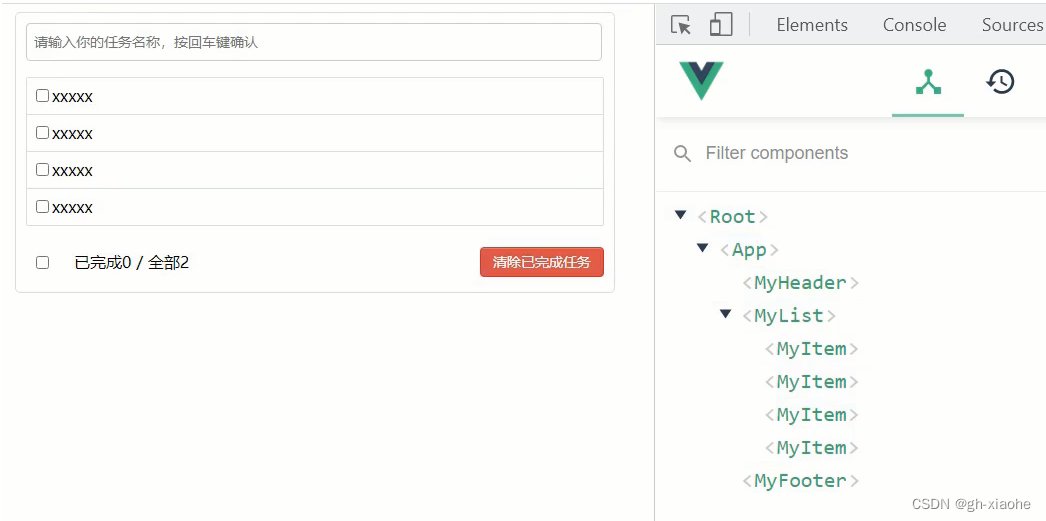
2、展示动态的数据
- 数据的类型、名称是什么
- 一堆要做的事情是一个数组,一个个要做的事情是对象,对象里面的内容=={id,name,done(标识,完成)}==
- 数据保存在哪个组件
- 谁要展示数据,list组件展示
MyList.vue
- 根据数据决定使用多少次 MyItem
- 把每一条的具体信息对象传递给 MyItem
<template>
	<ul class="todo-main">
		<MyItem v-for:"todoObj in todos" :key="todoObj.key" :todo="todoObj"/>

	</ul>
</template>

<script>
	import MyItem from './MyItem'

	export default {
		name:'MyList',
		components:{MyItem},
       data() {
           return {
               todos:[
                   {id:'001',title:'抽烟',done:true},
                   {id:'002',title:'喝酒',done:false},
                   {id:'003',title:'开车',done:true}
               ]
           }
       }
	}
</script>
MyItem.vue
- 接收
- 动态决定是否勾选
<template>
	<li>
		 <label>
            	<!--动态决定是否勾选-->
				<input type="checkbox" :checked="todo.done"/>
				<span>{
    {todo.title}}</span>
		 </label>
			  <button class="btn btn-danger" style="display:none">删除</button>
	</li>
</template>

<script>
	export default {
		name:'MyItem',
		//声明接收todo
		props:['todo'],
	}
</script>
3、交互
- 组件之间的通信(兄弟、子传父、爷传孙),后面有更好的方式实现。
添加
MyHeader.vue
绑定个键盘事件
把用户的输入打印
获取用户的输入
方式一:event 事件对象
        add(event){
            consloe.log(event.target.value) // 获得发生事件对象的元素
        }
方式二:v-model
<input type="text" placeholder="请输入你的任务名称,按回车键确认" v-model='title' @keyup.enter="add"/>

		data() {
            return {
                title:''
            }
        }
		menthod: {
            add(event){
        		consloe.log(this.target) // 获得发生事件对象的元素
            }
        }
把获取到的数据包装成一个todo对象 id使用uuid 的压缩版本 nanoid (单机版本) npm i nanoid
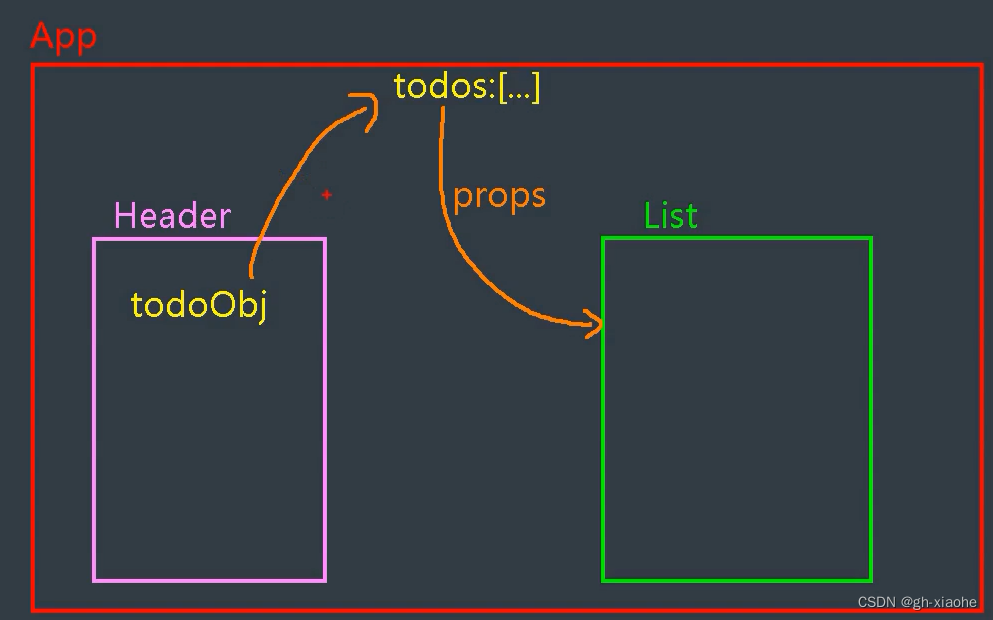
把对象放到数组的前方 保存数据的todos 在LIst组件中 输出 在 Header组件
- 两个兄弟组件之间数据传递—> 暂时实现不了
- 把List中的todos[] 给 App 让App 通过props 方式 传递给list
- 让Header 把todoObj 给App
<template>
	<div class="todo-header">
		<input type="text" placeholder="请输入你的任务名称,按回车键确认" @keyup.enter="add"/>
	 </div>
</template>

<script>
   // 引入 nanoid
   import {nanoid} from 'nanoid'
	export default {
		name:'MyHeader',
		menthod: {
           add(event){
               consloe.log(event.target.value) // 获得发生事件对象的元素
				//将用户的输入包装成一个todo对象
				const todoObj = {id:nanoid(),title:event.target.value,done:false}
               consloe.log(todoObj)
           }
       }
	}
</script>
App.vue
<template>
	<div id="root">
		<div class="todo-container">
			<div class="todo-wrap">
				<MyHeader/>
				<MyList :todos="todos"/>
				<MyFoote/>
			</div>
		</div>
	</div>
</template>

<script>
	import MyHeader from './components/MyHeader'
	import MyList from './components/MyList'
	import MyFooter from './components/MyFooter.vue'

	export default {
		name:'App',
		components:{MyHeader,MyList,MyFooter},
		data() {
			return {
				//由于todos是MyHeader组件和MyFooter组件都在使用,所以放在App中(状态提升)
				todos:[
					{id:'001',title:'抽烟',done:true},
					{id:'002',title:'喝酒',done:false},
					{id:'003',title:'开车',done:true}
				]
			}
		},
	}
</script>
MyList.vue
<template>
	<ul class="todo-main">
		<MyItem v-for:"todoObj in todos" :key="todoObj.key" :todo="todoObj"/>
	</ul>
</template>

<script>
	import MyItem from './MyItem'

	export default {
		name:'MyList',
       components:{MyItem},
		props:['todos'],
	}
</script>
MyHeader.vue 给 App.vue 方式一:实现 清空数据时操作了dom
<template>
	<div class="todo-header">
		<input type="text" placeholder="请输入你的任务名称,按回车键确认" @keyup.enter="add"/>
	 </div>
</template>

<script>
   // 引入 nanoid
   import {nanoid} from 'nanoid'
	export default {
		name:'MyHeader',
       props:['addTodo'],
		menthod: {
           add(event){
               consloe.log(event.target.value) // 获得发生事件对象的元素
				//将用户的输入包装成一个todo对象
				const todoObj = {id:nanoid(),title:event.target.value,done:false}
               consloe.log(todoObj)
               this.addTodo(todoObj)
               //清空输入
				event.target.value = ''
           }
       }
	}
</script>
MyHeader.vue 给 App.vue 方式二:v-model
<template>
	<div class="todo-header">
		<input type="text" placeholder="请输入你的任务名称,按回车键确认" v-model="title" @keyup.enter="add"/>
	</div>
</template>

<script>
   // 引入 nanoid
	import {nanoid} from 'nanoid'
	export default {
		name:'MyHeader',
		//接收从App传递过来的addTodo
		props:['addTodo'],
		data() {
			return {
				//收集用户输入的title
				title:''
			}
		},
		methods: {
			add(){
				//校验数据
				if(!this.title.trim()) return alert('输入不能为空')
				//将用户的输入包装成一个todo对象
				const todoObj = {id:nanoid(),title:this.title,done:false}
				//通知App组件去添加一个todo对象
				this.addTodo(todoObj)
				//清空输入
				this.title = ''
			}
		},
	}
</script>
App.vue 接收数据
<template>
	<div id="root">
		<div class="todo-container">
			<div class="todo-wrap">
				<MyHeader :addTodo="addTodo"/>
				<MyList :todos="todos"/>
				<MyFoote/>
			</div>
		</div>
	</div>
</template>

<script>
	import MyHeader from './components/MyHeader'
	import MyList from './components/MyList'
	import MyFooter from './components/MyFooter.vue'

	export default {
		name:'App',
		components:{MyHeader,MyList,MyFooter},
		data() {
			return {
				//由于todos是MyHeader组件和MyFooter组件都在使用,所以放在App中(状态提升)
				todos:[
					{id:'001',title:'抽烟',done:true},
					{id:'002',title:'喝酒',done:false},
					{id:'003',title:'开车',done:true}
				]
			}
		},
       methods: {
			//添加一个todo
			addTodo(todoObj){
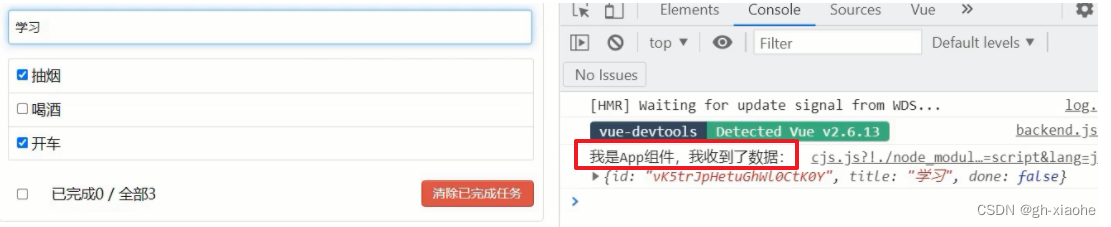
				console.log('我是App组件,我收到了数据:',todoObj)
			}
		},
	}
</script>
App.vue 添加数据methods: { //添加一个todo addTodo(todoObj){ this.todos.unshift(todoObj) } },
- 校验数据不为空 和 添加完成后 输入框清空 也补全 MyHeader.vue 中
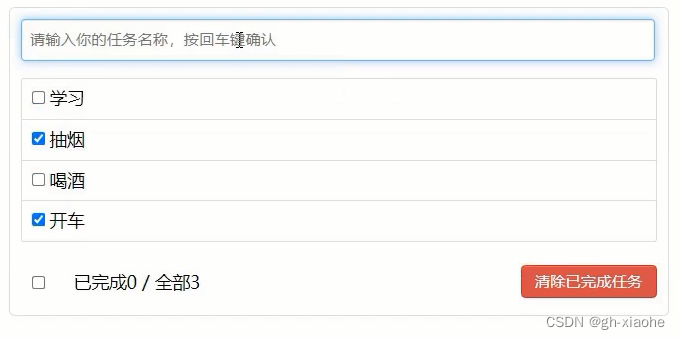
勾选
MyItem.vue
- 拿到勾选的id 去todos中找到这个人 done 取反
- todos数据在App (数据在哪里操作数据的方法就在哪里)
<template>
	<li>
		 <label>
           	<!--动态决定是否勾选-->
				<input type="checkbox" :checked="todo.done" @change="handleCheck(todo.id)"/> <!--change 改变-->
			<!--
				如下代码也能实现功能,但是不太推荐,因为有点违反原则,因为修改了props
				v-model 绑定的是传递过来的数据 props 不建议
			-->
			<!-- <input type="checkbox" v-model="todo.done"/> -->
				<span>{
    {todo.title}}</span>
		 </label>
		 <button class="btn btn-danger" style="display:none">删除</button>
	</li>
</template>

<script>
	export default {
		name:'MyItem',
		//声明接收todo
		props:['todo'],
       methods: {
			//勾选or取消勾选
			handleCheck(id){
				//通知App组件将对应的todo对象的done值取反

			}
		},
	}
</script>
App.vue
<template>
	<div id="root">
		<div class="todo-container">
			<div class="todo-wrap">
				<MyHeader :addTodo="addTodo" :checkTodo="checkTodo"/>
				<MyList :todos="todos"/>
				<MyFoote/>
			</div>
		</div>
	</div>
</template>

<script>

	export default {
		name:'App',
		components:{MyHeader,MyList,MyFooter},
		data() {
			return {
				//由于todos是MyHeader组件和MyFooter组件都在使用,所以放在App中(状态提升)
				todos:[
					{id:'001',title:'抽烟',done:true},
					{id:'002',title:'喝酒',done:false},
					{id:'003',title:'开车',done:true}
				]
			}
		},
       methods: {
			//添加一个todo
			addTodo(todoObj){
				this.todos.unshift(todoObj)
			},
			//勾选or取消勾选一个todo
			checkTodo(id){
				this.todos.forEach((todo)=>{
					if(todo.id === id) todo.done = !todo.done
				})
			}
		}
	}
</script>
checkTodo 给 MyItem
先给list 再给 item
list.vue 接收–> 再传给 MyItem
	<MyItem v-for:"todoObj in todos" :key="todoObj.key" :todo="todoObj" :checkTodo="checkTodo"/>

	props:['todos','checkTodo']
MyItem 接收
		props:['todo','checkTodo'],
       methods: {
			//勾选or取消勾选
			handleCheck(id){
				//通知App组件将对应的todo对象的done值取反
				this.checkTodo(id)
			}
		},
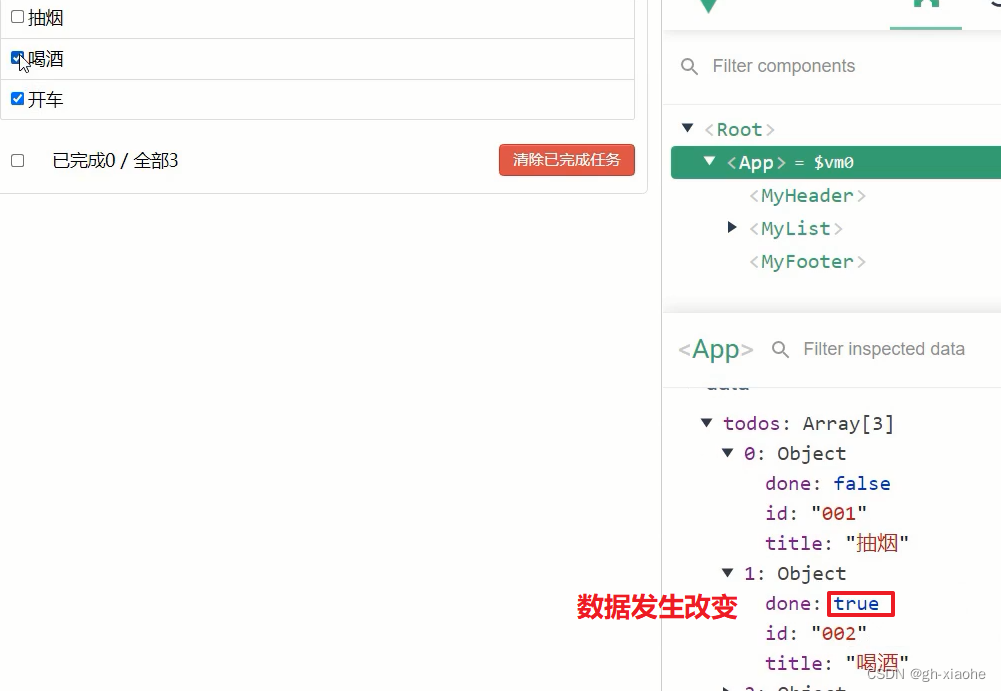
删除
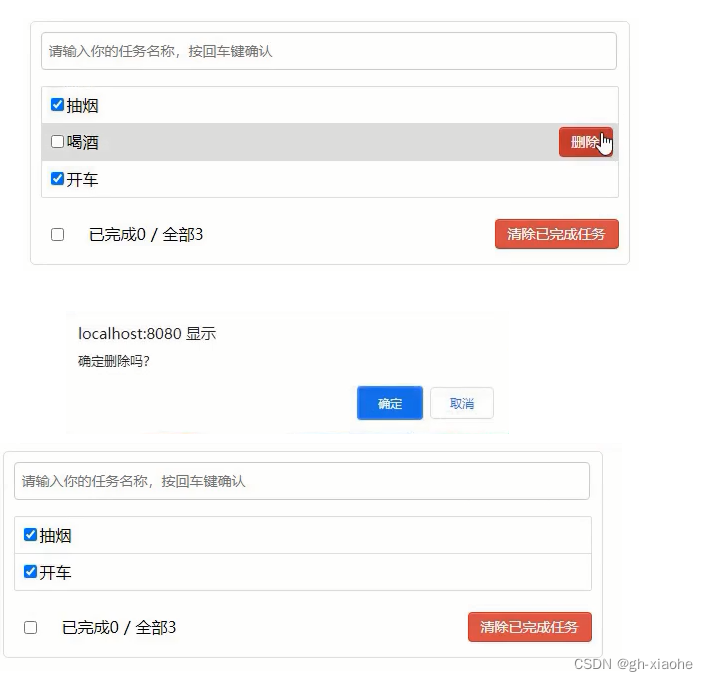
- 鼠标悬浮有高亮效果,删除按钮
- 获取id,根据id删除
MyItem.vue 通知app删除对应项 同样是 爷 传 孙
<button class="btn btn-danger" @click="handleDelete(todo.id)">删除</button>

		methods: {
			//删除
			handleDelete(id){
				if(confirm('确定删除吗?')){
					//通知App组件将对应的todo对象删除
					consloe.log(id)
				}
			}
		},
<style scoped>
	li:hover{
		background-color: #ddd;
	}
	li:hover button{
		display: block; // 鼠标滑过显示 删除按钮
	}
</style>
App.vue 传 list
		<MyList :todos="todos" :checkTodo="checkTodo" :deleteTodo="deleteTodo"/>

		methods: {
			//删除一个todo
			deleteTodo(id){
				// filter 不改变原数组
				this.todos = this.todos.filter( todo => todo.id !== id )
			}
		}
list 接收
		<MyItem
			v-for="todoObj in todos"
			:key="todoObj.id"
			:todo="todoObj"
			:checkTodo="checkTodo"
			:deleteTodo="deleteTodo"
		/>

props:['todos','checkTodo','deleteTodo']
list 传 item
		//声明接收todo、checkTodo、deleteTodo
		props:['todo','checkTodo','deleteTodo'],
		methods: {
			//删除
			handleDelete(id){
				if(confirm('确定删除吗?')){
					//通知App组件将对应的todo对象删除
					this.deleteTodo(id)
				}
			}
		},
底部实现
- 统计全部和已完成 MyFooter –> todos 数组的长度 done 为真的数量
- 全选/全部选 取解决 以完成 和全部 是否相等
- 如果没有数据时,不应该勾选
- 和不应该展示
- 删除已完成任务
App.vue 给 footer 传递
// 1
<MyFooter :todos="todos" />
MyFooter.vue 声明接收
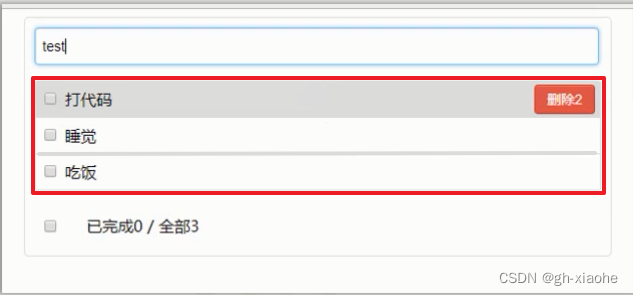
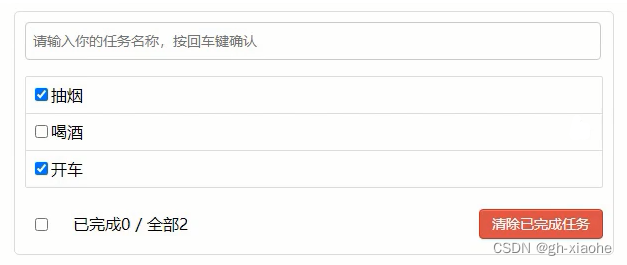
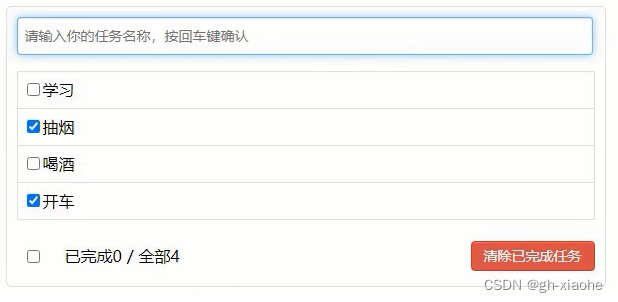
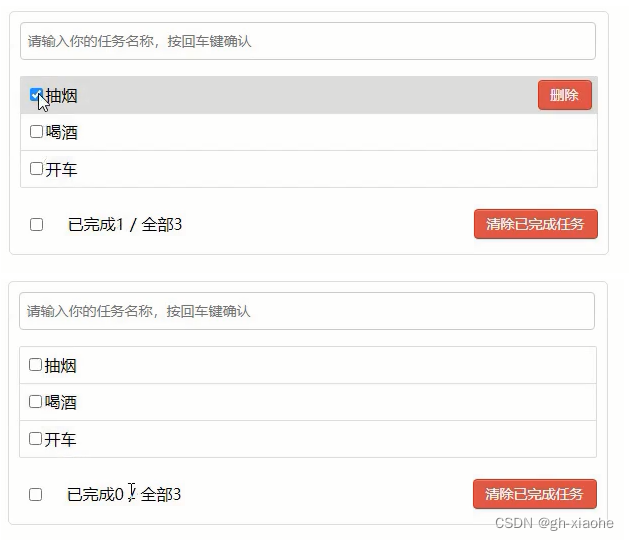
// 1 <span>已完成{ {todos.???}}</span> / 全部{ {todos.length}} props:['todos'], //2 // 等于0 时不展示 <div class="todo-footer" v-show="total"> <span>已完成{ {doneTotal}}</span> / 全部{ {total}} computed: { //总数 total(){ return this.todos.length }, //已完成数 // 方式一: 数组中的方法 reduce 推荐 doneTotal(){ //此处使用reduce方法做条件统计 /* const x = this.todos.reduce((pre,current)=>{ console.log('@',pre,current) return pre + (current.done ? 1 : 0) },0) */ //简写 return this.todos.reduce((pre,todo)=> pre + (todo.done ? 1 : 0) ,0) } // 或者方式二实现: doneTotal(){ let i = 0 this.todos.forEach((todo)=>){ if(todo.done) i++ } return i } },图片一
图片二
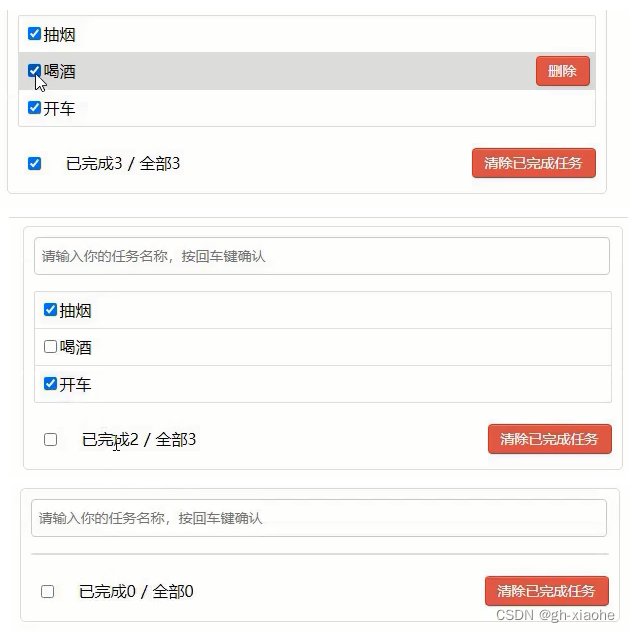
MyFooter.vue 勾选// 复杂 <input type="checkbox" :checked="doneTotal === tatal"/> <input type="checkbox" :checked="isAll" @change="checkAll"/> computed: { // 一个计算属性可以通过其他的计算属性 在进行计算 //控制全选框 isAll(){ // 简写方式,没有setter 方法 只能被读取不能被修改才可以 后面需要修改 return this.doneTotal === this.total && this.total > 0 } },
MyFooter.vue 全选/全不选
- this.checkAllTodo(e.target.checked) // true false 全选 或者 全不选
- 告诉存储 todos 的人全选全不选
// 1
<input type="checkbox" :checked="isAll" @change="checkAll"/>

		methods: {
			checkAll(e){
				this.checkAllTodo(e.target.checked) // true false 全选 或者 全不选
			}

		},
// 2
// 方式一:
props:['todos','checkAllTodo'],

		methods: {
			//清空所有已完成
			clearAll(e){
				this.clearAllTodo(e.target.checked)
			}
		},
// 方式二: 更好
// 初始值需要展示 以后有交互
<input type="checkbox" v-model="isAll"/>
		非简写方式 可读可写
		computed: {
			//控制全选框
			isAll:{
				//全选框是否勾选
				get(){
					return this.doneTotal === this.total && this.total > 0
				},
				//isAll被修改时set被调用
				set(value){
					this.checkAllTodo(value)
				}
			}
		},
		methods: {  // 中的方法就不需要了

		},
app.vue
<MyFooter :todos="todos" :checkAllTodo="checkAllTodo" />
		methods: {
			//全选or取消全选
			checkAllTodo(done){
				this.todos.forEach((todo)=>{
					todo.done = done
				})
			},
		}
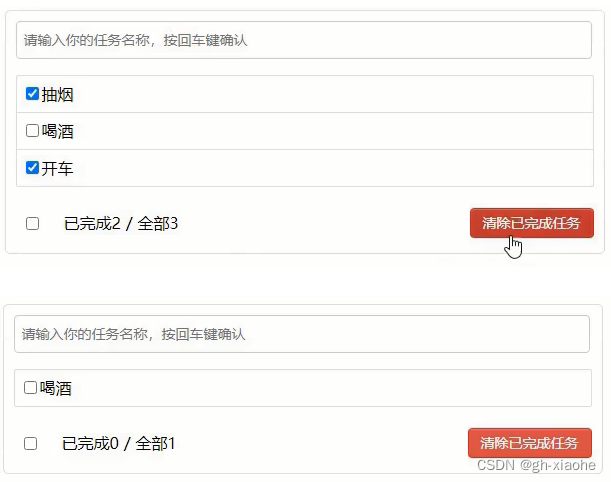
MyFooter.vue 清除已完成 app传递 接收
		<button class="btn btn-danger" @click="clearAll">清除已完成任务</button>
		methods: {
			//清空所有已完成
			clearAll(){

			}
		},

---------------------------------------
		props:['todos','checkAllTodo','clearAllTodo'],
		methods: {
			//清空所有已完成
			clearAll(){
				this.clearAllTodo()
			}
		},
app.vue
<MyFooter :todos="todos" :checkAllTodo="checkAllTodo" :clearAllTodo="clearAllTodo"/>
		methods: {
			//清除所有已经完成的todo
			clearAllTodo(){
				this.todos = this.todos.filter((todo)=>{
					return !todo.done
				})
			}
		}
全部文件
MyFooter.vue
<template>
	<div class="todo-footer" v-show="total">
		<label>
			<!-- <input type="checkbox" :checked="isAll" @change="checkAll"/> -->
			<input type="checkbox" v-model="isAll"/>
		</label>
		<span>
			<span>已完成{
   {doneTotal}}</span> / 全部{
   {total}}
		</span>
		<button class="btn btn-danger" @click="clearAll">清除已完成任务</button>
	</div>
</template>

<script>
	export default {
		name:'MyFooter',
		props:['todos','checkAllTodo','clearAllTodo'],
		computed: {
			//总数
			total(){
				return this.todos.length
			},
			//已完成数
			doneTotal(){
				//此处使用reduce方法做条件统计
				/* const x = this.todos.reduce((pre,current)=>{
					console.log('@',pre,current)
					return pre + (current.done ? 1 : 0)
				},0) */
				//简写
				return this.todos.reduce((pre,todo)=> pre + (todo.done ? 1 : 0) ,0)
			},
			//控制全选框
			isAll:{
				//全选框是否勾选
				get(){
					return this.doneTotal === this.total && this.total > 0
				},
				//isAll被修改时set被调用
				set(value){
					this.checkAllTodo(value)
				}
			}
		},
		methods: {
			/* checkAll(e){
				this.checkAllTodo(e.target.checked)
			} */
			//清空所有已完成
			clearAll(){
				this.clearAllTodo()
			}
		},
	}
</script>

<style scoped>
	/*footer*/
	.todo-footer {
		height: 40px;
		line-height: 40px;
		padding-left: 6px;
		margin-top: 5px;
	}

	.todo-footer label {
		display: inline-block;
		margin-right: 20px;
		cursor: pointer;
	}

	.todo-footer label input {
		position: relative;
		top: -1px;
		vertical-align: middle;
		margin-right: 5px;
	}

	.todo-footer button {
		float: right;
		margin-top: 5px;
	}
</style>
MyHeader.vue
<template>
	<div class="todo-header">
		<input type="text" placeholder="请输入你的任务名称,按回车键确认" v-model="title" @keyup.enter="add"/>
	</div>
</template>

<script>
	import {nanoid} from 'nanoid'
	export default {
		name:'MyHeader',
		//接收从App传递过来的addTodo
		props:['addTodo'],
		data() {
			return {
				//收集用户输入的title
				title:''
			}
		},
		methods: {
			add(){
				//校验数据
				if(!this.title.trim()) return alert('输入不能为空')
				//将用户的输入包装成一个todo对象
				const todoObj = {id:nanoid(),title:this.title,done:false}
				//通知App组件去添加一个todo对象
				this.addTodo(todoObj)
				//清空输入
				this.title = ''
			}
		},
	}
</script>

<style scoped>
	/*header*/
	.todo-header input {
		width: 560px;
		height: 28px;
		font-size: 14px;
		border: 1px solid #ccc;
		border-radius: 4px;
		padding: 4px 7px;
	}

	.todo-header input:focus {
		outline: none;
		border-color: rgba(82, 168, 236, 0.8);
		box-shadow: inset 0 1px 1px rgba(0, 0, 0, 0.075), 0 0 8px rgba(82, 168, 236, 0.6);
	}
</style>
MyItem.vue
<template>
	<li>
		<label>
			<input type="checkbox" :checked="todo.done" @change="handleCheck(todo.id)"/>
			<!--

				如下代码也能实现功能,但是不太推荐,因为有点违反原则,因为修改了props
				v-model 绑定的是传递过来的数据
			-->
			<!-- <input type="checkbox" v-model="todo.done"/> -->
			<span>{
   {todo.title}}</span>
		</label>
		<button class="btn btn-danger" @click="handleDelete(todo.id)">删除</button>
	</li>
</template>

<script>
	export default {
		name:'MyItem',
		//声明接收todo、checkTodo、deleteTodo
		props:['todo','checkTodo','deleteTodo'],
		methods: {
			//勾选or取消勾选
			handleCheck(id){
				//通知App组件将对应的todo对象的done值取反
				this.checkTodo(id)
			},
			//删除
			handleDelete(id){
				if(confirm('确定删除吗?')){
					//通知App组件将对应的todo对象删除
					this.deleteTodo(id)
				}
			}
		},
	}
</script>

<style scoped>
	/*item*/
	li {
		list-style: none;
		height: 36px;
		line-height: 36px;
		padding: 0 5px;
		border-bottom: 1px solid #ddd;
	}

	li label {
		float: left;
		cursor: pointer;
	}

	li label li input {
		vertical-align: middle;
		margin-right: 6px;
		position: relative;
		top: -1px;
	}

	li button {
		float: right;
		display: none;
		margin-top: 3px;
	}

	li:before {
		content: initial;
	}

	li:last-child {
		border-bottom: none;
	}

	li:hover{
		background-color: #ddd;
	}

	li:hover button{
		display: block;
	}
</style>
MyList.vue
<template>
	<ul class="todo-main">
		<MyItem
			v-for="todoObj in todos"
			:key="todoObj.id"
			:todo="todoObj"
			:checkTodo="checkTodo"
			:deleteTodo="deleteTodo"
		/>
	</ul>
</template>

<script>
	import MyItem from './MyItem'

	export default {
		name:'MyList',
		components:{MyItem},
		//声明接收App传递过来的数据,其中todos是自己用的,checkTodo和deleteTodo是给子组件MyItem用的
		props:['todos','checkTodo','deleteTodo']
	}
</script>

<style scoped>
	/*main*/
	.todo-main {
		margin-left: 0px;
		border: 1px solid #ddd;
		border-radius: 2px;
		padding: 0px;
	}

	.todo-empty {
		height: 40px;
		line-height: 40px;
		border: 1px solid #ddd;
		border-radius: 2px;
		padding-left: 5px;
		margin-top: 10px;
	}
</style>
App.vue
<template>
	<div id="root">
		<div class="todo-container">
			<div class="todo-wrap">
				<MyHeader :addTodo="addTodo"/>
				<MyList :todos="todos" :checkTodo="checkTodo" :deleteTodo="deleteTodo"/>
				<MyFooter :todos="todos" :checkAllTodo="checkAllTodo" :clearAllTodo="clearAllTodo"/>
			</div>
		</div>
	</div>
</template>

<script>
	import MyHeader from './components/MyHeader'
	import MyList from './components/MyList'
	import MyFooter from './components/MyFooter.vue'

	export default {
		name:'App',
		components:{MyHeader,MyList,MyFooter},
		data() {
			return {
				//由于todos是MyHeader组件和MyFooter组件都在使用,所以放在App中(状态提升)
				todos:[
					{id:'001',title:'抽烟',done:true},
					{id:'002',title:'喝酒',done:false},
					{id:'003',title:'开车',done:true}
				]
			}
		},
		methods: {
			//添加一个todo
			addTodo(todoObj){
				this.todos.unshift(todoObj)
			},
			//勾选or取消勾选一个todo
			checkTodo(id){
				this.todos.forEach((todo)=>{
					if(todo.id === id) todo.done = !todo.done
				})
			},
			//删除一个todo
			deleteTodo(id){
				this.todos = this.todos.filter( todo => todo.id !== id )
			},
			//全选or取消全选
			checkAllTodo(done){
				this.todos.forEach((todo)=>{
					todo.done = done
				})
			},
			//清除所有已经完成的todo
			clearAllTodo(){
				this.todos = this.todos.filter((todo)=>{
					return !todo.done
				})
			}
		}
	}
</script>

<style>
	/*base*/
	body {
		background: #fff;
	}
	.btn {
		display: inline-block;
		padding: 4px 12px;
		margin-bottom: 0;
		font-size: 14px;
		line-height: 20px;
		text-align: center;
		vertical-align: middle;
		cursor: pointer;
		box-shadow: inset 0 1px 0 rgba(255, 255, 255, 0.2), 0 1px 2px rgba(0, 0, 0, 0.05);
		border-radius: 4px;
	}
	.btn-danger {
		color: #fff;
		background-color: #da4f49;
		border: 1px solid #bd362f;
	}
	.btn-danger:hover {
		color: #fff;
		background-color: #bd362f;
	}
	.btn:focus {
		outline: none;
	}
	.todo-container {
		width: 600px;
		margin: 0 auto;
	}
	.todo-container .todo-wrap {
		padding: 10px;
		border: 1px solid #ddd;
		border-radius: 5px;
	}
</style>
边栏推荐
猜你喜欢

4 kmiles join YiSheng group, with more strong ability of digital business, accelerate China's cross-border electricity full domain full growth
Kali命令ifconfig报错command not found
溜不溜是个问题
Caldera(一)配置完成的虚拟机镜像及admin身份简单使用

Caldera(二)高级实战
![[安洵杯 2019]easy_web](/img/26/c04bc8b9c65ac75ddd2696b48e1661.png)
[安洵杯 2019]easy_web
磁盘分区的知识
日志框架学习
【LeetCode】118. 杨辉三角 - Go 语言题解
unittest自动化测试框架总结
随机推荐
技术分享 | Apache Linkis 快速集成网页IDE工具 Scriptis
Redis集群配置
所谓武功再高也怕菜刀-分区、分库、分表和分布式的优劣
基于 flex 布局实现的三栏布局
栈、队列和数组
es 读流程源码解析
Geoserver+mysql+openlayers
leetcode刷题记录:7.整数反转,8.字符串转整数,9.回文数
PG 之 SQL执行计划
2022-07-28
聊一聊 AS 的一些好用的功能
J9 Digital Currency Theory: Identifying Web3's New Scarcity: Open Source Developers
看完这篇,轻松get限流!
什么是乙二醇二乙酸酯(EGDA)?
笑话:如果你在河边等待得足够久,你会看到你的敌人的尸体漂过,是怎么翻译出来的?
【LeetCode】1374. 生成每种字符都是奇数个的字符串
golang刷leetcode 经典(11) 朋友圈
ShardingSphere-proxy +PostgreSQL implements read-write separation (static strategy)
4KMILES加入艾盛集团,以更强劲的数字商务能力,加速中国跨境电商的全域全效增长
解析List接口中的常用的被实现子类重写的方法