当前位置:网站首页>@RequestMapping详解
@RequestMapping详解
2022-07-28 16:31:00 【及时机芯】
大家好,我是~
今天主要介绍的就是哆啦a梦的法宝之一——任意门,我们知道任意门可以随意通往自己想要到达的地方,直接就是一扇门,打开就到了另外一个地方,非常神奇。
而在我们的Java web开发中也有一个同样神奇的法宝,可以为我们节省好多时间和代码,从而实现浏览器与服务器之间的映射,它就是——RequestMapping注解,下面我们一起来了解一下吧。

文章目录
@RequestMapping
前言
我们在实际的开发当中,一个控制器中不一定只有一个方法,而这些方法都是用来处理请求的,那么怎样才能将请求与处理方法一一对应呢,当然是通过 RequestMapping 注解来处理这些映射请求,也就是通过它来指定控制器可以处理哪些URL请求。
@RequestMapping
@RequestMapping注解是一个用来处理请求地址映射的注解,可用于映射一个请求或一个方法,可以用在类或方法上。
[email protected]可以标注的位置
1.1 标注在方法上
用于方法上,表示在类的父路径下追加方法上注解中的地址将会访问到
该方法@Controller
public class RequestMappingController {@RequestMapping("/testRequest") public String testRequest(){ return "success"; }}
此时请求映射所映射的请求的请求路径为:http://http://localhost:8080/springmvc_study02/testRequest
注意:springmvc_study02是项目名称
1.2 标注在类和方法上
用于类上,表示类中的所有响应请求的方法都是以该地址作为父路径。
@Controller
@RequestMapping(“/hello”)
public class RequestMappingController {@RequestMapping("/testRequest") public String testRequest(){ return "success"; }}
此时请求映射所映射的请求的请求路径为:http://localhost:8080/springmvc_study02/hello/testRequest
注意:当你在类上添加RequestMapping注解后,如果要请求映射,就意味着请求要先映射到标注类的位置,然后再映射到该类的方法上。如果不加就会出现如下错误
2. @RequestMapping的属性
- 我们可以先查看一下源码:按住Ctrl键,鼠标点击RequestMapping注解就可以看到下面的界面
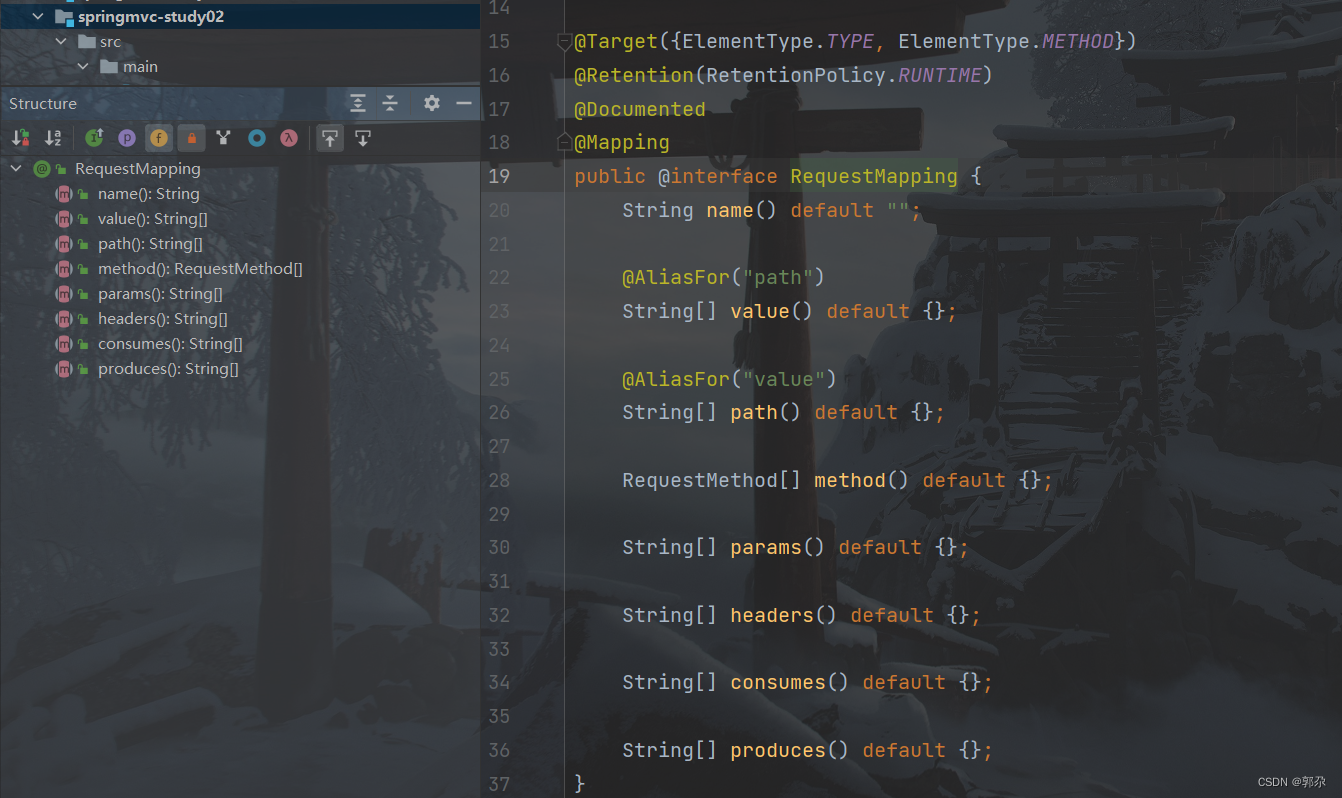
- 在源码中我们可以看到@RequestMapping的所有属性,那么接下来就一起看一看这些属性
2.1 @RequestMapping的value属性*
- @RequestMapping 的 value 属性必须设值;
- @RequestMapping 的 value 属性是通过当前请求的请求地址来匹配请求;
- 从上面的源码中可以看到value属性是一个字符串类型的数组,因此说明可以将多个请求映射到一个方法上,只需要给 value 来指定一个包含多个路径的数组。
设置value属性的值:
@Controller
public class RequestMappingController {

    @RequestMapping(value = {"/testRequest","/test"})
    public String testRequest(){
        return "success";
    }
}
在浏览器中输入下面路径进行测试:

注意:从上面两张图我们能够看到,这时的请求映射所映射的请求的请求路径为选择value数组中的任意一个都可以。
2.2 @RequestMapping的method属性*
- @RequestMapping的method属性是通过当前请求的请求方式来匹配请求;
- 浏览器向服务器发送请求,请求方式有很多GET、HEAD、POST、PUT、PATCH、DELETE、OPTIONS、TRACE。可以使用 method 属性来约束请求方式。
设置请求方式为get:
@Controller
public class RequestMappingController {

    @RequestMapping(value = "/testRequest",method = RequestMethod.GET)
    public String testRequest(){
        return "success";
    }
}
以post方式请求:
<form th:action="@{/testRequest}" method="post">
    <input type="submit">
</form>
请求结果:
注意:我们在@RequestMapping注解里加一个方法限定:method = RequestMethod.GET,则请求必须是get的,否则就会发生以上的错误。
映射方法中明确要求请求方式为get,所以post方式不被允许,只有修改为get,才能够请求成功,如果要想两种方式都支持,只需在@RequestMapping注解的method属性中添加另一种方式即可,中间用英文逗号隔开。
扩展:
@GetMapping:处理get方式请求的映射
@PostMapping:处理post方式请求的映射
@PutMapping:处理put方式请求的映射
@DeleteMapping:处理delete方式请求的映射
@GetMapping就相当于@RequestMapping(method=RequestMethod.GET),它会将get映射到特定的方法上。
使用方式:@GetMapping(value = "/testRequest")
2.3 @RequestMapping的params属性
@RequestMapping的params属性是通过当前请求的请求参数来匹配请求;
@RequestMapping的params属性是一个字符串类型的数组,可以通过下面四种表达是来设置匹配关系
- “param”:要求请求映射的请求必须为包含 param的请求参数
- “!param”:要求请求映射的请求是不能包含param的请求参数
- “param=value”:要求请求映射的请求必须包含 param 的请求参数,且 param 参数的值必须为 value
- “param!=value”: 要求请求映射的请求是必须包含 param 的请求参数,其值不能为 value。
设置params的属性值为username:
@RequestMapping(value = "/test",params = "username")
    public String test(){
        return "success";
    }
请求结果:
注意:我们设置了params属性,就意味着该请求映射的请求必须包含username才能够请求成功。
当我们传入参数用http://localhost:8080/springmvc_study02/test?username路径来访问,我们来看看结果:
当给params属性设置多个属性值时,必须同时满足才能够请求成功,否则会出现下面的错误
2.4 @RequestMapping的headers属性
@RequestMapping的headers属性是通过当前请求的请求头信息来匹配请求;
@RequestMapping的headers属性是一个字符串类型的数组,可以通过下面四种表达是来设置匹配关系
- “header”:要求请求映射的请求必须为包含 header的请求头信息
- “!header”:要求请求映射的请求必须为不包含 header的请求头信息
- “header=value”:要求请求映射的请求必须为包含 header的请求头信息,并且header的值必须为value
- “header!=value”:要求请求映射的请求必须为包含 header的请求头信息,并且header的值必须不是value
设置请求头信息:
 @RequestMapping(value = "/test",headers = "Host = localhost:8081")
    public String test(){
        return "success";
    }
请求结果:
注意:如果当前请求不满足headers属性,此时页面就会显示404错误,即资源未找到。
学完这个法宝,是不是感觉非常有意思呢,那还不赶紧去试试。
边栏推荐
- easyui tree
- Editor MAVON editor for offline use
- Convert multidimensional object array to one-dimensional array
- Visual Object Class介绍PASCAL VOC数据集
- Easy to use vscode plug-in memo
- Export word according to the template, generate compound format tables and variable column tables
- JS synchronizes the local time with the server time
- Kali installation configuration of penetration test killer
- How important is baseline safety from non child websites
- clang format
猜你喜欢

Shell脚本之免交互操作

Mqtt.fx connects to Alibaba cloud Internet of things platform

软件测试真有网上说的那么好吗?

Punctual atomic serial port protocol

Application system log structure of elastic stack

Backup and restore of SNAT and DNAT firewall rules

漫谈测试平台—平台建设思路(上)

部署LAMP平台---Linux,Apache,MySQL,PHP的编译安装

Talk about what you know about publishing online (2)

Blue Bridge Cup embedded competition resources and skills
随机推荐
特殊质数js实现
软件测试干货
软件测试和软件开发应该怎么选择?
MySQL detailed learning tutorial (recommended Collection)
Zero foundation uses unity3d to develop AR applications and download 3D models remotely
Verilog daily question (VL2 asynchronous reset Series T trigger - Niuke network)
掌握JVM面试专题和答案Offer拿到手软(附学习路线图)
Can‘t use an undefined value as an ARRAY reference at probe2symbol
strsplit()函数
网上出现的js小数计算的除法优化
FreeRTOS learning notes
软件测试零基础入门好学吗?
软件测试培训需要多久?
Export word according to the template, generate compound format tables and variable column tables
转行学习软件测试有前途吗?
Using OCR to reverse recognize text content in airtest
Talk about what you know about publishing online (2)
在airtest中使用ocr反向识别文本内容
JDWP未授权快速利用
[kibana] problem sorting kibana 7.x no indices match pattern "APM-*“