当前位置:网站首页>Wechat applet 5 - foundation strengthening (not finished)
Wechat applet 5 - foundation strengthening (not finished)
2022-07-27 09:11:00 【Cabbage 007】
( One ) Custom components
1. Components
1.1 Create components
- Right click in the root directory of the project , establish components->test Folder
- In the new components->test folder , Right mouse button , Click on " newly build components"
- Type the name of the component and press enter , Four files corresponding to the component will be automatically generated , The suffixes are .js.json.wxml and .wxss
1.2 Refer to the component
The reference methods of components are divided into " Partial quote " and " Global references "
- Partial quote : Components can only be used in the currently referenced page .
- Global references : Components can be used in every applet page
1.2.1 Local reference component
On page .json How components are referenced in the configuration file , be called " Partial quote "
On page .json In file , Introduce in the form of key value pairs , The key is the name after the component reference , Value is the storage path of the component

1.2.2 Global reference component
stay app.json How components are referenced in the global configuration file , be called " Global references "

1.2.3 Global references VS Partial quote
According to the frequency and range of components , Choose the right way to quote
1.2.4 Differences between components and pages
On the surface , Components and pages are made up of .js .json .wxml and .wxss These four documents make up , however , Components and pages .js And .json The files are obviously different :
- Component's .json Declaration required in document "component":true attribute
- Component's .json What is called in the file is Component() function
- The event handler function of the component needs to be defined to methods node in
2. Custom components - style
2.1 Component style isolation
By default , The style of a custom component is only valid for the current component , Will not affect... Outside the component ui structure

2.2 Notes on component style isolation
- app.wxss The global style in is not valid for the component
- Only class The selector will have the effect of style isolation ,id Selectors , Attribute selector , Label selectors are not affected by style isolation
Suggest : It is recommended to use... In components and pages referencing components class Selectors , Do not use id, attribute , tag chooser
2.3 Modify component style isolation options
By default , The style isolation feature of custom components can prevent the interference between internal and external styles of components , But sometimes , External connection is required to control the style inside the component , here , Can pass styleIsolation Modify style isolation options for components , Two ways :
1: 2:
2:
2.4 styleIsolation Optional values for

3. Custom components - data 、 Methods and properties
3.1 data data
In applet components . Private data for component template rendering , Need to define to data In nodes

3.2 methods Method
In applet components , Event handler and Custom method Need to define to methods node in

Be careful : Custom methods are based on _ start , Used to distinguish between methods and event handlers
3.3 properties attribute : Declare attribute nodes
In applet components ,properties Is the external attribute of the component , It is used to receive the data transferred from the outside to the component

In custom attributes , You can declare some available attribute nodes by declaration
There are two ways to declare : One is to declare attributes completely , The other is to simplify the way of declaring attributes ,
Simplified method : The type of the value corresponding to the attribute name max:Number , min:String , mid : Boolean; Cannot specify default
Complete way : Point to configuration object ,type The data type used to specify the attribute value of the custom instruction ,value Specify the default value of the attribute value , Subsequently specify the value of the attribute , The specified value overrides the default value .

4. Custom components - Data listener
4.1 What is a data listener
The data listener is used for Listen and respond to any attribute changes , To perform specific operations . His function is similar to vue Medium watch The listener . In applet components , The basic syntax format of the data listener is as follows :
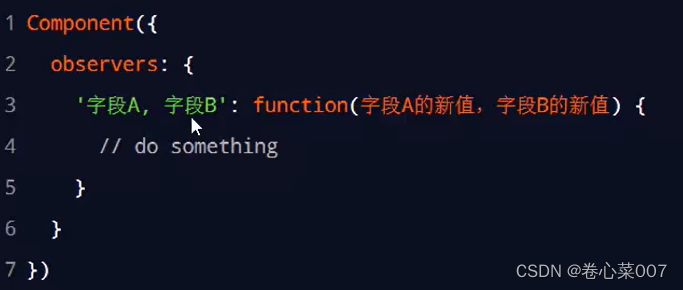
Make a statement observes Configuration object , You can listen for changes in fields , When listening for changes in multiple fields , Use commas between different fields , You can arbitrarily monitor the changes of multiple fields in a listener
4.2 Basic usage of data listener
Component's UI structure :

Component's .js File code :

stay js Document Zhonghua , Statement n1,n2 as well as sum Data nodes , Definition n1,n2 Click event function of two buttons ,sum The value of and needs to be monitored n1,n2 Changes to automatically evaluate , You can listen inside the monitor at the same time n1 and n2
( Two ) Use npm package
( 3、 ... and ) Global data sharing
( Four ) to subcontract
边栏推荐
- PVT's spatial reduction attention (SRA)
- Data interaction based on restful pages
- 基于ArkUI eTS开发的坚果笑话(NutJoke)
- Nut weather
- Primary function t1744963 character writing
- “蔚来杯“2022牛客暑期多校训练营1
- Interface test tool -postman usage details
- QT uses SQLite to open multiple database files at the same time
- A survey of robust lidar based 3D object detection methods for autonomous driving paper notes
- Matlab drawing skills and examples: stackedplot
猜你喜欢
软件测试功能测试全套常见面试题【功能测试-零基础】必备4-1

B tree
![[I2C reading mpu6050 of Renesas ra6m4 development board]](/img/1b/c991dd0d798edbb7410a1e16f3a323.png)
[I2C reading mpu6050 of Renesas ra6m4 development board]

基于restful页面数据交互

5G没能拉动行业发展,不仅运营商失望了,手机企业也失望了
![[flutter -- geTx] preparation](/img/5f/96075fa73892db069db51fe789715a.png)
[flutter -- geTx] preparation

Five kinds of 2D attention finishing (non local, criss cross, Se, CBAM, dual attention)

Can "Gulangyu yuancosmos" become an "upgraded sample" of China's cultural tourism industry
C# 窗体应用常用基础控件讲解(适合萌新)

Hangzhou E-Commerce Research Institute released an explanation of the new term "digital existence"
随机推荐
The execution sequence of async/await, macro tasks and micro tasks
Test picture
07_ Service registration and discovery summary
Cross domain and processing cross domain
存储和计算引擎
Is the operation of assigning values to int variables atomic?
二叉树讲解
Mmrotate trains its dataset from scratch
D3.v3.js data visualization -- pictures and tips of force oriented diagram
Restful
【云原生之kubernetes实战】在kubernetes集群下部署Rainbond平台
“蔚来杯“2022牛客暑期多校训练营1
Explanation of common basic controls for C # form application (suitable for Mengxin)
Nut joke based on arkui ETS
【每日算法Day 94】经典面试题:机器人的运动范围
Function anti chattering throttling
函数防抖节流
How to optimize the deep learning model to improve the reasoning speed
HUAWEI 机试题:字符串变换最小字符串 js
8 kinds of visual transformer finishing (Part 1)