当前位置:网站首页>基于restful页面数据交互
基于restful页面数据交互
2022-07-27 09:00:00 【lwj_07】
做的功能如下所示:


一、基于restful页面数据交互(后台接口开发)
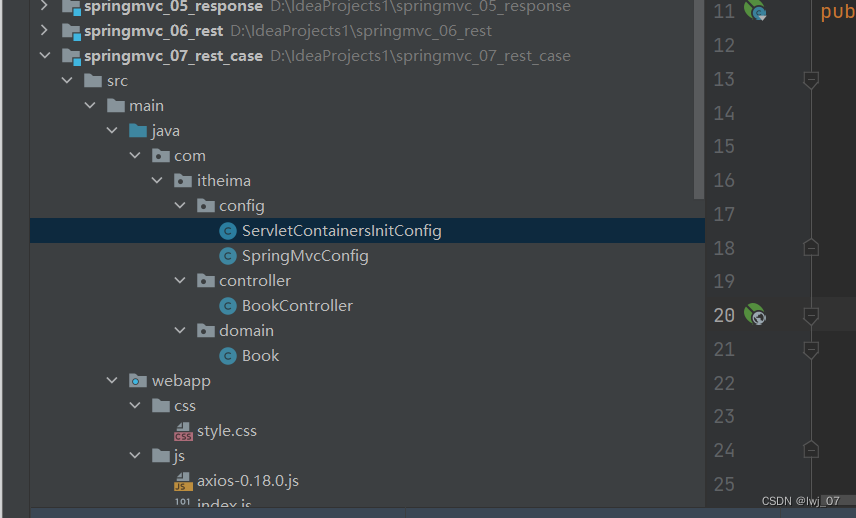
SpringMvcConfig:

ServletContainersInitConfig:

controller包下含有bean注解的对象:
BookController:(REST风格)
package com.itheima.controller;

import com.itheima.domain.Book;
import org.springframework.web.bind.annotation.*;

import java.util.ArrayList;
import java.util.List;

@RestController // 合二为一:@Controller和@ResponseBody注解
@RequestMapping(value = "/books")   // 简化的访问资源路径注解
public class BookController {

    /**
     *  1、 保存数据功能
     *
     *      注1:保存成功后,响应给前端保存成功的提示(所以用String返回类型)
     *      注2:后端肯定要先接收到前端请求保存的数据信息才能保存(这里模拟:以Book对象进行接收前端请求保存的数据)
     */
    @PostMapping    // Restful风格访问的路径简化method(忘记的话看前面笔记)
    public String save(@RequestBody Book book){ // @RequestBody: json数据的转换注解
        /**
         *  假设接收到前端保存的信息后,我们这里用的是假数据,
         *  因此用输出代替一些保存到数据库中的逻辑
         */
        System.out.println("book save ====>" +book);
        return "{'module':'book save success'}";    // 响应给前端的成功标识
    }

    /**
     *  2、查询所有的功能
     *
     *      注1:查询的数据过多,所有以封装在对象属性当中以集合形式封装展示
     */
    @GetMapping
    public List<Book> getAll(){
        /**
         *  注:假设这里模拟一些从数据库中查询出来的假的数据,然后存放到List集合当中传递展示给前端
         */
        Book book =new Book();
        book.setType("计算机");
        book.setName("SpringMvc入门课程");
        book.setDescription("小试牛刀");

        Book book1 = new Book();
        book1.setName("计算机");
        book1.setName("SpringMvc实践课程");
        book1.setDescription("一代宗师");

        // 把查询出来的数据封装到List集合中返回给前端
        List<Book> bookList = new ArrayList<Book>();
        bookList.add(book);
        bookList.add(book1);

        return bookList;
    }
}
前端访问后端保存功能路径如下所示:


前端访问后端查询所有功能路径如下所示:
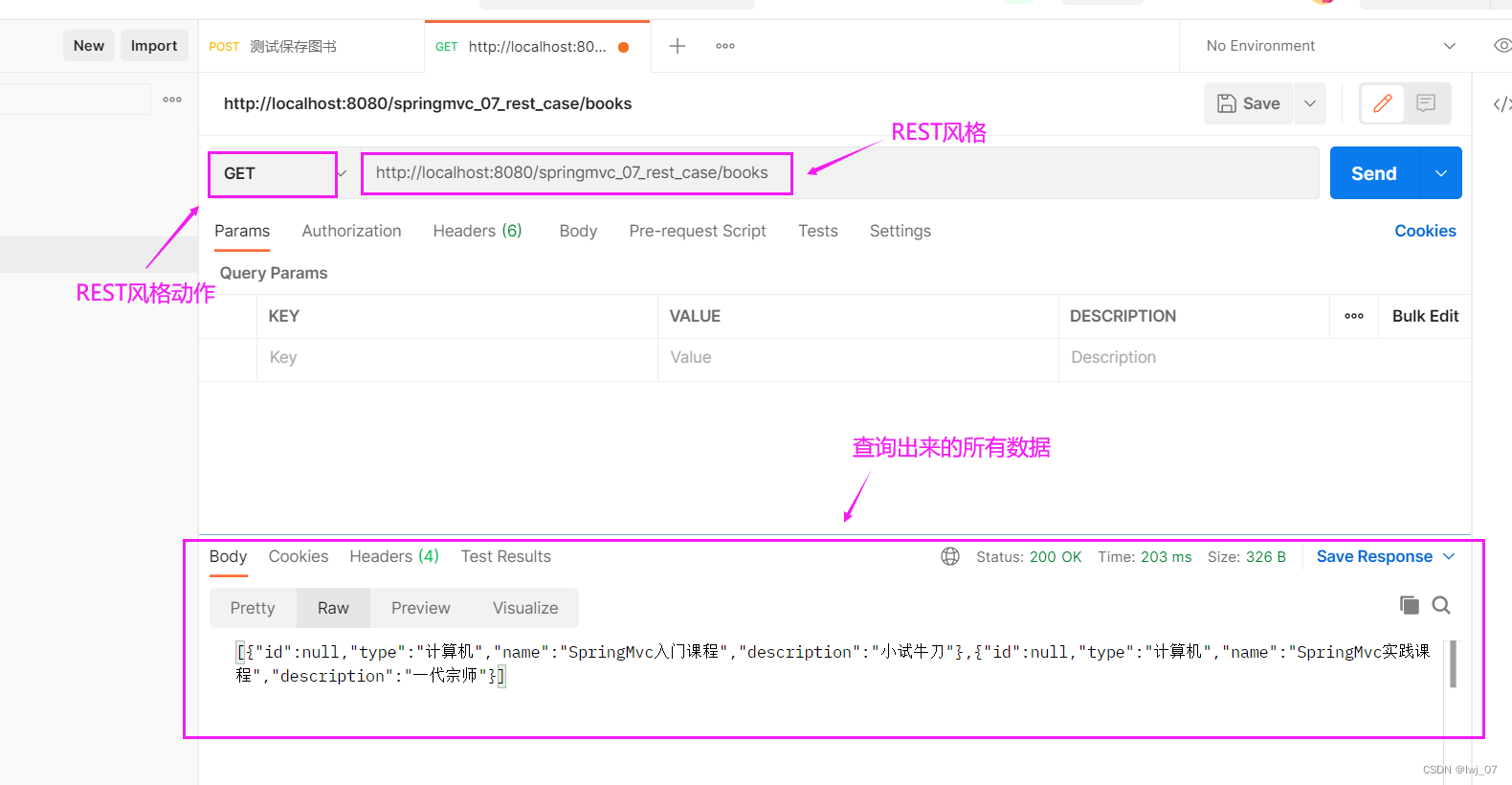
二、基于restful页面数据交互(前端页面访问处理)

我们开启服务器进行访问前端页面的时候:思考会出现什么问题
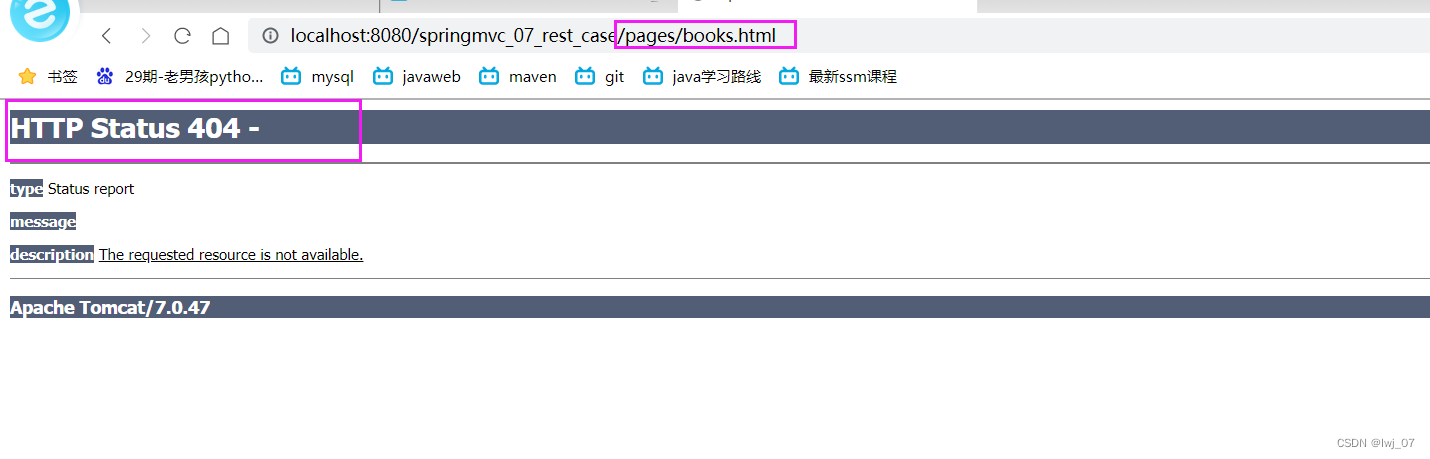

我们可以看出,当访问前端页面的时候,前端会404,并且后端会出现[WARNING]警告提示
思考:为什么会出现这种情况呢?
就是因为这个方法把客户端所有的请求都归属到springmvc管理了,而前端访问请求路径:

我们知道这种请求是get方式的请求(在URL地址栏中明着写的都是get请求方式),所以当访问前端路径的时候,下面的这个方法就把该路径交给springmvc进行处理了,而springmvc认为这是一个简单的get请求路径,所以找不到路径就报404了
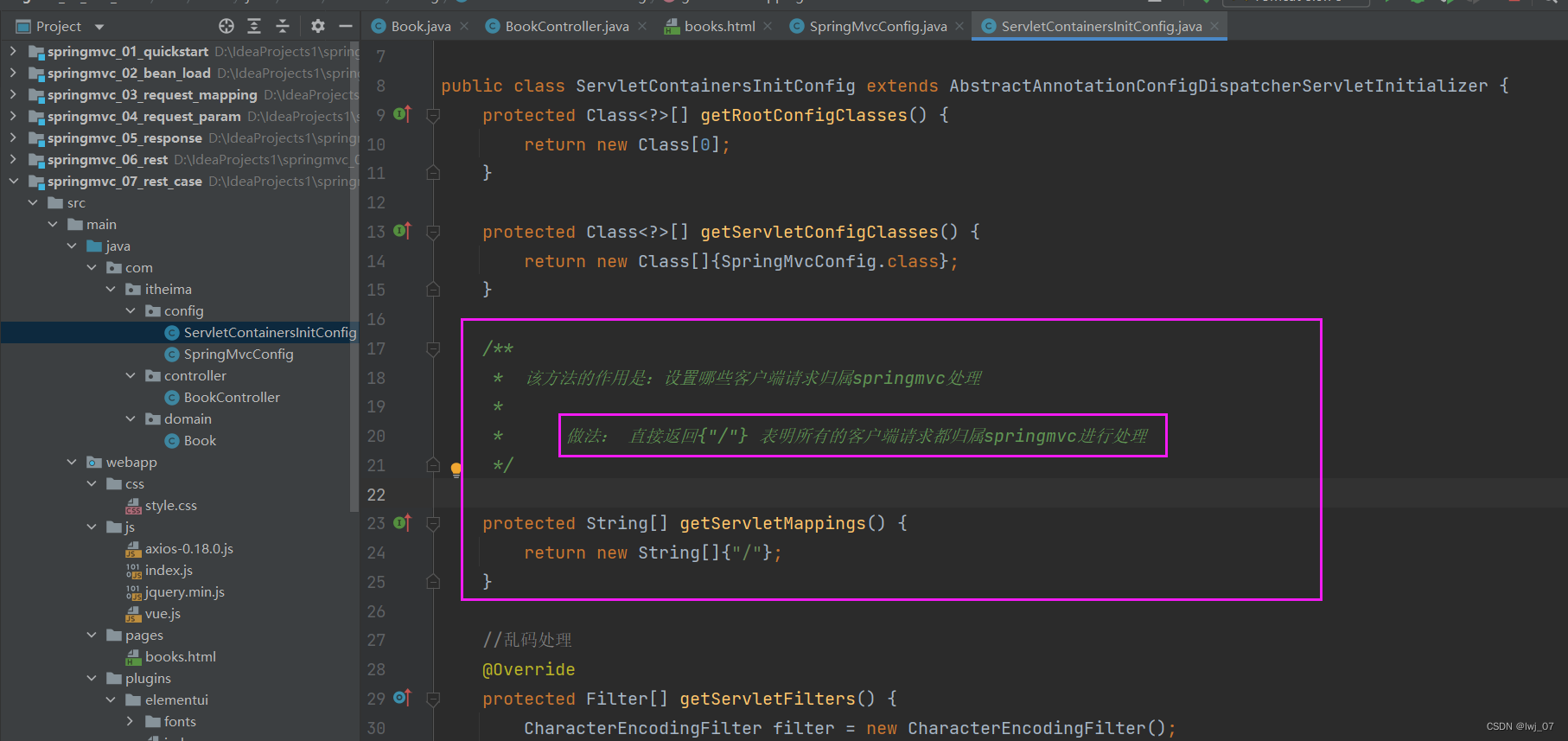
因此解决方法如下所示:
配置一个过滤对象(并注解成bean形式):


我们开启服务器再次进行访问前端页面的时候:会发现能访问到前端页面了

=========================================================================
books.html:
<!DOCTYPE html>

<html>
    <head>
        <!-- 页面meta -->
        <meta charset="utf-8">
        <title>SpringMVC案例</title>
        <!-- 引入样式 -->
        <link rel="stylesheet" href="../plugins/elementui/index.css">
        <link rel="stylesheet" href="../plugins/font-awesome/css/font-awesome.min.css">
        <link rel="stylesheet" href="../css/style.css">
    </head>

    <body class="hold-transition">

        <div id="app">

            <div class="content-header">
                <h1>图书管理</h1>
            </div>

            <div class="app-container">
                <div class="box">
                    <div class="filter-container">
                        <el-input placeholder="图书名称" style="width: 200px;" class="filter-item"></el-input>
                        <el-button class="dalfBut">查询</el-button>
                        <el-button type="primary" class="butT" @click="openSave()">新建</el-button>
                    </div>

                    <el-table size="small" current-row-key="id" :data="dataList" stripe highlight-current-row>
                        <el-table-column type="index" align="center" label="序号"></el-table-column>
                        <el-table-column prop="type" label="图书类别" align="center"></el-table-column>
                        <el-table-column prop="name" label="图书名称" align="center"></el-table-column>
                        <el-table-column prop="description" label="描述" align="center"></el-table-column>
                        <el-table-column label="操作" align="center">
                            <template slot-scope="scope">
                                <el-button type="primary" size="mini">编辑</el-button>
                                <el-button size="mini" type="danger">删除</el-button>
                            </template>
                        </el-table-column>
                    </el-table>

                    <div class="pagination-container">
                        <el-pagination
                            class="pagiantion"
                            @current-change="handleCurrentChange"
                            :current-page="pagination.currentPage"
                            :page-size="pagination.pageSize"
                            layout="total, prev, pager, next, jumper"
                            :total="pagination.total">
                        </el-pagination>
                    </div>

                    <!-- 新增标签弹层 -->
                    <div class="add-form">
                        <el-dialog title="新增图书" :visible.sync="dialogFormVisible">
                            <el-form ref="dataAddForm" :model="formData" :rules="rules" label-position="right" label-width="100px">
                                <el-row>
                                    <el-col :span="12">
                                        <el-form-item label="图书类别" prop="type">
                                            <el-input v-model="formData.type"/>
                                        </el-form-item>
                                    </el-col>
                                    <el-col :span="12">
                                        <el-form-item label="图书名称" prop="name">
                                            <el-input v-model="formData.name"/>
                                        </el-form-item>
                                    </el-col>
                                </el-row>
                                <el-row>
                                    <el-col :span="24">
                                        <el-form-item label="描述">
                                            <el-input v-model="formData.description" type="textarea"></el-input>
                                        </el-form-item>
                                    </el-col>
                                </el-row>
                            </el-form>
                            <div slot="footer" class="dialog-footer">
                                <el-button @click="dialogFormVisible = false">取消</el-button>
                                <el-button type="primary" @click="saveBook()">确定</el-button>
                            </div>
                        </el-dialog>
                    </div>

                </div>
            </div>
        </div>
    </body>

    <!-- 引入组件库 -->
    <script src="../js/vue.js"></script>
    <script src="../plugins/elementui/index.js"></script>
    <script type="text/javascript" src="../js/jquery.min.js"></script>
    <script src="../js/axios-0.18.0.js"></script>

    <script>
        var vue = new Vue({

            el: '#app',

            data:{
				dataList: [],//当前页要展示的分页列表数据
                formData: {},//表单数据
                dialogFormVisible: false,//增加表单是否可见
                dialogFormVisible4Edit:false,//编辑表单是否可见
                pagination: {},//分页模型数据,暂时弃用
            },

            //钩子函数,VUE对象初始化完成后自动执行
            created() {
                this.getAll();
            },

            methods: {
                // 重置表单
                resetForm() {
                    //清空输入框
                    this.formData = {};
                },

                // 弹出添加窗口
                openSave() {
                    this.dialogFormVisible = true;
                    this.resetForm();
                },

                //添加        // 确定按钮 调用这个saveBook()
                saveBook () {       // 添加数据的请求
                    axios.post("/springmvc_07_rest_case/books",this.formData).then((res)=>{

                    });
                },

                //主页列表查询(查询所有)
                getAll() {
                    axios.get("/springmvc_07_rest_case/books").then((res)=>{    // get请求("/#") 访问资源路径
                       this.dataList = res.data;
                    });
                },

            }
        })
    </script>
</html>
边栏推荐
猜你喜欢

Can "Gulangyu yuancosmos" become an "upgraded sample" of China's cultural tourism industry

String type and bitmap of redis

Rewrite the tensorrt version deployment code of yolox

微信安装包从0.5M暴涨到260M,为什么我们的程序越来越大?
软件测试功能测试全套常见面试题【功能测试-零基础】必备4-1

Some practical, commonly used and increasingly efficient kubernetes aliases

Digital intelligence innovation

Network IO summary

CUDA programming-02: first knowledge of CUDA Programming
一些实用、常用、效率越来越高的 Kubernetes 别名
随机推荐
罗克韦尔AB PLC 通过RSLinx Classic与PLC建立通信的具体方法步骤
Implementation of queue (sequential storage, chain storage)
693. 行程排序
MATLAB data import -- importdata and load functions
Ctfshow ultimate assessment
flex布局 (实战小米官网)
Matlab 利用M文件产生模糊控制器
【每日算法Day 96】腾讯面试题:合并两个有序数组
Digital intelligence innovation
如何在B站上快乐的学习?
07_ Service registration and discovery summary
[I2C reading mpu6050 of Renesas ra6m4 development board]
苹果降价600元,对本就溃败的国产旗舰手机几乎是毁灭性打击
linux安装和远程连接mysql记录
"Weilai Cup" 2022 Niuke summer multi school training camp 1
Unity3D 2021软件安装包下载及安装教程
B tree
Horse walking oblique sun (backtracking method)
HUAWEI 机试题:字符串变换最小字符串 js
Full Permutation (depth first, permutation tree)