当前位置:网站首页>Redux state management
Redux state management
2022-07-31 07:08:00 【 K 】
一、初识Redux
Redux 是 JavaScript 状态容器(是JS库,并不是react的插件库,Just often withreact搭配开发,redux同样适用与vue、angularand other frameworks for development),提供可预测化的状态管理,Centrally manage multi-component shared state.学过vue的同学,应该接触过vuex,redux就相当于vuex.
二、使用步骤
1.安装
安装稳定版:
npm install --save redux
2.三大原则
Redux 可以用这三个基本原则来描述:
- state以单一对象存储在store对象中
- state只读(每次都返回一个新的对象)
- 适用reducer执行state更新
3.reducer工作流
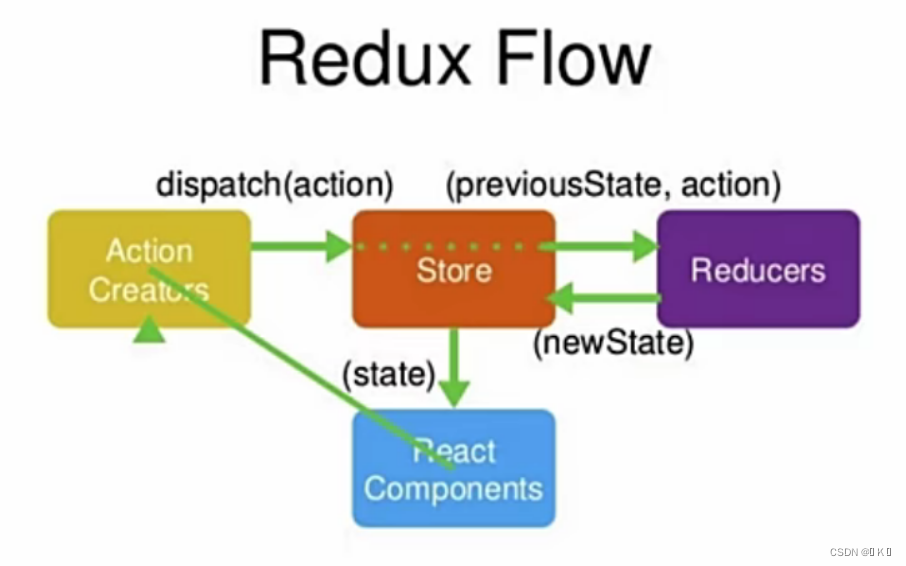
4.核心步骤
在src文件夹下创建store文件夹,并分别创建index.js和reducer.js文件.
store
在index文件中创建store,创建store的时候需要传入一个reducer,这是为了,每次store.dispatch发送一个新的action后,redux都会自动调用reducer,并返回新的state.
import {
     createStore } from 'redux'
const store = createStore(reducer)
export default store
reducer
在reducer文件中创建reducer,reducer就是用来计算新的store的,reducer接收两个参数:当前的state和接收到的action,It will be calculated,然后返回一个新的state.We cannot change it directlystate,必须通过返回一个新的state来进行变更.
但是在reducer第一次执行的时候,store传的state是undefined,So prepare oneinitialState作为默认值,复制给state,然后再把这个state返回给store,所以initialState实际上,就是store的初始值.
const initialState = {
     num: 0 };
const reducer = (prevState = initialState, action) => {

  let newState = {
    ...prevState}
  switch (action.type) {

      case 'ADD':
      		newState.num = 1
            return newState;
      default:
            return prevState;
}};
- combineReducers用法
如果不同的actionThere is no connection between them,可以将reducer函数进行拆分,Different functions handle different logic,最后通过combineReducers合并为大Reducer.
// reducers.js,不同的reducer函数
export default theDefaultReducer = (state = 0, action) => state;

export const firstNamedReducer = (state = 1, action) => state;

export const secondNamedReducer = (state = 2, action) => state;


// rootReducer.js
import {
    combineReducers, createStore} from "redux";

import theDefaultReducer, {
    firstNamedReducer, secondNamedReducer} from "./reducers";

// 使用 ES6 The object literal shorthand for defining the object structure
const rootReducer = combineReducers({

    theDefaultReducer,
    firstNamedReducer,
    secondNamedReducer
});
// 合并为大的rootReducer函数
const store = createStore(rootReducer);
console.log(store.getState());
// {theDefaultReducer : 0, firstNamedReducer : 1, secondNamedReducer : 2}
action
每个 action 必须有一个 type 属性,这表示 action 的名称,Then there can be one more payload 属性,这个属性可以带一些参数,用作 Store 变更.
const action = {

  type: 'ADD_ITEM',
  payload: 'theme', // 可选属性
}
- ActionTypes的拆分
如果action的typeThe value is a custom string,Then even if the string is spelled wrong,The page will not report an error,This is very bad for us to locate the problem、解决问题.所以,我们可以对action的type进行拆分,Use a constant instead of the original string.这样的话,If we are in the process of using it,Accidentally misspelled a character in a variable,The page will also report an error.
// 在store下创建actionTypes文件,里面定义typesconstants and exported
export const SWITCH_THEME = 'switch_theme';


// 在用到action的type的地方,Import the constant just defined
import {
     SWITCH_THEME } from './store/actionTypes';

// 使用的时候,Directly replace strings with constants
    handleBtnClick(e){

        const action = {

            type:SWITCH_THEME
        }
        store.dispatch(action);
    }
- actionCreators 统一创建 action
一般来说,actionFunctions are scattered in business logic,但是,When the business logic is very complex,action到处都是,It will be very inconvenient for later testing and management.所以,我们可以把action拆分到actionCreatorUnified creation management.
// 在store下创建actionCreators.js文件,我们把actionThe creation of unified into this file,对action进行统一的管理
// Mainly to improve the maintainability of the code,方便自动化测试
import {
     SWITCH_THEME } from './actionTypes';

// 定义一个常量,是一个函数,该函数返回一个对象,对象包含action的type和值
export  const switchTheme = (theme) => ({

    type: SWITCH_THEME,
    payload: theme,
})

// 具体的使用,Introduce these firstactionCreators 里的action
import {
     switchTheme } from './store/actionCreators';

// 然后使用store.dispatch去触发action
    handleBtnClick(e){

        const action = switchTheme(‘dark’);
        store.dispatch(action);
    }
5.reducer中间件
在reducer中,action是一个普通的js对象,This form is called synchronizationaction,通过store.dispatch()进行分发,但当actionfor asynchronous time,reducer就无法处理,这时,就需要redux-thunk中间件.
安装:
npm install redux-thunk
配置:
import thunkMiddleware from 'redux-thunk';
import {
     createStore, applyMiddleware } from 'redux'
const store = createStore(reducer, applyMiddleware(thunkMiddleware))
export default store
action函数:
function getAdd(){

	return dispatch => {

            dispatch({

                type: ADD,
                payload: axios.get(
                     url: ADD_URL,
                     query: {

                         name: '',
                     },
                )
            });
        },
}
6.redux开发者工具
redux提供了redux-devtools-extension插件,Status changes can be viewed visually
安装:
npm install redux-devtools-extension
同时在chrome浏览器安装Redux DevTools扩展程序
配置代码:
 const {
     createStore } = require('redux');
 // Introduce tool plugins
 const {
     composeWithDevTools } = require('redux-devtools-extension');
 const store = createStore(reducer, composeWithDevTools(// Wrapped outside the middleware));
在浏览器中按f12,找到Redux菜单,Click to see it:
总结
createStore 创建store
store.dispatch(),distribution createdaction
store.getState(),获取到store里的数据内容
store.subscribe(),订阅store里数据的改变,只要store发生改变,subscribeThe function received by the method,就会被执行.
边栏推荐
猜你喜欢
浅析重复线性渐变repeating-linear-gradient如何使用
磁盘管理与文件系统
Oracle入门 08 - Linux 系统远程登录维护
Oracle入门 06 - Windows 服务器安装配置

Skywalking安装部署
高并发与多线程之间的难点对比(容易混淆)
英语翻译软件-批量自动免费翻译软件支持三方接口翻译

Analysis of pseudo-classes and pseudo-elements

Analysis of the implementation principle and detailed knowledge of v-model syntactic sugar and how to make the components you develop support v-model

【TA-霜狼_may-《百人计划》】美术2.3 硬表面基础
随机推荐
OSI七层模型
文本三剑客之e`grep,seq文本编辑工具
银河麒麟服务器v10 sp1安装.net6
shell的脚本的基本用法
外贸网站优化-外贸网站优化教程-外贸网站优化软件
接口报错no message avaliable
How to use repeating-linear-gradient
Exam Questions Previous True Questions Wrong Bills [The Fourth Session] [Provincial Competition] [Group B]
第十七章:回溯探求指定入口的马步遍历,贪心无回溯探求马步遍历,递归探求nxm棋盘带障碍马步遍历
选择排序法
Debian 10 dhcp 服务配置
浅层了解欧拉函数
银河麒麟v10 sp1 安装 PostgreSQL 11.16
试题 历届真题 错误票据【第四届】【省赛】【B组】
Debian 10 iptables (防火墙)配置
Oracle入门 02 - IT软硬件平台及操作系统介绍
How to choose a suitable UI component library in uni-app
【云原生】-Docker容器迁移Oracle到MySQL
服务器硬件及RAID配置实战
DDL+DML+DQL