当前位置:网站首页>ELK日志收集系统部署
ELK日志收集系统部署
2022-06-23 15:54:00 【用户7353950】
日志在计算机系统中是一个非常广泛的概念,任何程序都有可能输出日志:操作系统内核、各种应用服务器等等。日志的内容、规模和用途也各不相同,很难一概而论。
Web日志中包含了大量人们——主要是产品分析人员会感兴趣的信息,最简单的,我们可以从中获取网站每类页面的PV值(PageView,页面访问量)、独立IP数(即去重之后的IP数量)等;稍微复杂一些的,可以计算得出用户所检索的关键词排行榜、用户停留时间最高的页面等;更复杂的,构建广告点击模型、分析用户行为特征等等。
今天给大家介绍一款日志分析工具:ELK
ELK由Elasticsearch、Logstash和Kibana三部分组件组成;
Elasticsearch 是基于 JSON 的分布式搜索和分析引擎,专为实现水平扩展、高可用和管理便捷性而设计
Logstash 是开源的服务器端数据处理管道,能够同时 从多个来源采集数据、转换数据,然后将数据发送到您最喜欢的 “存储库” 中。(我们的存储库当然是 Elasticsearch。)
Kibana 能够以图表的形式呈现数据,并且具有可扩展的用户界面,供您全方位配置和管理 Elastic Stack。
今天的试验是:通过ELK分析线上所有Nginx的访问日志。
一、试验拓扑图
二、软件包获得
Nginx下载http://nginx.org/en/download.html
Redis下载 https://redis.io/
Elasticsearch logstash kibana下载 https://www.elastic.co/downloads
三,开始部署
3.1)业务机部署A
业务机:192.168.1.242/24
OS:rhel6.5
涉及软件:nginx+logstash+redis+jdk
软件包准备:根据上述的提示下载软件包
[[email protected] opt]# ls
jdk-8u144-linux-x64.rpm logstash-5.5.1.tar.gz nginx-1.13.4.tar.gz redis-4.0.1.tar.gz
3.1.1)安装JDK
[[email protected] opt]# rpm -ivh jdk-8u144-linux-x64.rpm
Preparing... ####################################### [100%]
1:jdk1.8.0_144 ######################################## [100%]
Unpacking JAR files...
tools.jar...
plugin.jar...
javaws.jar...
deploy.jar...
rt.jar...
jsse.jar...
charsets.jar...
localedata.jar...
设置java环境变量
[[email protected] opt]# vim /root/.bash_profile 末尾追加一下内容
JAVA_HOME=/usr/java/jdk1.8.0_144
PATH=JAVA_HOME/bin:PATH:
CLASSPATH=.:JAVA_HOME/lib/tools.jar:JAVA_HOME/lib/dt.jar
export PATH JAVA_HOME CLASSPATH CATALINA_HOME
生效配置并验证
[[email protected] opt]# source /root/.bash_profile
[[email protected] opt]# java -version
java version "1.8.0_144"
Java(TM) SE Runtime Environment (build 1.8.0_144-b01)
Java HotSpot(TM) 64-Bit Server VM (build 25.144-b01, mixed mode)
3.1.2)安装redis
[[email protected] opt]# tar xf redis-4.0.1.tar.gz
[[email protected] opt]# cd redis-4.0.1
[[email protected] redis-4.0.1]# make
[[email protected] redis-4.0.1]# make install
配置redis
[[email protected] redis-4.0.1]# sed -i -r '/^(bind)/s/127.0.0.1/0.0.0.0/' redis.conf
[[email protected] redis-4.0.1]# sed -i -r '/^(daemonize)/s/no/yes/' redis.conf
启动redis
[[email protected] redis-4.0.1]# redis-server redis.conf
5789:C 30 Aug 11:09:58.584 # oO0OoO0OoO0Oo Redis is starting oO0OoO0OoO0Oo
5789:C 30 Aug 11:09:58.584 # Redis version=4.0.1, bits=64, commit=00000000, modified=0, pid=5789, just started
5789:C 30 Aug 11:09:58.584 # Configuration loaded
验证启动
[[email protected] redis-4.0.1]# lsof -i :6379
COMMAND PID USER FD TYPE DEVICE SIZE/OFF NODE NAME
redis-ser 5790 root 6u IPv4 18672 0t0 TCP *:6379 (LISTEN)
3.1.3)安装nginx
[[email protected] opt]# tar xf nginx-1.13.4.tar.gz
[[email protected] opt]# cd nginx-1.13.4
[[email protected] nginx-1.13.4]# yum -y install pcre-devel zlib-devel
[[email protected] nginx-1.13.4]# ./configure --prefix=/usr/local/nginx
[[email protected] nginx-1.13.4]# make
[[email protected] nginx-1.13.4]# make install
修改nginx配置文件,重新定义log_format 以json格式输出日志到access.log
[[email protected] nginx-1.13.4]# cd /usr/local/nginx/conf/
[[email protected] conf]# vim nginx.conf
启动nginx并验证
[[email protected] conf]# /usr/local/nginx/sbin/nginx
[[email protected] conf]# lsof -i :80
COMMAND PID USER FD TYPE DEVICE SIZE/OFF NODE NAME
nginx 10765 root 6u IPv4 24510 0t0 TCP *:http (LISTEN)
nginx 10766 nobody 6u IPv4 24510 0t0 TCP *:http (LISTEN)
访问一次nginx 验证日志格式是否正确
3.1.4)安装logstash
[[email protected] opt]# tar xf logstash-5.5.1.tar.gz -C /usr/local/
[[email protected] opt]# cd /usr/local/logstash-5.5.1/
[[email protected] logstash-5.5.1]# mkdir conf.d
[[email protected] logstash-5.5.1]# vim conf.d/nginx_to_redis
input {
file {
path => ["/usr/local/nginx/logs/access.log"]
type => "nginx_log"
codec => json
}
}
output {
redis{
host => "192.168.1.242"
key => 'logstash:redis'
data_type => 'channel'
port => '6379'
}
stdout {
codec => rubydebug
}
}
启动logstash 并测试是否成功收集nginx日志到redis
[[email protected] ~]# /usr/local/logstash-5.5.1/bin/logstash -f /usr/local/logstash-5.5.1/conf.d/nginx_to_redis
查看启动日志
[[email protected] logstash-5.5.1]# tailf /usr/local/logstash-5.5.1/logs/logstash-plain.log
测试日志收集
Logstash收集日志输出
开启redis 监控
3.2)业务机部署B
业务机:192.168.1.241/24
OS:rhel6.5
涉及软件:elasticsearch+logstash+kibana
[[email protected] opt]# ls
elasticsearch-5.5.1.rpm
kibana-5.5.1-x86_64.rpm
jdk-8u144-linux-x64.rpm
logstash-5.5.1.tar.gz
3.2.1)安装jdk
参考242设置
3.2.2)安装elasticsearch
[[email protected] opt]# rpm -ivh elasticsearch-5.5.1.rpm
warning: elasticsearch-5.5.1.rpm: Header V4 RSA/SHA512 Signature, key ID d88e42b4: NOKEY
Preparing... ######################################## [100%]
Creating elasticsearch group... OK
Creating elasticsearch user... OK
1:elasticsearch ######################################## [100%]
### NOT starting on installation, please execute the following statements to configure elasticsearch service to start automatically using chkconfig
sudo chkconfig --add elasticsearch
### You can start elasticsearch service by executing
sudo service elasticsearch start
配置elasticsearch
[[email protected] opt]# sed -i -r '/^(#network.host:)/cnetwork.host: 0.0.0.0' /etc/elasticsearch/elasticsearch.yml
[[email protected] opt]# sed -i -r '/^(#http.port:)/chttp.port: 9200' /etc/elasticsearch/elasticsearch.yml
[[email protected] opt]# sed -i -r '/^(#bootstrap.memory_lock:)/cbootstrap.memory_lock: falsenbootstrap.system_call_filter: false' /etc/elasticsearch/elasticsearch.yml
优化系统
[[email protected] opt]# vim /etc/security/limits.conf 末尾追加
elasticsearch soft nproc 10240
elasticsearch hard nproc 10240
* soft nofile 65540
* hard nofile 65540
重启计算机生效
启动elasticsearch
[[email protected] opt]# /etc/init.d/elasticsearch start
Starting elasticsearch: [ OK ]
验证
3.2.3)安装logstash
[[email protected] opt]# tar xf logstash-5.5.1.tar.gz -C /usr/local/
[[email protected] opt]# cd /usr/local/logstash-5.5.1/
[[email protected] logstash-5.5.1]# mkdir conf.d
[[email protected] logstash-5.5.1]# vim conf.d/redis_to_elk
input {
redis {
port => "6379"
host => "192.168.1.242"
data_type => "channel"
key => "logstash:redis"
type => "redis-input"
}
}
output {
elasticsearch {
hosts => "192.168.1.241"
index => "logstash-%{+YYYY.MM.dd}"
action => "index"
}
stdout {
codec => rubydebug
}
}
启动logstash
[[email protected] logstash-5.5.1]#./bin/logstash -f conf.d/redis_to_elk
访问一次测试数据是否有redis写入到elk
3.2.4)安装kibana
[[email protected] opt]# rpm -ivh kibana-5.5.1-x86_64.rpm
warning: kibana-5.5.1-x86_64.rpm: Header V4 RSA/SHA512 Signature, key ID d88e42b4: NOKEY
Preparing... ####################################### [100%]
1:kibana ####################################### [100%]
修改配置文件中的
[[email protected] opt]# sed -i -r '/^(#server.host:)/cserver.host: "0.0.0.0"' /etc/kibana/kibana.yml
[[email protected] opt]# /etc/init.d/kibana start
kibana started
验证启动
[[email protected] opt]# netstat -ntpl |grep 5601
tcp 0 0 0.0.0.0:5601 0.0.0.0:* LISTEN 1993/node
测试通过浏览器
边栏推荐
- golang二分查找法代码实现
- How did Tencent's technology bulls complete the overall cloud launch?
- Does the enterprise want to use the MES system? These conditions have to be met
- [tcapulusdb knowledge base] Introduction to tmonitor background one click installation (I)
- [today in history] June 23: Turing's birthday; The birth of the founder of the Internet; Reddit goes online
- [tcapulusdb knowledge base] Introduction to tmonitor stand-alone installation guidelines (I)
- Object
- Innovation strength is recognized again! Tencent security MSS was the pioneer of cloud native security guard in 2022
- NLP 论文领读|改善意图识别的语义表示:有监督预训练中的各向同性正则化方法
- ADB 按鍵名、按鍵代碼數字、按鍵說明對照錶
猜你喜欢
![[today in history] June 23: Turing's birthday; The birth of the founder of the Internet; Reddit goes online](/img/d5/4b3e622ab77bc546ca5d285ef67d8a.jpg)
[today in history] June 23: Turing's birthday; The birth of the founder of the Internet; Reddit goes online
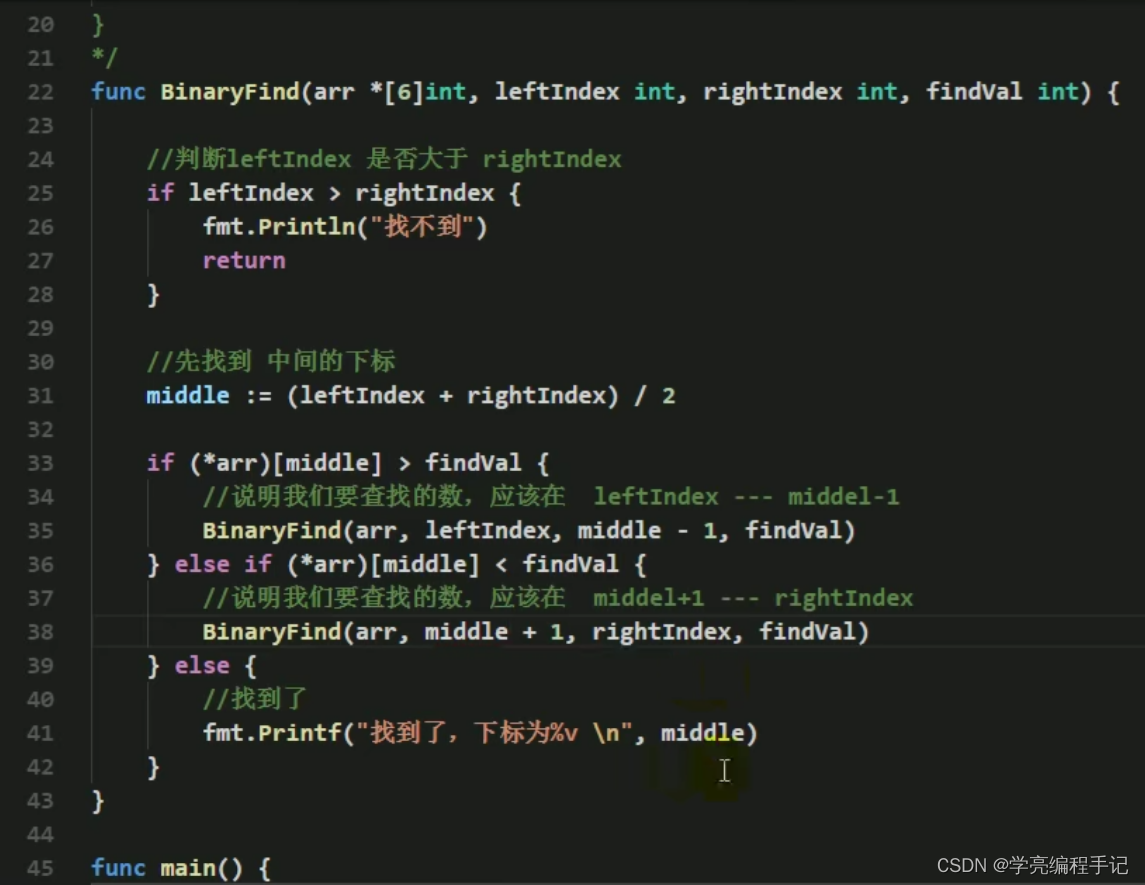
golang二分查找法代码实现

CoAtNet: Marrying Convolution and Attention for All Data Sizes翻译

数学分析_证明_第1章:可数个可数集之并为可数集

Leetcode 450. Delete node in binary search tree

二分查找法思路分析

Interpreting the 2022 agile coaching industry status report

Server deployment and instructions

Opengauss database source code analysis series articles -- detailed explanation of dense equivalent query technology (Part 1)

stylegan2:analyzing and improving the image quality of stylegan
随机推荐
golang数据类型图
[tcapulusdb knowledge base] Introduction to tmonitor background one click installation (II)
golang冒泡排序代码实现
Safe and comfortable, a new generation of Qijun carefully interprets the love of the old father
Sleuth + Zipkin
15 differences between MES in process and discrete manufacturing enterprises (Part I)
Does the enterprise want to use the MES system? These conditions have to be met
Code example of golang date time package: get age, zodiac and constellation based on birthday
Drag the child file to the upper level
A tour of grpc:01 - Basic Theory
Now I want to buy stocks. How do I open an account? Is it safe to open a mobile account?
golang日期时间time包代码示例: 根据生日获取年龄、生肖、星座
Opengauss database source code analysis series articles -- detailed explanation of dense equivalent query technology (Part 2)
科大讯飞神经影像疾病预测方案!
R language uses the image of magick package_ The scale function resizes the image. You can customize the scaling from the angle of width or height
CoAtNet: Marrying Convolution and Attention for All Data Sizes翻译
走好数据中台最后一公里,为什么说数据服务 API 是数据中台的标配?
Thinking analysis of binary search method
[tcapulusdb knowledge base] Introduction to tmonitor system upgrade
如何选择券商?手机开户安全么?