当前位置:网站首页>Add an "open search description" to the site to adapt to the browser's "site search"“
Add an "open search description" to the site to adapt to the browser's "site search"“
2022-06-26 03:23:00 【Bo Wei】
background
To search on a popular website , Presumably most people will be like this :
- Visit the home page of this website or any page with a search box
- Focus input box , Enter keywords and Enter
And if a website is equipped with a browser " Site search "(site search) characteristic , Or add " Open search description "(opensearch description), Then users can also search in the following ways :
- New TAB , Enter the site domain name in the address bar ( Enter the domain name prefix of the site , Can press Tab Key auto completion )
- Enter the keywords you want to search for , And return
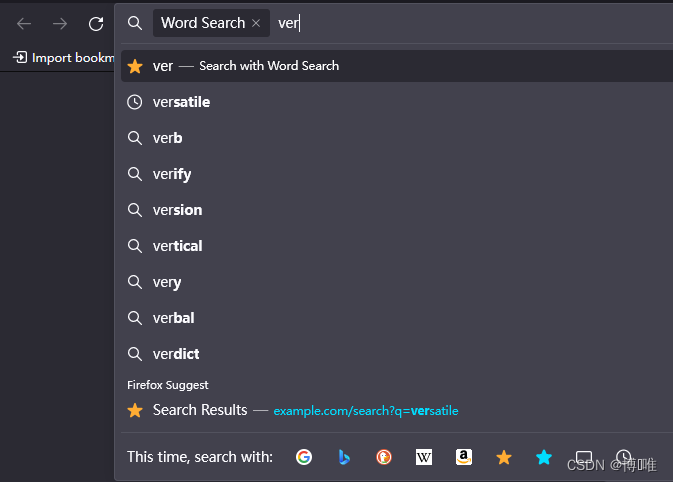
- If the site implements " Search suggestion "(search-suggestions), A list of suggested keywords can also be displayed below the address bar
If you need to frequently open new pages to search on a website , Using site search to search can usually save time .
Cause Web developer : Let the website adapt to the browser " Site search "
The following steps will take the site www.example.com For example , This article introduces how to integrate an existing word search function into the browser address bar .
First step : establish opensearch description file .
for example :search.osdx, Put it next to the front page of the site
<?xml version="1.0" encoding="UTF-8"?>
<OpenSearchDescription xmlns="http://a9.com/-/spec/opensearch/1.1/">
<ShortName>Word Search</ShortName>
<Image type="image/x-icon" width="16" height="16">https://example.com/favicon.ico</Image>
<Url rel="results" type="text/html" method="GET" template="https://www.example.com/search?q={searchTerms}"/>
<Url rel="suggestions" type="application/x-suggestions+json" method="GET" template="https://www.example.com/api/search-suggestions?q={searchTerms}"/>
<Url rel="self" type="application/opensearchdescription+xml" template="https://www.example.com/search.osdx" />
</OpenSearchDescription>
The server is providing search.osdx It is best to use standard MIME “application/opensearchdescription+xml”, Therefore, you need to modify the server configuration file to set the extension .osdx Of MIME type. Really can't use MIME "application/xml" Browsers also recognize , In this case search.osdx Change the extension to .xml that will do .
notes :
<Url rel="suggestions" ... />Optional , Used to provide search suggestions<Url rel="self" ... />Optional , For automatic updates
The second step :【 Optional 】 Implement search suggestions
Implement a REST API Interface GET /api/search-suggestions, Its response MIME type Should be application/x-suggestions+json, The format of the response body is as follows
[
"ver",
[
 "verge",
 "vertical"
],
[
 "[vɜːdʒ] n.  edge , limit  || be o...",
 "[ˈvɜːtɪkl] adj.  Vertical , Upright ..."
],
[
 "https://www.example.com/search?q=verge&utm_source=search-suggestion",
 "https://www.example.com/search?q=vertical&utm_source=search-suggestion"
]
]
If you want to name each part of the response body / Add identifier , So use JavaScript It can be like this :
let q = 'ver';
let completions = [
  "verge",
  "vertical"
];
let descriptions = [
  "[vɜːdʒ] n.  edge , limit  || be o...",
  "[ˈvɜːtɪkl] adj.  Vertical , Upright ..."
];
let queryURLs = [
  "https://www.example.com/search?q=verge&utm_source=search-suggestion",
  "https://www.example.com/search?q=vertical&utm_source=search-suggestion"
];
let content = JSON.stringify([
  q,
  completions,
  descriptions,
  queryURLs
], null, 2);
The third step : Add... On the front page of the website opensearch description Mark
stay <head> Add <link rel="search" ...> Elements , It is also recommended to <head> Add attribute profile="http://a9.com/-/spec/opensearch/1.1/" So that the browser can automatically discover .
<head profile="http://a9.com/-/spec/opensearch/1.1/">

<link rel="search" type="application/opensearchdescription+xml" href="/search.osdx" title="Word Search" />
Step four : Debug site search
Debugging preparation : You can modify this computer hosts File to simulate the online environment , To debug site search . for example : stay hosts Add... To the file
127.0.0.1 www.example.com
After the local commissioning is passed , Restore hosts file .
stay Chrome Browser debug site search
With Chrome 102 For example , The operation steps are as follows :
Visit the home page of the site https://www.example.com
Activate https://www.example.com Site search function
Current Chrome The browser requires activation of the discovered site search (Activate) Ability to use ( You don't have to ), stay " Set up "/“ Search engine ”/“ Manage search engines and site searches ”, Expand the inactive... At the bottom , find www.example.com That line , And click the " Activate "
New TAB , Input example.com, Or input exam The prompt for automatic completion is example.com when , Press Tab key ( At this time, the left side of the address bar will display " Search for Word Search").
Type keywords
If you implement search suggestions , Interface /api/search-suggestions Will receive HTTP request ; If response MIME/ The content format is correct , Search completion suggestions will be displayed below the address bar .
enter

stay Firefox Browser debug site search
With Firefox 102 For example , Operating procedures and Chrome 102 Almost the same , The difference is :
- Firefox Automatically discovered site search terms are available by default , No manual activation is required
- Firefox By default, the site is searched through a separate search box , You need to customize Firefox Toolbar display " Search for ". To use the address bar for site search , You need to in “ Set up ” Change the search method in .
- Firefox It can display at most 8 Suggestions to complete , and Chrome Display at most 3 strip
- You can configure the shortcut keywords for starting site search , for example @word
边栏推荐
- Leetcode 175 Combine two tables (2022.06.24)
- Route jump: click the operation button of the list to jump to another menu page and activate the corresponding menu
- Une citation classique de la nature humaine que vous ne pouvez pas ignorer
- Matlab| short term load forecasting of power system based on BP neural network
- usb peripheral 驱动 - 枚举
- Analysis and optimization of ue5 global illumination system lumen
- 项目部署遇到的问题-生产环境
- Classic quotations from "human nature you must not know"
- todolist未完成,已完成
- Is it safe to open an account in flush online? How to open a brokerage account online
猜你喜欢





随机推荐
360 秒了解 SmartX 超融合基础设施
Deletelater Usage Summary in QT
2022年挖财证券开户安全嘛?
R language Markov chain Monte Carlo: practical introduction
Business process diagram design
多媒体元素,音频、视频
Scratch returns 400
虫子 构造与析构
丝网印刷的种类及其应用方法
Is it safe to open an account in flush online? How to open a brokerage account online
Learn Tai Chi Maker - mqtt (IV) server connection operation
关于#sql#的问题:SQL问题--账号多地登录的SQL代码
Interpreting Oracle
golang正則regexp包使用-06-其他用法(特殊字符轉換、查找正則共同前綴、切換貪婪模式、查詢正則分組個數、查詢正則分組名稱、用正則切割、查詢正則字串)
《你不可不知的人性》经典语录
请求对象,发送请求
Is it safe to open a fund account? How to apply
【QT】自定义控件-空气质量仪表盘
Cliquez sur le bouton action de la liste pour passer à une autre page de menu et activer le menu correspondant
【QT】自定义控件-开关