当前位置:网站首页>Detailed explanation of TF2 command line debugging tool in ROS (parsing + code example + execution logic)
Detailed explanation of TF2 command line debugging tool in ROS (parsing + code example + execution logic)
2022-06-12 07:08:00 【Fat fat is the sun】
Catalog
monitor “ Sender of coordinate information ” Operating state
Real time display of coordinate system conversion data
The publisher who creates the relative position relationship of the coordinate system
PDF Format coordinate information generation tool
Exception analysis instructions
Yes launch Check the documents
ROS Commonly used Linux Instructions
Tf2 The meaning of command line tools is “ We can use these command-line tools to understand the tree structure of the entire coordinate system and the conversion information between any two coordinate systems ”. We will find almost all tf2 Command line tools do not work with rostopic It also has its own execution instructions ,tf2 The calling of command-line tools is more like the format in which we run executable files . That's right ,tf2 Command line tools are actually officially encapsulated CPP Source file , We use the command line to CPP The source file transfers parameters to complete the corresponding functions ,tf2 The implementation of all functions of the function pack is mostly based on topic communication .
monitor “ Sender of coordinate information ” Operating state
Command format :rosrun tf tf_monitor “ Name of original coordinate system ” “ Target coordinate system name ”
Run the command :rosrun tf tf_monitor "laser" "base_link"
The running results are as follows :

The execution logic of the command :
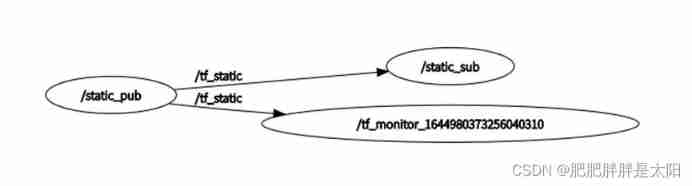
Actually , We want to listen to the running state of the node , The monitored node and the listening node must subscribe to the same topic topic of conversation , Use topic communication to transmit status information in real time . The function of this command is “ Set a name to “tf_monitor_ random number ” Listening node for , Then the node / The monitored publishing nodes subscribe separately / The release topic is tf_static The message content of ”:
Real time display of coordinate system conversion data
Command format :rosrun tf tf_echo “ Source coordinate system name ” “ Target coordinate system name ”
Run the command :rosrun tf tf_echo "laser" "base_link"
The running results are as follows :

The above output data in the command line is the data that is published by our publishing end and represents the relative position relationship of the coordinate system geometry_msgs::TransformStamped Data of data type .
Command execution logic :
Actually , We want to get information about the running state of the node , The monitored node and the listening node must subscribe to the same topic topic of conversation , Use topic communication to transmit status information in real time . The function of this command is “ Set a name to “tf_echo_ random number ” Listening node for , Then the node / The monitored publishing nodes subscribe separately / The release topic is tf_static The message content of ”:

The publisher who creates the relative position relationship of the coordinate system
There are two forms of the relative position relationship of the published coordinate system : Write the release side CPP file and Command line tools . Actually , As I said before : What we started was tf A node in the Feature Pack , In essence, the node still passes through CPP Source file for encapsulation , We use “rosrun tf static_transform_publisher param1 …” Call the source file to complete the function call .
Command format 1:rosrun static_transform_publisher X Axis offset distance Y Axis offset distance Z Axis offset distance X Shaft rotation angle Y Shaft rotation angle Z Shaft rotation angle Target coordinate system Coordinate system source Information release interval (/ms)
Command format 2:rosrun static_transform_publisher X Axis offset distance Y Axis offset distance Z Axis offset distance Quaternion_w Quaternion_x Quaternion_y Quaternion_z Target coordinate system Coordinate system source Information release interval (/ms)
Run the command :rosrun tf static_transform_publisher 2 3 4 10 10 10 "world" "son3" 1000
The running results are as follows :( Use rqt Toolbox view coordinate system tree structure )

Command execution logic :

In the implementation of the subscriber , We usually declare a tf2_ros::Buffer The object is tf2_ros::TransformListener When an object is instantiated, it is passed in as a parameter , This buffer The function of the object is “ Gather all the information about coordinate transformation ”, That's why we use either the command line or CPP The source file publishes coordinate system relative relation information , Will eventually be deposited in tf2_ros::Buffer Among the objects .
PDF Format coordinate information generation tool
We need to use tf_tools The function package generates files , because ROS2 Not installed by default , So we need to install it manually :
// 1. Run this sentence to jump to the main working directory
cd ~
// 2. Run this sentence to tf2_tools Installation of function pack
sudo apt install ros-noetic-tf2-tools
Command run format :rosrun tf2_tools view_frames.py
The result of the command is as follows :

The contents of the document are as follows :

Exception analysis instructions
Project structure
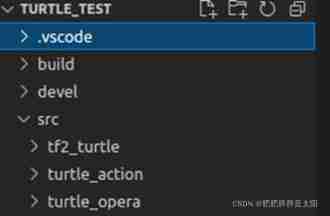
Project name :turtle_test;
Function pack name :tf2_turtle、turtle_action、turtle_opera.
Analyze the document
Running roswtf Before the command , Need to run rosdep update Update project dependencies !
1. Command format :roswtf
2. The running results are as follows :
1) Start location information :
Run in the project home directory roswtf command :

No package or stack in the current directory: explain “ We did not start in the Feature Pack working directory roswtf Tools ”. Then if we roscd tf2_turtle( perhaps cd ./tf2_turtle) Jump to the working directory of our customized function package to run roswtf Orders will find out :
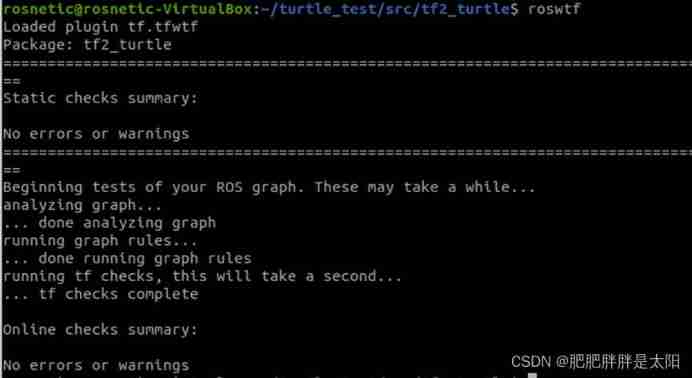
“Package:tf2_turtle” It shows that we are tf2_turtle Started under the working directory of the function package roswtf command .
2) Static check :
It is mainly when it is not opened roscore when , System checks . If we ROS There is no problem with the system installation also The environment variable is correct , Then there will be no errors in the static check . We assign environment variables at random :
ROS_PACKAGE_PATH=bad_path, We assign a string to a token “ Environment variables of the function package storage path ”,
Then look at roswtf Statically check the output information :
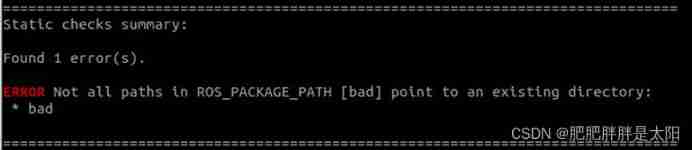
If you want to ROS_PACKAGE_PATH Environment variables return to normal , Refresh the environment variables again :

We see that the normal function package search path is restored :/home/rosnetic/turtle_test/src:/opt/ros/noetic/share,
It contains two paths :/home/rosnetic/turtle_test/src This is the path where we store our custom function packs , and /opt/ros/noetic/share It is ROS The path where the official function package is stored . To make a long story short ,ROS_PAKCAGE_PATH The variable contains the system to find the function package ( Custom feature pack +ROS Official Feature Pack ) The path of . To prove it , We do the following :

tf The storage path of the function package is “/opt/ros/noetic/share/tf”;

turtle_test The project storage directory is "/home/rosnetic/turtle_test", Then the source file storage address of the project file is “/home/rosnetic/turtle_test/src”.
ROS_PACKAGE_PATH The details are as follows :
4.3 ROS Workspace coverage · Autolabor-ROS Introduction to Robotics 《ROS Theory and practice 》 Zero basic course  http://www.autolabor.com.cn/book/ROSTutorials/5/41-rosgong-zuo-kong-jian-fu-gai.html3) Online inspection :
When we start roscore after ,roswtf Only in the working directory Communication status of the running node Perform an online check . If it doesn't start roscore, The system will display the following information :

This indicates that the system cannot be based on ROS The file system of the project obtains and checks the node communication status .

stay Online inspection in , The system will Check the communication status of all topic subscriptions and publishers under the working directory , Both parties of topic subscription and publication must be running at the same time , As long as the online inspection result of one party is missing, there will be an error prompt .
We jump to turtle_test Of tf2_turtle Function pack , When we just start turtlesim_node The nodes start at the same time roscore, function roswtf The following error prompt will be displayed :

The above error shows :turtlesim_node The topic subscribed by the node has only one object instantiation ( such as : When we start turtlesim_node Node time ,/spawn The client of the topic is automatically instantiated by the system, but the server of the topic is not instantiated by us , That is, we do not use rosrun Run the command to instantiate the executable file of the server ), explain turtlesim_node The node is not working properly , namely turtlesim_node Node publishing / The subscribed message does not have a node with the same topic subscribed to / Release .
Be careful : We use cd Command jump to turtle_test Of tf2_turtle Function package working directory , When we run roswtf On command , The system detects turtle_test Of tf2_turtle Function package working directory Communication status of the running node . But if we were turtle_test Run in the main working directory roswtf command , Then the system will detect all function packages under the project Communication status of the running node .
Sometimes , We will encounter the following warnings :

Yes launch Check the documents
Running roswtf Before the command , Need to run rosdep update Update project dependencies !
Command format :roswtf launch The path of the folder where the file is located /launch_name.launch
Command function : We want to be right launch Check the communication status of several nodes specified in the file .
Yes launch Check the communication status of the node started in the file , hypothesis launch The code in the file is as follows :
<launch>
    <!--  Start the first tortoise node and keyboard control node  -->
    <node pkg="turtlesim" type="turtlesim_node" name="turtlesim_node" output="screen" />
    <node pkg="turtlesim" type="turtle_teleop_key" name="turtle_teleop_key" output="screen"/>
    <!--  Release the coordinate information of the first turtle  -->
    <node pkg="tf2_turtle" type="getTurtle1Pose" name="getTurtle1Pose" output="screen"/>
    <!--  Create a second turtle and subscribe to publish coordinate information  -->
    <node pkg="tf2_turtle" type="getTurtle2Pose" name="getTurtle2Pose" output="screen"/>
    <!--  Coordinate transformation  -->
    <node pkg="tf2_turtle" type="frameTransform" name="frameTransform" output="screen"/>
</launch>
So when we run the following command :
roswtf /home/rosnetic/turtle_test/src/tf2_turtle/launch/setupGUI.launch
The running results are as follows :

We will know launch The file contains turtlesim_node、turtle_teleop_key、getTurtle1Pose、getTurtle2Pose、frameTransform Whether the communication status of the five nodes is normal , That is, whether the communication parties exist and can communicate normally .
Be careful :roswtf Order followed by launch Of documents Absolute path .
ROS Commonly used Linux Instructions
1. cd and roscd Jump instruction :“cd ./ The file name in the current working directory ” Equate to “roscd The file name in the current working directory ”;
2. “echo $ environment variable ” perhaps “$ environment variable ”: Display the contents of the environment variables ;
3. “export Variable name = A variable's value ” perhaps “ Variable name = A variable's value ”: Change the value of the variable ;
4. ls command :Is yes List Abbreviation , Indicates that the list of file directories is displayed .( Show only file names of non hidden files )
Parameters :
-a:--all Abbreviation , Display all files , Including hidden files ( With . Opening file )
-L: List long data strings , Show the size of the file , Time and other data information .
Examples of use :ls -la: Indicates all information included in the display file , The results are shown below :

边栏推荐
- Cron expression and website generation
- 6 functions
- Junior high school education, less than 3k, to 30k+ monthly salary, how wonderful life is without restrictions
- 最近面了15个人,发现这个测试基础题都答不上来...
- Unable to load bean of class marked with @configuration
- RT thread studio learning (VIII) connecting Alibaba cloud IOT with esp8266
- 8. form label
- 数据库全量SQL分析与审计系统性能优化之旅
- 循环链表和双向链表—课上课后练
- TypeScript基础知识全集
猜你喜欢

新知识:Monkey 改进版之 App Crawler

【图像去噪】基于高斯滤波、均值滤波、中值滤波、双边滤波四种滤波实现椒盐噪声图像去噪附matlab代码

Detailed explanation of convirt paper (medical pictures)

leetcode:剑指 Offer 60. n个骰子的点数【数学 + 层次dp + 累计贡献】
数据库全量SQL分析与审计系统性能优化之旅

9 Sequence container

Junior high school education, less than 3k, to 30k+ monthly salary, how wonderful life is without restrictions

Pyhon的第六天
Postman splice replacement parameter loop call interface

【图像检测】基于深度差分和PCANet实现SAR图像变化检测附matlab代码
随机推荐
Dépannage de l'opération cl210openstack - chapitre expérience
Codeforces Round #793 (Div. 2) A B C
(14)Blender源码分析之闪屏窗口显示软件版本号
platform driver
Pyhon的第六天
Scons compiling imgui
Matlab 6-DOF manipulator forward and inverse motion
Leetcode: offer 60 Points of N dice [math + level DP + cumulative contribution]
The most understandable explanation of coordinate transformation (push to + diagram)
esp32 hosted
SSM integration
【图像检测】基于深度差分和PCANet实现SAR图像变化检测附matlab代码
leetcode:剑指 Offer 66. 构建乘积数组【前后缀积的应用】
4 expression
8. form label
Leetcode: Sword finger offer 66 Build product array [application of pre and post infix]
Vscode outline preview cannot find file symbol
MySQL group query to obtain the latest data date function of each group
Introduction to JDE object management platform and use of from
Imx6q PWM drive