当前位置:网站首页>9 Sequence container
9 Sequence container
2022-06-12 06:45:00 【A building climbing pig】
9 Sequence containers
1、 Containers are defined in a header file , The file name is the same as the type name .
9.1 Sequence container Overview
1、 The type of sequential container : All sequential containers provide quick sequential access to elements, but , These containers have different performance tradeoffs in the following areas :①、 The cost of adding or removing elements from a container ,②、 Cost of non sequential access to elements in container

2、 Comparison of containers : Except for the fixed size array Outside , Other containers offer efficiency 、 Flexible memory management . We can add and remove elements , Expand and shrink the size of the container . The strategy of container holding elements has inherent influence on the efficiency of container operation , Sometimes it's a big impact . In some cases , Storage policies also affect whether a particular container supports a particular operation .
- for example ,string and vector Keep elements in contiguous memory space . Because elements are stored continuously , It's very fast to calculate the address of an element by its subscript . however , Adding or removing elements in the middle of these two containers can be time-consuming : Insert or delete at one time After the operation , Need to move insert / Delete all elements after position , To maintain continuous storage . and , Adding an element may sometimes require the allocation of additional storage space . under these circumstances , Each element must be moved to a new storage space .
- list and forward_list The design of the two containers is to make the addition and deletion of containers anywhere fast . As a price , These two containers do not support random access to elements : To access an element , We can only traverse the entire container . and , And vector、deque and array
comparison , The extra memory overhead of these two containers is also large . - deque It's a change For complex data structures . And string and vector similar , deque Support fast random access . And string and vector equally , stay deque The cost of adding or removing elements in the middle of ( Probably ) Very high . however , stay deque Adding or removing elements at both ends of is fast , And list or forward list Adding and deleting elements is as fast as .
- forward_list and array It's new. C++ Types of standard additions . Compared to built-in arrays ,array It's a safer way 、 Easier to use array types . Similar to built-in arrays ,array The size of the object is fixed . therefore ,array Adding and deleting elements and changing container size are not supported .forward list The design goal of is to achieve the performance equivalent to the best handwritten one-way linked list data structure . therefore ,forward_list No, size operation , Because saving or calculating its size will cost more than handwritten list . For other containers ,size Guarantee is a fast constant time operation .
3、 Basic rules for selecting containers : Usually use vector It's the best , Other selection rules such as :
- If your program has a lot of small elements , And the extra cost of space is important , Do not use list or forward_list.
- If the program requires random access to elements , You should use vector or deque.
- If the program requires an element to be inserted or deleted in the middle of the container , You should use list or forward_list.
- If the program needs to insert or delete elements at the beginning and end , But it doesn't insert or delete in the middle , Then use deque.
- If the program only needs to insert elements in the middle of the container when reading the input , Then you need to access the elements randomly , Then first , To determine whether it is fragrant, you need to add elements in the middle of the container . When processing input data , It's usually easy to ask vector Additional data , Then call the standard library's sort Function to rearrange the elements in the container , To avoid adding elements in the middle . If you have to insert elements in the middle , Consider using... In the input phase list Once the input is complete , take list Copy the content in to a vector in .
9.2 Container library Preview
1、 Container operations are not universal : Some operations are provided by all container types ; Other operations are only for a specific container .
2、 Restrictions on the types of elements that a container can hold : Sequential containers can hold almost any type of element , Containers that can also define containers , Such as vector Of vector:vector<vector<string>> lines;
3、 The effect of the default constructor : Some classes do not have a default constructor . We can define a container to hold objects of this type , But when we construct this kind of container, we can't just pass it an element number parameter :
vector<noDefault> v1 (10,init) ;//  correct : Provides an element initializer
vector<noDefault> v2 (10) ;// error : An element initializer must be provided
9.2.1 iterator
All iterators on the standard container type allow us to access elements in the container , All iterators implement this operation through dereference operators .
1、 The basic operation of iterators :
Tips:forward_list Iterators do not support the decrement operator (–).
2、 Scope of iterators :begin Point to first element ,end Points to the following element of the last element , The mathematical description is [begin,end) The relationship between , Short for left closure specification , As shown in the figure :
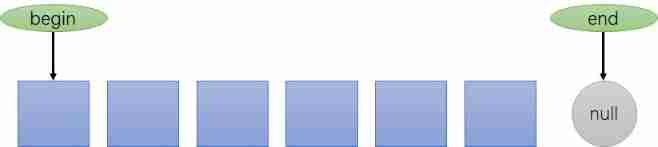
3、 Programming assumptions using the left closure specification : It includes the following three parts
- If begin And end equal , The range is empty
- If begin And end Unequal , Then the scope contains at least one element , And begin Point to the first element in the range
- It can be done to begin Increment several times , bring begin==end
4、begin and and Version of : belt r The version of returns the reverse iterator ; With c The first version returns const iterator , And const Pointers are similar to references , You can put an ordinary iterator Convert to the corresponding const_iterator, But not vice versa .
9.2.2 Relational operator
1、 Conditions for container comparison : Each container type supports the equality operator (== and !=); All containers except unordered associative containers Both support relational operators (>、>=、<、<=). The left and right operands of relational operators must be containers of the same type , And must save elements of the same type .
 We can only put one vector<int> And another vector<int> Compare ,
 Instead of putting one vector<int> With a list<int> Or a vector<double> Compare .
2、 Compare the transport mechanism of the relationship : Compare elements pair by pair , How to work and string The relational operation of is similar to .
- If two containers have the same size and all the elements are equal , Then the two containers are equal ; Otherwise, the two containers are not equal .
- If two containers are different in size , But each element in the smaller container is equal to the corresponding element in the larger container , Smaller containers are smaller than larger ones .
- If neither container is a prefix subsequence of the other , Then their comparison results depend on the comparison results of the first unequal element .
vector<int>v1={
    1,3,5,7,9,12};
vector<int> v2 = {
     1,3,9 };
vector<int> v3 = {
     1, 3,5,7 };
vector<int>v4={
    1,3,5,7,9,12};
v1 < v2 // true; v1 and v2 Element in [2] Different : v1[2] Less than or equal to v2[2]
vl < v3 // false; All elements are equal , but v3 Less elements in
v1 == v4 // true;  Every element is equal , And v1 and v4 Same size
vl == v2 // false; v2 The ratio of the number of elements v1 Less
3、 For container comparison of user-defined types, the comparison operation must be defined in advance : Only if the element type also defines the corresponding comparison operator , We can use relational operators to compare two containers .
/* The container's equality operator actually uses elements == Operator for comparison , Other relational operators use elements < Operator .  If the element type does not support the required operator , Then the container that holds this element cannot use the corresponding relational operation .  for example Sales_ data  Type is not defined == and < operation . therefore , You can't compare two saves Sales_data  The container of elements :*/
vector<Sales_ data> storeA, storeB;
if (storeA < storeB) //  error : Sales_ data No, < Operator
9.2.3 The size of the container
A function to find the size of a container : As shown in the figure below

9.3 Sequential container operation
It is summarized as the basic operations of defining, initializing, adding, deleting, modifying and querying sequence containers .
9.3.1 Container definition and initialization
1、 Definition of container : Each container type defines a default constructor , except array outside , The default constructor of other containers will create an empty container of the specified type , And can accept parameters that specify the size of the container and the initial value of the element .

2、 Using one container to initialize a copy of another container :: You can copy the entire container directly , perhaps Copies are made by an iterator to the specified range of elements (array With the exception of ).
When initializing a container as a copy of another container , Both containers must have the same container type and element type .
// Each container has three elements , Initialize with the given initializer
list<string> authors = {
    "Milton", "Shakespeare", "Austen"};
vector<const char*> articles = {
    "a", "an", "the"};
list<string> list2 (authors); //  correct : Type match
// deque<string> authList (authors); //  error : Container type mismatch
// vector<string> words (articles); //  error : Container type must match
// correct : Can be const char* Element to string
forward_list<string> words (articles.begin(), articles.end()) ;
3、 Copy the range of an iterator : except array: The assigned container element depends on the type of iterator container :
deque<string> deq221 (list211.begin(),list211.end());
for(auto out:deq221){
    cout<<out<<" ";}cout<<endl;
4、array The particularity of :(1)array The size of is fixed ;(2)array Constructor behavior of is special :;(3) The difference from the built-in array type
    // (1)array The size of is fixed , Its definition needs to specify the size and type
    array<int,10> arr311;

    // (2)array Special constructors

    // (3)array Different from the built-in array , It can copy array types or assign values to objects
    // int digs[10] = {0, 1,2,3,4,5,6, 7,8,9};
    // int cpy[10] = digs;// error : Built in arrays do not support copy or assignment
    array<int, 10> digits = {
    0,1,2,3,4,5,6, 7,8,9};
    array<int, 10> copy = digits; // correct : As long as the array type matches, it's legal
9.3.2 Copy and assignment of sequential containers
1、 Assignment operation applicable to all containers : As shown in the figure below , The assignment operator replaces all elements in its left container with copies of elements in its right container .
2、 Use assign( Sequential containers only , Divide... In a sequential container array): Allows assignment from a different but compatible type , Or from a subsequence of the container .assign The element specified by the action parameter ( A copy of the ) Replace all elements in the container on the left . for example , We can use assgin Implementation will be a vector Middle paragraph char Value is given to a list Medium string:
list<string> names;
vector<const char*> oldstyle;
//names = oldstyle; // error : Container type mismatch
// correct : Can be const char* Convert to string
names.assign(oldstyle.cbegin(),oldstyle.cend());
1、assign The parameters of determine how many elements will be in the container and what their values are .
2、 Because its old element is replaced , So pass to assign The iterator of cannot point to the call assign The container of
3、 Use swap:swap Operation exchange Two containers of the same type The content of . call swap after , The elements in the two containers will be exchanged , usage :swap( Containers A, Containers B)
vector<string> svec1 (10) ; // 10 An element of vector
vector<string> svec2 (24) ; // 24 An element of vector
swap (svec1,svec2) ;
1、swap Just exchange the internal data structures of the two containers —— The elements themselves do not exchange .
2、 except array Outside ,swap Don't copy any elements 、 Delete or insert operations , Therefore, it can be guaranteed to complete in a constant time .
4、swap Structure of elements after exchange :swap The element itself is not exchanged , That is, the element will not be moved , It means , except string Outside , Iterators pointing to containers 、 References and pointers in swap No failure after operation . They still point to swap The elements pointed to before the operation . however , stay swap after , These elements already belong to different containers .
 for example , Assume iter stay swap Before pointing to svec1[3] Of string, So in swap Then it points to svec2[3] The elements of .
 Unlike other containers , To a string call swap It causes iterators 、 References and pointers fail .
9.3.3 Add elements... To the sequence container
1、 The basic operation of adding a single element from beginning to end : As shown in the figure below , Be careful array These operations are not supported ( because array The size of is fixed ).

1、 These operations change the size of the container , array These operations are not supported .
2、forward_ list It has its own proprietary version of insert and emplace.
3、forward_ list I won't support it push_ back and emplace_ back.
4、vector and string I won't support it push_ front and emplace_ front.
5、 The new standard introduces three new members :emplace_ front、emplace and emplace_ back,emplace Construct, not copy elements .
2、 Use insert Insert elements anywhere in the container :vector、deque、list and string All support insert member ,forward_list A special version of insert member ,array Inserting elements... Is not supported .
- insert Operations include iterator locations , Insert the number of elements and element contents :seqc.insert( Iterator location , Element number , Elements );
- nsert There are many overloaded versions , Include seqc.insert( Iterator location , Elements ) Insert single ;seqc.insert( iterator A Location , iterator B beginning , iterator B end ) wait
- insert To insert an element is to insert... Before the element , so forward_list The generic version of... Is not supported insert
- New standard insert The return value is an iterator of the position where the element is inserted , Such as 124 stay 4 Insert in the front 3, At last insert The return value is pointing to 3 The iterator ,
- If you insert more than one, it is the first element , That is to say 123554 Of end() Insert before the iterator 0123 Finally 1235540123 The return value is in 0 Iterator of position
- insert When the insertion range is out of range , Failed to insert , Return to void
Basic operation table ( barring stack,tree Basic data type ):

#include<iostream>
#include<vector>
#include<deque>
#include<forward_list>
#include<array>
#include<list>
#include<string>

using namespace std;

void coutall(vector<int> v,deque<int> d,list<int> l,forward_list<int> f,array<int,5> a,string s){

    cout<<"vector: ";for(auto c : v){
    cout<<c<<" ";}cout<<endl;
    cout<<"deque: ";for(auto c : d){
    cout<<c<<" ";}cout<<endl;
    cout<<"list: ";for(auto c : l){
    cout<<c<<" ";}cout<<endl;
    cout<<"forward_list: ";for(auto c : f){
    cout<<c<<" ";}cout<<endl;
    cout<<"array: ";for(auto c : a){
    cout<<c<<" ";}cout<<endl;
    cout<<"string: ";for(auto c : s){
    cout<<c<<" ";}cout<<endl;
};

int main()
{

    vector<int> veca = {
    1,2,3};         vector<int> vecb;
    deque<int> deqa = {
    1,2,3};          deque<int> deqb;
    list<int> lista = {
    1,2,3};          list<int> listb;
    forward_list<int> flista = {
    1,2,3}; forward_list<int> flistb;
    array<int,5> arra = {
    1,2,3};        array<int,10> arrb;
    string stra = "123";                string strb;

    cout<<endl<<"--------------Add member [without iterator] in sequential_container----------------------"<<endl;
// 1、 Add a single element at both ends of the container , Common methods , barring forward_list and array

    //  except array and forward_list  outside , Each sequence container ( Include string type ) All support push_back Add elements at the end of the team
    // vector Add element operation of object ,push_back(v) Only at the end of the team
    veca.push_back(4);

    // deque Add elements , Including the tail of the team push_back(d),emplace_back(d); Team leader yes :push_front(d),emplace_front(d)
    deqa.push_back(4);deqa.emplace_back(5);
    deqa.push_front(0);deqa.emplace_front(-1);

    // list Add elements , Including the tail of the team push_back(l),emplace_back(l); Team leader yes :push_front(l),emplace_front(l)
    lista.push_back(4);lista.emplace_back(5);
    lista.push_front(0);lista.emplace_front(-1);

    // string Add elements , Add elements at the end of the team push_back(s);
    stra.push_back('4');    //  Be similar to stra+='4';
    coutall(veca,deqa,lista,flista,arra,stra);


    cout<<endl<<"--------------Add member [with insert and iterator] in sequential_container----------------------"<<endl;
// 2、 Use insert Insert any element anywhere in the container
    // 2.1 vector、deque、list and string All support insert member .forward_list A special version of insert member ,array Inserting elements... Is not supported
    // 2.2 insert Operations include iterator locations , Insert the number of elements and element contents :seqc.insert( Iterator location , Element number , Elements );
         // insert There are many overloaded versions , Include seqc.insert( Iterator location , Elements ) Insert single ;seqc.insert( iterator A Location , iterator B beginning , iterator B end ) wait
    // 2.3 insert To insert an element is to insert... Before the element , so forward_list The generic version of... Is not supported insert
    // 2.4  New standard insert The return value is an iterator of the position where the element is inserted , Such as 124 stay 4 Insert in the front 3, At last insert The return value is pointing to 3 The iterator ,
        //  If you insert more than one, it is the first element , That is to say 123554 Of end() Insert before the iterator 0123 Finally 1235540123 The return value is in 0 Iterator of position
    // 2.5 insert When the insertion range is out of range , Failed to insert , Return to void


    veca.insert(--veca.end(),2,5);  // veca Insert two... Before the last element 5, namely 1234 The last one is 4,4 Insert two before 5; so veca=123554

    vector<int> temp_insert = {
    0,1,2,3};
    //  stay veca Tail insertion veca The head to tail data is veca = 1235540123
    auto insert_sit = veca.insert(veca.end(),temp_insert.begin(),temp_insert.end());


    // insert What happens when the insertion position exceeds the range of the container : That is, the element is not inserted successfully ,insert The return value is void
    deqa.insert(deqa.begin() + 10,7);
    coutall(veca,deqa,lista,flista,arra,stra);
    cout<<endl<<"0123 insert to 123554 the insert sit is: "<<*insert_sit<<endl;


    cout<<endl<<"--------------some add number operate in forward_list ----------------------"<<endl;
// 3、 About forward_list and array Special operation of

    // 3.1 array Adding elements is not allowed because the array length is fixed

    // 3.2 forword_list Add elements , Add an element before the team leader or element , Including operation push_front(f) and emplace_front(f);
    // 3.3  Use iterators to add elements after elements ,emplace_after(iter,f); Note the position of the iterator , Such as end The back is empty , The iterator range :[begin,end)
    // 3.4  Insert an element anywhere in the iterator
    flista.push_front(0);flista.emplace_front(-1);
    flista.emplace_after(flista.begin(),4);
    coutall(veca,deqa,lista,flista,arra,stra);


    return 0;
}
9.3.4 Delete elements to the sequence container
1、 General delete element operation : except forward_list and array Several common operations outside :

1、 Deleting an element changes the container size , So all of them are applicable to array.
2、forward_ list There is a special version of erase.
3、forward list I won't support it pop_back, vector and string I won't support it pop_ front.
2、erase The characteristics of the operation : erase Delete one or more elements in the middle of the container
- erase( The iterator starts , Iterators end up ), The deletion range is [ rise , end )
- erase The return value of : After deletion, return to the position of the next element ; If the iterator is on the tail element , After deletion, it returns to the tail iterator nullptr; Out of range is void
Operation diagram :

#include<iostream>
#include<vector>
#include<deque>
#include<forward_list>
#include<array>
#include<list>
#include<string>

using namespace std;

void coutall(vector<int> v,deque<int> d,list<int> l,forward_list<int> f,array<int,5> a,string s){

    cout<<"vector: ";for(auto c : v){
    cout<<c<<" ";}cout<<endl;
    cout<<"deque: ";for(auto c : d){
    cout<<c<<" ";}cout<<endl;
    cout<<"list: ";for(auto c : l){
    cout<<c<<" ";}cout<<endl;
    cout<<"string: ";for(auto c : s){
    cout<<c<<" ";}cout<<endl<<endl;
    cout<<"forward_list: ";for(auto c : f){
    cout<<c<<" ";}cout<<endl;
    cout<<"array: ";for(auto c : a){
    cout<<c<<" ";}cout<<endl;
};

int main()
{

    vector<int> veca = {
    1,2,3,4,5};         vector<int> vecb;
    deque<int> deqa = {
    1,2,3,4,5};          deque<int> deqb;
    list<int> lista = {
    1,2,3,4,5};          list<int> listb;
    forward_list<int> flista = {
    1,2,3,4,5}; forward_list<int> flistb;
    array<int,5> arra = {
    1,2,3,4,5};        array<int,10> arrb;
    string stra = "12345";                  string strb;

    cout<<endl<<"--------------reduce member [without iterator] in sequential_container----------------------"<<endl;
// 1、 Delete a single element at both ends of the container , Common methods , barring forward_list and array
    // 1.1 vector: Only end of queue deletion is supported pop_back()
    // 1.2 deque: End of team delete element :pop_back(); Team head to delete pop_front()
    // 1.3 list: End of team delete element :pop_back(); Team head to delete pop_front()
    // 1.4 string: Delete the end of the string pop_back()
    // 1.5  If the deleted element does not exist , Then return to void

    veca.pop_back();    // veca = 1234
    deqa.pop_back();deqa.pop_front();   // deqa = 234
    lista.pop_back();lista.pop_front();   // lista = 234
    stra.pop_back();    //stra = 1234
    coutall(veca,deqa,lista,flista,arra,stra);


    cout<<endl<<"--------------Add member [with insert and iterator] in sequential_container----------------------"<<endl;
// 2、 Use erase Delete one or more elements in the middle of the container
    // 2.1  Delete iterator specific location elements :erase( Iterator location )
    // 2.2  Delete all elements between iterator positions :erase( The iterator starts , Iterators end up ), The deletion range is [ rise , end )
    // 2.3 erase The return value of : After deletion, return to the position of the next element ; If the iterator is on the tail element , After deletion, it returns to the tail iterator nullptr; Out of range is void

    auto erase_sit = veca.erase(veca.begin(),veca.begin()+2);    // veca = 34;erase_sit Point to 3

    deqa.erase(deqa.begin(),deqa.begin()+2);    // deqa = 4
    lista.erase(lista.begin());    // lista = 34
    stra.erase(stra.begin(),stra.begin()+2);    // stra = 34

    coutall(veca,deqa,lista,flista,arra,stra);
    cout<<"1234 to earse(begin(),begin()+2) the sit of earse is : "<<*erase_sit<<endl;


    cout<<endl<<"--------------some add number operate in forward_list ----------------------"<<endl;
// 3、 About forward_list Special operation of
    // 3.1  Delete single element :erase_after( iterator ) Delete the element after the position pointed to by the iterator , If the iterator is in begin Delete begin The next element is the second element
    // 3.2  Delete multiple elements :erase_ after( The iterator starts , Iterator tail ), The deletion range is [ rise -1, end )
    // 3.3  Returns an iterator that points to the element after the deleted element , Crossing the boundary is void

    flista.erase_after(flista.begin()); // flista = 1345
    coutall(veca,deqa,lista,flista,arra,stra);


    return 0;
}
9.3.5 Access the elements of the container
1、 The access element returns a reference : Member functions that access elements in containers ( namely ,front、 back、 Subscripts and at) All returned are references . If the container is a const object , Then the return value is const References to . If the container is not const Of , The return value is a normal reference , We can use it to change the value of an element :① Direct assignment :c.front () = 42;;② Dereference assignment :auto &v = c.back() ; v = 1024;:
    vector<int> c = {
    1,2,3,4,5};
    if (!c.empty()) {

        c.front () = 42;   // take 42 give C The first element in
        auto &v = c.back() ;    // Get a reference to the last element
        v = 1024;   // change C The elements in

        auto v2 = c.back() ;   // v2 Not a reference , It is c.back() A copy of
        v2 = 0;   // Unchanged C The elements in
    }
    for(auto o : c){

        cout<<o<<" ";
    }
The final output is :42 2 3 4 1024
2、 To prevent subscript overflow at operation :string、 vector、deque and array All provide subscript operators , The subscript operator accepts a subscript parameter , Returns a reference to the element at that location in the container . When the access index is not in the range of the array , The compiler does not save but runs abnormally , Therefore adopt at Prevent subscript overflow ,c.at(n) When the subscript overflows , Throw out out_of_range abnormal .
vector<string> svec;// empty vector
cout << svec[0] ;// Runtime error : svec No elements in !
cout << svec.at (0) ;// Throw a out_ of_ range abnormal
3、 The operation of accessing elements : See the diagram for operation , The explanation is as follows :

9.4 string Additional operations of type
9.4.1 structure string Other methods
1、string Other constructors for :string Type also includes three other constructors .

const char *cp = "Hello World! ! !";// An array that ends with a null character
charnoNull[]={
    'H','i'};// It does not end with a blank character
string s1 (cp) ; // Copy cp The characters in until the null character is encountered ; s1 == "Hello World! ! !"
string s2 (noNull,2) ;// from noNull Copy two characters ; s2 == "Hi"
string s3 (noNull) ;// Undefined : noNull Does not end with a null character
strings4(cp+6,5);// from cp[6] Start copying 5 Characters ; s4 == "World"
string s5(s1, 6,5) ;// from s1 [6] Start copying 5 Characters ; s5 == "World"
string s6 (s1,6) ;// from s1[6] Start copying , until sl At the end of ; s6== "World!! !"
string s7 (s1, 6,20) ;// correct , Copy only to s1 At the end of ; s7 == "World! ! !"
string s8 (s1, 16) ;// Throw a out_ of_ range abnormal
2、substr Slicing operation :substr Return to one string, It's primitive string A partial or complete copy of . Can be passed to substr An optional start position and count value :string strb = stra.substr(index,len);
string s ("hello world") ;
string s2 = s.substr (0,5) ;//s2=hello
string s3 = s.substr (6) ;// s3 = world
string s4 =s.substr (6, 11) ;// s3 = world
string s5 =s.substr (12) ;// Throw a out_ of range abnormal
9.4.2 string Type of search operation
1、 Basic search functions :string Class provides 6 Different search functions , Every function has 4 Overloaded versions . Each search operation returns a string:size_ type(int) value , Indicates where the match occurred Subscript ( The subscript is from 0 From the beginning to size()-1). If the search fails , Then return a file named string::npos Of static member . The standard library will npos Define as a const string::size_ type type , And initialize to the value -1.


2、 Specify where to start the search : namely find family (str,pos);, Take the following example , from 4 The start , Including the first 4 Each character starts searching for the position of the comma , The output is 7.
    string s  = "012,456,89";
    cout<<s.find(',',4);
3、 Reverse search : Default find All operations are left to right search . The standard library also provides similar , But searching from right to left .rfind The member function searches for the last match , That is, the rightmost position of the substring .
9.4.3 compare Function comparison relation
1、compare Function has 6 A version : The basis is to compare two string Or a string With a character array , The parameters vary . In both cases , Can compare whole or partial strings .

2、compare The return value of : If the compared string is equal to, it returns 0、 Greater than returns 1, Less than return -1.
9.4.4 Numerical transformation
Including installation and change into integer stoi; floating-point stof, For details, please refer to C++ Data type conversion

9.5 Container adapter
1、 Sequential containers are used to store data , Facilitate the increase of data 、 Delete 、 Change .
2、 An adapter is a mechanism ( Some kind of data structure ), The container adapter is used to directly install the elements of the container into the data structure for operation , So now the sequence container only defines which container adapter it is :stack,queue and priority_queue.( Pay attention to differences queue Queues of data structures , Container library deque deque , Don't confuse the two )
This section focuses on
1、 How to assign the sequence container directly to the adapter ;
2、 Pair adapter ( data structure ) Basic operation
9.5.1 Define a container adapter
1、 Two constructors for the adapter :
- ① The default constructor creates an empty object ( An empty data structure , Store elements in sequence ), for example
stack<int> stk; This way, the constructor of a container is copied to initialize the adapter . namely deq It's a deque, We can use deq To initialize a new one stack, As shown below :stack<int> stk(deq) - ② By default ,stack and queue Is based on deque Realized ,priority_queue Is in vector On top of that . You can use a named sequential container as the second type parameter when you create an adapter , To overload the default container type . If in vector. Empty stack implemented on :
stack<str ing,vector<string>> str_ stk;, as well as str stk2 stay vector Implemented on , Save at initialization svec A copy of thestack<string, vector<string>> str stk2 (svec) ;
2、 The limitation of the adapter corresponding to the container :
- 1、 The adapters can no longer array On the structure .
- 2、stack Acceptable except array and forward_list All containers except
- 3、queue Can be constructed in lisy or deque On , But it cannot be constructed in vector On .
- 4、priority_queue Can be constructed in vector and deque On the container , But not based on list structure .
9.5.2 Operation of the adapter
1、 Operations supported by all three container adapters :

2、 Operation of stack adapter :stack It's defined in stack In the header file of , In data structure, stack is a data type of "first in, last out" .

Each container adapter defines its own special operations based on the operations of the underlying container type . We can only use adapters to operate , Instead of using operations of the underlying container type .
intStack.push(ix); // intStack  preservation 0 To 9 Ten numbers

/* This statement attempts to intStack The bottom of the deque Object push_ back.  although stack Is based on deque Realized , But we can't use it directly deque operation .  Can't be in one stack On the call push_back, And must use stack Your own operation is push.*/
3、 Queue adapter :queue and priority_queue The adapter is defined in queue Header file :queue Queues are first in first out data structures . Objects entering the queue are placed at the end of the queue , Objects leaving the queue are removed from the queue head .priority_queue Allows priority to be established for elements in the queue . The newly added element will rank before all existing elements with lower priority . for example : The hotel arranges seats for guests according to their reservation time rather than the morning and evening of their arrival time , This is an example of a priority queue . By default , The standard library uses... On element types < Operator to determine relative priority .

边栏推荐
- 2021 robocom world robot developer competition - undergraduate group (Preliminary)
- Troubleshooting of cl210openstack operation -- Chapter experiment
- Multithreading mode (I) -- protective pause and join source code
- Deep and detailed analysis of PHP one sentence Trojan horse
- The second day of June training - string
- Multithreading (4) -- no lock (2) -- Atomic related atomic classes
- Upload file (post form submission form data)
- PHP read / write cookie
- AI operation ch8
- descheduler 二次调度让 Kubernetes 负载更均衡
猜你喜欢







随机推荐
数据库语法相关问题,求解一个正确语法
The first day of June training - array
Multithreading mode (I) -- protective pause and join source code
leetcode:890. 查找和替换模式【两个dict记录双射(set)】
PowerDesigner connects to entity database to generate physical model in reverse
LeetCode-1716. Calculate the amount deducted from the bank
SQL language
A journey of database full SQL analysis and audit system performance optimization
丢掉丑陋的 toast,会动的 toast 更有趣
集合判断存在交集
【图像去噪】基于非局部欧几里德中值 (NLEM) 实现图像去噪附matlab代码
About session Getattribute, getattribute error
5 statement
Multithreading Foundation (XI) -- prevent CPU from occupying 100%
Redis basic notes
Torch models trained in higher versions report errors in lower versions
Troubleshooting of cl210openstack operation -- Chapter experiment
esp32 hosted
torch在高版本训练的模型在低版本中使用报错
Qt-- realize TCP communication