当前位置:网站首页>MongoDB-在windows电脑本地安装一个mongodb的数据库
MongoDB-在windows电脑本地安装一个mongodb的数据库
2022-06-27 21:35:00 【小博测试成长之路】
1
安装包下载
windows下mongodb安装包的下载地址:
https://www.mongodb.com/try/download/community

也可以直接点击下面的地址下载:
https://fastdl.mongodb.org/windows/mongodb-windows-x86_64-5.0.9-signed.msi
2
windows系统安装mongodb
下载好安装包后,双击msi文件启动安装,安装过程中截图如下:(一般直接点击下一步按钮就行)
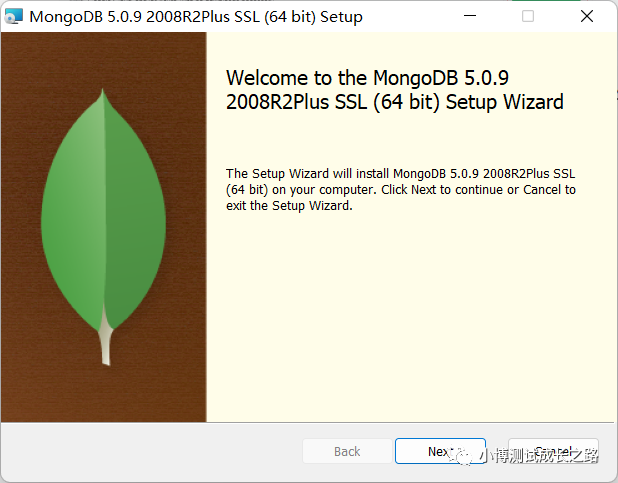
看到Next按钮就点就可以

一般下图中选择Complete,安装完整的功能


注意:安装前,服务列表是没有MongoDB的服务名的:

下面这个复选框可按需选择,选择后,会安装一个叫MongoDB Compass的GUI工具,功能类似navicat的那种。这里也可以不勾选,到时候自己去单独下安装包进行安装。


安装完成后,服务列表多出了一个Mongo的服务。并且这个服务状态为启动状态。(如果状态没启动,则手动启动,否则肯定连接不上)

到这里,mongo数据库就安装好了,默认没有设置用户名和密码认证。
3
使用工具连接MongoDB
接下来,介绍几款工具连接mongodb的:
一、MongoDB Compass
下载地址:https://www.mongodb.com/try/download/compass
安装后,打开软件,输入ip和端口连接即可。
如果有涉及到要输入账号密码认证或者通过ssl代理进行连接的,可以切换到对应的页签补充录入相关信息即可。

工具优点:
1、在只知道表名不知道数据库名称的情况下,可以输入表名直接进行搜索。

2、可以导出数据(有部分工具导出功能需要付费开通权限)
3、可以生成对应编程语言的代码案例
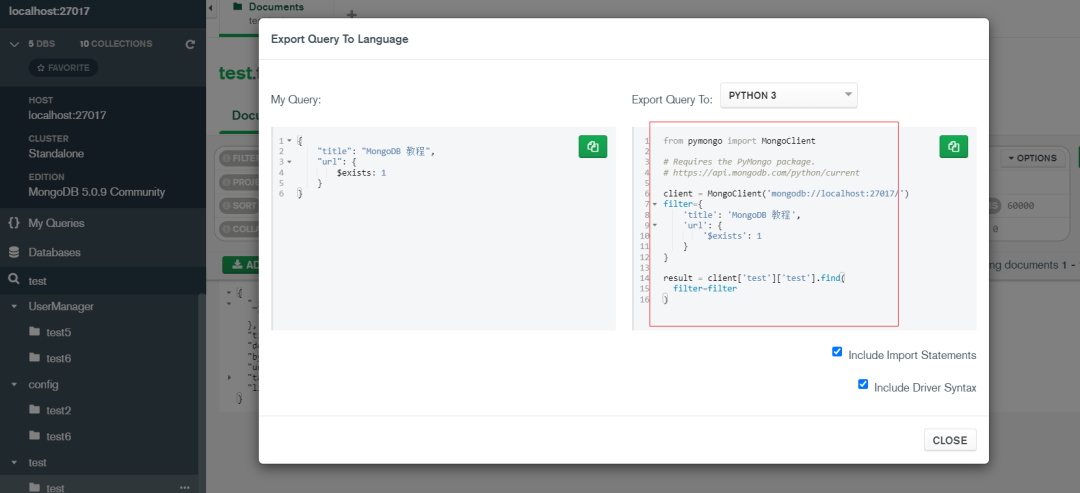
二、Robo 3T/Studio 3T
这两个工具一个是免费版本,可以商用,一个是付费的专业版,未购买不能商用。前者是免费的版本。
1、Robo 3T
下载地址:
https://github.com/Studio3T/robomongo/releases/download/v1.4.4/robo3t-1.4.4-windows-x86_64-e6ac9ec5.exe
robo3t官网地址:https://robomongo.org/
优点:免费
缺点:
1、免费版导出不了数据
2、批量执行改数据脚本的时候,很容易卡死
3、如果电脑网络中断后再重连网络时,工具要关掉重连
2、Studio 3T
studio 3t官网地址:https://studio3t.com/
下载地址:https://download.studio3t.com/studio-3t/windows/2022.6.0/studio-3t-x64.zip
缺点:非要说缺点的话,那就是收费
三、NoSQLBooster
下载地址:https://nosqlbooster.com/home
缺点:付费购买后解锁其他权限,免费版没有导出权限
优点:脚本调试什么的还是比较方便,功能也还比较强大,我觉得仅次于Studio3T
如果大家有用到其他更好用的工具,也可以介绍给我喔。
边栏推荐
- 如何找到外文文献对应的中文文献?
- Chenyun pytorch learning notes_ Build RESNET with 50 lines of code
- 表单form 和 表单元素(input、select、textarea等)
- 【AI应用】NVIDIA Tesla V100S-PCIE-32GB的详情参数
- Smart wind power | Tupu software digital twin wind turbine equipment, 3D visual intelligent operation and maintenance
- apipost脚本使用讲解一~全局变量
- MySQL read / write separation configuration
- One step forward is excellent, one step backward is ignorant
- 【PCL自学:PCLVisualizer】点云可视化工具PCLVisualizer
- 【AI应用】Jetson Xavier NX的详情参数
猜你喜欢

零基础自学SQL课程 | SQL基本函数大全

Windows环境下的ELK——Logstash+Mysql(4)

Cornernet understands from simple to profound
![计数质数[枚举 -> 空间换时间]](/img/11/c52e1dfce8e35307c848d12ccc6454.png)
计数质数[枚举 -> 空间换时间]

Applet referer
Zero foundation self-study SQL course | complete collection of SQL basic functions
Local visualization tool connects to redis of Alibaba cloud CentOS server
Does the subscription of Siyuan notes stop deleting cloud data directly?

安全省油环保 骆驼AGM启停电池魅力十足
![[sword finger offer] 47 Maximum value of gifts](/img/bc/1aff1223b1672c4089151dc56c4d4e.png)
[sword finger offer] 47 Maximum value of gifts

随机推荐
mysql读写分离配置
【AI应用】NVIDIA GeForce RTX 1080Ti的详情参数
图的存储结构
夏日的晚会
MySQL企业级参数调优实践分享
[tinyriscv verilator] branch transplanted to Da Vinci development board of punctual atom
Applet referer
Zero foundation self-study SQL course | complete collection of date functions in SQL
flutter系列之:flutter中的变形金刚Transform
ICML 2022:ufrgs | optimistic linear support and subsequent features as the basis for optimal strategy transfer
Eliminate gaps around El image images
How to use the apipost script - global variables
How to solve the problem that the browser developed with CeF3 does not support flash
【AI应用】NVIDIA Tesla V100S-PCIE-32GB的详情参数
MySQL character set
Elk in Windows Environment - logstash+mysql (4)
【PCL自学:PCLPlotter】PCLPlotter绘制数据分析图
如何找到外文文献对应的中文文献?
超纲练习题不超纲
SQL中IS NOT NULL与!=NULL的区别