当前位置:网站首页>Learn the most basic operation of discodiffusion
Learn the most basic operation of discodiffusion
2022-06-27 01:40:00 【YakSue】
The goal is
Disco Diffusion It's a AI Drawing tools , One sentence can make AI Draw a picture that matches the description , You can see many amazing results on the Internet .
I also want to try this magical technology , The goal of this article is to learn the basic operation of using it .
The main reference tutorial is :Quick & Easy Tutorial for Disco Diffusion Google Colab (Make your own pictures!). - YouTube
Because it is in Google Colab On , So if you know nothing about it , It is best to have a brief understanding of the relevant basic concepts ( see The previous )
0. Basic information
The Disco Diffusion Of GoogleColab The address is :
Disco Diffusion v5.4 [Now with Warp] - Colaboratory
( The version of the original tutorial is 4.1, But I made a mistake after trying , So it ended up with this 5.4 edition )
And then , You can copy it to your own GoogleDrive In the network disk .
Then you can open it in your network disk . The follow-up operation of this article is also done in your own network disk .
just as The previous said , It is Jupyter Notebook, So all you have to do is configure the basic settings in this document , Then run the document .
The directory structure of the document is as follows :
The next step is to make some basic settings .
1. Set up : name 、 They count 、 Size
These settings are in Settings in
Here are three basic parameters note :
bathch_name: The name of this run , It is also the name that will be saved in the cloud disk later
steps: Number of steps to run . The more steps, the more detail , Examples given in the tutorial :
Of course , The higher the number of steps, the longer it will take , So you need to find the most appropriate number of steps for a picture .
width_height: Picture length and width . Must be 64 Multiple .
2. Set up : Save interval
This is set at Settings Medium ExtraSettings in : intermediate_saves Save the control center several times . For example, I fill in here 9, In addition to seeing the last result on my cloud disk , You can also see the 9 Zhang .
3. Set up : The core Prompts
It's in Settings Medium Prompts in .
Of course , He is the core . For this parameter , The description in the document is :
text_prompts: A description of what you’d like the machine to generate. Think of it like writing the caption below your image on a website. A description of what you want the machine to generate . It can be imagined that , If this picture appears on the website , So what is its title .
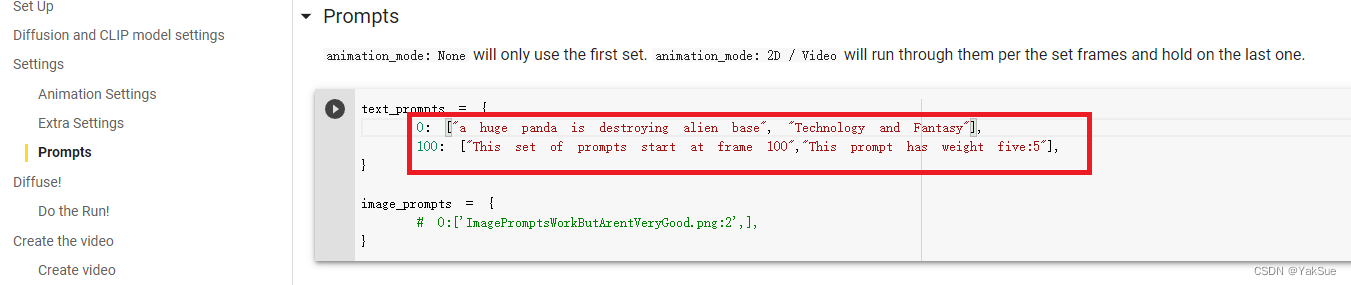
for example , I am here :
“a huge panda is destroying alien base”, “Technology and Fantasy”
“ Giant pandas are destroying alien bases ”,“ Technology and fantasy ”
4. Set up : Show interval , Number of batches
These settings are in Diffuse in :
display_rate : Just a few steps apart Colab It shows that
n_batches: How many batches are calculated in total ( That is, output several completely different pictures )
5. Began to run !
At the top , find “ All running ” The button :
Then some prompts will pop up .
such as 
There are also some man-machine verifications 
There's a connection GoogleDrive A hint of :
When it's all done , Start running the code in this document .
It will take a few minutes to wait for the data that the installation depends on .
Then you can see the progress of the calculation at the bottom :
6. result
After completion of operation ( About experienced 40 minute ), You can find the output pictures in your network disk :
( among partials Folders store intermediate processes )


Evaluate the result :
Feeling “ Alien base ” The feeling is that ,“ Panda ” This “ huge ” You can also see the characteristics of , Black and white can also be seen , But the panda's own details , A little too abstract ( laugh ).
summary
- This is based on GoogleColab Of , So it's best to understand the basic concepts ,( see The previous )
- To DiscoDiffusion Of GoogleColab Address , Copy it to your own GoogleDrive In the network disk .
- Open... In your network disk DiscoDiffusion copy , Make the most basic settings , The core setting is prompts.
- Click on the run , Then you can do it in your own GoogleDrive See the result in the network disk .
Other references
Sina weibo @Simon_ aven There are a lot of relevant information in , This tutorial is also seen here .
Artificial intelligence painting tools Disco Diffusion Introductory tutorial - Bili, Bili It is also a similar Chinese tutorial , You can refer to .
边栏推荐
- Ml: a detailed introduction to the division of the top ten roles, backgrounds, responsibilities and outputs of the machine learning engineering team
- Kept to implement redis autofailover (redisha) 15
- Reporting Classes中uvm_report_server的get_severity_count和get_server用法
- XSS notes (Part 2)
- George Washington University: Hanhan Zhou | PAC: auxiliary value factor decomposition with counterfactual prediction in Multi-Agent Reinforcement Learning
- Modeling specifications: environment settings
- get_sequencer的用法总结
- The listing of Fuyuan pharmaceutical is imminent: the net amount raised will reach 1.6 billion yuan, and hubaifan is the actual controller
- buuctf-pwn write-ups (6)
- Structure the fifth operation of the actual camp module
猜你喜欢

可视化介绍 Matplotlib 和 Plotnine

Did your case really pass?

Buuctf PWN write UPS (6)
你的case真的pass了吗?

I encountered some problems when connecting to the database. How can I solve them?

1.44寸TFT-LCD显示屏取模教程

理想L9产品力分析:售价45.98万,采用四缸发动机,续航1315公里

30《MySQL 教程》MySQL 存储引擎概述
CLIP:从自然语言监督中学习可迁移的视觉模型

SystemVerilog simulation speed increase
随机推荐
Two days of beautiful butterfly animation
UVM中config_db机制的使用方法
TopoLVM: 基于LVM的Kubernetes本地持久化方案,容量感知,动态创建PV,轻松使用本地磁盘
Keepalived 实现 Redis AutoFailover (RedisHA)13
[graduation season] role conversion
XSS攻击笔记(上)
How to convert an old keyboard into a USB keyboard and program it yourself?
How to measure the thickness of glass substrate by spectral confocal
Memcached foundation 4
Config in UVM_ How to use the DB mechanism
Markdown table (consolidated)
可视化介绍 Matplotlib 和 Plotnine
在连接数据库的时候遇到了点问题,请问怎么解决呀?
Custom class loader encrypts and decrypts classes
Kept to implement redis autofailover (redisha) 17
Ml: a detailed introduction to the division of the top ten roles, backgrounds, responsibilities and outputs of the machine learning engineering team
Buuctf PWN write UPS (6)
Summary of config mechanism and methods in UVM (1)
Keepalived 实现 Redis AutoFailover (RedisHA)15
Continuous delivery blue ocean application