当前位置:网站首页>【MySQL8入门到精通】基础篇- Linux系统静默安装MySQL,跨版本升级
【MySQL8入门到精通】基础篇- Linux系统静默安装MySQL,跨版本升级
2022-07-31 05:08:00 【m0_67402013】
???
哈喽!大家好,我是【】,江湖人称jeames007,10年DBA工作经验
一位上进心十足的【大数据领域博主】!???
中国DBA联盟(ACDU)成员,目前从事DBA及程序编程
擅长主流数据Oracle、MySQL、PG 运维开发,备份恢复,安装迁移,性能优化、故障应急处理等。
如果有对【数据库】感兴趣的【小可爱】,欢迎关注【】???
感谢各位大可爱小可爱!
文章目录
前言
最近客户的数据要做升级,从5.7的版本升级到8.0,本文详细的概述了全过程
1.环境确认
1.1 操作系统
[[email protected] ~]# cat /etc/redhat-release
Red Hat Enterprise Linux release 8.1 (Ootpa)
1.2 防火墻
[[email protected] ~]# systemctl status firewalld
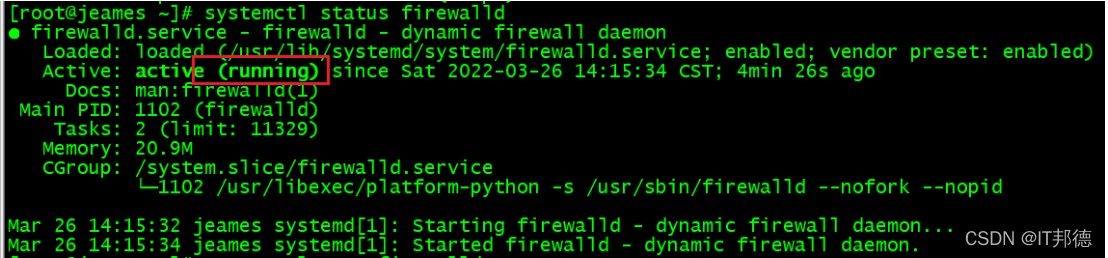
??? 关闭防火墙
systemctl stop firewalld
??? 取消开机自启动
[[email protected] ~]# systemctl disable firewalld
Removed /etc/systemd/system/multi-user.target.wants/firewalld.service.
Removed /etc/systemd/system/dbus-org.fedoraproject.FirewallD1.service.
1.3 selinux关闭
[[email protected] ~]# more /etc/sysconfig/selinux
修改/etc/selinux/config 文件
将SELINUX=enforcing改为SELINUX=disabled
???重启机器即可
[[email protected] ~]# sestatus
SELinux status: disabled
[[email protected] ~]# getenforce
Disabled
2.MySQL二进制包下载
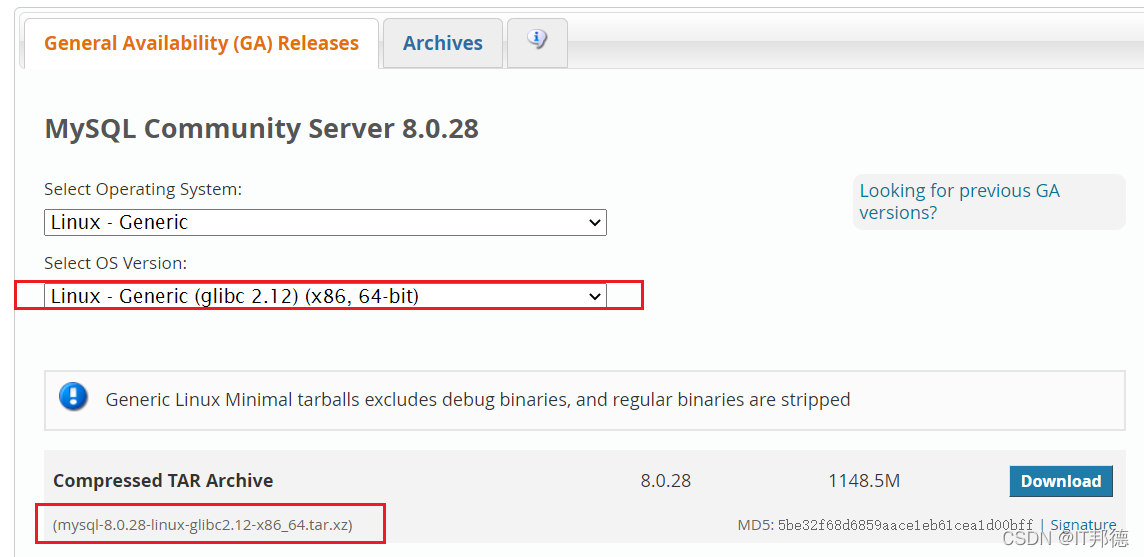
??? 安装包
mysql-5.7.30-linux-glibc2.12-x86_64.tar.gz
mysql-8.0.19-linux-glibc2.12-x86_64.tar.xz
3.安装MySQL 5.7
3.1 安装包解压
[[email protected] ~]# mkdir /soft
#二进制包解压
[[email protected] ~]# mkdir -p /usr/local/mysqlsoft
[[email protected] ~]# cd /soft/
tar -zxvf mysql-5.7.30-linux-glibc2.12-x86_64.tar.gz -C /usr/local/mysqlsoft
tar -Jxf mysql-8.0.19-linux-glibc2.12-x86_64.tar.xz -C /usr/local/mysqlsoft
#快捷方式创建
[[email protected] ~]# mkdir -p /usr/local/mysql57
[[email protected] ~]# mkdir -p /usr/local/mysql80
3.2 创建用户组
groupadd mysql
useradd -r -g mysql mysql
chown -R mysql:mysql /usr/local/mysqlsoft
[[email protected] soft]# passwd mysql
3.3.本地yum安装依赖
# 创建挂载路径
mkdir -p /mnt/cdrom

# 挂载系统镜像光盘到指定目录
mount -t iso9660 /dev/sr0 /mnt/cdrom

cd /etc/yum.repos.d

# 修改yum源配置文件
vi rhel8-local.repo
[localREPO]
name=localhost8
baseurl=file:///mnt/cdrom/BaseOS
enable=1
gpgcheck=0

[localREPO_APP]
name=localhost8_app
baseurl=file:///mnt/cdrom/AppStream
enable=1
gpgcheck=0

##安装依赖包
yum install libaio
yum -y install perl perl-devel
yum install libncurses*
yum -y install autoconf
yum -y install numactl.x86_64
3.4 初始化(5.7版本)
chown -R mysql.mysql /usr/local/mysql50
##静默安装
/usr/local/mysql57/mysql5730/bin/mysqld --initialize-insecure --user=mysql --basedir=/usr/local/mysql57/mysql5730 --datadir=/usr/local/mysql57/mysql5730/data
##配环境变量
echo “export PATH=$PATH:/usr/local/mysql57/mysql5730/bin” >> /root/.bashrc
source /root/.bashrc
3.5 启动数据库
??? mysqld_safe & ??? 新增用户及修改密码
mysql> select user,host,authentication_string from mysql.user;
##新增远程用户
mysql> grant all on . to [email protected]‘%’ identified by ‘root’ with grant option;
mysql> flush privileges;
##修改本地密码
set password for [email protected]‘localhost’=password(‘root’);
mysql> flush privileges;
4.模拟数据,准备升级
mysql> show variables like ‘innodb_fast_shutdown%’;
±---------------------±------+
| Variable_name | Value |
±---------------------±------+
| innodb_fast_shutdown | 1 |
±---------------------±------+
1 row in set (0.01 sec)
内存数据全部落盘
mysql> set global innodb_fast_shutdown=0;
mysql> create database jeames;
Query OK, 1 row affected (0.00 sec)
#关闭Mysql
mysqladmin -uroot -proot shutdown
5.MySQL 5.0升级8.0
5.1 安装MySQL8.0.19
chown -R mysql.mysql /usr/local/mysql80
##静默安装MySQL
/usr/local/mysql80/mysql8019/bin/mysqld --initialize-insecure --user=mysql
–basedir=/usr/local/mysql80/mysql8019 --datadir=/usr/local/mysql80/mysql8019/data
5.2 修改mysql8配置文件
??? 指向5.7的数据文件及错误日志路径
vi /etc/my.cnf
[mysqld]
basedir=/usr/local/mysql80/mysql8019
datadir=/usr/local/mysql57/mysql5730/data
port=3306
log-error=/usr/local/mysql57/mysql5730/data/log.err
server_id=80193306
log-bin
default_authentication_plugin=mysql_native_password
character_set_server=utf8mb4
5.3 启动Mysq8019
cd /usr/local/mysql80/mysql8019/bin
mysqld_safe &
##输入密码为:5.7版本的密码(root)
echo “export PATH=$PATH:/usr/local/mysql80/mysql8019/bin” >> /root/.bashrc
source /root/.bashrc
??? 此处记得要删除原来的环境变量

6.MySQL卸载
yum remove -y mysql --nodeps
yum remove -y mysql-community-* --nodeps
rpm -qa|grep mysql|xargs rpm -e --nodeps
rpm -qa | grep mysql
rpm -e mysql-community-embedded-devel-5.7.30-1.el7.x86_64 --nodeps
rpm -e mysql-community-libs-5.7.30-1.el7.x86_64 --nodeps
rpm -e mysql-community-embedded-5.7.30-1.el7.x86_64 --nodeps
rpm -e mysql-community-embedded-compat-5.7.30-1.el7.x86_64 --nodeps
rpm -e mysql-community-common-5.7.30-1.el7.x86_64 --nodeps
rpm -e mysql-community-devel-5.7.30-1.el7.x86_64 --nodeps
rpm -e mysql-community-libs-compat-5.7.30-1.el7.x86_64 --nodeps
rm -rf /var/lib/mysql
rm -rf /var/log/mysqld.log
rm -rf /usr/lib/mysql
rm -rf /usr/include/mysql
rm -rf /etc/my.cnf
rm -rf /run/lock/subsys/mysql
find / -iname mysql
大家点赞、收藏、关注、评论啦 ???微信公众号???
先自我介绍一下,小编13年上师交大毕业,曾经在小公司待过,去过华为OPPO等大厂,18年进入阿里,直到现在。深知大多数初中级java工程师,想要升技能,往往是需要自己摸索成长或是报班学习,但对于培训机构动则近万元的学费,着实压力不小。自己不成体系的自学效率很低又漫长,而且容易碰到天花板技术停止不前。因此我收集了一份《java开发全套学习资料》送给大家,初衷也很简单,就是希望帮助到想自学又不知道该从何学起的朋友,同时减轻大家的负担。添加下方名片,即可获取全套学习资料哦
边栏推荐
- Pytorch教程Introduction中的神经网络实现示例
- CentOS7 —— yum安装mysql
- Information System Project Manager Core Test Site (55) Configuration Manager (CMO) Work
- 信息系统项目管理师核心考点(五十五)配置管理员(CMO)的工作
- SQL行列转换
- 工作流编排引擎-Temporal
- C Implementation of Simple Network File Copy
- centos7安装mysql5.7步骤(图解版)
- MySQL optimization: from ten seconds to three hundred milliseconds
- Blockbuster | foundation for platinum, gold, silver gave nameboards donors
猜你喜欢

30 Years of Open Source Community | 2022 Open Atom Global Open Source Summit 30 Years of Open Source Community Special Event Held Successfully
The MySQL database installed configuration nanny level tutorial for 8.0.29 (for example) have hands

工作流编排引擎-Temporal

ERROR 2003 (HY000) Can't connect to MySQL server on 'localhost3306' (10061)
Centos7 install mysql5.7
Summary of MySQL common interview questions (recommended collection!!!)

Blockbuster | foundation for platinum, gold, silver gave nameboards donors

DVWA installation tutorial (understand what you don't understand · in detail)
Mysql application cannot find my.ini file after installation
MySQL8--Windows下使用压缩包安装的方法
随机推荐
参考代码系列_1.各种语言的Hello World
.NET-9.乱七八糟的理论笔记(概念,思想)
.NET-6.WinForm2.NanUI学习和总结
PWN ROP
MySQL8.0.26安装配置教程(windows 64位)
Puzzle Game Level Design: Reverse Method--Explaining Puzzle Game Level Design
The 15th day of the special assault version of the sword offer
Temporal介绍
Linux系统安装mysql(rpm方式安装)
面试官问我TCP三次握手和四次挥手,我真的是
MySQL window function
12个MySQL慢查询的原因分析
Sql解析转换之JSqlParse完整介绍
1. Get data - requests.get()
益智类游戏关卡设计:逆推法--巧解益智类游戏关卡设计
[R language] [3] apply, tapply, lapply, sapply, mapply and par function related parameters
MySQL开窗函数
From scratch, a mirror to the end, a pure system builds a grasscutter (Grasscutter)
MySQL-Explain详解
剑指offer专项突击版第15天