当前位置:网站首页>Cookie和Session的相关概念
Cookie和Session的相关概念
2022-07-01 18:46:00 【Dragon_qing】
Cookie和Session的相关概念
Cookie、Session
1.会话
会话: 用户打开了一个浏览器,点击了很多超链接,访问多个web次元,关闭浏览器,这个过程可以称之为会话
有状态会话: 带有访问记录的会话
1.服务端会给客户端一个cookie,客户端下次访问时携带cookie访问就可以了 cookie
2.服务端登记客户端访问过,下次访问时匹配到客户端; session
2.保存会话的两种技术
cookie
- 客户端技术(响应,请求)
session
- 服务器技术,利用这个技术,可以保存用户的会话信息,可以把信息或者数据保存在Session中。
常见场景:网站登录之后,下次不用再登录了,第二次访问直接就上去了!
3.Cookie
1.从请求中拿到cookie信息
2.服务器响应给客户端cookie
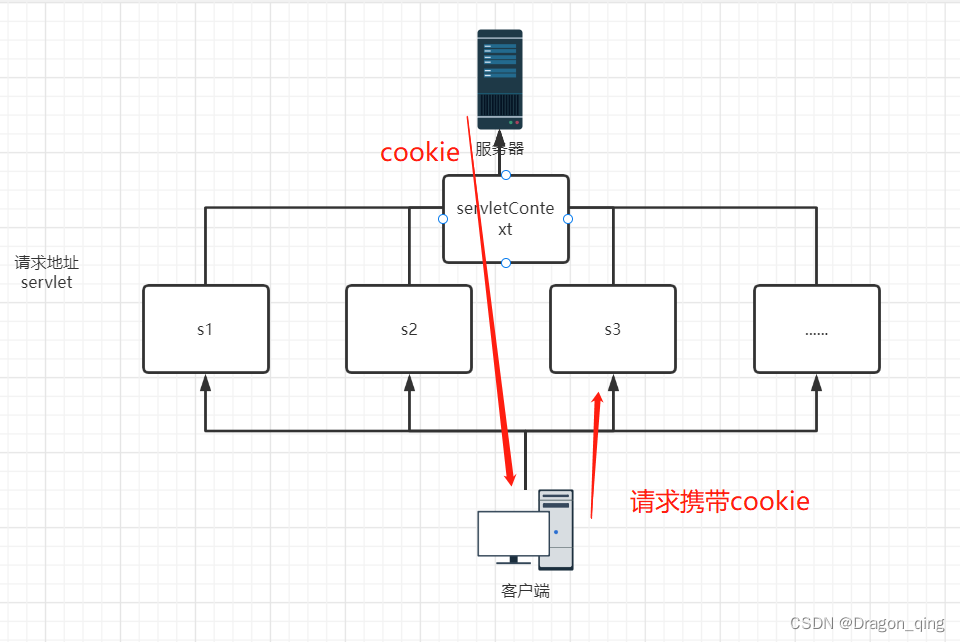
cookie相关方法:
Cookie[] cookies = req.getCookies(); //获得cookie
cookie.getName() //获得cookie中的键
cookie.getValue() //获得cookie中的值
new Cookie("LastLoginTime",System.currentTimeMillis()+"") //新建一个cookie
cookie.setMaxAge(24*60*60); //设置cookie有效期
resp.addCookie(cookie); //响应给客户端一个cookie
案例:
@Override
protected void doGet(HttpServletRequest req, HttpServletResponse resp) throws ServletException, IOException {

    //解决中文乱码
    req.setCharacterEncoding("utf-8");
    resp.setCharacterEncoding("utf-8");
    resp.setContentType("text/html; charset=utf-8");
    PrintWriter out = resp.getWriter();
    Cookie[] cookies = req.getCookies();
    //判断cookie是否存在
    if(cookies == null){

        out.println("第一次访问网站");
    }else{

        out.write("您上一次访问的时间是:");
        for (Cookie cookie : cookies) {

            if("LastLoginTime".equals(cookie.getName())){

                //获取cookie中的值
                long time = Long.parseLong(cookie.getValue());
                Date date = new Date(time);
                DateFormat dfd = DateFormat.getDateInstance(DateFormat.MEDIUM,Locale.CHINA);
                DateFormat dft = DateFormat.getTimeInstance(DateFormat.MEDIUM, Locale.CHINA);
                out.write(dfd.format(date)+dft.format(date));
            }
        }
    }
    Cookie cookie = new Cookie("LastLoginTime",System.currentTimeMillis()+"");
    //设置cookie有效期为一天
    cookie.setMaxAge(24*60*60);
    resp.addCookie(cookie);
}
cookie:一般会保存在本地的用户目录下appdate;
一个网站cookie是否存在上限?
- 一个cookie只能保存一个信息;
- 一个web网站可以给浏览器发送多个cookie,最多存放20个cookie;
- cookie大小有限制4kb
- 300个cookie浏览器上限
删除cookie:
- 不设置有效期,关闭浏览器,自动失效;
- 设置有效期时间为0;
注意:在cookie的值为中文时最好使用URLEncoder.encode()来进行编码,防止中文乱码。取值时用URLDecoder.decode()来解码。
4.Session(重点)
什么事session:
- 服务器会给每一个用户创建一个session对象
- 一个session独占一个浏览器,只要浏览器没有关闭,这个Session就存在;
- 用户登录之后,整个网站都可以访问 -->保存用户的信息;

Session常用的方法
Session和cookie的区别:
- Cookie是把用户的数据写到用户的浏览器,浏览器保存(可以保存多个)
- session把用户的数据写到用户独占的Session中,服务器端保存(保存重要的信息,减少服务器资源的浪费)
- session对象由服务器创建;
使用场景:
- 保存一个登录用户的信息;
- 购物车信息;
- 在整个网站中经常会使用的数据,我们将它保存到Session中;
使用session:
@Override
protected void doGet(HttpServletRequest req, HttpServletResponse resp) throws ServletException, IOException {

    //解决乱码
    req.setCharacterEncoding("utf-8");
    resp.setCharacterEncoding("utf-8");
    resp.setContentType("text/html; charset=utf-8");
    PrintWriter out = resp.getWriter();
    //得到Session
    HttpSession session = req.getSession();
    //给session中存东西
    session.setAttribute("name",new Person("张三",18));
    //获取session的id
    String id = session.getId();
    //判断session是不是新创建的
    if(session.isNew()){

        out.write("session创建成功,ID:"+id);
    }else{

        out.write("session已经存在,id:"+id);
    }
    //Session创建的时候做了什么事
    // Cookie jsessionid = new Cookie("JSESSIONID", id);
    // resp.addCookie(jsessionid);
}

//Person类
public class Person {

    private String name;
    private int age;

    @Override
    public String toString() {

        return "Person{" +
                "name='" + name + '\'' +
                ", age=" + age +
                '}';
    }

    public Person() {

    }

    public Person(String name, int age) {

        this.name = name;
        this.age = age;
    }

    public String getName() {

        return name;
    }

    public void setName(String name) {

        this.name = name;
    }

    public int getAge() {

        return age;
    }

    public void setAge(int age) {

        this.age = age;
    }
}
获取session中的信息
//得到Session
HttpSession session = req.getSession();

Person name = (Person) session.getAttribute("name");
System.out.println(name);
注销session
//得到Session
HttpSession session = req.getSession();
session.removeAttribute("name");
//注销session
session.invalidate();
会话自动过期:web.xml配置
<!-- 设置Session的默认失效时间-->
    <session-config>
<!-- 15分钟后session自动失效,以分钟为单位-->
        <session-timeout>15</session-timeout>
    </session-config>
边栏推荐
- 微信小程序 navigator点击后有阴影 ,去掉navigator阴影效果
- Go Language Advanced
- js三元表达式复杂条件判断
- 1592 例题1 国王(Sgu223 LOJ10170 LUOGU1896 提高+/省选-) 暴力思考 状压DP 01背包
- Parallelism, concurrency and life cycle of threads
- XML syntax, constraints
- 集合对象值改变NULL值对象
- 原生js打造日程表-支持鼠标滚轮滚动选择月份-可以移植到任何框架中
- Optimization of video streaming with repeated requests in the case of unstable easygbs network
- DTD modeling
猜你喜欢
What is the essential difference between Bi development and report development?

How to configure webrtc video streaming format for easygbs, a new version of national standard gb28181 video platform?

解决VSCode下载慢或下载失败的问题
Task: denial of service DOS

【AI服务器搭建】CUDA环境
The use of subplot function in MATLAB

uni-app商品分类
Audio and video, encoding and decoding related e-books, gadgets, packaged for free!

AAAI2020: Real-time Scene Text Detection with Differentiable Binarization

Flutter 实战-快速实现音视频通话应用
随机推荐
[English grammar] Unit1 articles, nouns, pronouns and numerals
采集抖音视频
【sql优化】with as 和 临时表的区别
产品模块化设计的前世今生
mysql 报错 Can‘t create table ‘demo01.tb_Student‘ (errno: 150)*
MySQl的基本使用
Shell高级进阶
Redo和Undo的区别
Audio and video, encoding and decoding related e-books, gadgets, packaged for free!
CMU AI PhD 第一年总结
Basic knowledge of audio coding and decoding
sql查询去重统计的方法总结
新版国标GB28181视频平台EasyGBS如何配置WebRTC视频流格式播放?
Flutter 实战-快速实现音视频通话应用
Define dichotomy lookup
宝,运维100+服务器很头疼怎么办?用行云管家!
Axure does not display catalogs
任务:拒绝服务DoS
English grammar_ Adjective / adverb Level 3 - precautions
Uni app wechat applet one click login to obtain permission function