当前位置:网站首页>Shell高级进阶
Shell高级进阶
2022-07-01 18:44:00 【向上的狼】
一、Shell运算符
1.1、运算符的分类
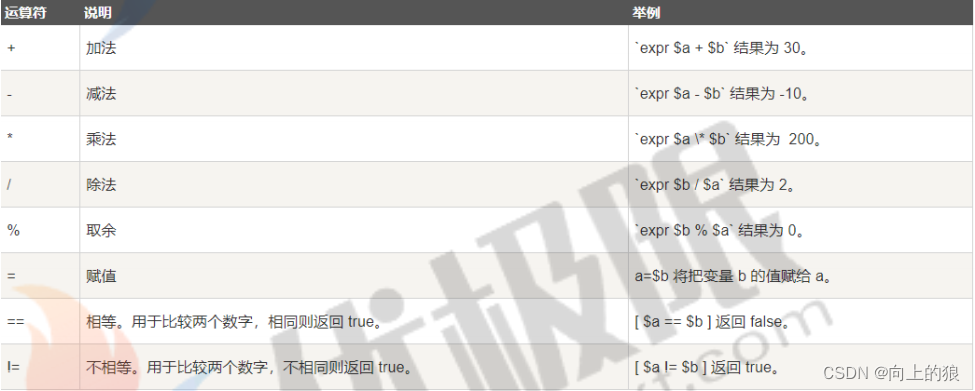
- 算数运算符
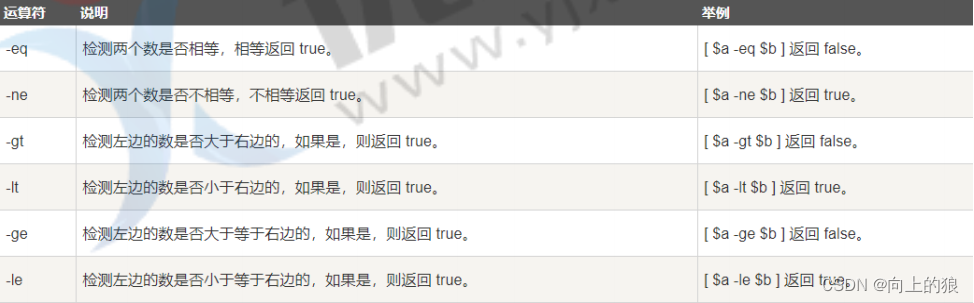
- 关系运算符
- 布尔运算符

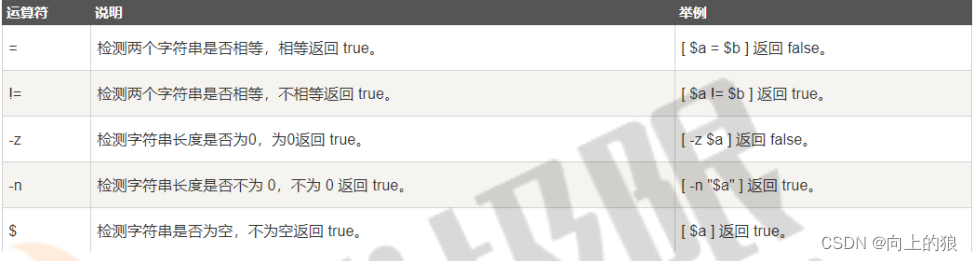
- 字符串运算符

- 文件测试运算符
 1.2、算数运算符
#!/bin/basha=10b=20val=`expr $a + $b` 注:这里=号两边都不要空格,还有就是+左右都要空格,下面都是一样的规则echo "a + b : $val"val=`expr $a - $b` 注: 这里用的 ` 是在Esc下面那个符号echo "a - b : $val"val=`expr $a \* $b`echo "a * b : $val"val=`expr $b / $a`echo "b / a : $val"val=`expr $b % $a`echo "b % a : $val"if [ $a == $b ] 注: if跟 [ 之间是要空格的, [ 跟$a之间也是要空格的, 后面$b跟 ] 也是要空格的thenecho "a 等于 b"fiif [ $a != $b ]thenecho "a 不等于 b"fi
1.3、关系运算符
#!/bin/basha=10b=20if [ $a -eq $b ]thenecho "$a -eq $b : a 等于 b"elseecho "$a -eq $b: a 不等于 b"fiif [ $a -ne $b ]thenecho "$a -ne $b: a 不等于 b"elseecho "$a -ne $b : a 等于 b"fiif [ $a -gt $b ]thenecho "$a -gt $b: a 大于 b"elseecho "$a -gt $b: a 不大于 b"fiif [ $a -lt $b ]thenecho "$a -lt $b: a 小于 b"elseecho "$a -lt $b: a 不小于 b"fiif [ $a -ge $b ]thenecho "$a -ge $b: a 大于或等于 b"elseecho "$a -ge $b: a 小于 b"fiif [ $a -le $b ]thenecho "$a -le $b: a 小于或等于 b"elseecho "$a -le $b: a 大于 b"fi
1.4、布尔运算符
#!/bin/basha=10b=20if [ $a != $b ]thenecho "$a != $b : a 不等于 b"elseecho "$a == $b: a 等于 b"fiif [ $a -lt 100 -a $b -gt 15 ]thenecho "$a 小于 100 且 $b 大于 15 : 返回 true"elseecho "$a 小于 100 且 $b 大于 15 : 返回 false"fiif [ $a -lt 100 -o $b -gt 100 ]thenecho "$a 小于 100 或 $b 大于 100 : 返回 true"elseecho "$a 小于 100 或 $b 大于 100 : 返回 false"fiif [ $a -lt 5 -o $b -gt 100 ]thenecho "$a 小于 5 或 $b 大于 100 : 返回 true"elseecho "$a 小于 5 或 $b 大于 100 : 返回 false"fi
1.5、逻辑运算符
#!/bin/basha=10b=20if [[ $a -lt 100 && $b -gt 100 ]] 注: 这里如果使用的是逻辑运算符&&, ||则需要两个[[ , ]], 如果then 使用的是位运算符则不需要.echo "返回 true"elseecho "返回 false"fiif [[ $a -lt 100 || $b -gt 100 ]]thenecho "返回 true"elseecho "返回 false"fi
1.6、字符串运算符
#!/bin/basha="abc"b="efg"if [ $a = $b ] //注意: 这里字符串的比较用的是=号thenecho "$a = $b : a 等于 b"elseecho "$a = $b: a 不等于 b"fiif [ $a != $b ]thenecho "$a != $b : a 不等于 b"elseecho "$a != $b: a 等于 b"fiif [ -z $a ]thenecho "-z $a : 字符串长度为 0"3.1.6. 文件测试运算符elseecho "-z $a : 字符串长度不为 0"fiif [ -n "$a" ]thenecho "-n $a : 字符串长度不为 0"elseecho "-n $a : 字符串长度为 0"fiif [ $a ]thenecho "$a : 字符串不为空"elseecho "$a : 字符串为空"fi
1.7、文件测试运算符
#!/bin/bashfile="/var/node/test.sh"if [ -r $file ]thenecho "文件可读"elseecho "文件不可读"fiif [ -w $file ]thenecho "文件可写"elseecho "文件不可写"fiif [ -x $file ]thenecho "文件可执行"elseecho "文件不可执行"fiif [ -f $file ]thenecho "文件为普通文件"elseecho "文件为特殊文件"fiif [ -d $file ]thenecho "文件是个目录"elseecho "文件不是个目录"fiif [ -s $file ]thenecho "文件不为空"elseecho "文件为空"fiif [ -e $file ]thenecho "文件存在"elseecho "文件不存在"fi
二、echo打印数据
Shell的echo指令用于字符串的输出
## 显示普通字符串echo "Hello World"## 显示转义字符echo "\"Hello World\""## 显示变量name="zhangsan"echo "$name Hello World"## 显示换行echo -e "OK! \n" 注: 如果想要时用换行的功能, 则需要在echo加一个-eecho "Hello World"## 显示不换行echo -e "OK! \c"echo "Hello World"## 显示结果定向至文件echo "Hello World" > myfile## 原样输出字符串echo '$name\"'## 显示命令执行结果echo `date`
三、test命令
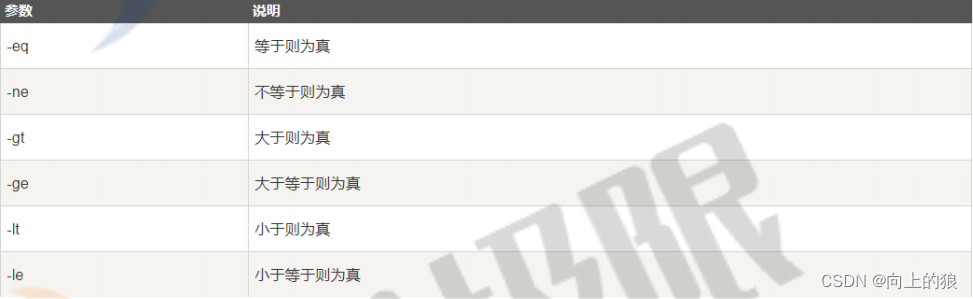
- 数字
- 字符串
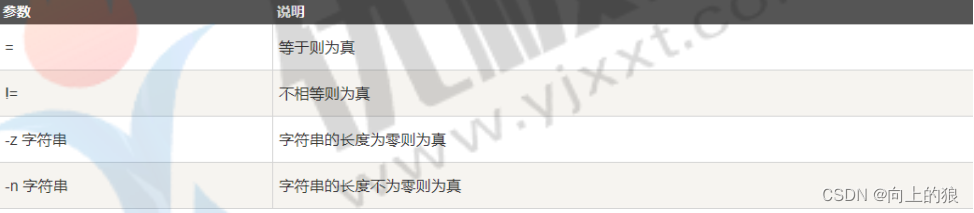
- 文件测试

# 比较num1=100num2=100if test $[num1] -eq $[num2]thenecho '两个数相等!'elseecho '两个数不相等!'fi
四、Shell流程控制(可以联想java语法)
4.1、if
格式:
if condition1thencommand1elif condition2thencommand2elsecommandNfi
举例:
a=10b=20if [ $a == $b ]thenecho "a 等于 b"elif [ $a -gt $b ]thenecho "a 大于 b"elif [ $a -lt $b ]thenecho "a 小于 b"elseecho "没有符合的条件"fi
4.2、case
case 值 in模式1)command1command2...commandN;;模式2)command1command2...commandN;;esac
举例:
echo '输入 1 到 4 之间的数字:'echo '你输入的数字为:'read numcase $num in1) echo '你选择了 1';;2) echo '你选择了 2';;3) echo '你选择了 3';;4) echo '你选择了 4';;*) echo '你没有输入 1 到 4 之间的数字';;esac
4.3、for
- 当变量值在列表里,for循环即执行一次所有命令,使用变量名获取列表中的当前取值。
- 命令可为任何有效的shell命令和语句。in列表可以包含替换、字符串和文件名。
- in列表是可选的,如果不用它,for循环使用命令行的位置参数。
格式:
for var in item1 item2 ... itemNdocommand1command2...commandNdone
举例:
for loop in 1 2 3 4 5doecho "The value is: $loop"donefor str in 'This is a string','hello moto'doecho $strdone
4.4、while循环
while循环用于不断执行一系列命令, 也用于从输出文件中读取数据; 命令通常为测试条件
while conditiondocommanddone
# Bash let 命令,它用于执行一个或多个表达式,变量计算中不需要加上 $ 来表示变量#!/bin/bashint=1while(( $int<=5 )) 注意: 这里如果要使用<=, >=运算符要使用(( ))来写doecho $intlet "int++"done# 无限循环while truedocommanddone
4.5、break
break命令运行跳出所有循环(终止执行后面的所有操作)
#!/bin/bashwhile :doecho -n "输入 1 到 5 之间的数字:"read aNumcase $aNum in1|2|3|4|5) echo "你输入的数字为 $aNum!";;*) echo "你输入的数字不是 1 到 5 之间的! 游戏结束"break;;esacdone
4.7、continue
continue命令不会跳出所有循环, 仅仅跳出当前循环
#!/bin/bashwhile :doecho -n "输入 1 到 5 之间的数字: "read aNumcase $aNum in1|2|3|4|5) echo "你输入的数字为 $aNum!";;*) echo "你输入的数字不是 1 到 5 之间的!"continueecho "游戏结束";;esacdone
五、Shell函数
- Linux shell可以用户自定义函数,然后在shell脚本中可以随便调用。
- 可以带function fun() 定义,也可以直接fun() 定义,不带任何参数。
- 参数返回,可以显示加:return 返回,如果不加,将以最后一条命令运行结果,作为返回值。 return后跟数值n(0-255)
#!/bin/bash## 第一个函数------------------------------demoFun(){echo "这是我的第一个 shell 函数!"}echo "-----函数开始执行-----"demoFunecho "-----函数执行完毕-----"## 函数返回值------------------------------funWithReturn(){echo "这个函数会对输入的两个数字进行相加运算..."echo "输入第一个数字: "read aNumecho "输入第二个数字: "read anotherNumecho "两个数字分别为 $aNum 和 $anotherNum !"return $(($aNum+$anotherNum))}funWithReturn# 函数返回值在调用该函数后通过 $? 来获得。echo "输入的两个数字之和为 $? !"## 函数参数------------------------------funWithParam(){echo "第一个参数为 $1 !"echo "第二个参数为 $2 !"echo "第十个参数为 $10 !"echo "第十个参数为 ${10} !"}funWithParam 1 2 3 4 5 6 7 8 9
边栏推荐
- ubuntu14安装MySQL并配置root账户本地与远程访问
- English语法_形容词/副词3级 -注意事项
- Solution and summary of Nacos startup failure
- [info() method in org.slf4j.logger]
- Redis 实现限流的三种方式
- Games202 operation 0 - environment building process & solving problems encountered
- Witness the times! "The future of Renji collaboration has come" 2022 Hongji ecological partnership conference opens live broadcast reservation
- Love business in Little Red Book
- ECS summer money saving secret, this time @ old users come and take it away
- Digital business cloud: from planning to implementation, how does Minmetals Group quickly build a new pattern of digital development?
猜你喜欢

Getting started with kubernetes command (namespaces, pods)
The former 4A executives engaged in agent operation and won an IPO
白盒加密技术浅理解

MySQL常用图形管理工具 | 黑马程序员

Lumiprobe 亚磷酰胺丨六甘醇亚磷酰胺说明书
M91快速霍尔测量仪—在更短的时间内进行更好的测量
nacos配置文件发布失败,请检查参数是否正确的解决方案

B2B e-commerce platform solution for fresh food industry to improve the standardization and transparency of enterprise transaction process

Intensive cultivation of channels for joint development Fuxin and Weishi Jiajie held a new product training conference

Lumiprobe free radical analysis h2dcfda instructions
随机推荐
English语法_形容词/副词3级 -注意事项
Reading the paper [learning to discretely compose reasoning module networks for video captioning]
Dlib+Opencv库实现疲劳检测
Werewolf killing strategy: do you think I'm easy to cheat? Who do we believe!
Lake Shore - crx-em-hf low temperature probe station
Bao, what if the O & M 100+ server is a headache? Use Xingyun housekeeper!
Lumiprobe cell imaging study PKH26 cell membrane labeling kit
Chaos engineering platform chaosblade box new heavy release
Appgallery connect scenario development practice - image storage and sharing
Les canaux de culture intensive s'efforcent de développer Fu Xin et Wei Shi jiajie pour organiser une conférence de formation sur les nouveaux produits
Helium transmission line of lake shore cryostat
从零开始学 MySQL —数据库和数据表操作
torch.nn.functional.interpolate函数
How to solve the problem of splash screen when the main and sub code streams of easygbs are h.265?
新版国标GB28181视频平台EasyGBS如何配置WebRTC视频流格式播放?
More information about M91 fast hall measuring instrument
案例分享:QinQ基本组网配置
Lean thinking: source, pillar, landing. I understand it after reading this article
Native JS creates a calendar - supports mouse wheel scrolling to select months - and can be ported to any framework
Go Language Advanced