当前位置:网站首页>OLED12864 液晶屏
OLED12864 液晶屏
2022-07-02 05:38:00 【比特冬哥】
一、简介
OLED 屏幕作为一种新型的显示技术,其自身可以发光,亮度,对比度高,功耗低,在当下备受追捧。而在我们正常的显示调整参数过程中,我们越来越多的使用这种屏幕。我们使用的一般是分辨率为 128x64 ,屏幕尺寸为 0.96 寸(本节用的是1.3寸的)。由于其较小的尺寸和比较高的分辨率,让它有着很好的显示效果和便携性。
基本参数
| 驱动芯片 | SSD1106/1306 |
|---|---|
| 支持接口 | I2C/SPI |
| 分辨率 | 128×64 |
| 型号 | JMD1.3D |
| 显示颜色 | 白光/蓝光 |
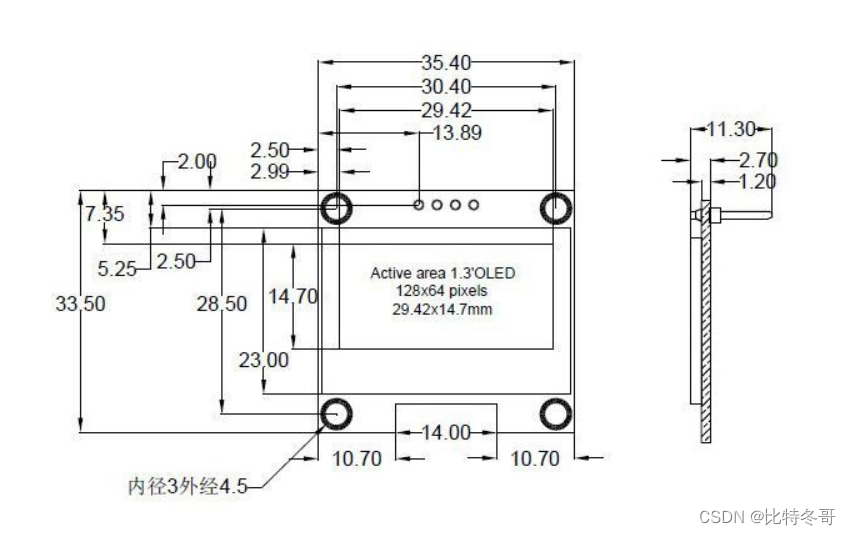
| 外形尺寸 | 35.431.72.7 (mm) |
| 显示区域 | 29.42*14.7 (mm) |
| 点间距 | 0.23*0.23 (mm) |
| 点大小 | 0.21*0.21 (mm) |
| 管脚数 | 4PIN |
| 功耗 | 正常显示功耗为20ma-30max |
| 工作温度 | -30℃~70℃ |
| 存储温度 | -40℃~80℃ |
| 工作电压 | 5V/ 3.3V |

二、程序实现
这里我以 IIC 协议为例进行编写
代码如下(示例):
1. 引脚初始化
void OLED_I2C_Init(void)
{

    RCC_APB2PeriphClockCmd(RCC_APB2Periph_GPIOB, ENABLE);

	GPIO_InitTypeDef GPIO_InitStructure;
 	GPIO_InitStructure.GPIO_Mode = GPIO_Mode_Out_OD;
	GPIO_InitStructure.GPIO_Speed = GPIO_Speed_50MHz;
	GPIO_InitStructure.GPIO_Pin = GPIO_Pin_6;
 	GPIO_Init(GPIOB, &GPIO_InitStructure);
	GPIO_InitStructure.GPIO_Pin = GPIO_Pin_7;
 	GPIO_Init(GPIOB, &GPIO_InitStructure);

	OLED_W_SCL(1);
	OLED_W_SDA(1);
}
2. IIC开始、停止和发送一个字节
void OLED_I2C_Start(void)
{

	OLED_W_SDA(1);
	OLED_W_SCL(1);
	OLED_W_SDA(0);
	OLED_W_SCL(0);
}

void OLED_I2C_Stop(void)
{

	OLED_W_SDA(0);
	OLED_W_SCL(1);
	OLED_W_SDA(1);
}

void OLED_I2C_SendByte(uint8_t Byte)
{

	uint8_t i;
	for (i = 0; i < 8; i++)
	{

		OLED_W_SDA(Byte & (0x80 >> i));
		OLED_W_SCL(1);
		OLED_W_SCL(0);
	}
	OLED_W_SCL(1);	//额外的一个时钟,不处理应答信号
	OLED_W_SCL(0);
}
3. OLED写命令、数据
void OLED_WriteCommand(uint8_t Command)
{

	OLED_I2C_Start();
	OLED_I2C_SendByte(0x78);		//从机地址
	OLED_I2C_SendByte(0x00);		//写命令
	OLED_I2C_SendByte(Command);
	OLED_I2C_Stop();
}


void OLED_WriteData(uint8_t Data)
{

	OLED_I2C_Start();
	OLED_I2C_SendByte(0x78);		//从机地址
	OLED_I2C_SendByte(0x40);		//写数据
	OLED_I2C_SendByte(Data);
	OLED_I2C_Stop();
}
4. OLED初始化
void OLED_Init(void)
{

	uint32_t i, j;

	for (i = 0; i < 1000; i++)			//上电延时
	{

		for (j = 0; j < 1000; j++);
	}

	OLED_I2C_Init();			//端口初始化

	OLED_WriteCommand(0xAE);	//关闭显示

	OLED_WriteCommand(0xD5);	//设置显示时钟分频比/振荡器频率
	OLED_WriteCommand(0x80);

	OLED_WriteCommand(0xA8);	//设置多路复用率
	OLED_WriteCommand(0x3F);

	OLED_WriteCommand(0xD3);	//设置显示偏移
	OLED_WriteCommand(0x00);

	OLED_WriteCommand(0x40);	//设置显示开始行

	OLED_WriteCommand(0xA1);	//设置左右方向,0xA1正常 0xA0左右反置

	OLED_WriteCommand(0xC8);	//设置上下方向,0xC8正常 0xC0上下反置

	OLED_WriteCommand(0xDA);	//设置COM引脚硬件配置
	OLED_WriteCommand(0x12);

	OLED_WriteCommand(0x81);	//设置对比度控制
	OLED_WriteCommand(0xCF);

	OLED_WriteCommand(0xD9);	//设置预充电周期
	OLED_WriteCommand(0xF1);

	OLED_WriteCommand(0xDB);	//设置VCOMH取消选择级别
	OLED_WriteCommand(0x30);

	OLED_WriteCommand(0xA4);	//设置整个显示打开/关闭

	OLED_WriteCommand(0xA6);	//设置正常/倒转显示

	OLED_WriteCommand(0x8D);	//设置充电泵
	OLED_WriteCommand(0x14);

	OLED_WriteCommand(0xAF);	//开启显示

	OLED_Clear();				//OLED清屏
}
5. OLED显示函数
/** * @brief OLED设置光标位置 * @param Y 以左上角为原点,向下方向的坐标,范围:0~7 * @param X 以左上角为原点,向右方向的坐标,范围:0~127 * @retval 无 */
void OLED_SetCursor(uint8_t Y, uint8_t X)
{

	OLED_WriteCommand(0xB0 | Y);					//设置Y位置
	OLED_WriteCommand(0x10 | ((X & 0xF0) >> 4));	//设置X位置低4位
	OLED_WriteCommand(0x00 | (X & 0x0F));			//设置X位置高4位
}

/** * @brief OLED清屏 * @param 无 * @retval 无 */
void OLED_Clear(void)
{

	uint8_t i, j;
	for (j = 0; j < 8; j++)
	{

		OLED_SetCursor(j, 0);
		for(i = 0; i < 128; i++)
		{

			OLED_WriteData(0x00);
		}
	}
}

/** * @brief OLED显示一个字符 * @param Line 行位置,范围:1~4 * @param Column 列位置,范围:1~16 * @param Char 要显示的一个字符,范围:ASCII可见字符 * @retval 无 */
void OLED_ShowChar(uint8_t Line, uint8_t Column, char Char)
{

	uint8_t i;
	OLED_SetCursor((Line - 1) * 2, (Column - 1) * 8);		//设置光标位置在上半部分
	for (i = 0; i < 8; i++)
	{

		OLED_WriteData(OLED_F8x16[Char - ' '][i]);			//显示上半部分内容
	}
	OLED_SetCursor((Line - 1) * 2 + 1, (Column - 1) * 8);	//设置光标位置在下半部分
	for (i = 0; i < 8; i++)
	{

		OLED_WriteData(OLED_F8x16[Char - ' '][i + 8]);		//显示下半部分内容
	}
}

/** * @brief OLED显示字符串 * @param Line 起始行位置,范围:1~4 * @param Column 起始列位置,范围:1~16 * @param String 要显示的字符串,范围:ASCII可见字符 * @retval 无 */
void OLED_ShowString(uint8_t Line, uint8_t Column, char *String)
{

	uint8_t i;
	for (i = 0; String[i] != '\0'; i++)
	{

		OLED_ShowChar(Line, Column + i, String[i]);
	}
}

/** * @brief OLED次方函数 * @retval 返回值等于X的Y次方 */
uint32_t OLED_Pow(uint32_t X, uint32_t Y)
{

	uint32_t Result = 1;
	while (Y--)
	{

		Result *= X;
	}
	return Result;
}

/** * @brief OLED显示数字(十进制,正数) * @param Line 起始行位置,范围:1~4 * @param Column 起始列位置,范围:1~16 * @param Number 要显示的数字,范围:0~4294967295 * @param Length 要显示数字的长度,范围:1~10 * @retval 无 */
void OLED_ShowNum(uint8_t Line, uint8_t Column, uint32_t Number, uint8_t Length)
{

	uint8_t i;
	for (i = 0; i < Length; i++)
	{

		OLED_ShowChar(Line, Column + i, Number / OLED_Pow(10, Length - i - 1) % 10 + '0');
	}
}

/** * @brief OLED显示数字(十进制,带符号数) * @param Line 起始行位置,范围:1~4 * @param Column 起始列位置,范围:1~16 * @param Number 要显示的数字,范围:-2147483648~2147483647 * @param Length 要显示数字的长度,范围:1~10 * @retval 无 */
void OLED_ShowSignedNum(uint8_t Line, uint8_t Column, int32_t Number, uint8_t Length)
{

	uint8_t i;
	uint32_t Number1;
	if (Number >= 0)
	{

		OLED_ShowChar(Line, Column, '+');
		Number1 = Number;
	}
	else
	{

		OLED_ShowChar(Line, Column, '-');
		Number1 = -Number;
	}
	for (i = 0; i < Length; i++)
	{

		OLED_ShowChar(Line, Column + i + 1, Number1 / OLED_Pow(10, Length - i - 1) % 10 + '0');
	}
}

/** * @brief OLED显示数字(十六进制,正数) * @param Line 起始行位置,范围:1~4 * @param Column 起始列位置,范围:1~16 * @param Number 要显示的数字,范围:0~0xFFFFFFFF * @param Length 要显示数字的长度,范围:1~8 * @retval 无 */
void OLED_ShowHexNum(uint8_t Line, uint8_t Column, uint32_t Number, uint8_t Length)
{

	uint8_t i, SingleNumber;
	for (i = 0; i < Length; i++)
	{

		SingleNumber = Number / OLED_Pow(16, Length - i - 1) % 16;
		if (SingleNumber < 10)
		{

			OLED_ShowChar(Line, Column + i, SingleNumber + '0');
		}
		else
		{

			OLED_ShowChar(Line, Column + i, SingleNumber - 10 + 'A');
		}
	}
}

/** * @brief OLED显示数字(二进制,正数) * @param Line 起始行位置,范围:1~4 * @param Column 起始列位置,范围:1~16 * @param Number 要显示的数字,范围:0~1111 1111 1111 1111 * @param Length 要显示数字的长度,范围:1~16 * @retval 无 */
void OLED_ShowBinNum(uint8_t Line, uint8_t Column, uint32_t Number, uint8_t Length)
{

	uint8_t i;
	for (i = 0; i < Length; i++)
	{

		OLED_ShowChar(Line, Column + i, Number / OLED_Pow(2, Length - i - 1) % 2 + '0');
	}
}
6. OLED字幕库
/*OLED字模库,宽8像素,高16像素*/
const uint8_t OLED_F8x16[][16]=
{

	0x00,0x00,0x00,0x00,0x00,0x00,0x00,0x00,
	0x00,0x00,0x00,0x00,0x00,0x00,0x00,0x00,// 0

	0x00,0x00,0x00,0xF8,0x00,0x00,0x00,0x00,
	0x00,0x00,0x00,0x33,0x30,0x00,0x00,0x00,//! 1

	0x00,0x10,0x0C,0x06,0x10,0x0C,0x06,0x00,
	0x00,0x00,0x00,0x00,0x00,0x00,0x00,0x00,//" 2

	0x40,0xC0,0x78,0x40,0xC0,0x78,0x40,0x00,
	0x04,0x3F,0x04,0x04,0x3F,0x04,0x04,0x00,//# 3

	0x00,0x70,0x88,0xFC,0x08,0x30,0x00,0x00,
	0x00,0x18,0x20,0xFF,0x21,0x1E,0x00,0x00,//$ 4

	0xF0,0x08,0xF0,0x00,0xE0,0x18,0x00,0x00,
	0x00,0x21,0x1C,0x03,0x1E,0x21,0x1E,0x00,//% 5

	0x00,0xF0,0x08,0x88,0x70,0x00,0x00,0x00,
	0x1E,0x21,0x23,0x24,0x19,0x27,0x21,0x10,//& 6

	0x10,0x16,0x0E,0x00,0x00,0x00,0x00,0x00,
	0x00,0x00,0x00,0x00,0x00,0x00,0x00,0x00,//' 7

	0x00,0x00,0x00,0xE0,0x18,0x04,0x02,0x00,
	0x00,0x00,0x00,0x07,0x18,0x20,0x40,0x00,//( 8

	0x00,0x02,0x04,0x18,0xE0,0x00,0x00,0x00,
	0x00,0x40,0x20,0x18,0x07,0x00,0x00,0x00,//) 9

	0x40,0x40,0x80,0xF0,0x80,0x40,0x40,0x00,
	0x02,0x02,0x01,0x0F,0x01,0x02,0x02,0x00,//* 10

	0x00,0x00,0x00,0xF0,0x00,0x00,0x00,0x00,
	0x01,0x01,0x01,0x1F,0x01,0x01,0x01,0x00,//+ 11

	0x00,0x00,0x00,0x00,0x00,0x00,0x00,0x00,
	0x80,0xB0,0x70,0x00,0x00,0x00,0x00,0x00,//, 12

	0x00,0x00,0x00,0x00,0x00,0x00,0x00,0x00,
	0x00,0x01,0x01,0x01,0x01,0x01,0x01,0x01,//- 13

	0x00,0x00,0x00,0x00,0x00,0x00,0x00,0x00,
	0x00,0x30,0x30,0x00,0x00,0x00,0x00,0x00,//. 14

	0x00,0x00,0x00,0x00,0x80,0x60,0x18,0x04,
	0x00,0x60,0x18,0x06,0x01,0x00,0x00,0x00,/// 15

	0x00,0xE0,0x10,0x08,0x08,0x10,0xE0,0x00,
	0x00,0x0F,0x10,0x20,0x20,0x10,0x0F,0x00,//0 16

	0x00,0x10,0x10,0xF8,0x00,0x00,0x00,0x00,
	0x00,0x20,0x20,0x3F,0x20,0x20,0x00,0x00,//1 17

	0x00,0x70,0x08,0x08,0x08,0x88,0x70,0x00,
	0x00,0x30,0x28,0x24,0x22,0x21,0x30,0x00,//2 18

	0x00,0x30,0x08,0x88,0x88,0x48,0x30,0x00,
	0x00,0x18,0x20,0x20,0x20,0x11,0x0E,0x00,//3 19

	0x00,0x00,0xC0,0x20,0x10,0xF8,0x00,0x00,
	0x00,0x07,0x04,0x24,0x24,0x3F,0x24,0x00,//4 20

	0x00,0xF8,0x08,0x88,0x88,0x08,0x08,0x00,
	0x00,0x19,0x21,0x20,0x20,0x11,0x0E,0x00,//5 21

	0x00,0xE0,0x10,0x88,0x88,0x18,0x00,0x00,
	0x00,0x0F,0x11,0x20,0x20,0x11,0x0E,0x00,//6 22

	0x00,0x38,0x08,0x08,0xC8,0x38,0x08,0x00,
	0x00,0x00,0x00,0x3F,0x00,0x00,0x00,0x00,//7 23

	0x00,0x70,0x88,0x08,0x08,0x88,0x70,0x00,
	0x00,0x1C,0x22,0x21,0x21,0x22,0x1C,0x00,//8 24

	0x00,0xE0,0x10,0x08,0x08,0x10,0xE0,0x00,
	0x00,0x00,0x31,0x22,0x22,0x11,0x0F,0x00,//9 25

	0x00,0x00,0x00,0xC0,0xC0,0x00,0x00,0x00,
	0x00,0x00,0x00,0x30,0x30,0x00,0x00,0x00,//: 26

	0x00,0x00,0x00,0x80,0x00,0x00,0x00,0x00,
	0x00,0x00,0x80,0x60,0x00,0x00,0x00,0x00,//; 27

	0x00,0x00,0x80,0x40,0x20,0x10,0x08,0x00,
	0x00,0x01,0x02,0x04,0x08,0x10,0x20,0x00,//< 28

	0x40,0x40,0x40,0x40,0x40,0x40,0x40,0x00,
	0x04,0x04,0x04,0x04,0x04,0x04,0x04,0x00,//= 29

	0x00,0x08,0x10,0x20,0x40,0x80,0x00,0x00,
	0x00,0x20,0x10,0x08,0x04,0x02,0x01,0x00,//> 30

	0x00,0x70,0x48,0x08,0x08,0x08,0xF0,0x00,
	0x00,0x00,0x00,0x30,0x36,0x01,0x00,0x00,//? 31

	0xC0,0x30,0xC8,0x28,0xE8,0x10,0xE0,0x00,
	0x07,0x18,0x27,0x24,0x23,0x14,0x0B,0x00,//@ 32

	0x00,0x00,0xC0,0x38,0xE0,0x00,0x00,0x00,
	0x20,0x3C,0x23,0x02,0x02,0x27,0x38,0x20,//A 33

	0x08,0xF8,0x88,0x88,0x88,0x70,0x00,0x00,
	0x20,0x3F,0x20,0x20,0x20,0x11,0x0E,0x00,//B 34

	0xC0,0x30,0x08,0x08,0x08,0x08,0x38,0x00,
	0x07,0x18,0x20,0x20,0x20,0x10,0x08,0x00,//C 35

	0x08,0xF8,0x08,0x08,0x08,0x10,0xE0,0x00,
	0x20,0x3F,0x20,0x20,0x20,0x10,0x0F,0x00,//D 36

	0x08,0xF8,0x88,0x88,0xE8,0x08,0x10,0x00,
	0x20,0x3F,0x20,0x20,0x23,0x20,0x18,0x00,//E 37

	0x08,0xF8,0x88,0x88,0xE8,0x08,0x10,0x00,
	0x20,0x3F,0x20,0x00,0x03,0x00,0x00,0x00,//F 38

	0xC0,0x30,0x08,0x08,0x08,0x38,0x00,0x00,
	0x07,0x18,0x20,0x20,0x22,0x1E,0x02,0x00,//G 39

	0x08,0xF8,0x08,0x00,0x00,0x08,0xF8,0x08,
	0x20,0x3F,0x21,0x01,0x01,0x21,0x3F,0x20,//H 40

	0x00,0x08,0x08,0xF8,0x08,0x08,0x00,0x00,
	0x00,0x20,0x20,0x3F,0x20,0x20,0x00,0x00,//I 41

	0x00,0x00,0x08,0x08,0xF8,0x08,0x08,0x00,
	0xC0,0x80,0x80,0x80,0x7F,0x00,0x00,0x00,//J 42

	0x08,0xF8,0x88,0xC0,0x28,0x18,0x08,0x00,
	0x20,0x3F,0x20,0x01,0x26,0x38,0x20,0x00,//K 43

	0x08,0xF8,0x08,0x00,0x00,0x00,0x00,0x00,
	0x20,0x3F,0x20,0x20,0x20,0x20,0x30,0x00,//L 44

	0x08,0xF8,0xF8,0x00,0xF8,0xF8,0x08,0x00,
	0x20,0x3F,0x00,0x3F,0x00,0x3F,0x20,0x00,//M 45

	0x08,0xF8,0x30,0xC0,0x00,0x08,0xF8,0x08,
	0x20,0x3F,0x20,0x00,0x07,0x18,0x3F,0x00,//N 46

	0xE0,0x10,0x08,0x08,0x08,0x10,0xE0,0x00,
	0x0F,0x10,0x20,0x20,0x20,0x10,0x0F,0x00,//O 47

	0x08,0xF8,0x08,0x08,0x08,0x08,0xF0,0x00,
	0x20,0x3F,0x21,0x01,0x01,0x01,0x00,0x00,//P 48

	0xE0,0x10,0x08,0x08,0x08,0x10,0xE0,0x00,
	0x0F,0x18,0x24,0x24,0x38,0x50,0x4F,0x00,//Q 49

	0x08,0xF8,0x88,0x88,0x88,0x88,0x70,0x00,
	0x20,0x3F,0x20,0x00,0x03,0x0C,0x30,0x20,//R 50

	0x00,0x70,0x88,0x08,0x08,0x08,0x38,0x00,
	0x00,0x38,0x20,0x21,0x21,0x22,0x1C,0x00,//S 51

	0x18,0x08,0x08,0xF8,0x08,0x08,0x18,0x00,
	0x00,0x00,0x20,0x3F,0x20,0x00,0x00,0x00,//T 52

	0x08,0xF8,0x08,0x00,0x00,0x08,0xF8,0x08,
	0x00,0x1F,0x20,0x20,0x20,0x20,0x1F,0x00,//U 53

	0x08,0x78,0x88,0x00,0x00,0xC8,0x38,0x08,
	0x00,0x00,0x07,0x38,0x0E,0x01,0x00,0x00,//V 54

	0xF8,0x08,0x00,0xF8,0x00,0x08,0xF8,0x00,
	0x03,0x3C,0x07,0x00,0x07,0x3C,0x03,0x00,//W 55

	0x08,0x18,0x68,0x80,0x80,0x68,0x18,0x08,
	0x20,0x30,0x2C,0x03,0x03,0x2C,0x30,0x20,//X 56

	0x08,0x38,0xC8,0x00,0xC8,0x38,0x08,0x00,
	0x00,0x00,0x20,0x3F,0x20,0x00,0x00,0x00,//Y 57

	0x10,0x08,0x08,0x08,0xC8,0x38,0x08,0x00,
	0x20,0x38,0x26,0x21,0x20,0x20,0x18,0x00,//Z 58

	0x00,0x00,0x00,0xFE,0x02,0x02,0x02,0x00,
	0x00,0x00,0x00,0x7F,0x40,0x40,0x40,0x00,//[ 59

	0x00,0x0C,0x30,0xC0,0x00,0x00,0x00,0x00,
	0x00,0x00,0x00,0x01,0x06,0x38,0xC0,0x00,//\ 60

	0x00,0x02,0x02,0x02,0xFE,0x00,0x00,0x00,
	0x00,0x40,0x40,0x40,0x7F,0x00,0x00,0x00,//] 61

	0x00,0x00,0x04,0x02,0x02,0x02,0x04,0x00,
	0x00,0x00,0x00,0x00,0x00,0x00,0x00,0x00,//^ 62

	0x00,0x00,0x00,0x00,0x00,0x00,0x00,0x00,
	0x80,0x80,0x80,0x80,0x80,0x80,0x80,0x80,//_ 63

	0x00,0x02,0x02,0x04,0x00,0x00,0x00,0x00,
	0x00,0x00,0x00,0x00,0x00,0x00,0x00,0x00,//` 64

	0x00,0x00,0x80,0x80,0x80,0x80,0x00,0x00,
	0x00,0x19,0x24,0x22,0x22,0x22,0x3F,0x20,//a 65

	0x08,0xF8,0x00,0x80,0x80,0x00,0x00,0x00,
	0x00,0x3F,0x11,0x20,0x20,0x11,0x0E,0x00,//b 66

	0x00,0x00,0x00,0x80,0x80,0x80,0x00,0x00,
	0x00,0x0E,0x11,0x20,0x20,0x20,0x11,0x00,//c 67

	0x00,0x00,0x00,0x80,0x80,0x88,0xF8,0x00,
	0x00,0x0E,0x11,0x20,0x20,0x10,0x3F,0x20,//d 68

	0x00,0x00,0x80,0x80,0x80,0x80,0x00,0x00,
	0x00,0x1F,0x22,0x22,0x22,0x22,0x13,0x00,//e 69

	0x00,0x80,0x80,0xF0,0x88,0x88,0x88,0x18,
	0x00,0x20,0x20,0x3F,0x20,0x20,0x00,0x00,//f 70

	0x00,0x00,0x80,0x80,0x80,0x80,0x80,0x00,
	0x00,0x6B,0x94,0x94,0x94,0x93,0x60,0x00,//g 71

	0x08,0xF8,0x00,0x80,0x80,0x80,0x00,0x00,
	0x20,0x3F,0x21,0x00,0x00,0x20,0x3F,0x20,//h 72

	0x00,0x80,0x98,0x98,0x00,0x00,0x00,0x00,
	0x00,0x20,0x20,0x3F,0x20,0x20,0x00,0x00,//i 73

	0x00,0x00,0x00,0x80,0x98,0x98,0x00,0x00,
	0x00,0xC0,0x80,0x80,0x80,0x7F,0x00,0x00,//j 74

	0x08,0xF8,0x00,0x00,0x80,0x80,0x80,0x00,
	0x20,0x3F,0x24,0x02,0x2D,0x30,0x20,0x00,//k 75

	0x00,0x08,0x08,0xF8,0x00,0x00,0x00,0x00,
	0x00,0x20,0x20,0x3F,0x20,0x20,0x00,0x00,//l 76

	0x80,0x80,0x80,0x80,0x80,0x80,0x80,0x00,
	0x20,0x3F,0x20,0x00,0x3F,0x20,0x00,0x3F,//m 77

	0x80,0x80,0x00,0x80,0x80,0x80,0x00,0x00,
	0x20,0x3F,0x21,0x00,0x00,0x20,0x3F,0x20,//n 78

	0x00,0x00,0x80,0x80,0x80,0x80,0x00,0x00,
	0x00,0x1F,0x20,0x20,0x20,0x20,0x1F,0x00,//o 79

	0x80,0x80,0x00,0x80,0x80,0x00,0x00,0x00,
	0x80,0xFF,0xA1,0x20,0x20,0x11,0x0E,0x00,//p 80

	0x00,0x00,0x00,0x80,0x80,0x80,0x80,0x00,
	0x00,0x0E,0x11,0x20,0x20,0xA0,0xFF,0x80,//q 81

	0x80,0x80,0x80,0x00,0x80,0x80,0x80,0x00,
	0x20,0x20,0x3F,0x21,0x20,0x00,0x01,0x00,//r 82

	0x00,0x00,0x80,0x80,0x80,0x80,0x80,0x00,
	0x00,0x33,0x24,0x24,0x24,0x24,0x19,0x00,//s 83

	0x00,0x80,0x80,0xE0,0x80,0x80,0x00,0x00,
	0x00,0x00,0x00,0x1F,0x20,0x20,0x00,0x00,//t 84

	0x80,0x80,0x00,0x00,0x00,0x80,0x80,0x00,
	0x00,0x1F,0x20,0x20,0x20,0x10,0x3F,0x20,//u 85

	0x80,0x80,0x80,0x00,0x00,0x80,0x80,0x80,
	0x00,0x01,0x0E,0x30,0x08,0x06,0x01,0x00,//v 86

	0x80,0x80,0x00,0x80,0x00,0x80,0x80,0x80,
	0x0F,0x30,0x0C,0x03,0x0C,0x30,0x0F,0x00,//w 87

	0x00,0x80,0x80,0x00,0x80,0x80,0x80,0x00,
	0x00,0x20,0x31,0x2E,0x0E,0x31,0x20,0x00,//x 88

	0x80,0x80,0x80,0x00,0x00,0x80,0x80,0x80,
	0x80,0x81,0x8E,0x70,0x18,0x06,0x01,0x00,//y 89

	0x00,0x80,0x80,0x80,0x80,0x80,0x80,0x00,
	0x00,0x21,0x30,0x2C,0x22,0x21,0x30,0x00,//z 90

	0x00,0x00,0x00,0x00,0x80,0x7C,0x02,0x02,
	0x00,0x00,0x00,0x00,0x00,0x3F,0x40,0x40,//{ 91

	0x00,0x00,0x00,0x00,0xFF,0x00,0x00,0x00,
	0x00,0x00,0x00,0x00,0xFF,0x00,0x00,0x00,//| 92

	0x00,0x02,0x02,0x7C,0x80,0x00,0x00,0x00,
	0x00,0x40,0x40,0x3F,0x00,0x00,0x00,0x00,//} 93

	0x00,0x06,0x01,0x01,0x02,0x02,0x04,0x04,
	0x00,0x00,0x00,0x00,0x00,0x00,0x00,0x00,//~ 94
};
详细资料:
百度云盘:https://pan.baidu.com/s/1Eu3qosCKjfnVoP6fO4_5iw
提取码 : xhn5
边栏推荐
- MySQL foundation --- query (learn MySQL foundation in 1 day)
- Typora installation (no need to enter serial number)
- Here comes a new chapter in the series of data conversion when exporting with easyexcel!
- centos8安裝mysql8.0.22教程
- 2022-2-14 learning xiangniuke project - Section 6 displays login information
- Global and Chinese market of commercial fish tanks 2022-2028: Research Report on technology, participants, trends, market size and share
- Opencv LBP features
- idea开发工具常用的插件合集汇总
- Visual studio import
- [personal test] copy and paste code between VirtualBox virtual machine and local
猜你喜欢

Fabric. JS iText sets the color and background color of the specified text
软件测试基础篇

LS1046nfs挂载文件系统

ThreadLocal memory leak
![Gee: analyze the change of spatial centroid of remote sensing image [centroid acquisition analysis]](/img/25/a726643b96b6f7dbfee3782c4905d9.jpg)
Gee: analyze the change of spatial centroid of remote sensing image [centroid acquisition analysis]

Gee series: Unit 1 Introduction to Google Earth engine
Pytorch Basics

Visual studio import
Centos8 installation mysql8.0.22 tutorial
RGB infinite cube (advanced version)
随机推荐
idea开发工具常用的插件合集汇总
Global and Chinese market of commercial fish tanks 2022-2028: Research Report on technology, participants, trends, market size and share
Online English teaching app open source platform (customized)
Simply encapsulate JS and apply it
“简单”的无限魔方
centos8安装mysql8.0.22教程
Online music player app
How matlab marks' a 'in the figure and how matlab marks points and solid points in the figure
Gee series: unit 10 creating a graphical user interface using Google Earth engine [GUI development]
6.网络-基础
Pytorch Chinese document
Reflection of the soul of the frame (important knowledge)
Mysql基础---查询(1天学会mysql基础)
Brew install * failed, solution
Fabric. JS iText superscript and subscript
Huawei Hongmeng OS, is it OK?
Global and Chinese markets of semiconductor laser therapeutics 2022-2028: Research Report on technology, participants, trends, market size and share
Centos8 installation mysql8.0.22 tutorial
金融门户相关信息
GRBL 软件:简单解释的基础知识