当前位置:网站首页>WinDbg common commands
WinDbg common commands
2022-06-29 13:34:00 【dvlinker】
Catalog
C++ A series of tutorials from getting started to mastering software exception troubleshooting ( Column list , Welcome to subscribe to , Continuous updating ...) https://blog.csdn.net/chenlycly/category_11397492.html 10.0 And above windbg Some intelligent operations are supported , There is no need to enter some complex commands to view information , Just click on some hyperlinks to automatically generate commands and execute , This is better than the old version windbg Much more convenient . But we still need to master some common Windbg Basic commands , These commands must be mastered , It is also frequently used when analyzing problems .

1、Windbg Order classification
Windbg Three types of commands are provided :
1) Standard order : Basic debugging commands , Case insensitive , such as g、kn、kv、lm etc. .
2) Metacommand : Built in debug engine commands , Provide functions that are not provided by standard commands , Command to . start , such as .excr、.reload、.dump etc. .
3) The extension command : It is used to extend the debugging function of a certain aspect , It is implemented in the dynamically loaded extension module , With ! start . Such as !analyze etc. .
2、 Common commands
2.1、.ecxr command
This command is mainly used for static analysis dump When you file , Used to switch to the thread with exception , Displays the context of the thread where the exception occurred . because windbg open dump When you file , It does not automatically switch to the thread where the exception occurred , We need to manually use this command to switch , As shown below :

Set up pdb Path or use .reload The command to load pdb After the document , It needs to be done again .ecxr Command to switch back to the abnormal thread .
2.2、kn/kv/kp command
Used to view the function call stack of the current thread .kn Just look at the function call stack ,kv You can view the function call parameters in the function call stack :

see windbg Help document for , say kp Command can view the parameters of the function call , No parameters are actually displayed .
Sometimes a thread in a program gets stuck , But I don't know which thread is stuck , You can use ~*kn command , Print out the function call stack of all threads :

See which threads are stuck WaitForSingleObject It's on the interface , Try to find out which thread is stuck .
2.3、lm command
Used to view the loaded in the process space dll Library or exe Information about , For example, the path of the library 、 Time stamp 、 Loading address of the library, etc . Generally, fuzzy matching pattern is used , such as :lm vm testdlg*, among , At the end of the module name, add... For fuzzy matching * Number ;vm It's for lm Parameters passed by the command .
Use this command , You can also check whether the target library has been loaded successfully pdb file , If successfully loaded pdb file , The loaded... Will be displayed pdb The full path to the file , as follows :

2.4、.reload command
Used to load pdb file , It is generally used to force loading a pdb file , such as :.reload /f hwcodec.dll. Be careful , Use the full file name for the name in this command . Sometimes in windbg Set in pdb After file path ,windbg There is no need to automatically load related libraries , At this point we need to use .reload Command to manually load . This manual loading is also called forced loading .
2.5、!analyze -v command
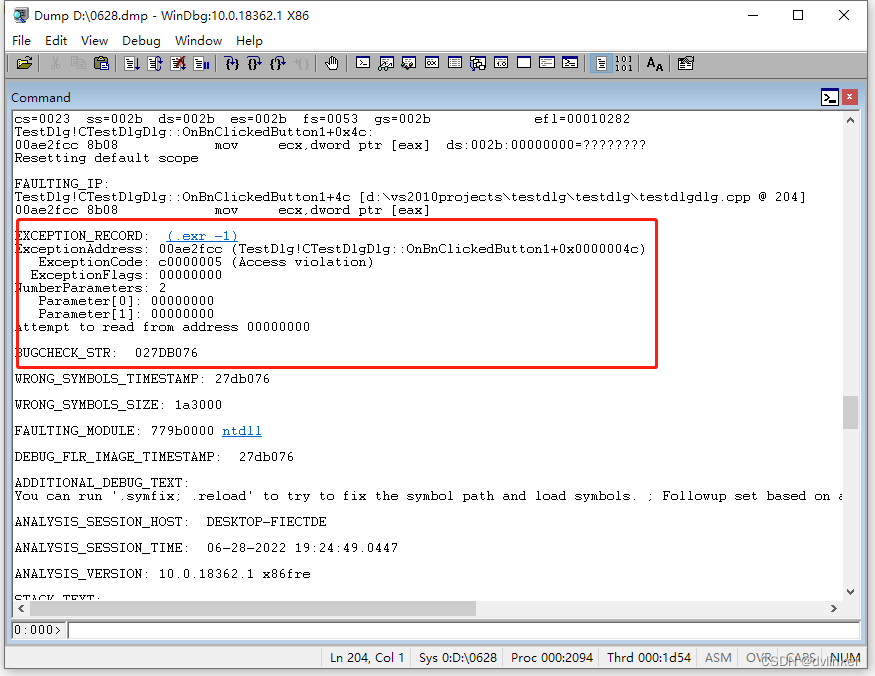
Execute the command , You can output detailed analysis information of the current exception , Such as exception code and exception description , The function call stack of the thread where the exception is located , as follows :
2.6、g command
Windbg During dynamic debugging , In interrupt mode , Execute this command to skip the interrupt , Let the program continue . Will be windbg When attaching to the target process , After the attachment is successful windbg Will be automatically interrupted , as follows :

You need to execute this command , Skip interrupt . Some non fatal exceptions can also make Windbg Cut it off , You also need to execute this command to skip interrupts .
2.7、bp/bl/bc command
These commands are used to view 、 add to 、 Delete breakpoints . In the use of windbg When debugging the target process , Can be in windbg Set breakpoints for function symbol addresses in ,bp Never add breakpoints ,bc Used to clear breakpoints ,bl Used to view all currently set breakpoints .
2.8、~ns command
This command is used to switch to n In thread No , among n Is the sequence number of the thread , as follows :

In use windbg When analyzing problems , We may have to switch to multiple threads to view the information , Especially when troubleshooting multithread deadlock . stay GUI In the application ,UI Thread is 0 Number thread , yes GUI Main thread of program .
2.9、.dump command
This command is used to export... Containing exception context during dynamic debugging dump file , such as .dump /ma D:\0628.dmp, The execution effect is as follows :

For example, we work in a colleague's PC Check the problem or remote to the customer's machine windbg Dynamic debugging , But I can't find any problems for a while , We can't keep using other people's computers , Others have to work with their own computers , We usually use .dump The command saves the context of the exception to dump In file , For later analysis .
2.10、r command
Sometimes when analyzing problems , We need to look at the values of all the current registers , Use this command to view , as follows :

2.11、.cls command
Clear the current screen display . When Windbg When there are many contents displayed in the output area of , You can use this command to clear the contents of the output area .
3、windbg Help document for
stay windbg In the menu bar, click Help->Index, Call out Windbg Help document , You can view detailed descriptions of all commands in this help document . For example. .dump command , Enter in the input box .dump keyword , The corresponding entries will be automatically indexed in the list on the left , Double click it to jump to .dump Command page , as follows :
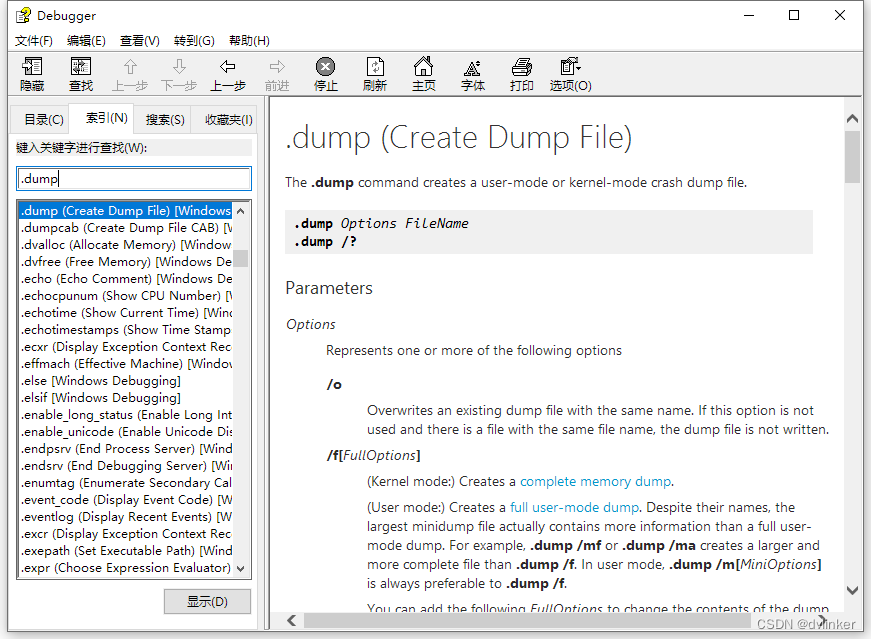
You can see .dump A detailed description of the order , You can also see which parameters the command supports and what the parameters mean .
There is a place to pay attention to , about k command , There are many subcommands , Input k after , The following matching entries will be displayed , You must click the last entry to jump to the corresponding command description page :

Clicking on the item in the middle can't jump .
边栏推荐
- @Table burst red
- 维修记录导出的excel表格太大怎么办?
- C language character function
- CVPR2022 | PanopticDepth:深度感知全景分割的统一框架
- Schiederwerk power supply maintenance smps12/50 pfc3800 analysis
- 六月集训(第29天) —— 分而治之
- Equidistant segmentation of surface rivers in ArcGIS [gradient coloring, pollutant diffusion]
- Solution to inconsistency between RTC time and world time on the server
- How to count project codes (e.g. wechat applets)
- mybaits入门(含实例教程和源码)
猜你喜欢

Rslo: self supervised lidar odometer (real time + high precision, icra2022)

Cnpm reports an error 'cnpm' is not an internal or external command, nor is it a runnable program or batch file
![Equidistant segmentation of surface rivers in ArcGIS [gradient coloring, pollutant diffusion]](/img/05/18fb41f78b9b57175d50dfece65535.png)
Equidistant segmentation of surface rivers in ArcGIS [gradient coloring, pollutant diffusion]

Cvpr2022 | a convnet for the 2020s & how to design neural network Summary

维修记录导出的excel表格太大怎么办?

Cvpr2022 | panopticdepth: a unified framework for depth aware panoramic segmentation

Cvpr2022 𞓜 future transformer with long-term action expectation

Another "provincial capital university", coming!

C语言内存函数
Evaluation of powerful and excellent document management software: image management, book management and document management
随机推荐
CVPR 2022 | 未知目标检测模块STUD:学习视频中的未知目标
The former security director of Uber faced fraud allegations and concealed the data leakage event
Schiederwerk power supply maintenance smps12/50 pfc3800 analysis
存算一体为何是造芯新方向?|对撞派 x 知存科技
如何统计项目代码(比如微信小程序等等)
云原生(三十一) | Kubernetes篇之Kubernetes平台基本预装资源
Uber前安全主管面临欺诈指控 曾隐瞒数据泄露事件
Schiederwerk Power Supply repair smps12 / 50 pfc3800 Analysis
Install the terrain ovirt plug-in to provide automated management for ovirt
Server monitoring netdata panel configuring mail service
LeCun用62页论文公布未来十年研究计划:AI自主智能
360数科新能源专项产品规模突破60亿
Yyds dry inventory solution sword finger offer: find the nearest common ancestor of two nodes in the binary tree
Force buckle: merging two ordered linked lists
C语言内存函数
The imshow function of Matplotlib displays grayscale images. Vmin and vmax2 parameters should be set
服务器监控netdata面板配置邮件服务
The scale of 360 digital new energy special products exceeded 6billion
CVPR2022 | 通过目标感知Transformer进行知识蒸馏
Cvpr2022 𞓜 loss problem in weakly supervised multi label classification