当前位置:网站首页>[data visualization] use Apache superset to visualize Clickhouse data
[data visualization] use Apache superset to visualize Clickhouse data
2022-06-11 20:38:00 【Rookie millet】

List of articles
Apache Superset Is a powerful BI Tools , It provides a way to view and explore data . It's in ClickHouse It's becoming more and more popular among users .
We'll talk about installing Superset Of 2 Methods , And then show how to start from Superset Connect to your first ClickHouse database . The code example is based on Ubuntu 18.04、Superset 1.1.0 and clickhouse-sqlalchemy 0.1.6.
Method 1 :Python A virtual environment
The first way is to install it directly on your host Superset. We will first create a Python A virtual environment . Here are some common commands .
python3 -m venv clickhouse-sqlalchemy
. clickhouse-sqlalchemy/bin/activate
pip install --upgrade pi
Install and start Superset
Install dependency packages
sudo apt-get install build-essential libssl-dev libffi-dev python-dev python-pip libsasl2-dev libldap2-dev
Deal with ClickHouse Of Superset Connected commands . It may need to be adjusted slightly according to your environment .
export FLASK_APP=superset
pip install apache-superset
superset db upgrade
superset fab create-admin
superset load_examples
superset init
install clickhouse-sqlalchemy The driver
pip install clickhouse-sqlalchemy
clickhouse-driver Version must be 0.2.0 Or later .
pip freeze |grep clickhouse
clickhouse-driver==0.2.0
clickhouse-sqlalchemy==0.1.6
start-up Superset And login
It's time to start Superset 了 . Run the following command :
superset run -p 8088 --with-threads --reload --debugger
Browser access localhost:8088
You will see the login screen shown below . Enter your Superset Administrator login and password defined during installation ( for example ,admin/secret).

Method 2: Use Docker Compose function Superset
If you don't want to be obsessed with Python edition 、 Virtual environment and pip. have access to docker.
First installation docker and docker-compose.
After installation, check the version .
$ docker --version
Docker version 19.03.4, build 9013bf583a
$ docker-compose --version
docker-compose version 1.29.1, build c34c88b2
Use docker-compose install superset
git clone https://github.com/apache/superset
cd superset
touch ./docker/requirements-local.txt
echo "clickhouse-driver>=0.2.0" >> ./docker/requirements-local.txt
echo "clickhouse-sqlalchemy>=0.1.6" >> ./docker/requirements-local.txt
docker-compose -f docker-compose-non-dev.yml up
After successful operation Browser access localhost:8088
Default login / The password is admin / admin.
Connect to ClickHouse
No matter which installation method you choose , You can now connect to your first ClickHouse database .
After logging in , You will see a screen , It includes your recent work and the current dashboard . Select the data tab in the upper right corner , Then select the database . A page will appear , It contains your current database connection . Press **+ database ** Button to add a new database .

Enter the following values :
 Database name :clickhouse-public
SQLALCHEMY  website :clickhouse+native://demo:[email protected] /default?secure=true
Altinity.Cloud It's a public dataset site .

Press the test connection button . Save the link after success .
Connection process
The connection uses SQLAlchemy, It's a way to connect ClickHouse And many other common databases API.

SQLAlchemy The connection uses a dedicated URL Format . To connect to ClickHouse, You need to provide an example similar to the one we showed earlier URL:
clickhouse+native://demo:[email protected]/default?secure=true
Connect ClickHouse There are two main agreements , Native TCP and HTTP.
Native... Is recommended TCP.
clickhouse+native://<user>:<password>@<host>:<port>/<database>[?options…]
To configure Superset
We have successfully connected clickhouse, Let's use superset Build a dashboard .
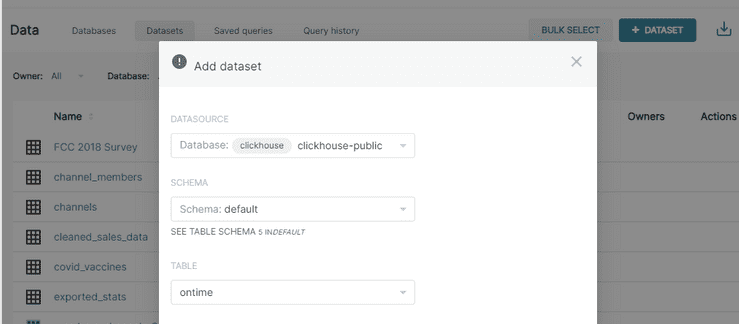
First , Let's create a dataset . choice clickhouse-public As the connection , And then choose schema default and table ontime.
With the data set , It's easy to create the first chart . Just click the dataset name on the dataset page .Superset Will switch to a screen to define a chart , As shown below .
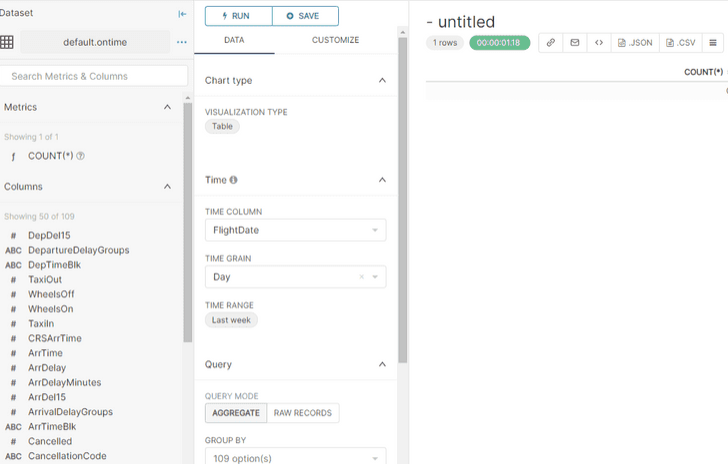
Create a time series chart

Publish charts in the dashboard .
choice DASHBOARD Button , Add the created chart in .


That's all Apache Superset visualization ClickHouse The whole process of data .
This article is shared from the author's personal site / Blog :https://www.cnblogs.com/tree1123/ Copy
If there is any infringement , Please contact me to delete .
边栏推荐
- Systematically study the recommendation system from a global perspective to improve competitiveness in actual combat (Chapter 8)
- Teach you how to grab ZigBee packets through cc2531 and parse encrypted ZigBee packets
- 27. this指向问题
- Unity截屏
- Jmeter安装
- vectorDrawable使用报错
- Flutter doctor 显示xcode没有安装的解决办法
- C deep copy
- Capriccio in the Internet Age
- [Unity插件]着色器关键字分析工具ShaderControl
猜你喜欢

26. 定时器

Date of SQL optimization_ Format() function

【数据可视化】Apache Superset 1.2.0教程 (三)—— 图表功能详解

周刊02|不瞒你说,我其实是MIT的学生

Gestionnaire de paquets d'Unit é Starting Server Stuck

QQ贴吧那种图片一点开,就变了的原理

电源防反接和防倒灌 - 使用MOS 管和运放实现理想二极管
【数据可视化】使用 Apache Superset 可视化 ClickHouse 数据

The first bullet of comparative learning

Installation and performance test of Apache APIs IX on Amazon graviton3
随机推荐
ubantu1804 两个opencv版本共存
In unity, opencv and QT are used to create a plugin (I)
Database introduction
Explanation of LNMP architecture source code compilation and installation with pictures and texts (with forum experiment)
Global Market Consulting - Research Report on the overall scale and application segmentation of the global HVDC converter station market in 2022
7905 和TL431 负电压稳压电路 - 相对于电源正极的稳压和浮地电路
R 16 basic exercises
27. this指向问题
STC hardware only automatic download circuit V2
Systematically study the recommendation system from a global perspective to improve competitiveness in actual combat (Chapter 8)
周刊02|不瞞你說,我其實是MIT的學生
[Err] 1045 - Access denied for user ‘root‘@‘%‘ (using password: YES)
Web3 product manager guide - Jason
29. location object
Jmeter安装
Lanqi technology joins in, and dragon dragon dragon community welcomes leading chip design manufacturers again
Summary of C language programming knowledge points 01
Flutter doctor 顯示xcode沒有安裝的解决辦法
Ora-01089 ora-19809 ora-19815 exceeded the limit for recovering files
Detailed tutorial on installing MySQL database in Linux environment (including uninstallation and password reset process)