当前位置:网站首页>使用JMeter录制脚本并调试
使用JMeter录制脚本并调试
2022-07-05 17:59:00 【咖猫】
第一步:在JMeter中添加线程组,命名为AddBugByJMeter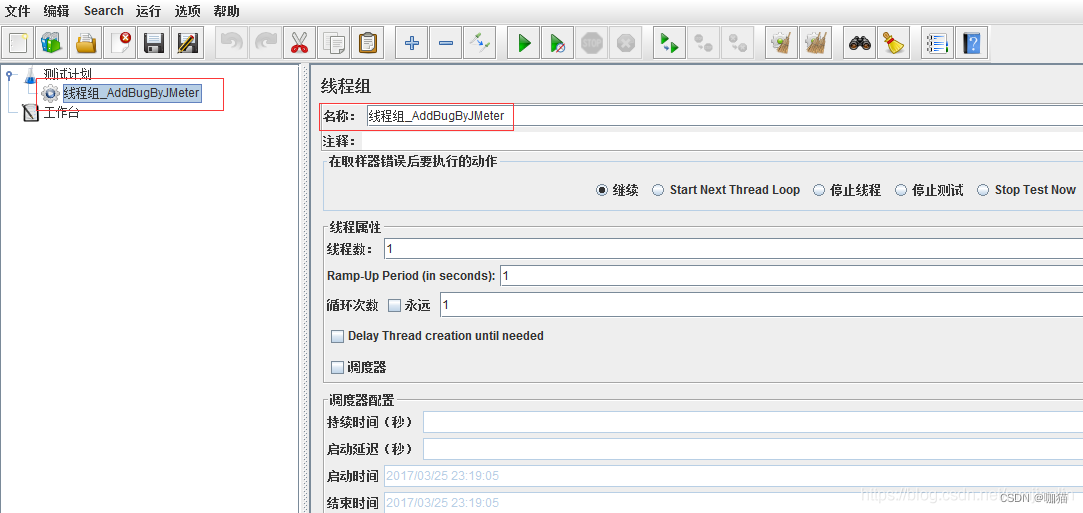
第二步:在线程组下添加HTTP请求默认值
添加->配置元件->HTTP请求默认值,设置服务器IP和端口号(JMeter默认使用80端口号,我的禅道配置的是81端口)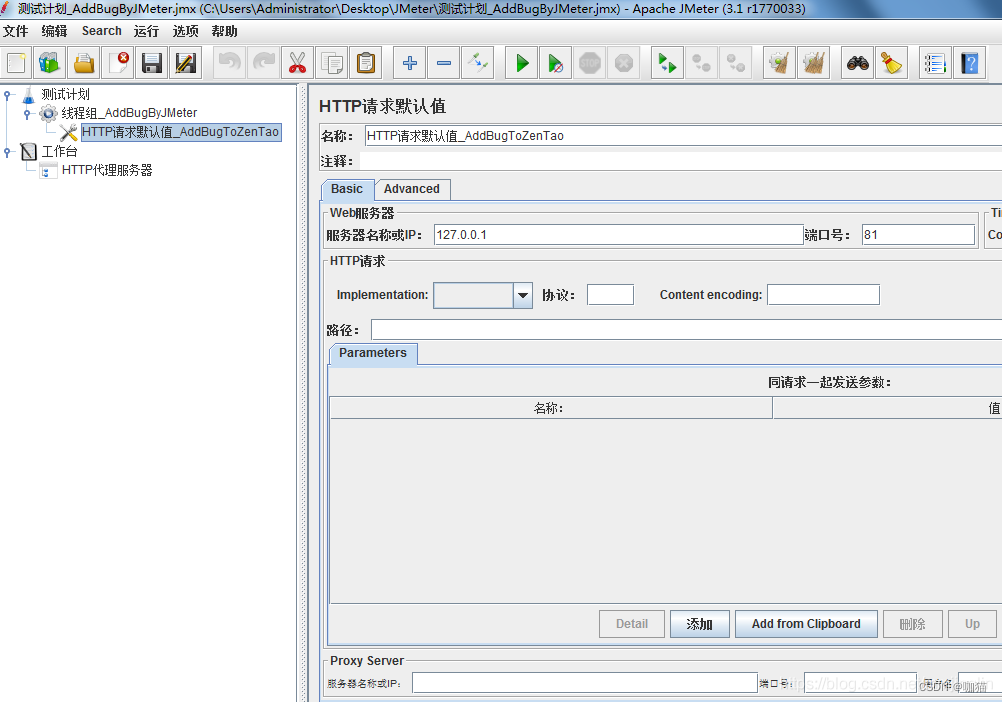
第三步:添加HTTP代理服务器
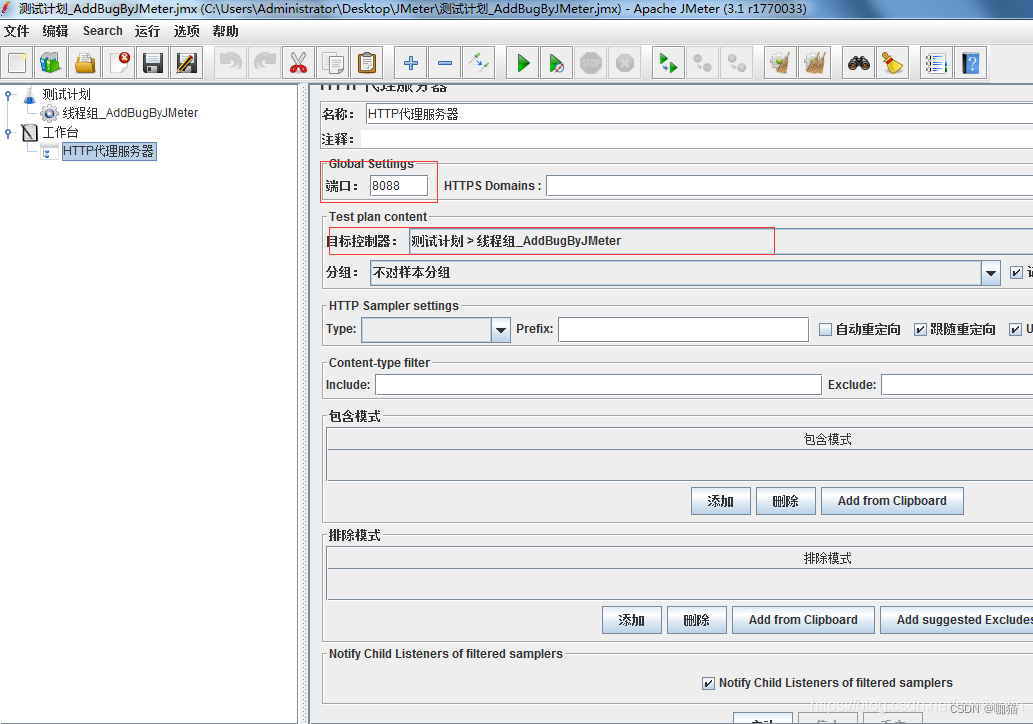
1、添加非测试原件->HTTP代理服务器,并设置端口号(可以通过netstat -ano查看电脑中未使用的端口号)、选择目标控制器(选中前面的线程组)
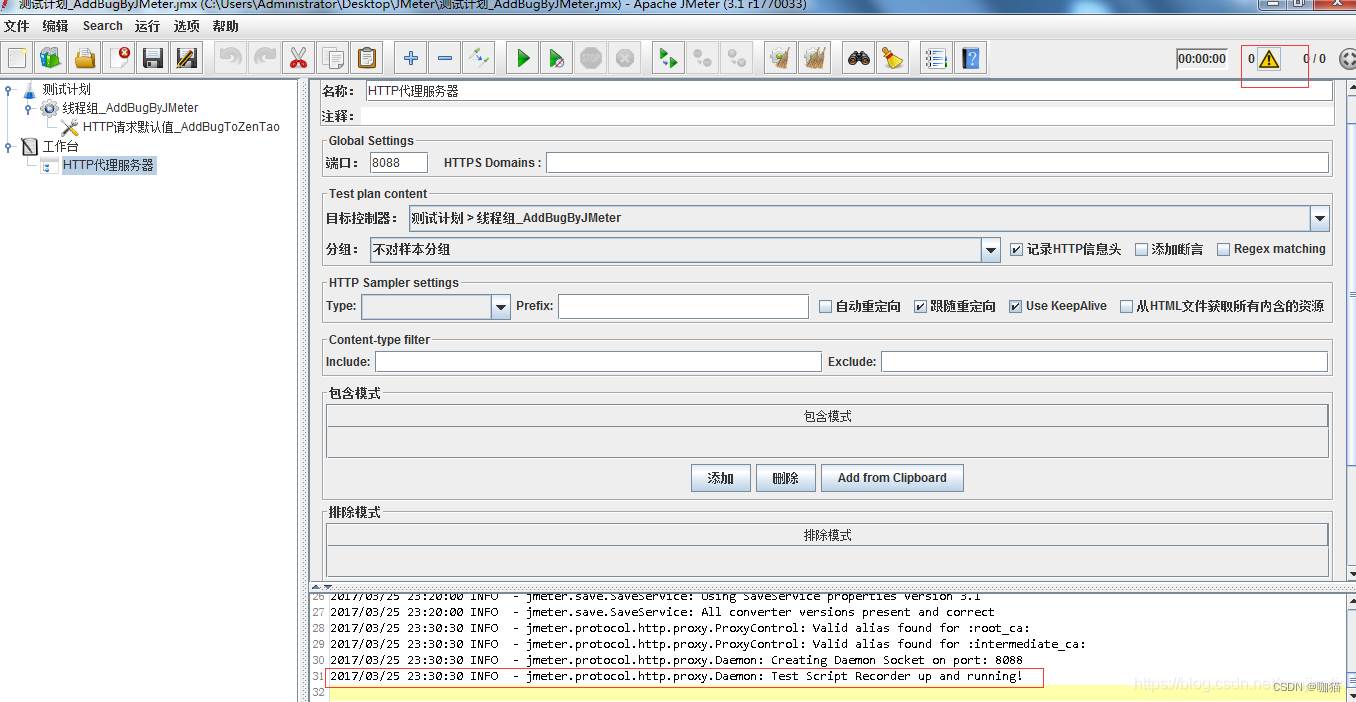
2、点击HTTP代理服务器的启动按钮,启动后可以通过JMeter右上角的log查看按钮查看启动情况
3、打开Google Chrome浏览器设置代理
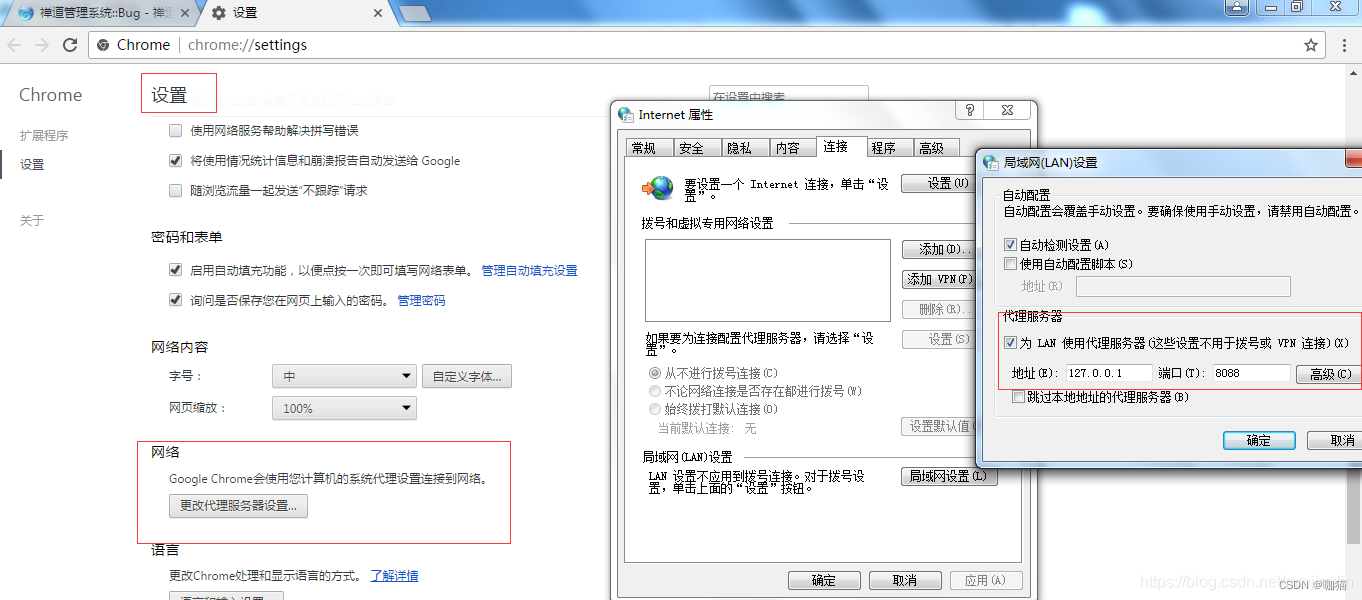
第四步:开始录制
1、用Google Chrome浏览器访问禅道主页,可以看到打开首页时JMeter就已经记录下对应的请求信息了。
2、继续录制完成添加bug的业务,完成后退出禅道管理系统,回到登录页面。
3、录制完成后取消浏览器的本地代理设置。
4、查看JMeter的录制情况,可以看到录制的内容特别多,其中有很多png、css、gif、js等请求信息.
在这里插入图片描述
5、通过HTTP代理服务器的排除模式,排除一些不需要的请求信息,如css、gif、png等等。
在这里插入图片描述
6、设置包含和排除模式后删除原来录制的请求,重新进行录制(可以在HTTP代理服务器下添加监听器->查看结果树来查看录制情况)。
第四步:调试脚本
我的脚本录制中有两个请求录制成功,但是回放失败,从请求信息中看到请求的服务器为api.zentao.net,其他请求都是127.0.0.1。因为不知道是什么,也不知道会不会对回放造成影响,所以我的做法是先禁用这两个请求,再继续调试。
在这里插入图片描述
第五步:在线程组下面添加察看结果树和聚合报告查看回放的情况。
1、从察看结果树中看到回放全部通过。
2、登录禅道系统查看是否真正添加成功(结果为失败,bug列表中并没有新增的bug)。
3、在查看结果树中通过HTML形式对每个请求进行排查。
4、为了测试结果更加直观,可以修改脚本中提前的bug名称,这里改成了Replay
在这里插入图片描述
5、回放成功后查看禅道管理器中是否添加成功。
在这里插入图片描述
总结
问题1: JMeter使用IE浏览器失败
问题现像: 录制结果中没有HTTP请求信息,只有第四步被禁用的那2条
问题分析:怀疑是浏览器自身的问题或者设置问题,未能解决,所以换成了Google Chrome
原文:https://www.cnblogs.com/tester808/p/6619129.html
此种方式的原理是利用代理记录浏览器的访问记录。录制脚本的另一种方式则是使用badboy。
边栏推荐
- 隐私计算助力数据的安全流通与共享
- Sophon CE Community Edition is online, and free get is a lightweight, easy-to-use, efficient and intelligent data analysis tool
- 图扑软件数字孪生 | 基于 BIM 技术的可视化管理系统
- Compared with the loss of Wenxin, the performance is improved a lot
- [JMeter] advanced writing method of JMeter script: all variables, parameters (parameters can be configured by Jenkins), functions, etc. in the interface automation script realize the complete business
- Sophon autocv: help AI industrial production and realize visual intelligent perception
- 让更多港澳青年了解南沙特色文创产品!“南沙麒麟”正式亮相
- Simulate the hundred prisoner problem
- About Statistical Power(统计功效)
- EPM related
猜你喜欢
Sophon kg upgrade 3.1: break down barriers between data and liberate enterprise productivity
nacos -分布式事务-Seata** linux安装jdk ,mysql5.7启动nacos配置ideal 调用接口配合 (保姆级细节教程)

Tencent music launched its new product "quyimai", which provides music commercial copyright authorization
分享:中兴 远航 30 pro root 解锁BL magisk ZTE 7532N 8040N 9041N 刷机 刷面具原厂刷机包 root方法下载

小林coding的内存管理章节
图扑软件数字孪生 | 基于 BIM 技术的可视化管理系统
LeetCode 练习——206. 反转链表
图像分类,看我就够啦!

Mask wearing detection based on yolov3

How awesome is the architecture of "12306"?
随机推荐
Le cours d'apprentissage de la machine 2022 de l'équipe Wunda arrive.
ClickHouse(03)ClickHouse怎么安装和部署
图片数据不够?我做了一个免费的图像增强软件
Star ring technology data security management platform defender heavy release
[JMeter] advanced writing method of JMeter script: all variables, parameters (parameters can be configured by Jenkins), functions, etc. in the interface automation script realize the complete business
Use of print function in MATLAB
Leetcode notes: Weekly contest 300
Numerical calculation method chapter8 Numerical solutions of ordinary differential equations
Easynmon Usage Summary
Gimp 2.10 tutorial "suggestions collection"
Isprs2022 / Cloud Detection: Cloud Detection with Boundary nets Boundary Networks Based Cloud Detection
【PaddleClas】常用命令
记录Pytorch中的eval()和no_grad()
Image classification, just look at me!
彻底理解为什么网络 I/O 会被阻塞?
mybash
使用Jmeter虚拟化table失败
To solve the stubborn problem of Lake + warehouse hybrid architecture, xinghuan Technology launched an independent and controllable cloud native Lake warehouse integrated platform
最大人工岛[如何让一个连通分量的所有节点都记录总节点数?+给连通分量编号]
Access the database and use redis as the cache of MySQL (a combination of redis and MySQL)