当前位置:网站首页>Understand chisel language. 25. Advanced input signal processing of chisel (I) -- asynchronous input and de jitter
Understand chisel language. 25. Advanced input signal processing of chisel (I) -- asynchronous input and de jitter
2022-07-27 09:41:00 【github-3rr0r】
Chisel Advanced input signal processing ( One )—— Asynchronous input and de dithering
The tutorial in the previous part has already Chisel The basic grammar is almost done , Start with this part , We will practice through different needs Chisel Advanced features of , The first part starts with input signal processing . The input signal from the external world to our synchronous sequential circuit is usually not synchronized with the clock . such as , The input signal may come from a slave 0 To 1 And from the 1 To 0 The conversion of has the source of jitter , For example, bounce buttons and switches . On the other hand, the input signal may be noisy , Burr , It may trigger a conversion in the synchronization circuit . This part is used to deal with these situations . Switching de jitter and noise filtering can be achieved by external analog circuits , But the more cost-effective way is to use digital circuits . First, let's start with asynchronous input , Explain how to use digital circuit to jitter .
Asynchronous input processing
The input signal that is not synchronized with the system clock signal is called Asynchronous signals , Such signals may violate the time for setting and holding the trigger input . This violation may cause the trigger to enter metastable state , This metastable state may cause the output to be in 0 and 1 Between or in 0 and 1 Between the shock . However, the trigger will stabilize after a period of time 1 perhaps 0.
Although we cannot avoid the metastable state of the trigger , But we can tolerate this effect . The classic approach is to use two triggers at the input , This approach is based on an assumption : The first trigger will enter metastable state , Then it will converge into a steady state within a clock cycle , Then there is enough time to allow the second trigger to be set and maintained .
The following diagram shows the process of external asynchronous input changing into synchronous input through two triggers :

The construction of this double trigger is called input synchronizer , Input synchronizer at Chisel Just one line of code inside , Instantiate two registers and you're done :
val btnSync = RegNext(RegNext(btn))
Generally speaking, all asynchronous external inputs require input synchronizers , But there are exceptions , That is, the input signal depends on a synchronous output signal , And the maximum propagation delay is known . The external reset signal also needs to be synchronized , The reset signal should pass through two triggers before being used as the reset signal of other triggers in the circuit . More specifically , Reset the setting of the signal 0 Need to synchronize with the clock .
To shake (Debouncing)
Switches and buttons may be on 、 It takes a little time to switch between off , In the process of transformation , The switch may switch between two states . If we use this signal without processing , More transformations than expected may be detected . One solution is to use time to filter out this jitter , Suppose the maximum jitter time is t b o u n c e t_{bounce} tbounce, Then let's use T Sample the input for the period , among T > t b o u n c e T>t_{bounce} T>tbounce. We will only use the sampled signal for downward propagation .
With long period T When sampling , We can know from 0 To 1 Only one sample of the conversion will enter the jitter region . The sampling before dithering area will be safely read as 0, The samples after the jitter area will be safely read as 1. The sampling of jitter area may be 0 It could be 1, But it's not a big problem , Because the key is that there will only be one time from 0 To 1 Transformation. .
The following diagram is the sampling process for anti jitter :
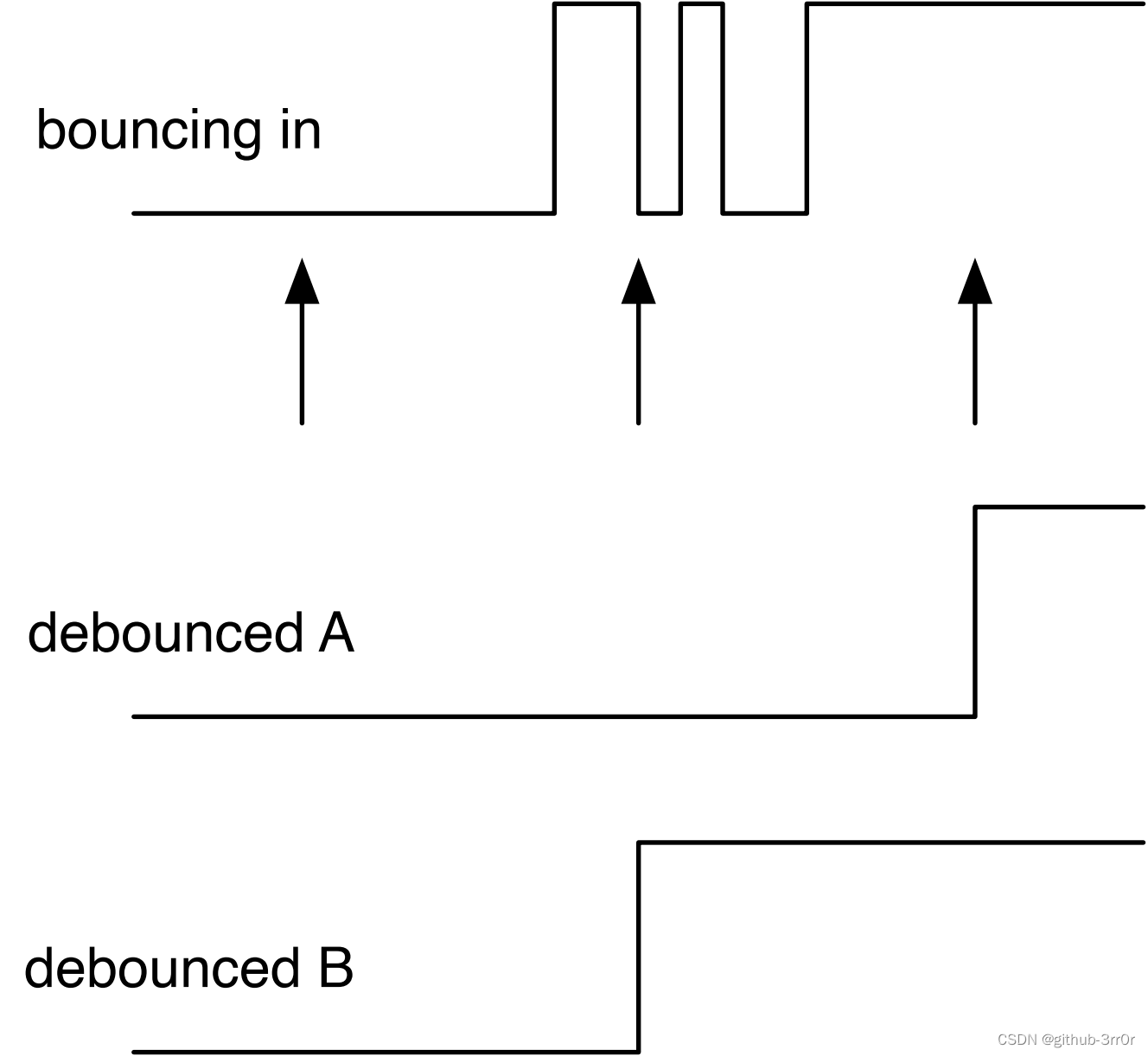
The top signal is the jittery input signal , The arrow below is the sampling point . The distance between sampling points should be longer than the maximum jitter time . The first sample will safely sample to 0, The last sample will safely sample to 1, And the middle sampling falls in the jitter time , May be 0, It could be 1. Then there are two possibilities , One is sampling 0, It's the debounced A, The other is sampling 1, That's the one in the picture debounced B, But no matter what the result is , They all started from 0 To 1 Transformation . The only difference between these two results is , The second result will be one sampling period later than the first , But this is not a problem at all .
use Chisel The code to realize de jitter is more complex than that of synchronizer . Here, we use the counter method we implemented before to generate the sampling timing , It can generate a periodic tick The signal . The de dithering code is implemented as follows :
val FAC = 100000000 / 100

val btnDebReg = Reg(Bool())

val cntReg = RegInit(0.U(32.W))
val tick = cntReg === (fac - 1).U

cntReg := cntReg + 1.U
when (tick) {

    cntReg := 0.U
    btnDebReg := btnSync
}
The following explains the code . First, we need to determine the sampling frequency , In the code, we assume that the clock frequency is 100MHz, The sampling frequency is 100Hz( The dithering time shall not exceed 10ms), That is, every 1M Sample once per clock . The maximum value of the counter is FAC, Divide and you get . Then we define a register btnDebReg To store the signal after jitter removal , This register has no reset value . register cntReg That's the way before , Use as a counter , Every time the counter reaches its maximum tick The signal maintains a clock cycle true. In this case ,when On the condition that true when , On the one hand, the counter will be reset to 0, On the other hand, the de jitter register will store the input samples .
It should be noted that , The input signal we use here is btnSync, Because it is the output of the synchronizer in the previous section . The de jitter circuit is usually behind the synchronizer circuit , We have to synchronize asynchronous signals first , Then we can further deal with it in the field of digital circuits .
Conclusion
The two concepts mentioned in this article will be a little strange to us compared with the synchronous circuit discussed previously . Fortunately, the principle doesn't sound too complicated , It's easy to implement , Synchronization and de jitter are achieved in just a few lines of code , Enough to cope with the asynchronous jitter input of buttons and switches . In the next article, we will continue with input signal processing , Further solve the possible noise problem , Try adding a noise filter to the input signal , And integrate these processing methods with functions , Finally, we will briefly discuss the synchronization of reset signals , Coming soon .
边栏推荐
- 【武汉理工大学】考研初试复试资料分享
- 七月集训(第15天) —— 深度优先搜索
- 加油程序君
- 【树莓派】Box相关手册-4 Web代理
- 1344. Included angle of clock pointer
- 吃透Chisel语言.22.Chisel时序电路(二)——Chisel计数器(Counter)详解:计数器、定时器和脉宽调制
- BGP的社团属性
- 七月集训(第26天) —— 并查集
- ESP8266-Arduino编程实例-PWM
- Google Earth engine app - print the coordinates of points to the console and map, set the style and update it
猜你喜欢

Read the paper snunet CD: a densely connected Siamese network for change detection of VHR images

Quick apply custom progress bar

The command prompt cannot start mysql, prompting system error 5. Access denied. terms of settlement

vscode使用remote-ssh连接以及连接失败的解决方法

What age are you still using date
![[Wuhan University of technology] information sharing for the preliminary and second examinations of postgraduate entrance examination](/img/15/298ea6f7367741e1e085007c498e51.jpg)
[Wuhan University of technology] information sharing for the preliminary and second examinations of postgraduate entrance examination

好久不送书,浑身不舒服
都什么年代了你还在用 Date

Lua函数嵌套调用

基于 FPGA 按键控制呼吸灯原理、仿真及验证全过程
随机推荐
【微信小程序】农历公历互相转换
【树莓派】Box相关手册-4 Web代理
July training (day 19) - binary tree
七月集训(第21天) —— 堆(优先队列)
Meeting seating function of conference OA project & Implementation of meeting submission for approval
七月集训(第15天) —— 深度优先搜索
Read the paper learning to measure changes: full revolutionary Siamese metric networks for scene change detect
NCCL (NVIDIA Collective Communications Library)
Monitoring artifact: Prometheus easy to get started, really fragrant!
BGP federal experiment
ESP8266-Arduino编程实例-PWM
How to use tdengine sink connector?
Eureka 延迟注册的一个坑
The whole process of principle, simulation and verification of breath lamp controlled by FPGA keys
工程材料期末考试试卷
七月集训(第16天) —— 队列
NCCL 集合通信--Collective Operations
July training (day 14) - stack
July training (the 26th day) - and check the collection
At the end of the year, I'll teach you how to get high performance!