当前位置:网站首页>IPv6 foundation construction experiment
IPv6 foundation construction experiment
2022-07-03 03:53:00 【Idle fish King】
Catalog
3.R1 and R2 Network construction between
3.1.IPV4 The network structures, RIP
4. On the right IPV6 To configure
1. subject
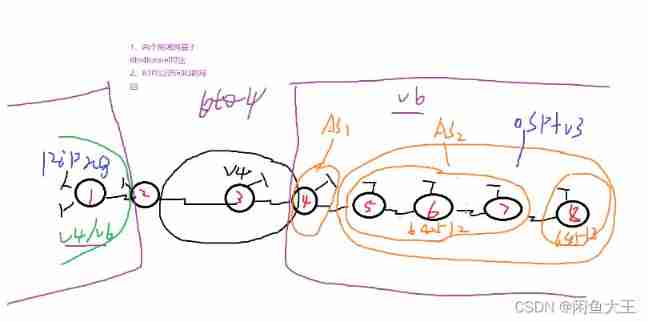
2.IP Divide
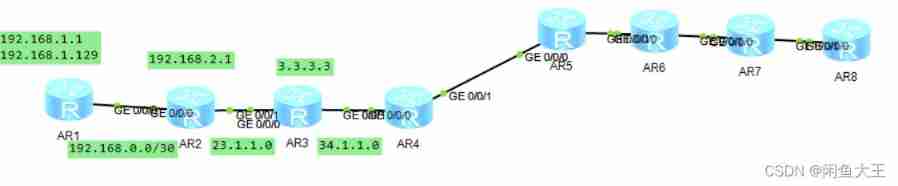
The public network is used R3 Substitutes
therefore R2 and R4 All have default points R3
[r2]ip route-static 0.0.0.0 0 23.1.1.2
[r4]ip route-static 0.0.0.0 0 34.1.1.1
3.R1 and R2 Network construction between
3.1.IPV4 The network structures, RIP
R2
[r2]rip 1
[r2-rip-1]ver 2
[r2-rip-1]network 192.168.2.0
[r2-rip-1]network 192.168.0.0
R1
[r1]rip 1
[r1-rip-1]ver 2
[r1-rip-1]network 192.168.1.0
[r1-rip-1]network 192.168.0.0
Yes R1 The above two loops are summarized
[r1]int g0/0/0
[r1-GigabitEthernet0/0/0]rip summary-address 192.168.1.0 255.255.255.0

then R2 towards R1 Send a default
[r2-rip-1]default-route originate

Make ACL, Enable NAT
[r2]acl 2000
[r2-acl-basic-2000]rule permit source 192.168.0.0 0.0.255.255
[r2-acl-basic-2000]int g0/0/1
[r2-GigabitEthernet0/0/1]nat outbound 2000

3.2.R1 and R2 IPV6 build
IPV6 IP Distribute
23.1.1.1 --->2002:1701:0101::/48
2002:1701:101::/64 --- 2002:1701:101:FFFF:/64
2002:1701:101::/65 As R1 Loopback
2002:1701:101:0:8000::/65 As R1 Loopback
2002:1701:101:1:: 64 As an interface IP
2002:1701:101:2:: 64 As R2 Loopback
[r1]ipv6
[r1]int lo0[r1-LoopBack0]ipv6 enable
[r1-LoopBack0]ipv6 add 2002:1701:101::1 65[r1-LoopBack1]ipv6 enable
[r1-LoopBack1]ipv6 add 2002:1701:101:0:8000::1 65[r1-LoopBack1]int g0/0/0
[r1-GigabitEthernet0/0/0]ipv6 enable
[r1-GigabitEthernet0/0/0]ipv6 address 2002:1701:101:1::1 64
[r2]ipv6
[r2]int g0/0/0[r2-GigabitEthernet0/0/0]ipv6 enable
[r2-GigabitEthernet0/0/0]ipv6 add 2002:1701:101:1::2 64[r2-LoopBack0]ipv6 add 2002:1701:101:2::1 64
RIPNG build
R1 ps:RIPNG It's an excuse to announce
[r1]ripng 1
[r1-ripng-1]int lo0
[r1-LoopBack0]ripng 1 enable
[r1-LoopBack0]int lo1
[r1-LoopBack1]ripng 1 enable
[r1-LoopBack1]int g0/0/0
[r1-GigabitEthernet0/0/0]ripng 1 enable
R2
[r2]ripng 1
[r2-ripng-1]int lo0
[r2-LoopBack0]ripng 1 enable
[r2-LoopBack0]int g0/0/0
[r2-GigabitEthernet0/0/0]ripng 1 enable

Summarize the two loops
[r2]int g0/0/0
[r2-GigabitEthernet0/0/0]ripng summary-address 2002:1701:101:0000:: 64
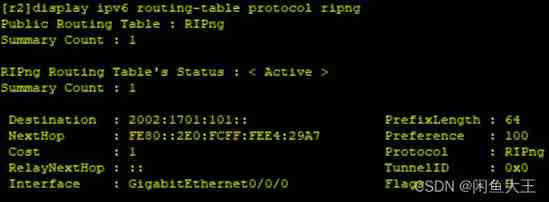
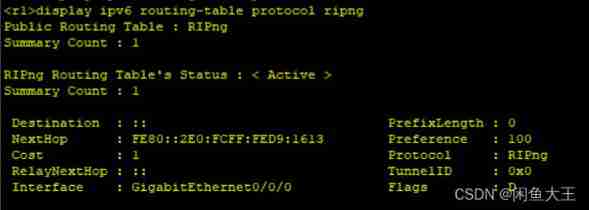
R2 to R1 default
[r2-GigabitEthernet0/0/0]ripng default-route only
3.3.tunner To configure 6to4
[r2]int t0/0/0
[r2-Tunnel0/0/0]ipv6 enable
[r2-Tunnel0/0/0]ipv6 address 2002:1701:101:3::1 64
[r2-Tunnel0/0/0]tunnel-protocol ipv6-ipv4 6to4
[r2-Tunnel0/0/0]source 23.1.11[r2]ipv6 route-static 2002:: 16 Tunnel 0/0/0
You need to configure a static , As long as there is no route to go Tunnel Interface
4. On the right IPV6 To configure
4.1.IP Divide
34.1.1.2 -----> 2002:2201:0102:: 48
2002:2201:0102:: 49 AS1
2002:2201:0102:: 64 2002:2201:0102:7fff:: 64
2002:2201:0102:8000:: 49 AS2
2002:2201:0102:8000:: 64 2002:2201:0102:FFFF:: 64
2002:2001:0102::1 64 R4 Loopback
2002:2201:0102:8000::1 R5 Loopback
2002:2201:0102:8002::1 64 R6 Loopback
2002:2201:0102:8004::1 64 R7 Loopback
2002:2201:0102:8006::1 64 R8 Loopback
2002:2201:0102:1:: 64 R4 R5 Interface link
2002:2201:102:8001:: R6 R5 Interface link
2002:2201:0102:8003:: R6 R7 Interface link
2002:2201:0102:8005:: R7 R8 Interface link
4::4 R4 Loopback
5::5 R5 Loopback
6::6 R6 Loopback
7::7 R7 Loopback
8::8 R8 Loopback
4.2.OSPFV3
This is running in AS2 Medium
R5
[r5]ospfv3 1
[r5-ospfv3-1]router-id 5.5.5.5
[r5-ospfv3-1]int lo0
[r5-LoopBack0]ospfv3 1 area 0
[r5-LoopBack0]int g0/0/1
[r5-GigabitEthernet0/0/1]ospfv3 1 area 0
R6
[r6]ospfv3 1
[r6-ospfv3-1]router-id 6.6.6.6
[r6-ospfv3-1]int lo0
[r6-LoopBack0]ospfv3 1 area 0
[r6-LoopBack0]int g0/0/0
[r6-GigabitEthernet0/0/0]ospfv3 1 area 0
[r6-GigabitEthernet0/0/0]int g0/0/1
[r6-GigabitEthernet0/0/1]ospfv3 1 area 0
R7
[r7]ospfv3 1
[r7-ospfv3-1]router-id 7.7.7.7
[r7-ospfv3-1]int lo0
[r7-LoopBack0]ospfv3 1 area 0
[r7-LoopBack0]int g0/0/0
[r7-GigabitEthernet0/0/0]ospfv3 1 area 0
[r7-GigabitEthernet0/0/0]int g0/0/1
[r7-GigabitEthernet0/0/1]ospfv3 1 area 0
R8
[r8]ospfv3 1
[r8-ospfv3-1]router-id 8.8.8.8
[r8-ospfv3-1]int lo0
[r8-LoopBack0]ospfv3 1 area 0
[r8-LoopBack0]int g0/0/0
[r8-GigabitEthernet0/0/0]ospfv3 1 area 0

4.3.BGP Jianlin
R4
[r4]bgp 1
[r4-bgp]router-id 4.4.4.4
[r4-bgp]peer 2002:2201:0102:1::2 as-number 2
[r4-bgp]ipv6
[r4-bgp-af-ipv6]peer 2002:2201:0102:1::2 enable
R5
[r5]bgp 64512
[r5-bgp]router-id 5.5.5.5
[r5-bgp]confederation id 2
[r5-bgp]peer 2002:2201:0102:1::1 as-number 1
[r5-bgp-af-ipv6]peer 2002:2201:0102:1::1 enable
[r5-bgp]peer 6::6 as-number 64512
[r5-bgp]peer 6::6 connect-interface LoopBack 0 5::5
[r5-bgp]ipv6
[r5-bgp-af-ipv6]peer 6::6 enable
R6
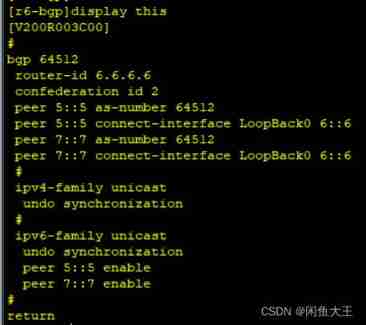
R7
[r7]bgp 64512
[r7-bgp]router-id 7.7.7.7
[r7-bgp]confederation id 2
[r7-bgp]confederation peer-as 64513
[r7-bgp]peer 6::6 as-number 64512
[r7-bgp]peer 6::6 connect-interface LoopBack 0 7::7
[r7-bgp]peer 8::8 as-number 64513
[r7-bgp]peer 8::8 connect-interface LoopBack 0 7::7
[r7-bgp]peer 8::8 ebgp-max-hop 2
[r7-bgp]ipv6
[r7-bgp-af-ipv6]peer 8::8 enable
[r7-bgp-af-ipv6]peer 6::6 enable
R8
[r8]bgp 64513
[r8-bgp]router-id 8.8.8.8
[r8-bgp]confederation id 2
[r8-bgp]confederation peer-as 64512
[r8-bgp]peer 7::7 as-number 64512
[r8-bgp]peer 7::7 connect-interface LoopBack 0 8::8
[r8-bgp]peer 7::7 ebgp-max-hop 2
[r8-bgp]ipv6
[r8-bgp-af-ipv6]peer 7::7 enable
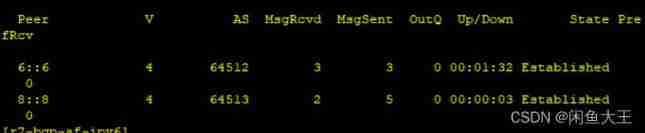
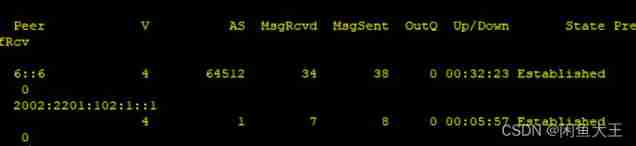
4.4. Other configuration
R4--Tunner To configure
[r4]int t0/0/0
[r4-Tunnel0/0/0]ipv6 enable
[r4-Tunnel0/0/0]ipv6 add 2002:2201:0102:2::1 64
[r4-Tunnel0/0/0]tunnel-protocol ipv6-ipv4 6to4
[r4-Tunnel0/0/0]source 34.1.1.2[r4]ipv6 route-static 2002:: 16 Tunnel 0/0/0
You need a static line to go directly to the left
Summarize and announce
[r5]ipv6 route-static 2002:2201:0102:8000:: 49 NULL 0
[r5]bgp 64512
[r5-bgp]ipv6
[r5-bgp-af-ipv6]network 2002:2201:0102:8000:: 49[r4]bgp 1
[r4-bgp]ipv6
[r4-bgp-af-ipv6]network 2002:: 16[r5-bgp-af-ipv6]peer 6::6 next-hop-local This should be changed to local, otherwise R6 There's no way to use
[r6-bgp-af-ipv6]peer 7::7 reflect-client Reflector let R6 Can pass the route to R7
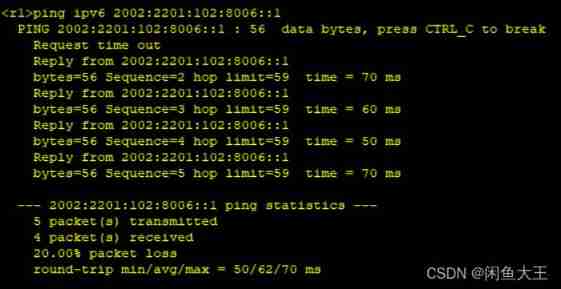
5. test
边栏推荐
- 2020-01-01t00:00:00.000000z date format conversion
- Nanning water leakage detection: warmly congratulate Guangxi Zhongshui on winning the first famous brand in Guangxi
- 105. SAP UI5 Master-Detail 布局模式的联动效果实现明细介绍
- 编译文件时报错:错误: 编码GBK的不可映射字符
- 2022-07-02:以下go语言代码输出什么?A:编译错误;B:Panic;C:NaN。 package main import “fmt“ func main() { var a =
- Half of 2022 is over, so we must hurry up
- SAP ui5 application development tutorial 105 - detailed introduction to the linkage effect implementation of SAP ui5 master detail layout mode
- [home push IMessage] software installation virtual host rental tothebuddy delay
- Commands related to the startup of redis under Linux server (installation and configuration)
- Tidal characteristics of the Bohai Sea and the Yellow Sea
猜你喜欢
Bid farewell to artificial mental retardation: Mengzi open source project team received RMB 100 million financing to help NLP develop
释放数据力量的Ceph-尚文网络xUP楠哥
递归:快速排序,归并排序和堆排序
![[MySQL] the difference between left join, right join and join](/img/d4/8684cd59cd1bd77e70bd4d7c7074c3.jpg)
[MySQL] the difference between left join, right join and join
TCP, the heavyweight guest in tcp/ip model -- Kuige of Shangwen network

In Net 6 project using startup cs
2022-07-02:以下go语言代码输出什么?A:编译错误;B:Panic;C:NaN。 package main import “fmt“ func main() { var a =

Download and install captura and configure ffmpeg in captura

IPv6过渡技术-6to4手工隧道配置实验--尚文网络奎哥
node,npm以及yarn下载安装
随机推荐
【全民编程】《软件编程-讲课视频》【零基础入门到实战应用】
小程序获取用户头像和昵称
Tidal characteristics of the Bohai Sea and the Yellow Sea
2022 mobile crane driver examination registration and mobile crane driver operation examination question bank
Null and undefined
Mongodb replication set [master-slave replication]
node,npm以及yarn下载安装
用Three.js做一個簡單的3D場景
Nanning water leakage detection: warmly congratulate Guangxi Zhongshui on winning the first famous brand in Guangxi
User value is the last word in the competition of mobile phone market
Intercept string fixed length to array
[combinatorics] basic counting principle (addition principle | multiplication principle)
阿洛对自己的思考
Numpy warning visibledeprecationwarning: creating an ndarray from ragged needed sequences
QSAR model establishment script based on pytoch and rdkit
2022 tea master (primary) examination questions and tea master (primary) examination question bank
Summary of electromagnetic spectrum
pytorch是什么?pytorch是一个软件吗?
What is pytorch? Is pytorch a software?
Filter