当前位置:网站首页>IPv6过渡技术-6to4手工隧道配置实验--尚文网络奎哥
IPv6过渡技术-6to4手工隧道配置实验--尚文网络奎哥
2022-07-03 03:30:00 【尚文网络】
之前我们聊过IPv6都有哪些过渡技术,那么这次我们来看下如何进行配置,至于双栈技术我们就不单独进行分析了,这篇文章主要以华为设备为出发点做一个6to4手工隧道实验。
一、实验拓扑

二、实验目标
蓝色部分为IPv4部分,配置IPv6手工隧道使1::1和5::5可以穿越IPv4网络相互通信
三、实验步骤
1:按照如图所示配置IP地址
2:配置R2、R3、R4之间的ospf
以R2为例:
[R2]ospf 1
[R2-ospf-1]area 0
[R2-ospf-1-area-0.0.0.0]network  23.1.1.0 0.0.0.255
[R2-ospf-1-area-0.0.0.0]network  2.2.2.2 0.0.0.0
3:配置R1和R2、R4和R5之间的ospfv3
[R1]ospfv3  1
[R1-ospfv3-1]router-id 1.1.1.1
[R1-ospfv3-1]area 0
[R1]int g0/0/0
[R1-GigabitEthernet0/0/0]ospfv3 1 area 0
[R1]int lo0
[R1-LoopBack0]ospfv3 1 area 0
[R2]ospfv3 1
[R2-ospfv3-1]router-id 2.2.2.2
[R2-ospfv3-1]area  0
[R2]interface  GigabitEthernet 0/0/0
[R2-GigabitEthernet0/0/0]ospfv3 1 area 0
R4和R5同配置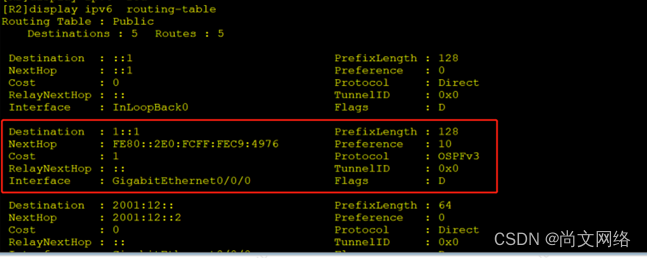
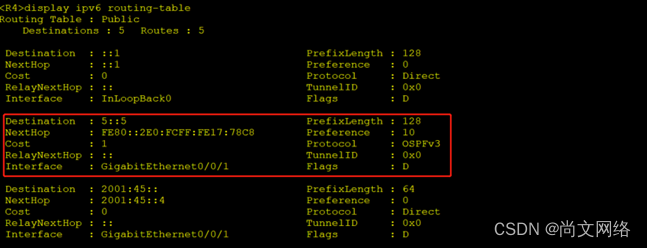
4:配置R2和R4之间的6over4隧道
[R2]interface  Tunnel  0/0/0	   //创建虚拟隧道接口
[R2-Tunnel0/0/0]tunnel-protocol ipv6-ipv4   //选择隧道封装协议(GRE也可以)
[R2-Tunnel0/0/0]source  2.2.2.2    //配置隧道源地址
[R2-Tunnel0/0/0]destination 4.4.4.4   //配置隧道目的地址(两地址必须互通)
[R2-Tunnel0/0/0]ipv6  enable  	//开启隧道接口IPv6功能
[R2-Tunnel0/0/0]ipv6  address  2001:24::2 64  //配置隧道IPv6地址,用于后续协议使用
[R4]interface  Tunnel 0/0/0
[R4-Tunnel0/0/0]tunnel-protocol ipv6-ipv4   //两边隧道封装必须一致
[R4-Tunnel0/0/0]source  4.4.4.4
[R4-Tunnel0/0/0]destination 2.2.2.2
[R4-Tunnel0/0/0]ipv6  enable
[R4-Tunnel0/0/0]ipv6  address  2001:24::4 64

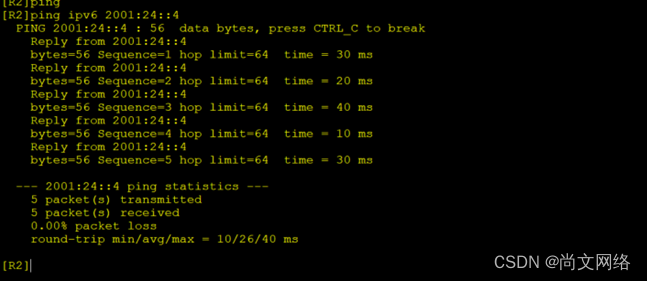
5:通过隧道接口配置ospfv3将两边网络打通
[R2]interface  Tunnel  0/0/0
[R2-Tunnel0/0/0]ospfv3 1 area 0
[R4]interface  Tunnel  0/0/0
[R4-Tunnel0/0/0]ospfv3 1 area 0

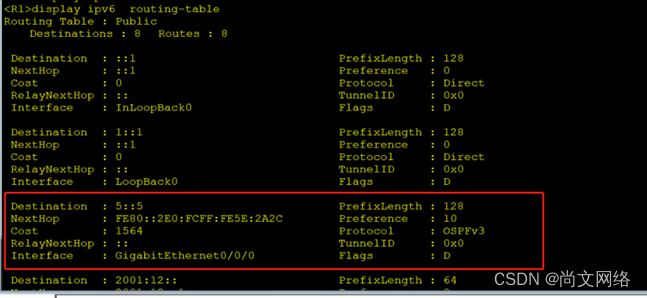
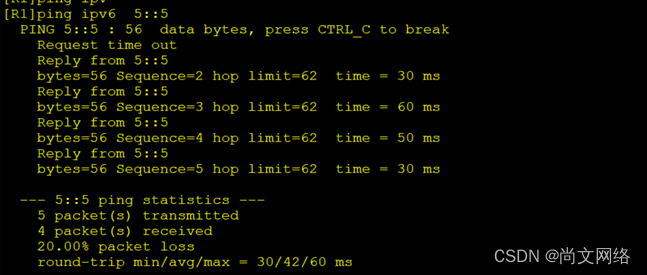
目前通过隧道相当于将R2和R4直接互联,因此使用隧道配置ospfv3并且两边网络也都配置了ospfv3协议,因此可以直接通信。如果一边网络为ospfv3一边为isis,中间隧道接口可以任意选择一种协议配置并加入路由引入。
加群一起聊技术,有啥问题可以直接分享交流QQ群:316317765,也可以关注下公众号,后期会有更多资料发布。
-----尚文网络奎哥原创
边栏推荐
- Pytorch配置
- The difference between static web pages and dynamic web pages & the difference between Web1.0 and Web2.0 & the difference between get and post
- [combinatorics] number of solutions of indefinite equations (number of combinations of multiple sets R | number of non negative integer solutions of indefinite equations | number of integer solutions
- Pat class B "1104 forever" DFS optimization idea
- 别再用 System.currentTimeMillis() 统计耗时了,太 Low,StopWatch 好用到爆!
- The calculation of stripe, kernel and padding in CNN
- Hi3536C V100R001C02SPC040 交叉编译器安装
- [AI practice] Application xgboost Xgbregressor builds air quality prediction model (I)
- Makefile demo
- [MySQL] the difference between left join, right join and join
猜你喜欢
Hi3536c v100r001c02spc040 cross compiler installation

Don't use the new Dede collection without the updated Dede plug-in

Docker install and start MySQL service

Idea format code idea set shortcut key format code

Use three JS make a simple 3D scene
numpy之 警告VisibleDeprecationWarning: Creating an ndarray from ragged nested sequences
leetcode:动态规划模板
The calculation of stripe, kernel and padding in CNN
Téléchargement et installation du client Filezilla
![[Chongqing Guangdong education] cultural and natural heritage reference materials of China University of Geosciences (Wuhan)](/img/19/815e7cba81f6eb52db5ef0db556dfd.jpg)
[Chongqing Guangdong education] cultural and natural heritage reference materials of China University of Geosciences (Wuhan)
随机推荐
Pytoch lightweight visualization tool wandb (local)
com. fasterxml. jackson. databind. Exc.invalidformatexception problem
node,npm以及yarn下载安装
File rename
渤、黄海的潮汐特征
Vs 2019 installation and configuration opencv
shardingsphere动态数据源
别再用 System.currentTimeMillis() 统计耗时了,太 Low,StopWatch 好用到爆!
Hi3536C V100R001C02SPC040 交叉编译器安装
Limit of one question per day
VS code配置虚拟环境
The file marked by labelme is converted to yolov5 format
Pytorch轻量级可视化工具wandb(local)
【全民编程】《软件编程-讲课视频》【零基础入门到实战应用】
C语言HashTable/HashSet库汇总
LVGL使用心得
Compare float with 0
sigaction的使用
403 error displayed when vs cloning
Solve high and send system Currenttimemillis Caton