当前位置:网站首页>How to Install MySQL on Linux
How to Install MySQL on Linux
2022-07-31 08:29:00 【bsegebr】
Directory
Start installation
1. Create a mysql file installation directory
mkdir /opt/mysqlEnter this directory
cd /opt/mysql/2. Install mysql
wget http://dev.mysql.com/get/mysql-5.7.26-1.el7.x86_64.rpm-bundle.tarUnzip the file
tar -xvf mysql-5.7.26-1.el7.x86_64.rpm-bundle.tar3. Delete the built-in database mariadb (if there is one on the virtual machine, no matter if it is not), it will conflict with mysql.
First execute the following command to see if it exists
rpm -qa | grep mariIf it exists, execute the following commands in sequence to delete
rpm -e --nodeps mariadb-libsrpm -e --nodeps marisa4. Start installing mysql and execute the following commands in sequence
rpm -ivh mysql-community-common-5.7.26-1.el7.x86_64.rpmrpm -ivh mysql-community-libs-5.7.26-1.el7.x86_64.rpmrpm -ivh mysql-community-client-5.7.26-1.el7.x86_64.rpmrpm -ivh mysql-community-server-5.7.26-1.el7.x86_64.rpmNote: When executing the last command, an error may be reported:
Solution: Execute the command to install libaio
yum install libaioThen execute the command again
rpm -ivh mysql-community-server-5.7.26-1.el7.x86_64.rpm5. Start mysql
systemctl start mysqld.service6.mysql automatically sets a random password for the root user, run the command to view the current password
grep "password" /var/log/mysqld.log
7. Use the password found above to enter mysql
mysql -u root -p8. Modify the password, and then execute the following command to make the password setting take effect (the local virtual machine can be set simpler, ECS recommends setting a complex password, and personally experience the database on the laboratory server being hacked)
set password for 'root'@'localhost'=password('root');flush privileges;Test if the installation was successful
Exit mysql and enter with the reset password
exit
At this time, if you use Navicat to connect to the serverThe database may fail
ECS please enter the security group to open port 3306, the local virtual machine does not need to worry about this problem
If the port has been opened, the problem may be as follows:

Solution:
First enter mysql on the virtual machine, and then execute the following commands in sequenceuse mysql;
SELECT Host, User FROM user;
UPDATE userSET Host = '%' WHERE User = 'root';
flush privileges;
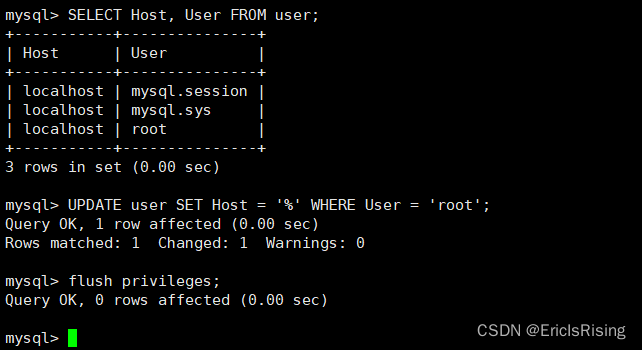
Then reconnect with Navicat again.
Let me introduce myself first. The editor graduated from Shanghai Jiaotong University in 2013. I worked in a small company and went to big factories such as Huawei and OPPO. I joined Alibaba in 2018, until now.I know that most junior and intermediate java engineers want to upgrade their skills, they often need to explore their own growth or sign up to study, but for training institutions, the tuition fee is nearly 10,000 yuan, which is really stressful.Self-learning that is not systematic is very inefficient and lengthy, and it is easy to hit the ceiling and the technology stops.Therefore, I collected a "full set of learning materials for java development" for everyone. The original intention is also very simple. I hope to help friends who want to learn by themselves but don't know where to start, and at the same time reduce everyone's burden.Add the business card below to get a full set of learning materials
边栏推荐
- Chapter 9 Exceptions try...except...else...finally
- 如何使用mysql binlog 恢复数据
- 7/28-7/29 Expectation + thinking + suffix array + ST table
- 会话技术之Coookie && Session详解
- Pygame Surface对象
- 【C#】判断字符串中是否包含指定字符或字符串(Contains/IndexOf)
- MySql database optimization query tool
- NK - RTU980 burning bare-metal program
- Regarding "computing power", this article is worth reading
- MySQL 5.7 安装教程(全步骤、保姆级教程)
猜你喜欢





随机推荐
New in Visual Studio: Low Priority Builds
Vscode:Project-tree插件
UML图及在drawio中的绘制
TypeError The view function did not return a valid response. The function either returned None 的解决
【小程序专栏】总结uniapp开发小程序的开发规范
Super detailed mysql database installation guide
力扣 593. 有效的正方形
【云原生与5G】微服务加持5G核心网
二维坐标工具API
SQL 入门之第一讲——MySQL 8.0.29安装教程(windows 64位)
一文搞定代码中的命名
35-Jenkins-共享库应用
mysql插入新字段方法
MySQL安装常见报错处理大全
哪些字符串会被FastJson解析为null呢
个人报错问题 持续总结
google搜索技巧——程序员推荐
Matlab学习第一天(持续更新中)
一文读懂Elephant Swap,为何为ePLATO带来如此高的溢价?
报销流程|By天放师兄