当前位置:网站首页>八叉树建立地图并实现路径规划导航
八叉树建立地图并实现路径规划导航
2022-07-26 15:29:00 【华为云】
构建语义地图时,用的是 octomap_server和 semantic_slam: octomap_generator,不过还是整理下之前的学习笔记。
一、Octomap 安装并使用Octomap_Server
1.1 Apt 安装 Octomap 库
如果你不需要修改源码,可以直接安装编译好的 octomap 库,记得把 ROS 版本「kinetic」替换成你用的:
sudo apt-get install ros-kinetic-octomap*上面这一行命令等价于安装以下的 octomap 组件:
sudo apt-get install ros-kinetic-octomap ros-kinetic-octomap-mapping ros-kinetic-octomap-msgs ros-kinetic-oc注意:上面没有安装 ros-kinetic-octomap-server,原因是我要使用这个包来建图,并且需要修改它,所以在下一步我直接通过编译源码来安装它!
1.2 编译安装 OctomapServer 建图包
因为我要启用八叉树体素栅格的 RGB 颜色支持,需要修改源码,所以必须使用源码编译安装,过程如下:
创建编译用的工作空间
cd 你的一个目录/# 创建工作空间mkdir octomap_wscd octomap_ws/# ROS 的工作空间必须包含 src 目录mkdir src/# 创建catkin_make# 记得 source 环境变量source devel/setup.zsh下载编译源码
cd src/git clone https://github.com/OctoMap/octomap_mapping.git返回你的工作空间主目录,安装下依赖,然后开始编译:
cd ../rosdep install octomap_mappingcatkin_make编译过程基本没有报错,如果你遇到问题,直接复制错误信息浏览器搜索解决,然后启动测试的 launch:
roslaunch octomap_server octomap_mapping.launch没问题的话应该可以用 rostopic list 看到一个 octomap_full 的话题: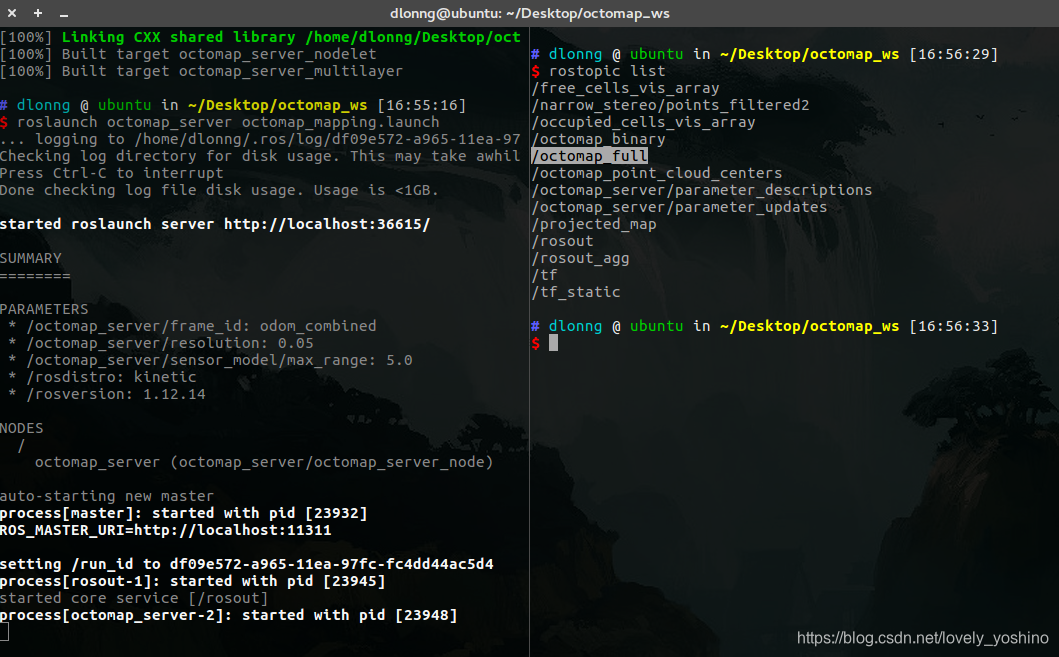
有这个话题说明这个建图包可以正常工作啦:)
1.3 Rviz 可视化 Octomap
ROS 中提供了一个 Rviz 可视化 Octomap 的插件,如果没有安装使用下面的命令即可:
sudo apt-get install ros-kinetic-octomap-rviz-plugins安装后启动 Rviz,直接添加一个八叉树占用网格的类型,第一个是带颜色的类型,第二个不带颜色: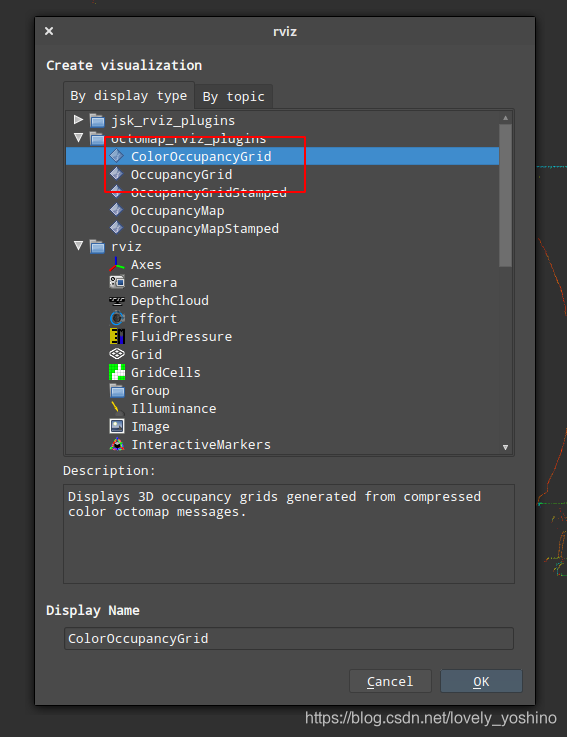
建图节点启动后,选择话题名称为 octomap_full,即可显示出八叉树体素栅格,这是我的实验结果,我用的是第一个带颜色的类型:

我把点云和体素栅格一起显示了,所以会重叠。这里要注意的是,如果你的点云显示不出来,要检查下「Global Options」的「Fixed Frame」有没有设置正确,我是设置的是 Robosense 雷达的 frame_id:「rslidar」。
1.4 启用 ColorOctomap
默认编译的 octomap 不能显示颜色,要开启颜色的支持,需要 2 个步骤,第一步编辑 OctomapServer.h 文件:
vim octomap_mapping/octomap_server/include/octomap_server/OctomapServer.h打开下面 COLOR_OCTOMAP_SERVER 宏的注释即可:
// switch color here - easier maintenance, only maintain OctomapServer. // Two targets are defined in the cmake, octomap_server_color and octomap_server. One has this defined, and the other doesn't// 打开这个注释#define COLOR_OCTOMAP_SERVER然后重新编译一遍源码:
cd octomap_ws/catkin_make第二步是在使用时,在 launch 文件中禁用 height_map,启用 colored_map,这个配置是我阅读源码查找的,因为官网文档很久没有更新了,一些参数配置方法需要通过阅读源码才能知道:
<param name = "height_map" value = "false" /><param name = "colored_map" value = "true" />比如以下是我实验用的 launch 文件:
<launch> <node pkg="octomap_server" type="octomap_server_node" name="octomap_server"> <!-- resolution in meters per pixel --> <param name="resolution" value="0.10" /> <!-- name of the fixed frame, needs to be "/map" for SLAM --> <!-- 增量式构建地图时,需要提供输入的点云帧和静态全局帧之间的 TF 变换 --> <param name="frame_id" type="string" value="world" /> <param name = "height_map" value = "false" /> <param name = "colored_map" value = "true" /> <!-- topic from where pointcloud2 messages are subscribed --> <!-- 要订阅的点云主题名称 /fusion_cloud --> <remap from="/cloud_in" to="/fusion_cloud" /> </node></launch>我设置了八叉树帧的 frame 为 rslidar,并将融合的点云话题 /fusion_cloud 作为节点的输入,我没有提供 TF,因为目前只是做了一个单帧的体素栅格构建,效果如下: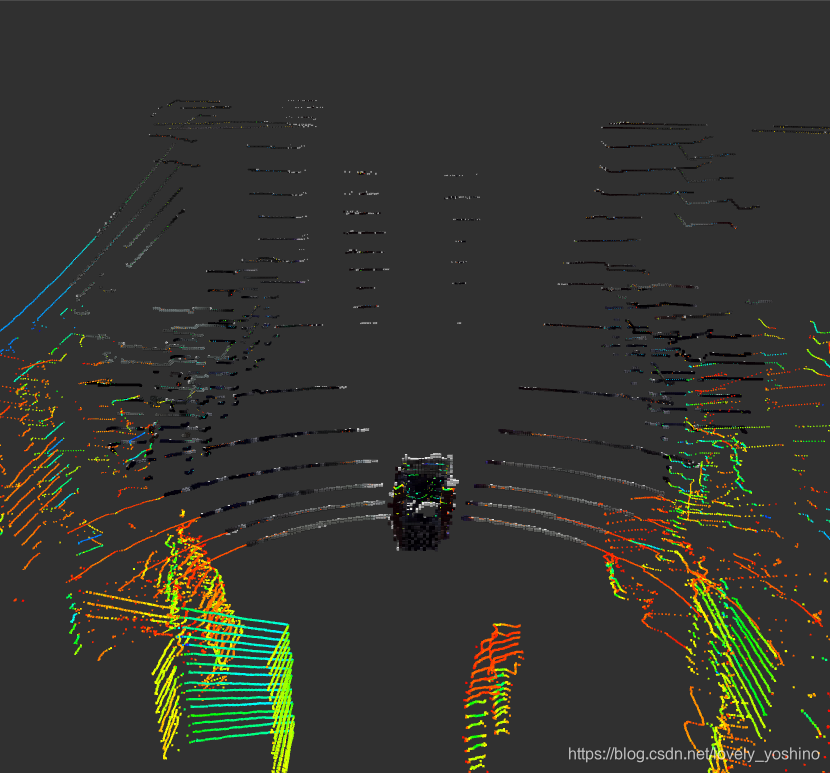
二、增量构建八叉树地图步骤
为了能够让 octomap_server 建图包实现增量式的地图构建,需要以下 2 个步骤:
2.1 配置 launch 启动参数
这 3 个参数是建图必备:
- 地图分辨率
resolution:用来初始化地图对象 - 全局坐标系
frame_id:构建的全局地图的坐标系 - 输入点云话题
cloud_in:作为建图的数据输入,建图包是把一帧一帧的点云叠加到全局坐标系实现建图
<launch> <node pkg="octomap_server" type="octomap_server_node" name="octomap_server"> <!-- resolution in meters per pixel --> <param name="resolution" value="0.10" /> <!-- 增量式构建地图时,需要提供输入的点云帧和静态全局帧之间的 TF 变换 --> <param name="frame_id" type="string" value="map" /> <!-- 要订阅的点云主题名称 /fusion_cloud --> <remap from="/cloud_in" to="/fusion_cloud" /> </node></launch>以下是所有可以配置的参数:
frame_id(string, default: /map)resolution(float, default: 0.05)height_map(bool, default: true)color/[r/g/b/a](float)sensor_model/max_range(float, default: -1 (unlimited))sensor_model/[hit|miss](float, default: 0.7 / 0.4)sensor_model/[min|max](float, default: 0.12 / 0.97)latch(bool, default: True for a static map, false if no initial map is given)base_frame_id(string, default: base_footprint)filter_ground(bool, default: false)ground_filter/distance(float, default: 0.04)ground_filter/angle(float, default: 0.15)ground_filter/plane_distance(float, default: 0.07)pointcloud_[min|max]_z(float, default: -/+ infinity)occupancy_[min|max]_z(float, default: -/+ infinity)filter_speckles(bool)
2.2 要求 TF 变换
有了全局坐标系和每一帧的点云,但是建图包怎么知道把每一帧点云插入到哪个位置呢?
因为随着机器人的不断移动,会不断产生新的点云帧,每个点云帧在全局坐标系中插入的时候都有一个确定的位置,否则构建的地图就不对了,因此需要给建图包提供一个当前帧点云到全局坐标系的位姿,这样建图包才能根据这个位姿把当前获得的点云插入到正确的位置上。
在 ROS 中可以很方便的使用 TF 来表示这个变换,我们只需要在启动建图包的时候,在系统的 TF 树中提供「cloud frame -> world frame」的变换就可以了:
cloud frame -> world frame (static world frame, changeable with parameter frame_id)注意:
cloud frame:就是输入点云话题中 head.frame_id,比如 Robosense 雷达的 frame_id = rslidarworld frame:这是全局坐标系的 frame_id,在启动 launch 中需要手动给定,比如我给的是 map
如果你给 world frame id 指定的是输入点云的 frame_id,比如 fusion_cloud.head.frame_id == wolrd_frame_id == rslidar,则只会显示当前帧的八叉树,而不会增量构建地图,这点要注意了,可以自己测试看看。
那么为了增量式建图,还需要在系统的 TF 树中提供「rslidar -> world」的变换,这个变换可以通过其他的 SLAM 等获得,比如我测试时候的一个 TF 树如下: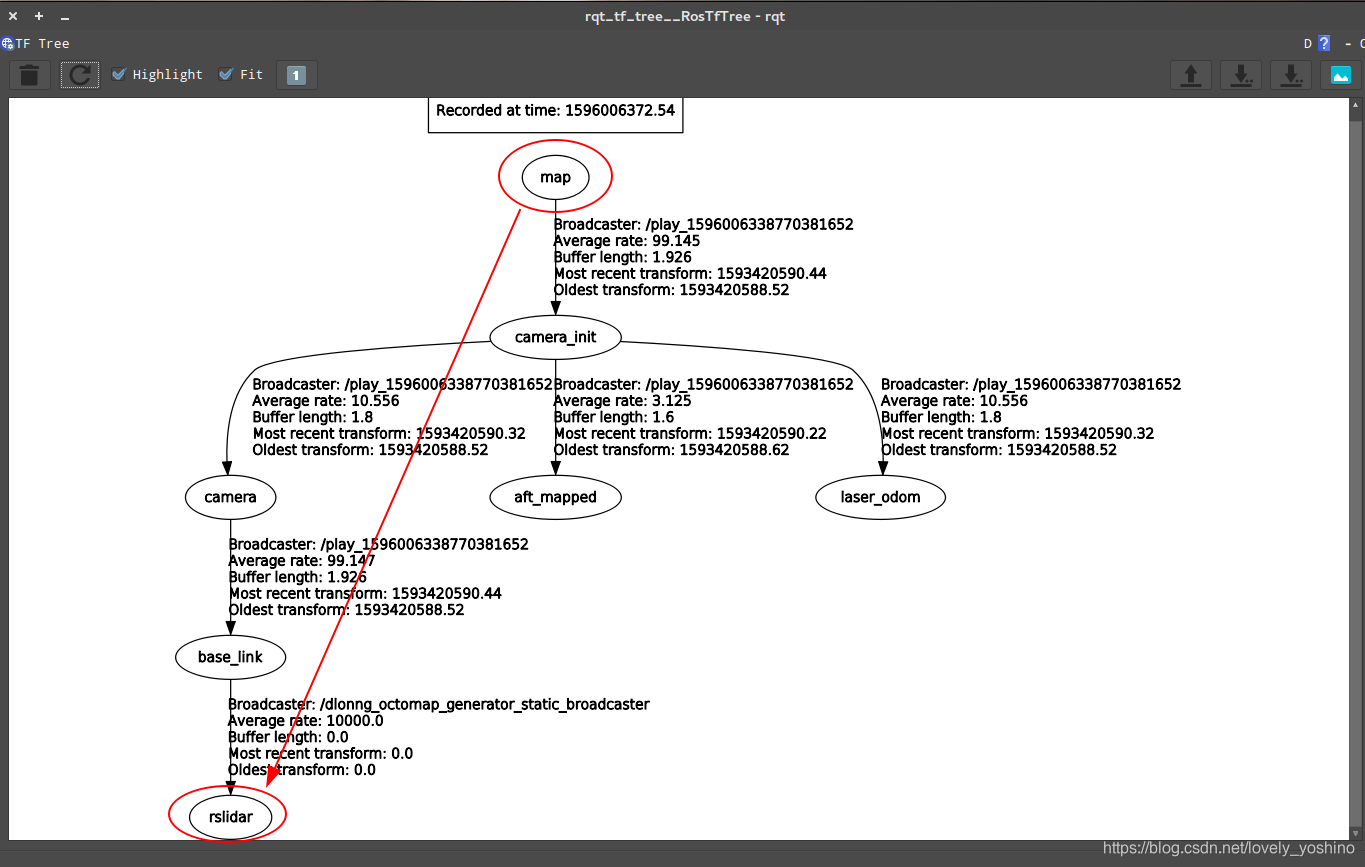
我找了下源代码 OctomapServer.cpp 中寻找 TF 的部分:
tf::StampedTransform sensorToWorldTf; try { m_tfListener.lookupTransform(m_worldFrameId, cloud->header.frame_id, cloud->header.stamp, sensorToWorldTf); } catch(tf::TransformException& ex){ ROS_ERROR_STREAM( "Transform error of sensor data: " << ex.what() << ", quitting callback"); return; }总体来说这个建图包使用起来还是挺简单的,最重要的就是要写清楚输入点云话题和 TF 变换。
小 Tips:没有 TF 怎么办?
我刚开始建图的时候,我同学录制的 TF 树中并没有「world -> rslidar」的变换,只有「world -> base_link」,所以为了能够测试增量式建图,因为我的点云帧的 frame_id 是 rslidar,因此我就手动发布了一个静态的「base_link -> rslidar」的变换:
rosrun tf2_ros static_transform_publisher 0 0 0 0 0 0 base_link rslidar这样系统中就有「rslidar -> world」的变换了,但是我发的位姿都是 0,所以对建图测试没有影响,为了方便启动,放在 launch 中:
<node pkg = "tf2_ros" type = "static_transform_publisher" name = "dlonng_static_test_broadcaster" args = "0 0 0 0 0 0 base_link rslidar" />如果你也遇到这个问题,可以试试发个静态 TF 做做测试,关于静态 TF 详细技术可以参考之前的文章:ROS 机器人技术 - 静态 TF 坐标帧
三、ColorOctomap 启用方法
为了显示 RGB 颜色,我分析了下源码,第一步修改头文件,打开注释切换地图类型:OctomapServer.h
// switch color here - easier maintenance, only maintain OctomapServer. // Two targets are defined in the cmake, octomap_server_color and octomap_server. One has this defined, and the other doesn't// 打开这个注释#define COLOR_OCTOMAP_SERVER#ifdef COLOR_OCTOMAP_SERVER typedef pcl::PointXYZRGB PCLPoint; typedef pcl::PointCloud<pcl::PointXYZRGB> PCLPointCloud; typedef octomap::ColorOcTree OcTreeT;#else typedef pcl::PointXYZ PCLPoint; typedef pcl::PointCloud<pcl::PointXYZ> PCLPointCloud; typedef octomap::OcTree OcTreeT;#endifCMakeList.txt 文件中有 COLOR_OCTOMAP_SERVER 的编译选项:
target_compile_definitions(${PROJECT_NAME}_color PUBLIC COLOR_OCTOMAP_SERVER)OctomapServer.cpp 中有 colored_map 的参数:
m_useHeightMap = true;m_useColoredMap = false; m_nh_private.param("height_map", m_useHeightMap, m_useHeightMap);m_nh_private.param("colored_map", m_useColoredMap, m_useColoredMap);地图默认是按照高度设置颜色,如果要设置为带颜色的地图,就要禁用 HeightMap,并启用 ColoredMap:
if (m_useHeightMap && m_useColoredMap) { ROS_WARN_STREAM("You enabled both height map and RGB color registration. This is contradictory. Defaulting to height map."); m_useColoredMap = false; }第二步、需要在 octomap_server 的 launch 文件中禁用 height_map,并启用 colored_map :
<param name="height_map" value="false" /><param name="colored_map" value="true" />2 个核心的八叉树生成函数 insertCloudCallback 和 insertScan 中有对颜色的操作:
#ifdef COLOR_OCTOMAP_SERVER unsigned char* colors = new unsigned char[3];#endif// NB: Only read and interpret color if it's an occupied node#ifdef COLOR_OCTOMAP_SERVER m_octree->averageNodeColor(it->x, it->y, it->z, /*r=*/it->r, /*g=*/it->g, /*b=*/it->b);#endif四、保存和显示地图
启动 octomap_server 节点后,可以使用它提供的地图保存服务,保存压缩的二进制存储格式地图:
octomap_saver mapfile.bt保存一个完整的概率八叉树地图:
octomap_saver -f mapfile.ot安装八叉树可视化程序 octovis 来查看地图:
sudo apt-get install octovis安装后重启终端,使用以下命令显示一个八叉树地图:
octovis xxx.ot[bt]五、源码阅读笔记
同时笔者整理了以下这个建图包的关键流程,只有 2 个关键的函数也不是很复杂。
第一步是订阅点云的回调:
第二步是插入单帧点云构建八叉树,这里就不详细介绍过程了,因为涉及到八叉树库 octomap 的更新原理: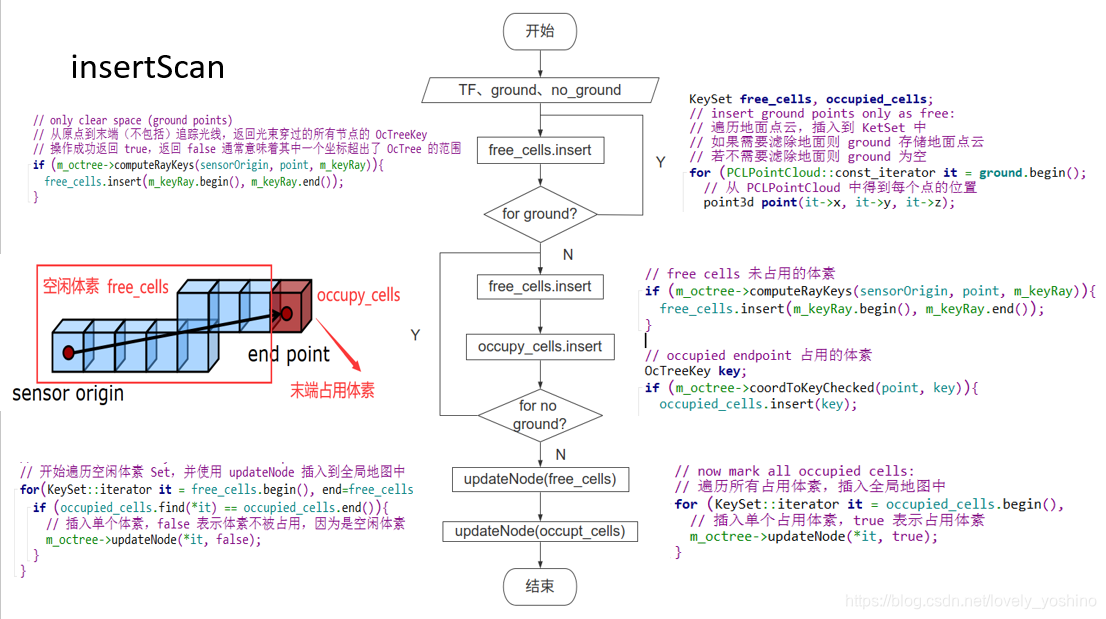
以下是我建图过程的 launch:
在这里插入代码片<launch> <node pkg="octomap_server" type="octomap_server_node" name="octomap_server"> <!-- resolution in meters per pixel --> <param name = "resolution" value = "0.15" /> <!-- name of the fixed frame, needs to be "/map" for SLAM --> <!-- 静态全局地图的 frame_id,但在增量式构建地图时,需要提供输入的点云帧和静态全局帧之间的 TF 变换 --> <param name = "frame_id" type = "string" value = "camera_init" /> <!-- set min to speed up! --> <param name = "sensor_model/max_range" value = "15.0" /> <!-- 机器人坐标系 base_link,滤除地面需要该 frame --> <!-- <param name = "base_frame_id" type = "string" value = "base_link" /> --> <!-- filter ground plane, distance value should be big! 项目并不需要滤除地面 --> <!-- <param name = "filter_ground" type = "bool" value = "true" /> --> <!-- <param name = "ground_filter/distance" type = "double" value = "1.0" /> --> <!-- 分割地面的 Z 轴阈值 value 值 --> <!-- <param name = "ground_filter/plane_distance" type = "double" value = "0.3" /> --> <!-- 直通滤波的 Z 轴范围,保留 [-1.0, 10.0] 范围内的点 --> <!-- <param name = "pointcloud_max_z" type = "double" value = "100.0" /> --> <!-- <param name = "pointcloud_min_z" type = "double" value = "-1.0" /> --> <!-- <param name = "filter_speckles" type = "bool" value = "true" /> --> <param name = "height_map" value = "false" /> <param name = "colored_map" value = "true" /> <!-- 增加了半径滤波器 --> <param name = "outrem_radius" type = "double" value = "1.0" /> <param name = "outrem_neighbors" type = "int" value = "10" /> <!-- when building map, set to false to speed up!!! --> <param name = "latch" value = "false" /> <!-- topic from where pointcloud2 messages are subscribed --> <!-- 要订阅的点云主题名称 /pointcloud/output --> <!-- 这句话的意思是把当前节点订阅的主题名称从 cloud_in 变为 /pointcloud/output --> <remap from = "/cloud_in" to = "/fusion_cloud" /> </node></launch>六、路径规划
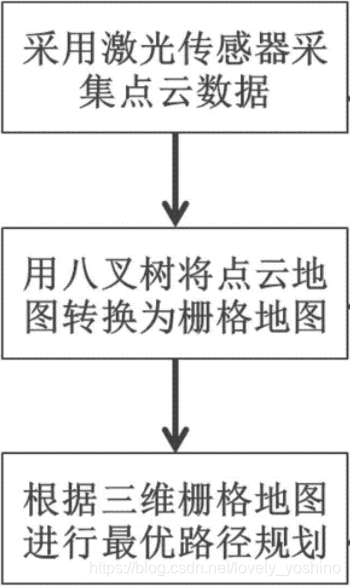
这里给一个链接:https://github.com/Quitino/IndoorMapping,该作者实现了基于ORB-SLAM生成三维密集点云,并使用OctoMap构建室内导航地图。也意味着我们可以在此基础上加入轨迹规划算法实现基于OBR-SLAM的室内规划导航。具体代码可以参照:https://blog.csdn.net/lovely_yoshino/article/details/105272602中的3D-RRT路径规划方法实现。
七:介绍三维A*在栅格地图中的使用
AngeloG 博文中写了三维 A的相关matlab仿真。为了便于在ROS中对A算法进行开发,这里也提供一下之前我学习的A*算法
#include "Astar_searcher.h"using namespace std;using namespace Eigen;void AstarPathFinder::initGridMap(double _resolution, Vector3d global_xyz_l, Vector3d global_xyz_u, int max_x_id, int max_y_id, int max_z_id){ gl_xl = global_xyz_l(0); gl_yl = global_xyz_l(1); gl_zl = global_xyz_l(2); gl_xu = global_xyz_u(0); gl_yu = global_xyz_u(1); gl_zu = global_xyz_u(2); GLX_SIZE = max_x_id; GLY_SIZE = max_y_id; GLZ_SIZE = max_z_id; GLYZ_SIZE = GLY_SIZE * GLZ_SIZE; GLXYZ_SIZE = GLX_SIZE * GLYZ_SIZE; resolution = _resolution; inv_resolution = 1.0 / _resolution; data = new uint8_t[GLXYZ_SIZE]; memset(data, 0, GLXYZ_SIZE * sizeof(uint8_t)); GridNodeMap = new GridNodePtr **[GLX_SIZE]; for (int i = 0; i < GLX_SIZE; i++) { GridNodeMap[i] = new GridNodePtr *[GLY_SIZE]; for (int j = 0; j < GLY_SIZE; j++) { GridNodeMap[i][j] = new GridNodePtr[GLZ_SIZE]; for (int k = 0; k < GLZ_SIZE; k++) { Vector3i tmpIdx(i, j, k); Vector3d pos = gridIndex2coord(tmpIdx); GridNodeMap[i][j][k] = new GridNode(tmpIdx, pos); } } }}void AstarPathFinder::resetGrid(GridNodePtr ptr){ ptr->id = 0; ptr->cameFrom = NULL; ptr->gScore = inf; ptr->fScore = inf;}void AstarPathFinder::resetUsedGrids(){ for (int i = 0; i < GLX_SIZE; i++) for (int j = 0; j < GLY_SIZE; j++) for (int k = 0; k < GLZ_SIZE; k++) resetGrid(GridNodeMap[i][j][k]);}void AstarPathFinder::setObs(const double coord_x, const double coord_y, const double coord_z){ if (coord_x < gl_xl || coord_y < gl_yl || coord_z < gl_zl || coord_x >= gl_xu || coord_y >= gl_yu || coord_z >= gl_zu) return; int idx_x = static_cast<int>((coord_x - gl_xl) * inv_resolution); int idx_y = static_cast<int>((coord_y - gl_yl) * inv_resolution); int idx_z = static_cast<int>((coord_z - gl_zl) * inv_resolution); data[idx_x * GLYZ_SIZE + idx_y * GLZ_SIZE + idx_z] = 1;}vector<Vector3d> AstarPathFinder::getVisitedNodes(){ vector<Vector3d> visited_nodes; for (int i = 0; i < GLX_SIZE; i++) for (int j = 0; j < GLY_SIZE; j++) for (int k = 0; k < GLZ_SIZE; k++) { // if(GridNodeMap[i][j][k]->id != 0) // visualize all nodes in open and // close list if (GridNodeMap[i][j][k]->id == -1) // visualize nodes in close list only visited_nodes.push_back(GridNodeMap[i][j][k]->coord); } ROS_WARN("visited_nodes size : %d", visited_nodes.size()); return visited_nodes;}Vector3d AstarPathFinder::gridIndex2coord(const Vector3i &index){ Vector3d pt; pt(0) = ((double)index(0) + 0.5) * resolution + gl_xl; pt(1) = ((double)index(1) + 0.5) * resolution + gl_yl; pt(2) = ((double)index(2) + 0.5) * resolution + gl_zl; return pt;}Vector3i AstarPathFinder::coord2gridIndex(const Vector3d &pt){ Vector3i idx; idx << min(max(int((pt(0) - gl_xl) * inv_resolution), 0), GLX_SIZE - 1), min(max(int((pt(1) - gl_yl) * inv_resolution), 0), GLY_SIZE - 1), min(max(int((pt(2) - gl_zl) * inv_resolution), 0), GLZ_SIZE - 1); return idx;}Eigen::Vector3d AstarPathFinder::coordRounding(const Eigen::Vector3d &coord){ return gridIndex2coord(coord2gridIndex(coord));}inline bool AstarPathFinder::isOccupied(const Eigen::Vector3i &index) const{ return isOccupied(index(0), index(1), index(2));}inline bool AstarPathFinder::isFree(const Eigen::Vector3i &index) const{ return isFree(index(0), index(1), index(2));}inline bool AstarPathFinder::isOccupied(const int &idx_x, const int &idx_y, const int &idx_z) const{ return (idx_x >= 0 && idx_x < GLX_SIZE && idx_y >= 0 && idx_y < GLY_SIZE && idx_z >= 0 && idx_z < GLZ_SIZE && (data[idx_x * GLYZ_SIZE + idx_y * GLZ_SIZE + idx_z] == 1));}inline bool AstarPathFinder::isFree(const int &idx_x, const int &idx_y, const int &idx_z) const{ return (idx_x >= 0 && idx_x < GLX_SIZE && idx_y >= 0 && idx_y < GLY_SIZE && idx_z >= 0 && idx_z < GLZ_SIZE && (data[idx_x * GLYZ_SIZE + idx_y * GLZ_SIZE + idx_z] < 1));}inline void AstarPathFinder::AstarGetSucc(GridNodePtr currentPtr, vector<GridNodePtr> &neighborPtrSets, vector<double> &edgeCostSets){ neighborPtrSets.clear(); edgeCostSets.clear(); /* STEP 4: finish AstarPathFinder::AstarGetSucc yourself please write your code below */ // get all neighbours of current node, calculate all the costs, and then save to the point. // should be a 3D search, maxumin 26 nodes, but need to remove the obstacles and boundary Vector3i neighborIdx; for (int dx = -1; dx < 2; dx++) { for (int dy = -1; dy < 2; dy++) { for (int dz = -1; dz < 2; dz++) { if (dx == 0 && dy == 0 && dz == 0) continue; neighborIdx(0) = (currentPtr->index)(0) + dx; neighborIdx(1) = (currentPtr->index)(1) + dy; neighborIdx(2) = (currentPtr->index)(2) + dz; if (neighborIdx(0) < 0 || neighborIdx(0) >= GLX_SIZE || neighborIdx(1) < 0 || neighborIdx(1) >= GLY_SIZE || neighborIdx(2) < 0 || neighborIdx(2) >= GLZ_SIZE) continue; neighborPtrSets.push_back(GridNodeMap[neighborIdx(0)][neighborIdx(1)][neighborIdx(2)]); edgeCostSets.push_back(sqrt(dx * dx + dy * dy + dz * dz)); } } }}double AstarPathFinder::getHeu(GridNodePtr node1, GridNodePtr node2){ /*STEP 1 choose possible heuristic function you want Manhattan, Euclidean, Diagonal, or 0 (Dijkstra) Remember tie_breaker learned in lecture, add it here ? */ // ROS_INFO("[node] calcute Heu"); // return getDiagHeu(node1, node2); double tie_breaker = 1 + 1 / 1000; return tie_breaker * getDiagHeu(node1, node2);}double AstarPathFinder::getEuclHeu(GridNodePtr node1, GridNodePtr node2){ // calculate distance at each dimention double dx = node1->index(0) - node2->index(0); double dy = node1->index(1) - node2->index(1); double dz = node1->index(2) - node2->index(2); double result1 = sqrt(dx * dx + dy * dy + dz * dz); // double result2 = (node2->index - node1->index).norm(); // cout.setf(ios::fixed); // cout << "norm1 = " << setprecision(4) << result1 << endl; // cout << "diff = " << (node2->index - node1->index) << endl; // cout << "norm2 = " << setprecision(4) << result2 << endl; return result1;}double AstarPathFinder::getDiagHeu(GridNodePtr node1, GridNodePtr node2){ double dx = abs(node1->index(0) - node2->index(0)); double dy = abs(node1->index(1) - node2->index(1)); double dz = abs(node1->index(2) - node2->index(2)); double h = 0.0; int diag = min(min(dx, dy), dz); dx -= diag; dy -= diag; dz -= diag; if (dx == 0) h = 1.0 * sqrt(3.0) * diag + sqrt(2.0) * min(dy, dz) + 1.0 * abs(dy - dz); if (dy == 0) h = 1.0 * sqrt(3.0) * diag + sqrt(2.0) * min(dx, dz) + 1.0 * abs(dx - dz); if (dz == 0) h = 1.0 * sqrt(3.0) * diag + sqrt(2.0) * min(dx, dy) + 1.0 * abs(dx - dy); return h;}double AstarPathFinder::getManhHeu(GridNodePtr node1, GridNodePtr node2){ double dx = abs(node1->index(0) - node2->index(0)); double dy = abs(node1->index(1) - node2->index(1)); double dz = abs(node1->index(2) - node2->index(2)); return dx + dy + dz;}void AstarPathFinder::AstarGraphSearch(Vector3d start_pt, Vector3d end_pt){ ros::Time time_1 = ros::Time::now(); // index of start_point and end_point Vector3i start_idx = coord2gridIndex(start_pt); // what is coord2gridIndex mean? Vector3i end_idx = coord2gridIndex(end_pt); goalIdx = end_idx; // position of start_point and end_point start_pt = gridIndex2coord(start_idx); end_pt = gridIndex2coord(end_idx); // Initialize the pointers of struct GridNode which represent start node and // goal node GridNodePtr startPtr = new GridNode(start_idx, start_pt); GridNodePtr endPtr = new GridNode(end_idx, end_pt); // openSet is the open_list implemented through multimap in STL library openSet.clear(); // currentPtr represents the node with lowest f(n) in the open_list GridNodePtr currentPtr = NULL; GridNodePtr neighborPtr = NULL; // put start node in open set startPtr->gScore = 0; startPtr->fScore = getHeu(startPtr, endPtr); // f = h + g = h + 0 startPtr->id = 1; startPtr->coord = start_pt; openSet.insert(make_pair(startPtr->fScore, startPtr)); // startPtr->cameFrom = startPtr; /** STEP 2: some else preparatory works which should be done before while loop please write your code below, neighbour of start point **/ double tentative_gScore; vector<GridNodePtr> neighborPtrSets; vector<double> edgeCostSets; // this is the main loop while (!openSet.empty()) { /* step 3: Remove the node with lowest cost function from open set to closed set, please write your code below IMPORTANT NOTE!!! This part you should use the C++ STL: multimap, more details can be find in Homework description */ // get the min f node from open set to current currentPtr = openSet.begin()->second; // if the current node is the goal if (currentPtr->index == goalIdx) { ros::Time time_2 = ros::Time::now(); terminatePtr = currentPtr; ROS_WARN("[A*]{sucess} Time in A* is %f ms, path cost is %f m", (time_2 - time_1).toSec() * 1000.0, currentPtr->gScore * resolution); // cout << "final point" << endl << terminatePtr->coord << endl; // cout << "came frome" << endl << terminatePtr->cameFrom->coord << endl; return; } // put to close, and erase it openSet.erase(openSet.begin()); currentPtr->id = -1; // STEP 4: finish AstarPathFinder::AstarGetSucc, get the succetion AstarGetSucc(currentPtr, neighborPtrSets, edgeCostSets); /*** STEP 5: For all unexpanded neigbors "m" of node "n", please finish this for loop please write your code below **/ for (int i = 0; i < (int)neighborPtrSets.size(); i++) { /* Judge if the neigbors have been expanded,please write your code below IMPORTANT NOTE!!! neighborPtrSets[i]->id = -1 : in closed set neighborPtrSets[i]->id = 1 : in open set */ neighborPtr = neighborPtrSets[i]; if (isOccupied(neighborPtr->index) || neighborPtr->id == -1) continue; double edge_cost = edgeCostSets[i]; tentative_gScore = currentPtr->gScore + edge_cost; if (neighborPtr->id != 1) { // discover a new node, which is not in the open set /* STEP 6: As for a new node, do what you need do ,and then put neighbor in open set and record it,please write your code below */ // insert to open set openSet.insert(make_pair(startPtr->fScore, neighborPtrSets[i])); neighborPtr->id = 1; neighborPtr->cameFrom = currentPtr; neighborPtr->gScore = tentative_gScore; neighborPtr->fScore = neighborPtr->gScore + getHeu(neighborPtr, endPtr); neighborPtr->nodeMapIt = openSet.insert(make_pair(neighborPtr->fScore, neighborPtr)); // put neighbor in open set and record it. continue; } else if (neighborPtr->gScore >= tentative_gScore) // compare original f and new f from current // this node is in open set and need to judge if it needs to update, // he "0" should be deleted when you are coding { /* STEP 7: As for a node in open set, update it , maintain the openset, and then put neighbor in open set and record it please write your code below */ neighborPtr->cameFrom = currentPtr; neighborPtr->gScore = tentative_gScore; neighborPtr->fScore = tentative_gScore + getHeu(neighborPtr, endPtr); openSet.erase(neighborPtr->nodeMapIt); neighborPtr->nodeMapIt = openSet.insert(make_pair(neighborPtr->fScore, neighborPtr)); // if change its parents, update the expanding direction for (int i = 0; i < 3; i++) { neighborPtr->dir(i) = neighborPtr->index(i) - currentPtr->index(i); if (neighborPtr->dir(i) != 0) neighborPtr->dir(i) /= abs(neighborPtr->dir(i)); } } } } // if search fails ros::Time time_2 = ros::Time::now(); if ((time_2 - time_1).toSec() > 0.1) ROS_WARN("Time consume in Astar path finding is %f", (time_2 - time_1).toSec());}vector<Vector3d> AstarPathFinder::getPath(){ vector<Vector3d> path; vector<GridNodePtr> gridPath; /* STEP 8: trace back from the curretnt nodePtr to get all nodes along the path please write your code below */ gridPath.push_back(terminatePtr); while (terminatePtr->cameFrom != NULL) { terminatePtr = terminatePtr->cameFrom; gridPath.push_back(terminatePtr); } for (auto ptr : gridPath) path.push_back(ptr->coord); reverse(path.begin(), path.end()); return path;}cite: 本文参照了登龙的相关文章
边栏推荐
- C # set different text watermarks for each page of word
- Can the parameterized view get SQL with different rows according to the characteristics of the incoming parameters? For example, here I want to use the column in the transmission parameter @field
- TI C6000 TMS320C6678 DSP+ Zynq-7045的PS + PL异构多核案例开发手册(3)
- kalibr标定realsenseD435i --多相机标定
- Chapter 7 supporting CORS in rest services
- 组件化开发基本规范、localStorage 和 sessionStorage、对象数据转基本值、原型链使用
- Using two stacks to implement a queue
- 【EXPDP导出数据】expdp导出23行记录,且不包含lob字段的表,居然用时48分钟,请大家帮忙看看
- Is there any need for livedata to learn—— Jetpack series (2)
- 蓝牙BLE4.0-HM-10设备配对指南
猜你喜欢
81. (cesium home) cesium modifies the gray background (default blue)

HTB-Apocalyst

【静态代码质量分析工具】上海道宁为您带来SonarSource/SonarQube下载、试用、教程

cs224w(图机器学习)2021冬季课程学习笔记5
TI C6000 TMS320C6678 DSP+ Zynq-7045的PS + PL异构多核案例开发手册(2)

二叉树的创建以及遍历

The civil construction of the whole line of Guangzhou Metro Line 13 phase II has been completed by 53%, and it is expected to open next year

【留点代码】将transformer运用到目标检测上来,通过debug了解模型的模型运算流程
![[basic] the difference between dynamic link library and static link library](/img/d5/fe7880e3fa91faff10a1c31870cce0.png)
[basic] the difference between dynamic link library and static link library

拒绝噪声,耳机小白的入门之旅
随机推荐
[expdp export data] expdp exports a table with 23 rows of records and no lob field. It takes 48 minutes. Please help us have a look
Remote desktop on Jetson nano
Pytorch--- advanced chapter (function usage skills / precautions)
[five minute paper] reinforcement learning based on parameterized action space
Digital warehouse: iqiyi digital warehouse platform construction practice
示波器的使用
FTP协议
Is there any need for livedata to learn—— Jetpack series (2)
R language uses LM function to build multiple linear regression model, writes regression equation according to model coefficient, and uses fitted function to calculate y value (response value) vector
.NET 手动获取注入对象
桌面应用布局图
TI C6000 TMS320C6678 DSP+ Zynq-7045的PS + PL异构多核案例开发手册(3)
撤回就看不到了?三步让你微信防撤回。
数仓:数仓建设中的数据建模和日志体系
R language ggplot2 visualization: use the ggdotplot function of ggpubr package to visualize dot plot, set the add parameter to add the mean and standard deviation vertical lines, and set the error.plo
Desktop application layout
什么是传输层协议TCP/UDP???
筑牢生态安全防线,广州开展突发环境事件应急演练
信用卡数字识别(opencv,代码分析)
Data warehouse: Data Modeling and log system in data warehouse construction